Fix 1: Disable iMessage on Your Old iPhone or via Apple Website
Are you switching from an iPhone to an Android phone? You need to disable iMessage on your iPhone to stop receiving messages. A person can reach you on iMessage via your Apple ID and mobile number. You can disable your mobile number on iMessage or turn off the function entirely. Here’s what you need to do.
Step 1: Open Settings > Messages > Tap Send & Receive > Disable the checkmark beside your mobile number.


You can also go to the previous menu and disable the iMessage toggle. From now on, you shall receive carrier messages on your new Android phone. The recipient may see a Green bubble instead of a Blue one. Read our dedicated post to learn the differences between iMessage and text messages.
If your iPhone is stolen or inaccessible, deregister your mobile number from iMessage and FaceTime. Go through the steps below to make changes.
Step 1: Head to the Deregister iMessage website.
Step 2: Select the country code and then enter your phone number.
Step 3: Enter the code from the image and then receive a confirmation code on your mobile number. Hit Submit.

Fix 2: Disable RCS on Your Old Android phone or via Google Website
RCS (Rich Communication Services) is Google’s take on creating an iMessage-like experience on Android. When you move to a new phone, disable RCS on your old Android phone to avoid any glitches. Follow the steps below.
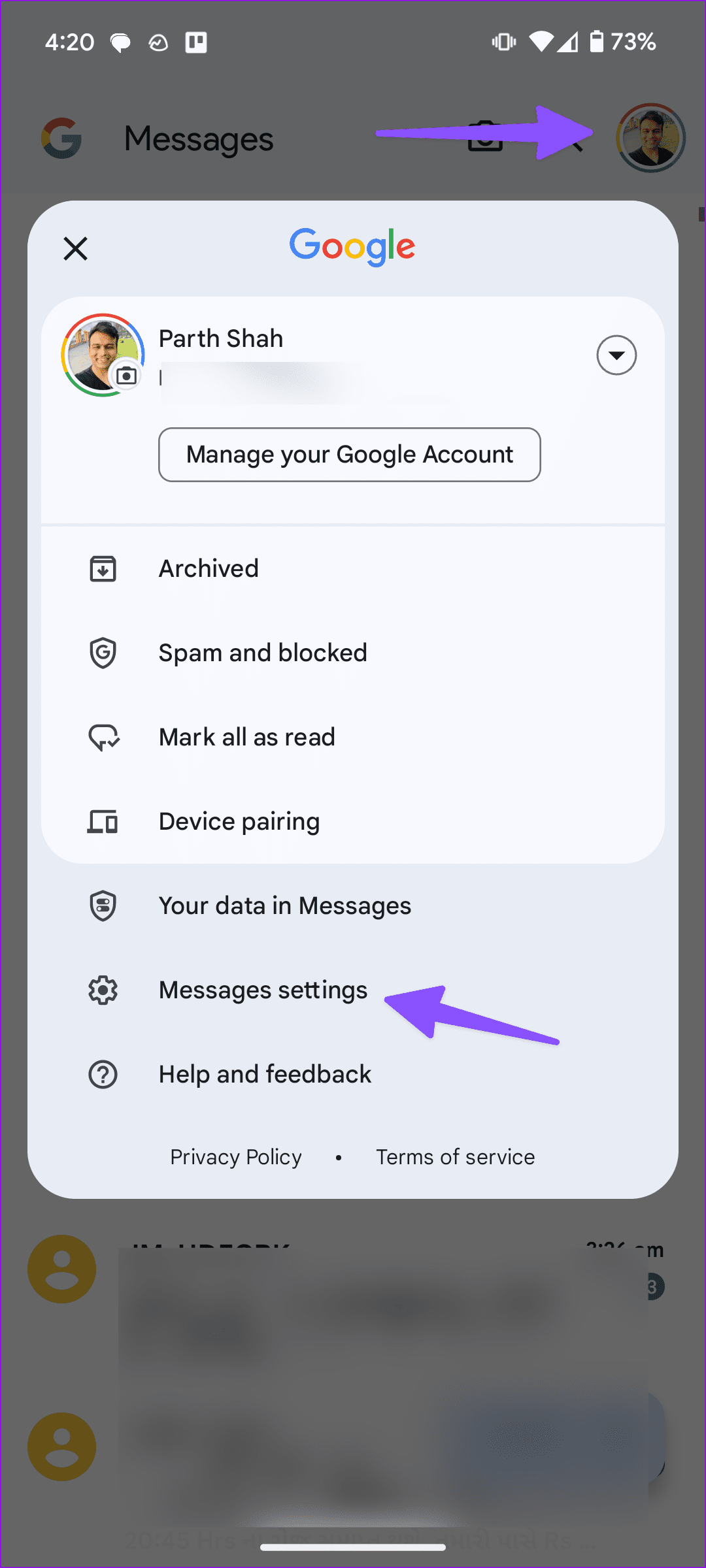
Open Messages > Profile picture > Messages settings > RCS Chats > Disable RCS.

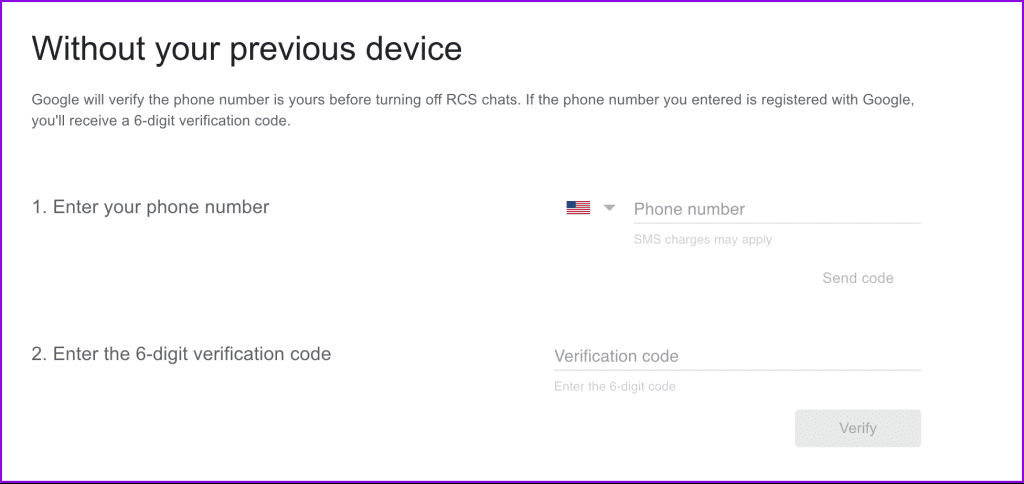
On your desktop, you can visit the Google webpage to disable RCS chats if your old Android phone is not accessible right now.
Fix 3: Reset Your Old Phone
Do you plan to sell your old phone? You shouldn’t just uninstall a few apps and call it a day. You need to reset your old phone to remove everything from it.
Note: Back up your old phone on a computer or move data to a new phone before following the steps below.
Learn the steps to reset your old iPhone.
How to Reset Android
Open Settings > System > Reset > Options > Erase all data.


Other Fixes You Can Try
- Check the SIM card on your old phone: Did you accidentally leave your SIM on your old phone? You will continue receiving carrier messages on your previous phone until you switch your SIM to a new one.
- Uninstall instant messaging apps: You must be using social media and instant messaging apps like Telegram, Gmail, Outlook, Facebook, Instagram, and more on your old phone. If you no longer plan to keep using them, uninstall these apps.
Was this helpful?
Last updated on 23 August, 2024
Read Next
 How to Stop Texts From Unknown Numbers on Your Phone
How to Block Messages From Unknown Numbers on iPhone Apple allows you to block spam texts sent from unknown numbers.
How to Stop Texts From Unknown Numbers on Your Phone
How to Block Messages From Unknown Numbers on iPhone Apple allows you to block spam texts sent from unknown numbers.
 4 Ways to Fix Android Not Receiving Texts From iPhone
Why Is My Android Phone Not Receiving Texts From an iPhone?
4 Ways to Fix Android Not Receiving Texts From iPhone
Why Is My Android Phone Not Receiving Texts From an iPhone?
 5 Ways to Fix iPhone Not Receiving Texts
Basic Troubleshooting Check cellular connectivity: If you are in an area with low or no coverage, errors like call drop, call failing, and not receiving or sending can occur.
5 Ways to Fix iPhone Not Receiving Texts
Basic Troubleshooting Check cellular connectivity: If you are in an area with low or no coverage, errors like call drop, call failing, and not receiving or sending can occur.
 How to Send Group Texts from Android and iPhone
How to Send Group Texts on iPhone Sending group texts on an iPhone is easy and convenient with Apple’s Messages app.
How to Send Group Texts from Android and iPhone
How to Send Group Texts on iPhone Sending group texts on an iPhone is easy and convenient with Apple’s Messages app.
 3 Ways to Stop Receiving WhatsApp Messages Without Blocking
https://youtu.be/8PzB-2WkB8Q WhatsApp doesn’t have a privacy setting to stop messages from contacts unless blocked (which they might know about).
3 Ways to Stop Receiving WhatsApp Messages Without Blocking
https://youtu.be/8PzB-2WkB8Q WhatsApp doesn’t have a privacy setting to stop messages from contacts unless blocked (which they might know about).
 How to Stop Receiving Direct Messages on Instagram Without Blocking
Direct messages, or DMs, are a great way to connect with your friends on Instagram privately.
How to Stop Receiving Direct Messages on Instagram Without Blocking
Direct messages, or DMs, are a great way to connect with your friends on Instagram privately.
 5 Ways to Fix Android Phone Not Receiving Emails
Basic Fixes Check internet connectivity: Ensure your device is connected to a Wi-Fi network or cellular data with good signal strength and an active plan.
5 Ways to Fix Android Phone Not Receiving Emails
Basic Fixes Check internet connectivity: Ensure your device is connected to a Wi-Fi network or cellular data with good signal strength and an active plan.
 5 Ways to Fix Samsung Galaxy Phone Not Receiving Calls
https://youtu.be/oL3QSdMsT3o Basic Fixes: Restart your phone: Long-press the power button and select Restart.
5 Ways to Fix Samsung Galaxy Phone Not Receiving Calls
https://youtu.be/oL3QSdMsT3o Basic Fixes: Restart your phone: Long-press the power button and select Restart.
The article above may contain affiliate links which help support Guiding Tech. The content remains unbiased and authentic and will never affect our editorial integrity.