

How to Use a Draft for Instagram Posts
Here’s how you can save, access, publish, or delete drafts for posts on the Instagram app. Let us look at how to create a draft.
Create a Draft for the Post
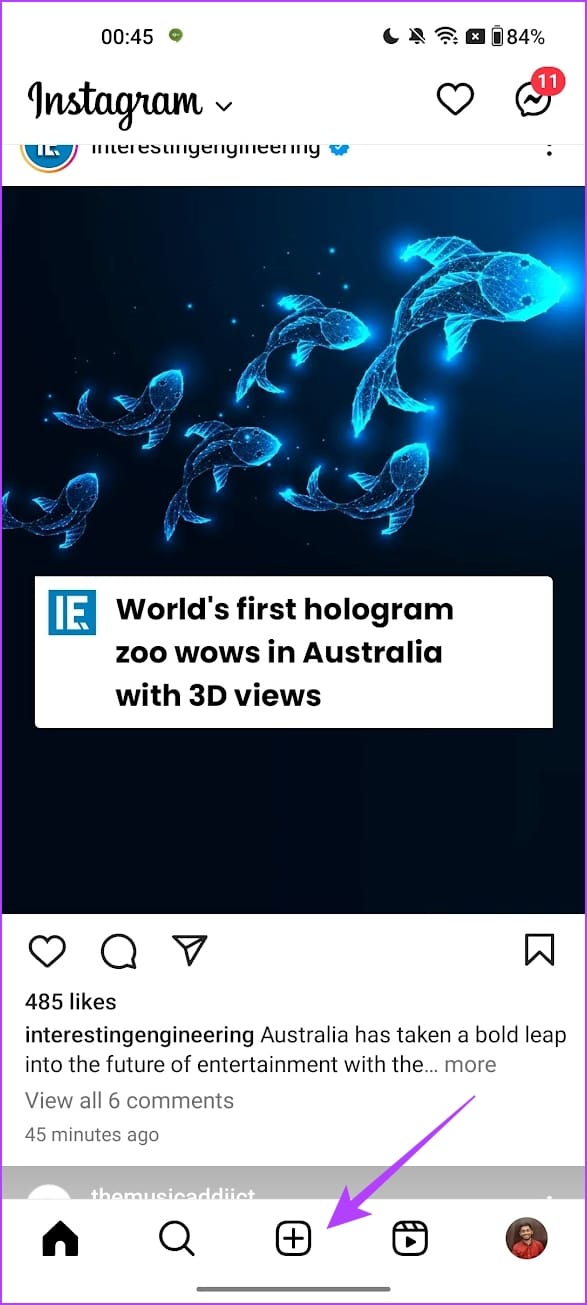
Step 1: Open Instagram > tap on the plus icon to create a new post.
Step 2: Tap on Post > select all the pictures you want to post.
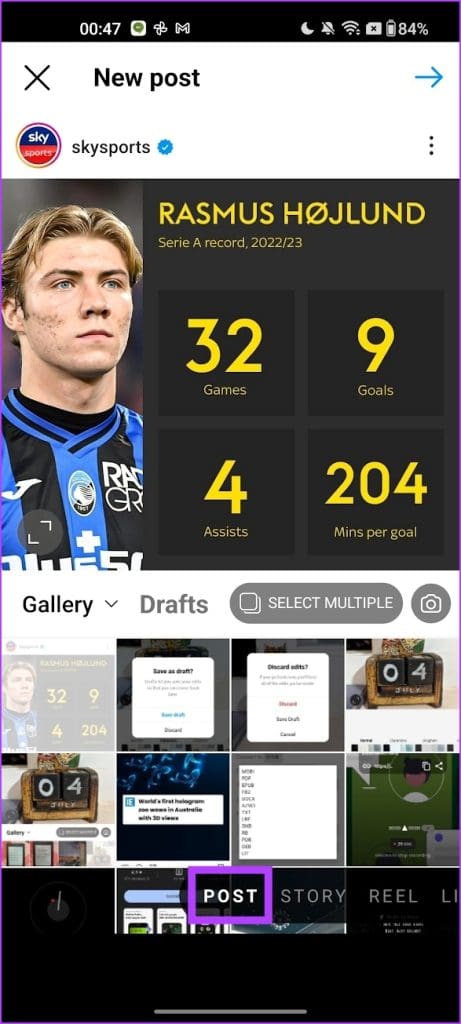
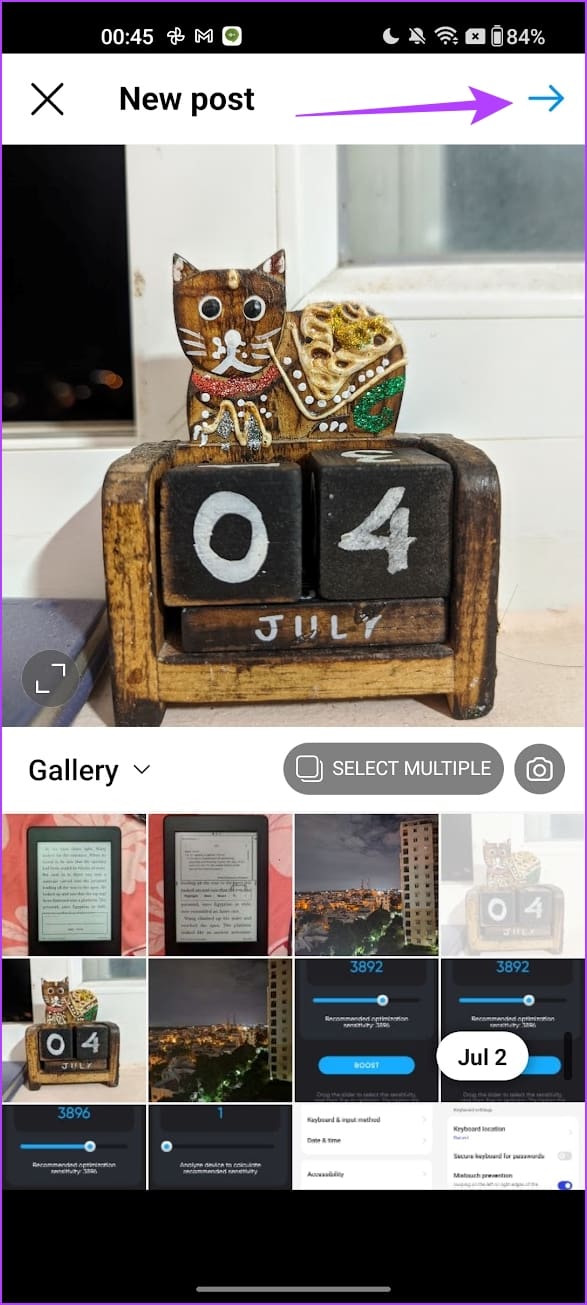
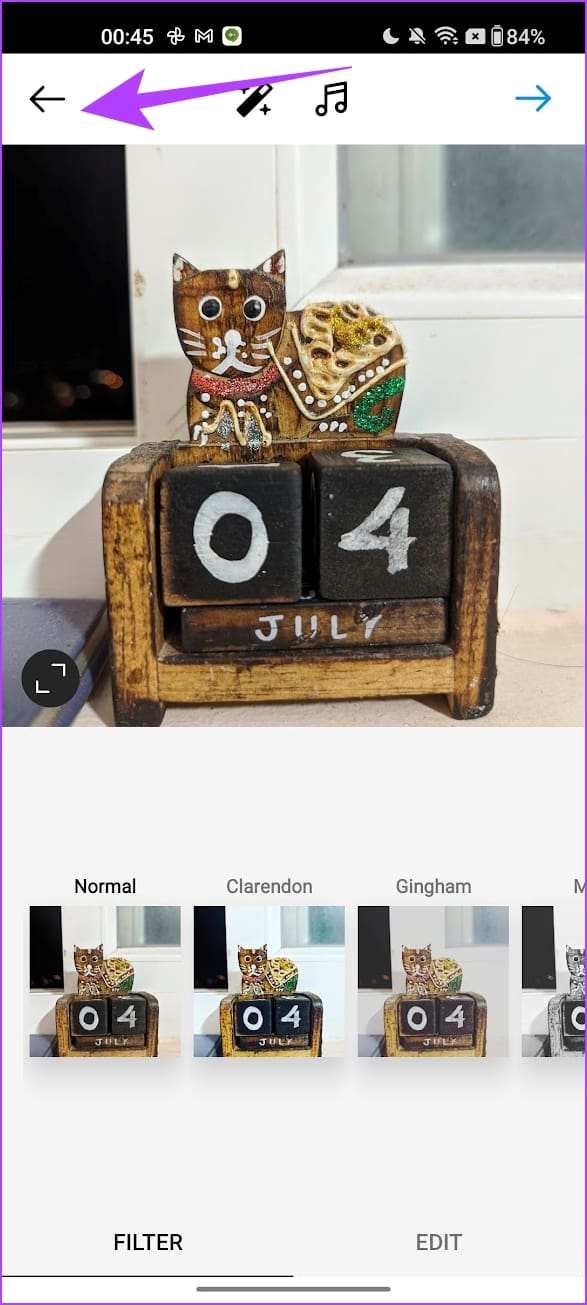
Step 3: Make the edits if you wish and tap on the left-facing arrow at the top left.
Step 4: Tap on Save Draft.

Find and Publish a Post From Drafts
Once your draft is saved, you can access or publish it as a post following the below steps.
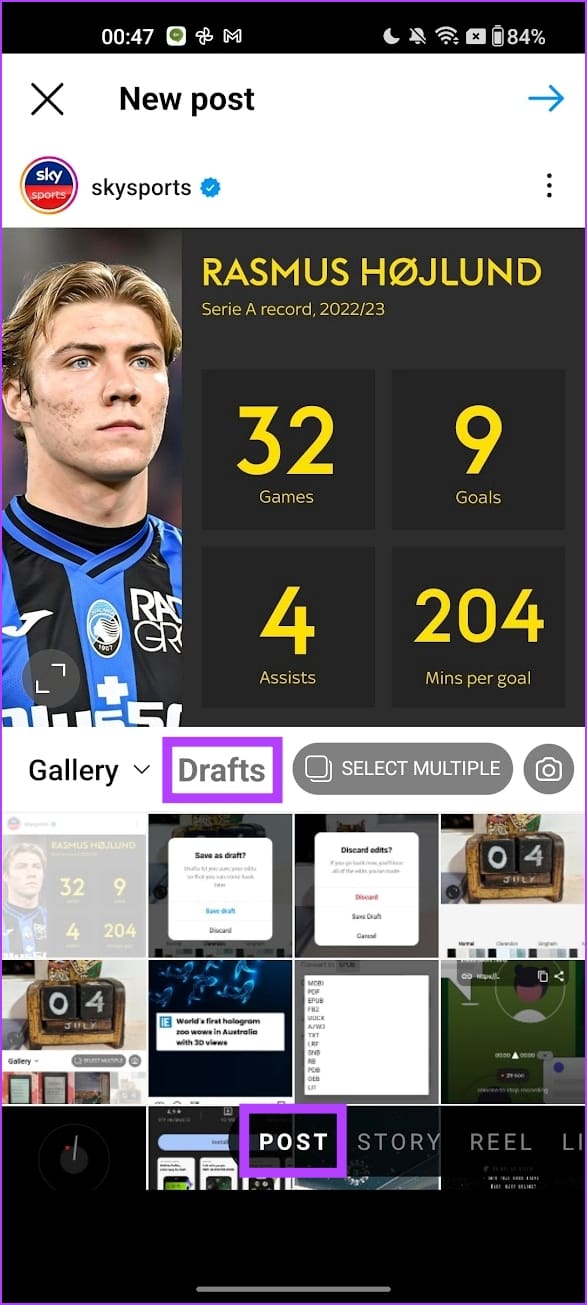
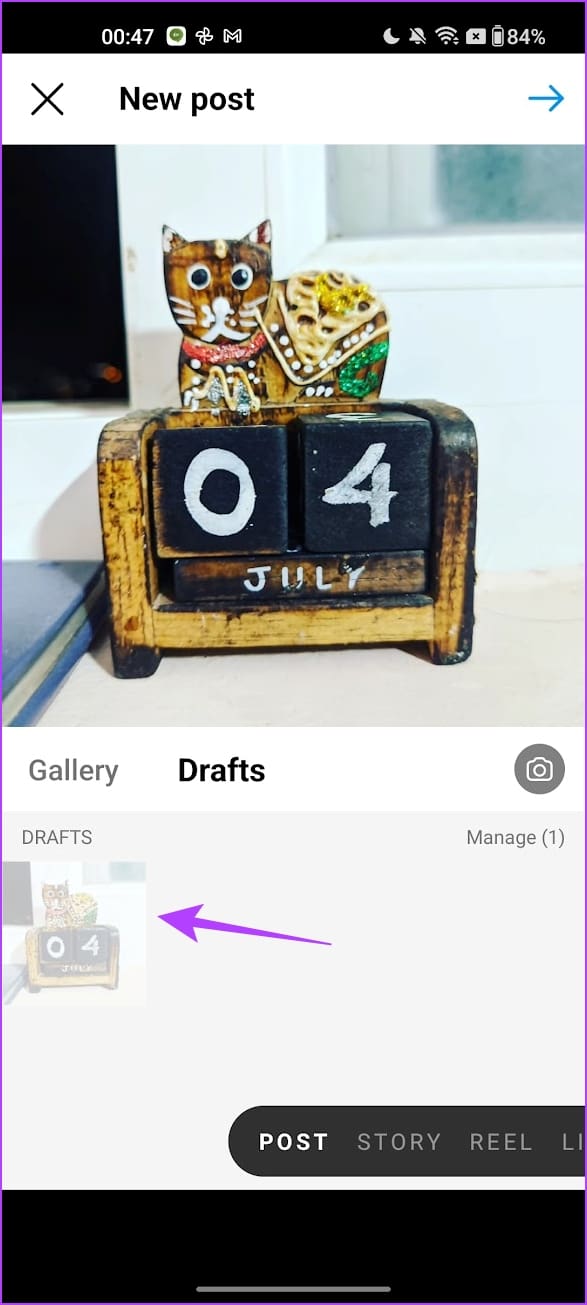
Step 1: Open the Instagram app and tap on the plus icon. Tap on Post and select Drafts.
Step 2: Select the draft and make any edits you wish. Once done, publish the same as a post.
Also Read: How to rearrange Instagram posts without deleting
How to Delete an Instagram Post Draft
Here’s how to delete a draft for an Instagram post. You first need to open the drafts section from the steps in the previous section.
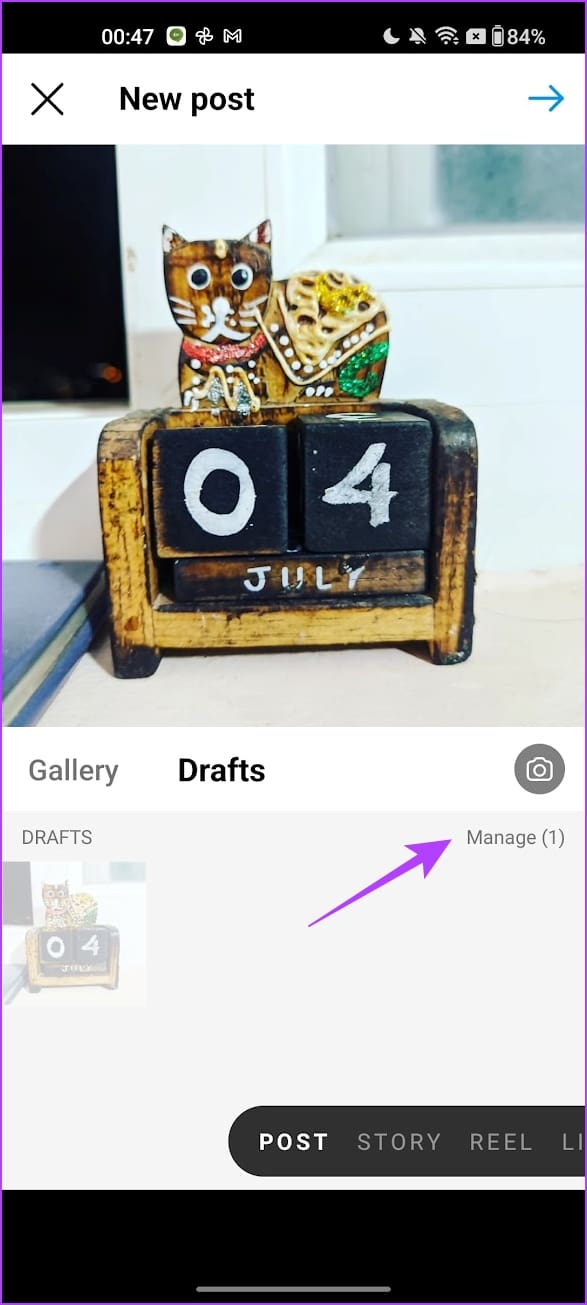
Step 1: Open the Instagram app and tap on the plus icon. Tap on Post > select Drafts > Manage.
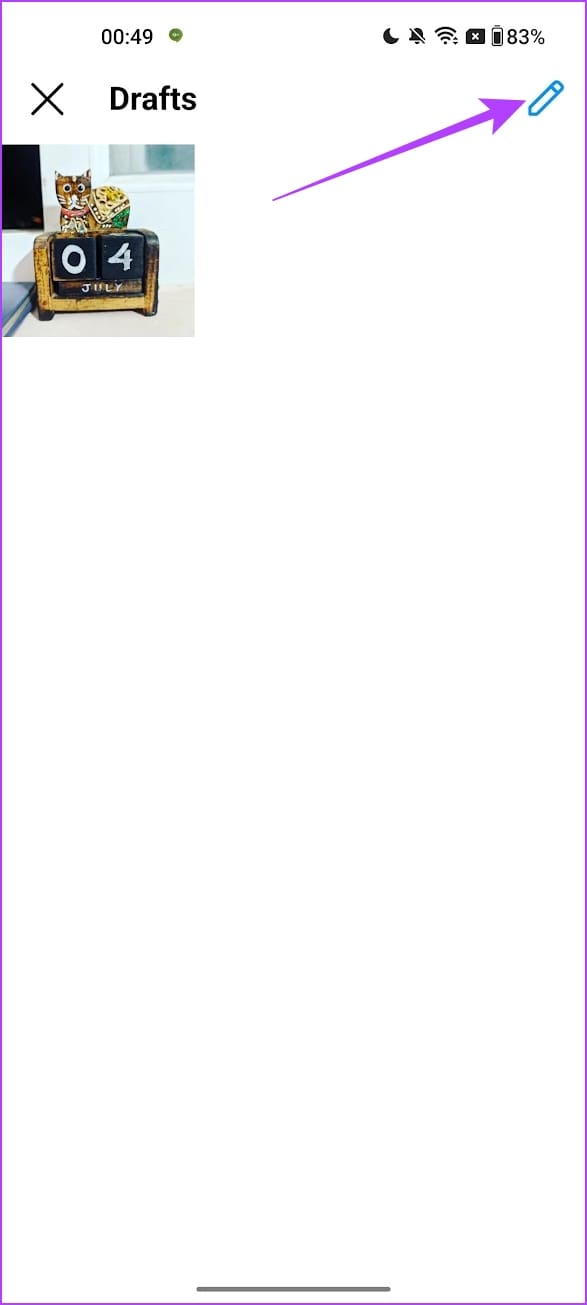
Step 2: Tap on the edit icon. Select the draft you want to discard and tap on the check mark.
Step 3: Tap on Discard to delete the draft.

How to Use a Draft for Instagram Stories
Here’s how to create, use, and delete a draft for an Instagram story.
Save Instagram Drafts for a Story
Step 1: Open the Instagram app and tap on the plus icon to add a new story. Select Story.
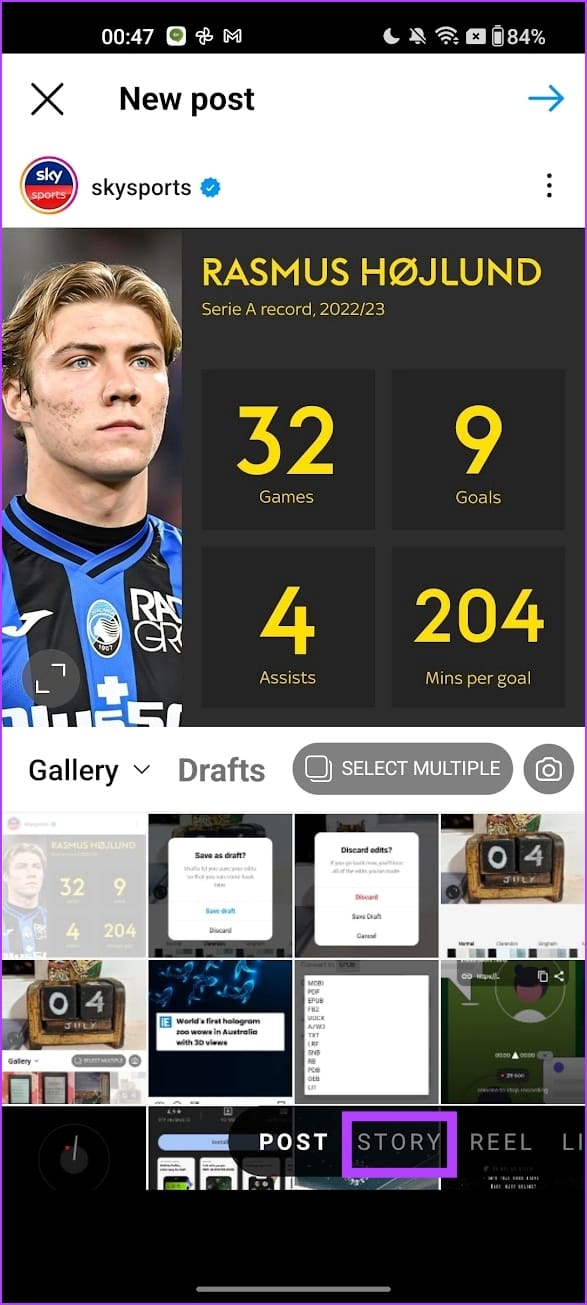
Step 2: Upload a picture. Once you make the edits, tap on the left-facing arrow > Save Draft.


Access Your Instagram Drafts
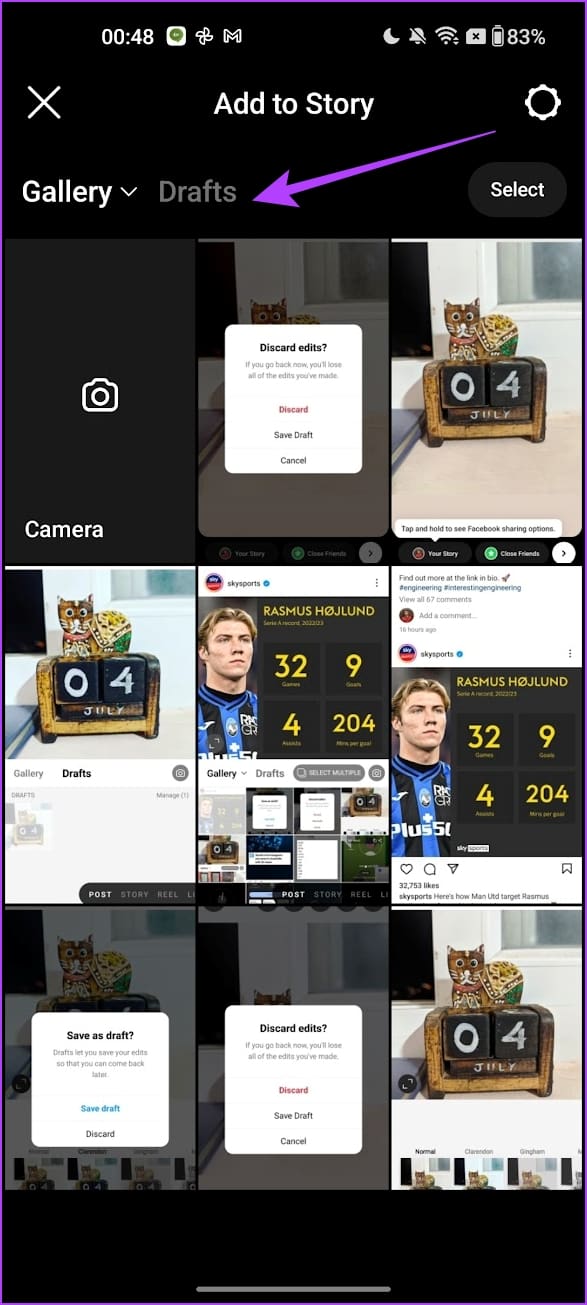
Step 1: Open the Instagram app and tap on the plus icon to add a new story.
Step 2: Select Story. Open the gallery and tap on Drafts. Select the draft you want to post and publish it as a story.

Delete an Instagram Story Draft
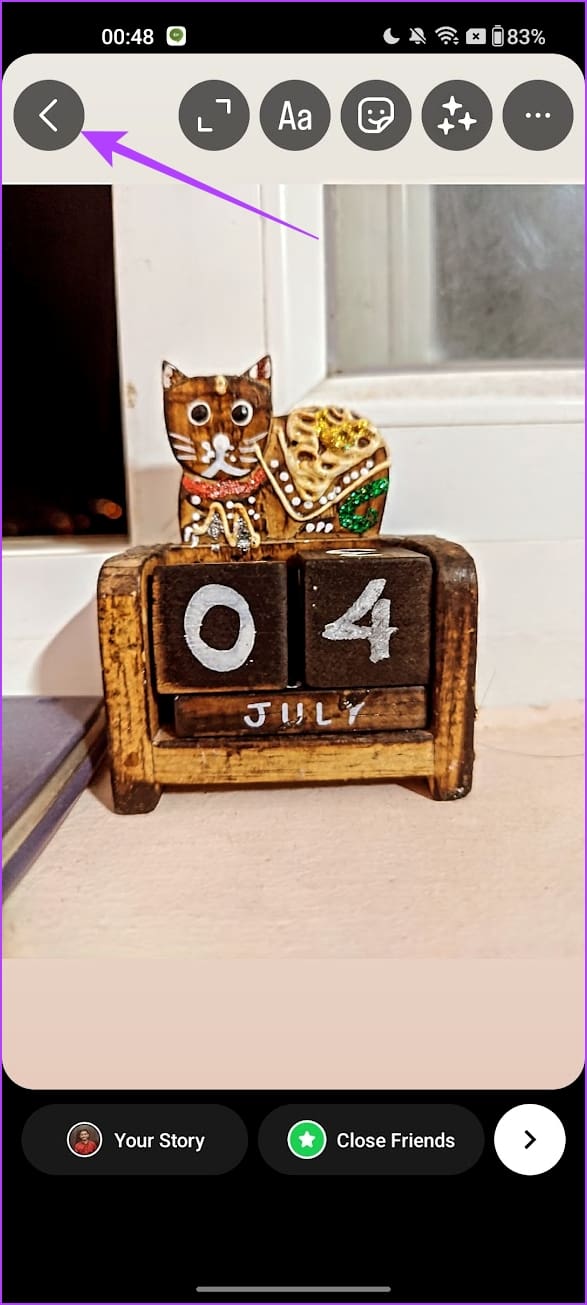
Step 1: Open the saved story draft on your Instagram app and tap on the left-facing arrow icon.
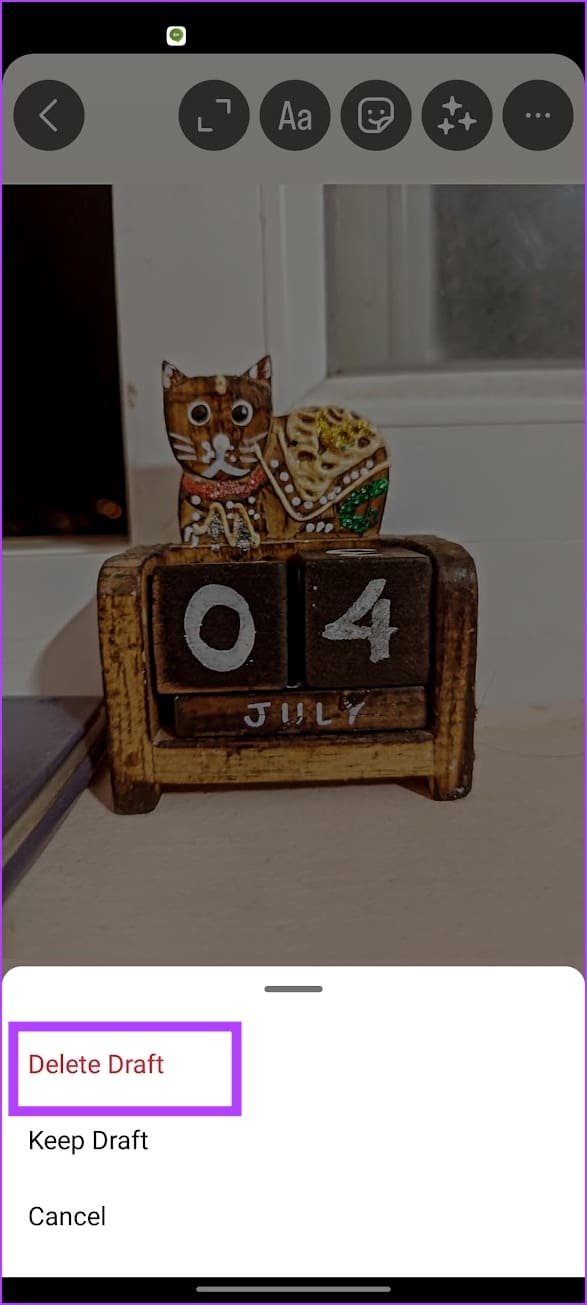
Step 2: Tap on Delete Draft.
How to Use Drafts for Instagram Reels
Also Read: How to edit Reels using Instagram’s built-in editor
How to Create a Draft for an Instagram Reel
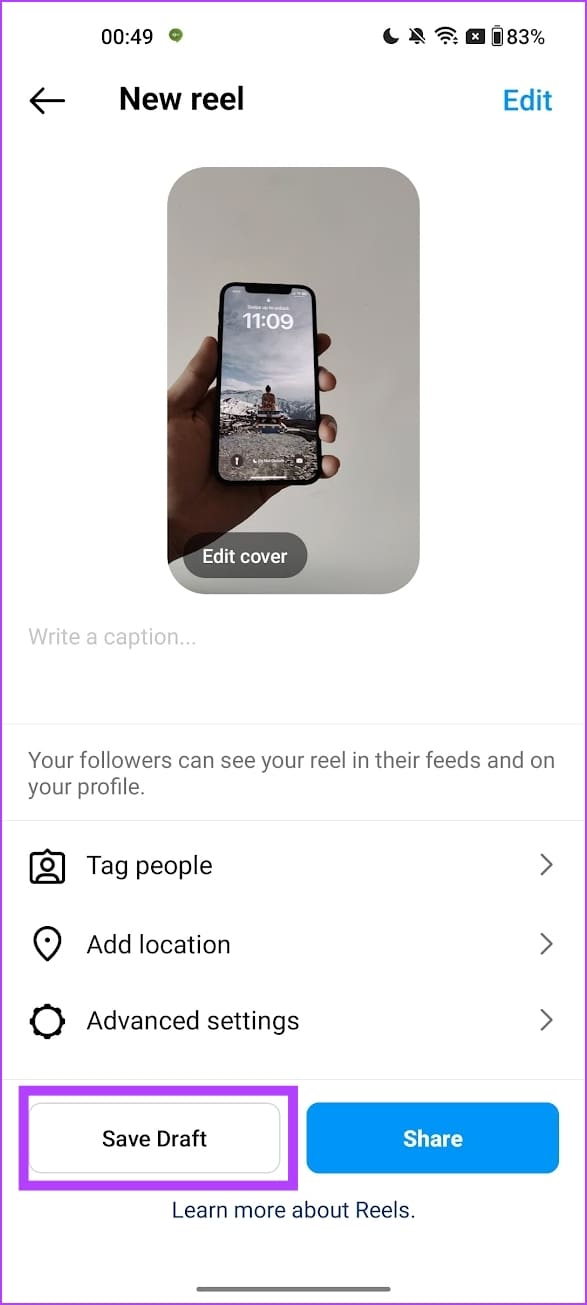
Once you make all the edits for the Reel and as you publish it, you will find an option to save the Reel as a draft. Tap on the Save Draft to do so.
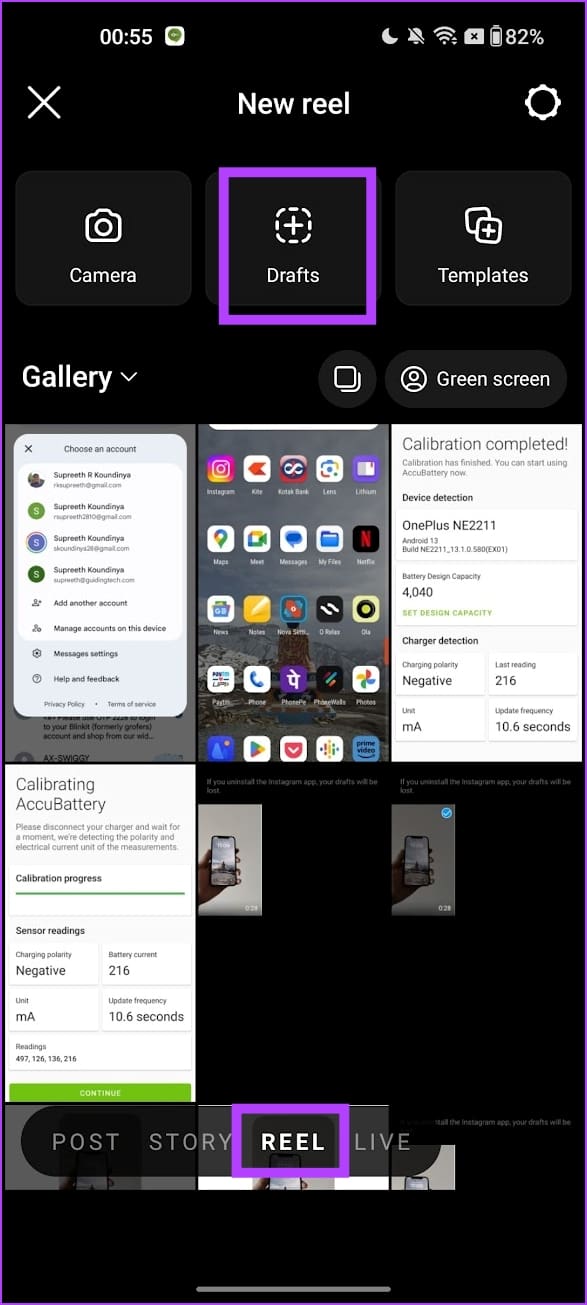
How to Find and Publish a Reel From Drafts
Step 1: In the Instagram app, tap on the plus icon to publish a new Reel.
Step 2: Tap on Reel and select Drafts. Select the Reel from the drafts to publish it on your feed.

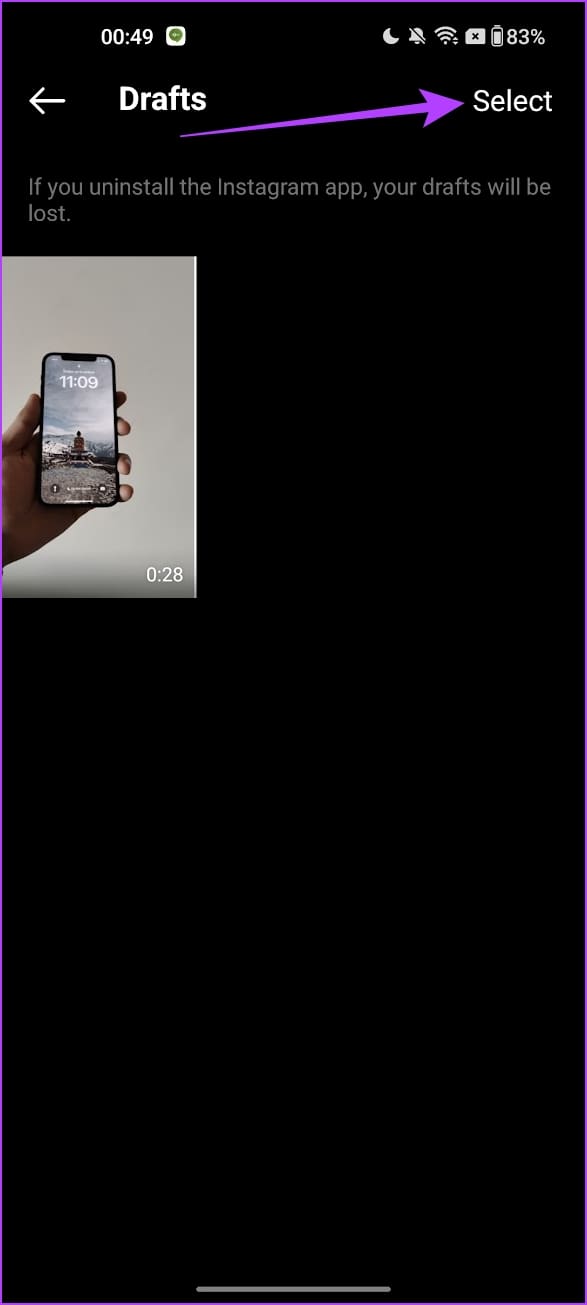
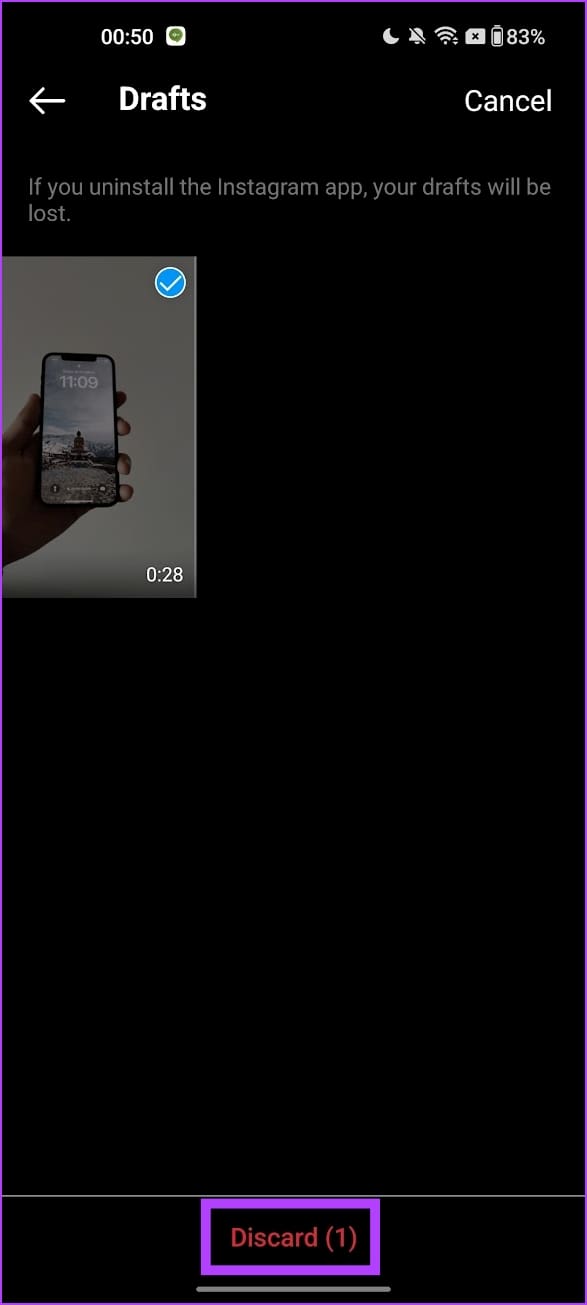
How to Delete an Instagram Reels Draft
To delete a draft, open the saved drafts and tap on Select at the top right. Then, select all the drafts you want to delete > tap on Discard.
Also Read: How to make Instagram Reels with multiple photos.
Was this helpful?
Last updated on 27 August, 2024
Read Next
 How to Find Drafts on Facebook on Mobile and Desktop
How to Find Saved Drafts on the Facebook Mobile App When you save a draft on the Facebook app on Android, you will instantly receive a notification (both as a
How to Find Drafts on Facebook on Mobile and Desktop
How to Find Saved Drafts on the Facebook Mobile App When you save a draft on the Facebook app on Android, you will instantly receive a notification (both as a
 4 Ways to Fix Microsoft Outlook Not Saving Drafts on Windows
Try Basic Fixes Use Outlook search to locate the draft: Outlook may sometimes fail to sort your drafts correctly, making it difficult to locate them.
4 Ways to Fix Microsoft Outlook Not Saving Drafts on Windows
Try Basic Fixes Use Outlook search to locate the draft: Outlook may sometimes fail to sort your drafts correctly, making it difficult to locate them.
 How to Delete a Story on Instagram and What to Do if You Can’t Delete It
How to Delete a Live Story on IG Once you upload a story on Instagram, it lasts for 24 hours.
How to Delete a Story on Instagram and What to Do if You Can’t Delete It
How to Delete a Live Story on IG Once you upload a story on Instagram, it lasts for 24 hours.
 How to Fix Instagram Save to Collection Not Working (And Other Tips)
Instagram lets you save posts so you can easily reference them later in the future.
How to Fix Instagram Save to Collection Not Working (And Other Tips)
Instagram lets you save posts so you can easily reference them later in the future.
 3 Ways to Save Instagram Stories With Music Easily
These days content sharing is inevitable, especially between platforms.
3 Ways to Save Instagram Stories With Music Easily
These days content sharing is inevitable, especially between platforms.
 What happens When You Save a Post on Instagram
It’s Kept in the Saved Folder When you save a post on Instagram, it’s added to the Saved section of Instagram and kept in the All Posts folder.
What happens When You Save a Post on Instagram
It’s Kept in the Saved Folder When you save a post on Instagram, it’s added to the Saved section of Instagram and kept in the All Posts folder.
 How to View, Download, and Delete Your Instagram Data
How to View Your Instagram Data If you only want to see what data Instagram has collected during your usage, you can easily access it in the Instagram app on
How to View, Download, and Delete Your Instagram Data
How to View Your Instagram Data If you only want to see what data Instagram has collected during your usage, you can easily access it in the Instagram app on
 How to Unsend or Delete Messages on Instagram
Besides being a popular social media app, Instagram is famous as a messaging application.
How to Unsend or Delete Messages on Instagram
Besides being a popular social media app, Instagram is famous as a messaging application.
The article above may contain affiliate links which help support Guiding Tech. The content remains unbiased and authentic and will never affect our editorial integrity.

