With Microsoft’s steady march into the future, some products and services will invariably get left behind. Today, we’re looking at one of these victims: the Microsoft Support and Recovery Assistant removal. What was it, why was Microsoft SaRA removed, and what does it mean for you? We’ll answer all.
Microsoft SaRA Removed
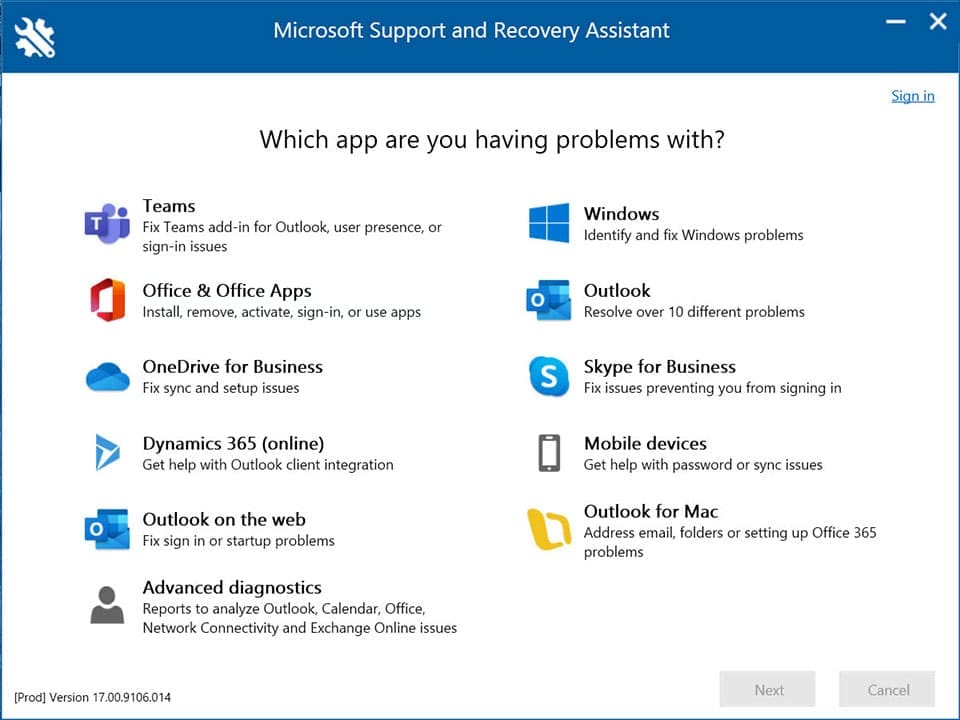
As of March 10, 2026, Microsoft has removed the Support and Recovery Assistant (SaRA) from Microsoft, the same fate that befell the Microsoft Support Diagnostic Tool a few years earlier. This is not the only product or service to be deprecated, either. The MS Authenticator app will phase out its password autofill feature, and Microsoft Publisher will slowly be removed from PCs and the Store.
What Is SaRA?
Just in case you aren’t familiar with it, the Support and Recovery Assistant was a command-line diagnostic tool that was used to provide automatic testing and assistance for a variety of Microsoft programs. These included:
- Microsoft Office and Microsoft 365
- OneDrive
- Outlook
- Windows
Along with the variety of software, it performed a variety of functions: everything from performing automatic repair to assisting with both installation and uninstallation of apps. It came in two variants: the Standard, which came included with any version of Windows (7 to 11), and the Enterprise version, used for IT support to troubleshoot issues via command-line instructions.
Why the Replacement?
While Microsoft hasn’t released an official reason for the retirement, there are rumors and observations swirling around. Microsoft has always had a reputation for backward-compatible software. Over time, however, it can become vulnerable to cyber attacks and infiltration. Seeing as SaRA has been around since Windows 7, there is a considerable risk.
Secondly, Microsoft seems to be making the drive to simplify and centralize tools and services. The retirement of SaRA allows its role to be collapsed into that of its successor.
Microsoft Get Help – The Replacement
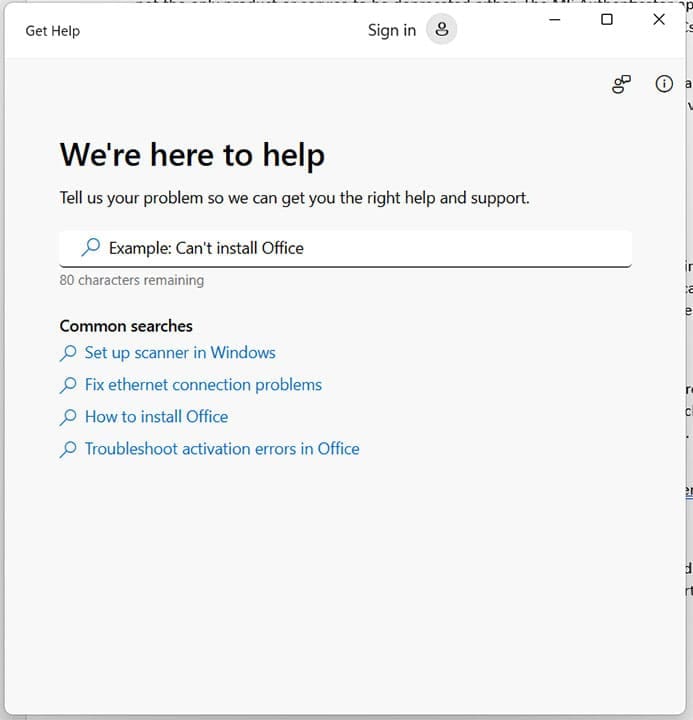
So, what comes after SaRA? The tool will be replaced with Get Help, a centralized app that combines repair, diagnostic, troubleshooting, and customer support in one place. It’s certainly a more user-friendly way to access assistance and allows for text input.
This might seem like the end for those fluent in SaRA’s command-line commands, but the good news is that the app also comes with its own command line interface that accepts the same commands and instructions that its predecessor does, provided you migrate them to the “GetHelpCmdLine” syntax. This means that you’ll still get to use the same form of tool, just in a different place.
In addition, you’ll now also have access to powerful troubleshooters that can repair quite specific app and system problems. These can be found in Settings, under “Troubleshoot” and “Other Troubleshooters.”
Was this helpful?
Last updated on 20 April, 2026
Read Next
 What Does Mapping a Drive Mean in Windows, and How Is It Useful?
What Does Mapping a Drive Mean in Windows?
What Does Mapping a Drive Mean in Windows, and How Is It Useful?
What Does Mapping a Drive Mean in Windows?
 What Does Locking the Taskbar Mean in Windows
Many features exist on our Windows PC that we seldom use.
What Does Locking the Taskbar Mean in Windows
Many features exist on our Windows PC that we seldom use.
 What Does Your Location Is Currently in Use Mean on Windows
Why Do Apps Track Your Location on Windows Weather, Maps, and news widgets frequently use your location to deliver astute results.
What Does Your Location Is Currently in Use Mean on Windows
Why Do Apps Track Your Location on Windows Weather, Maps, and news widgets frequently use your location to deliver astute results.
 What Does Reset App Preferences Mean and How to Do It on Android
What Does Reset App Preferences Mean?
What Does Reset App Preferences Mean and How to Do It on Android
What Does Reset App Preferences Mean?
 What Does “Make Available Offline” Mean in Google Drive?
Difference Between Offline and Download Downloading a file creates a separate copy of the file independent of the original file in Google Drive.
What Does “Make Available Offline” Mean in Google Drive?
Difference Between Offline and Download Downloading a file creates a separate copy of the file independent of the original file in Google Drive.
 What Does “SOS Only” Mean on iPhone and How to Fix It
What Does SOS Only Mean on iPhone The simplest explanation is that you are outside the coverage area.
What Does “SOS Only” Mean on iPhone and How to Fix It
What Does SOS Only Mean on iPhone The simplest explanation is that you are outside the coverage area.
 What Does “No Caller ID” Mean and How to Trace the Caller
How to Unmask No Caller ID or an Unknown Caller Blocking calls with no caller IDs might inadvertently block calls from recruiters, banks, etc.
What Does “No Caller ID” Mean and How to Trace the Caller
How to Unmask No Caller ID or an Unknown Caller Blocking calls with no caller IDs might inadvertently block calls from recruiters, banks, etc.
 What Does FaceTime Photos Must be Enabled on Both Devices Mean
What Is the FaceTime Photos Must be Enabled on Both Devices Message This message means that the FaceTime Live Photos feature is disabled either on your or the other participant’s
What Does FaceTime Photos Must be Enabled on Both Devices Mean
What Is the FaceTime Photos Must be Enabled on Both Devices Message This message means that the FaceTime Live Photos feature is disabled either on your or the other participant’s
The article above may contain affiliate links which help support Guiding Tech. The content remains unbiased and authentic and will never affect our editorial integrity.