How to Enable or Disable TikTok Profile Views History
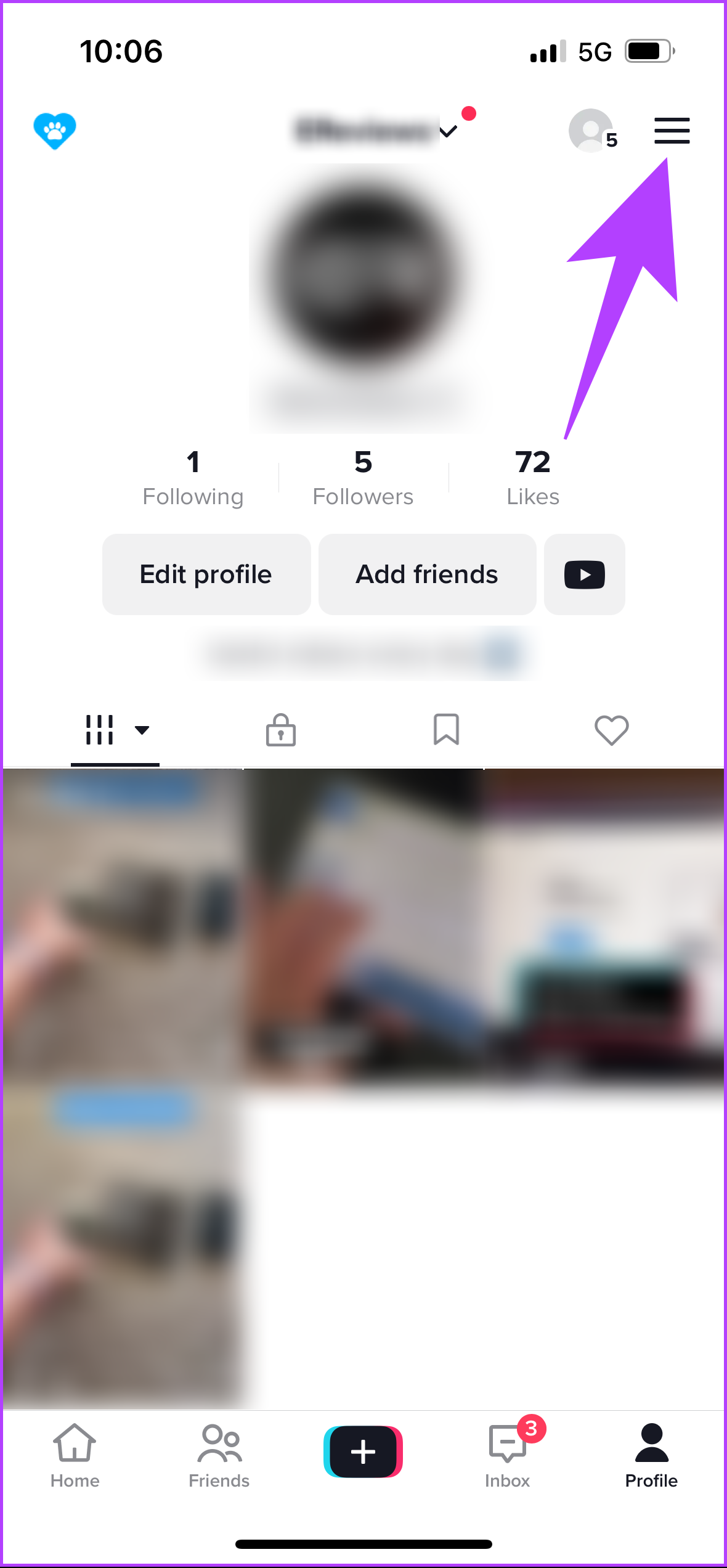
Step 1: Open TikTok on your Android or iOS device. Then, tap on your TikTok profile icon at the bottom.
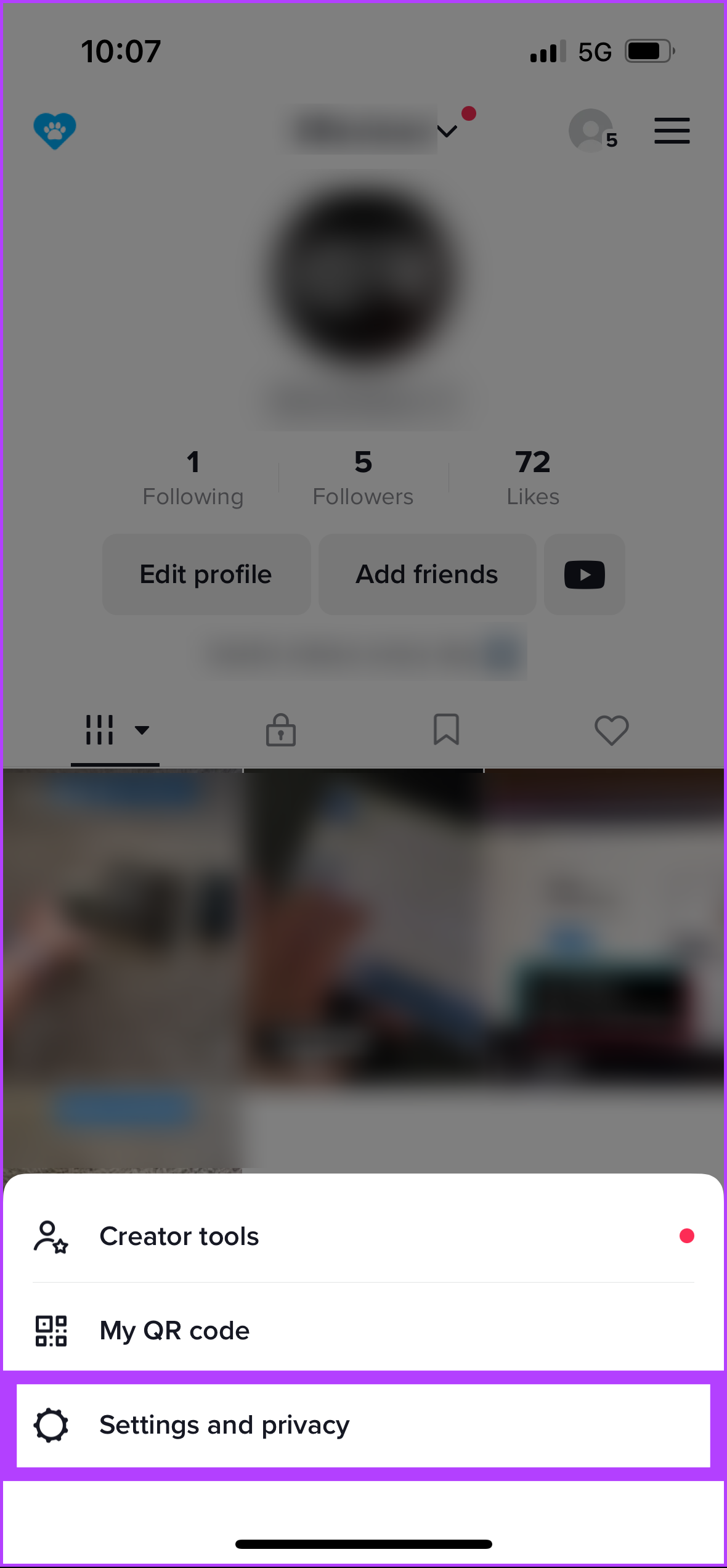
Step 2: Tap on the three horizontal lines menu at the top right corner > select Settings and privacy.
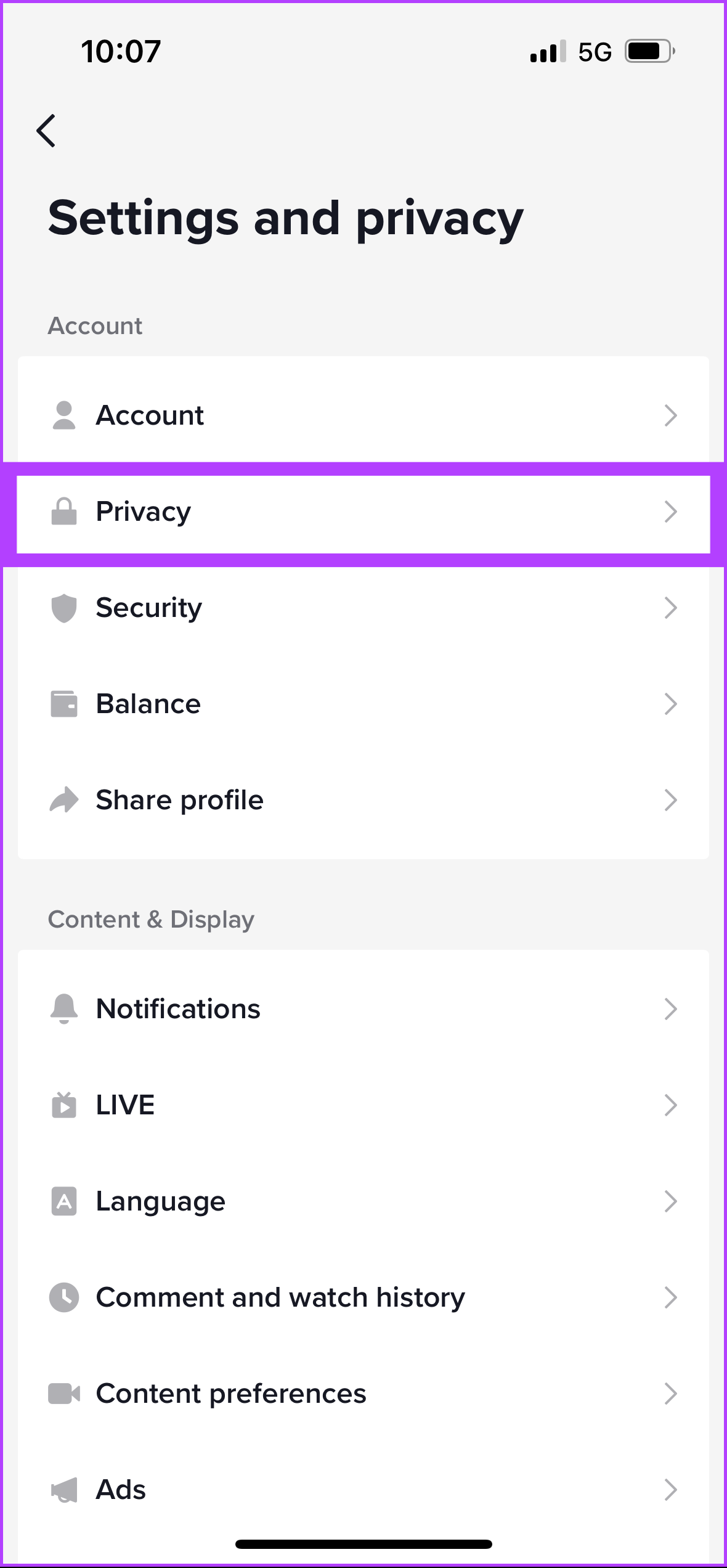
Step 3: Under the Account section, select Privacy > scroll down and tap on Profile views.
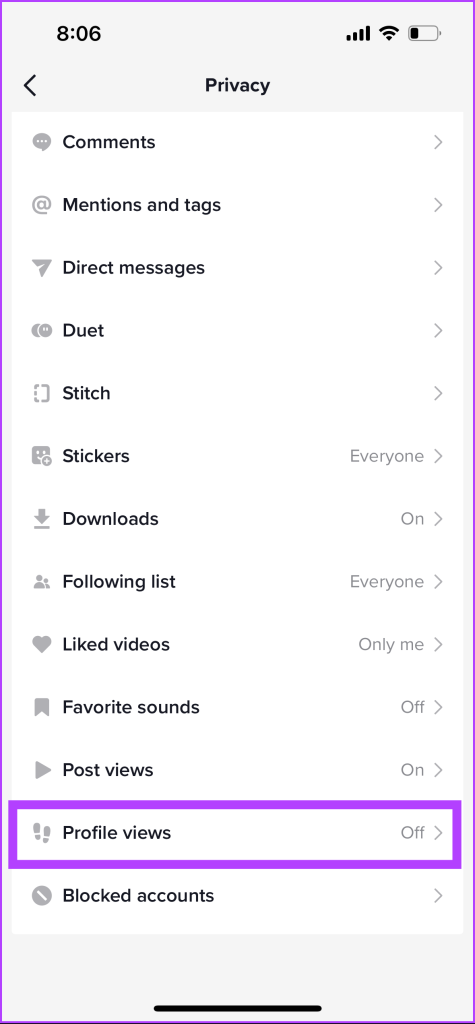
Step 4: Toggle on Profile view history > under the Profile views screen, tap on Turn on.

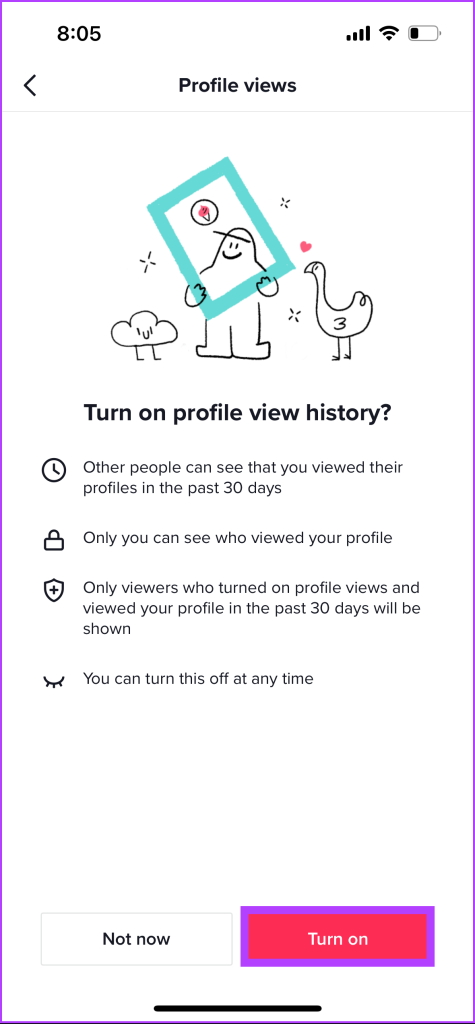
That’s it. You have successfully enabled the profile view feature on your TikTok account.
Also Read: How to clear the cache on TikTok on Android, iOS, or web
How to See Who Viewed Your TikTok Profile
As soon as you enable the profile views on your TikTok account, you will begin seeing accounts that have viewed your profile because of your content or TikTok recommendations. But where and how to view it? We have listed two methods below.
Method 1: From the Profile View Page
Step 1: Launch the TikTok app and tap on your profile icon at the bottom navigation.
Step 2: Under your profile, tap on the Step icon.
That’s it. You will see a list of profiles that have viewed your account.
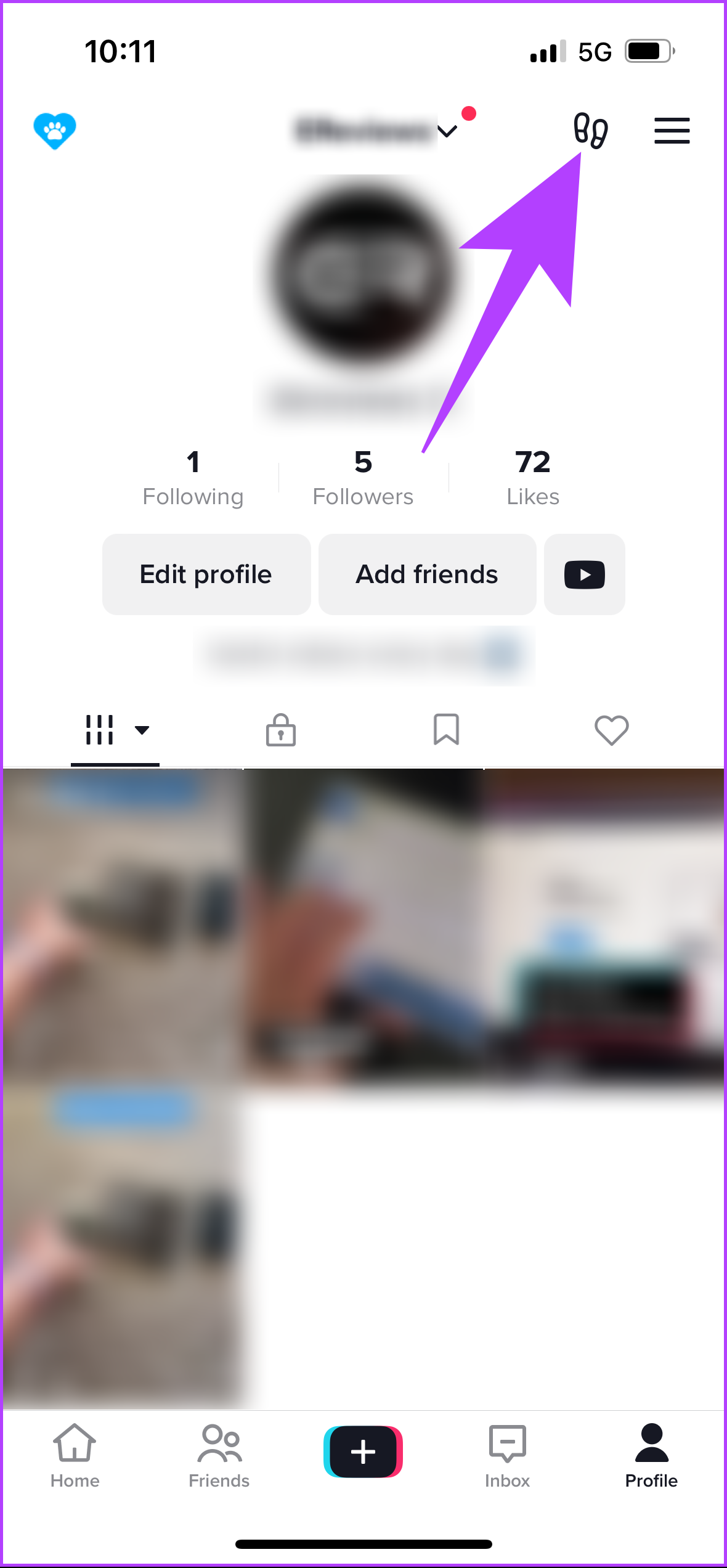

You can not only see their names but also visit their profile and follow them if you want.
Method 2: From the Inbox
Step 1: Launch TikTok and tap the Inbox icon at the bottom.
Step 2: Under Inbox, tap Activities > choose the notification saying viewed your profile.
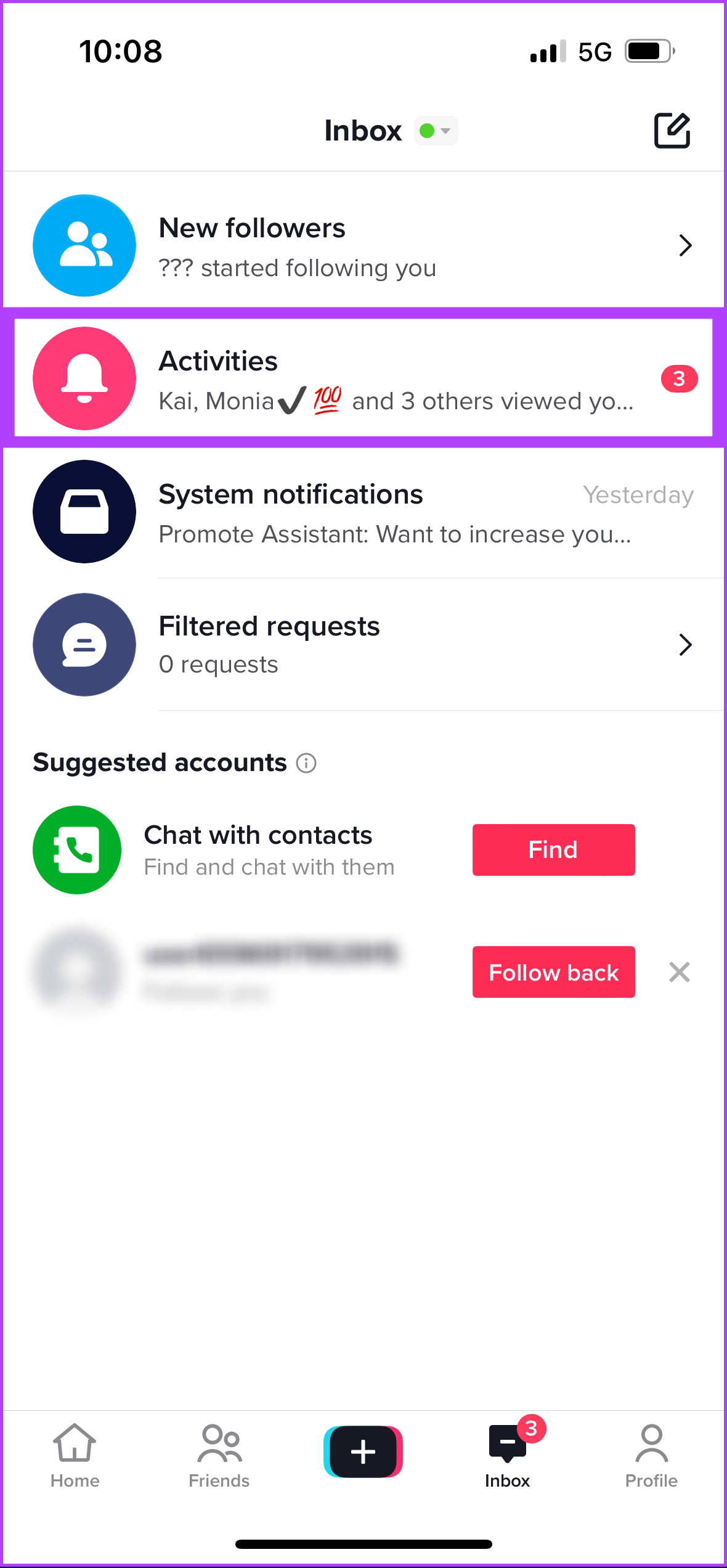

That’s it. You will see who viewed your profile alongside a follow button and a link to their account.
Why Don’t I Have Profile Views on TikTok
Below are the various reasons you don’t have or see profile views on TikTok.
- If you’re under 16 and/or have over 5,000 followers, TikTok won’t show your profile visit history. You can wait until you reach 18 or change your age on TikTok.
- If no one has visited your profile in the past 30 days, TikTok won’t have any data to show you.
- Users who have visited your profile may not have the profile views option turned on in their accounts. This means they won’t appear on your profile view page.
- Sometimes, lacking followers or unengaging content lowers your profile’s chances of getting views.
TikTok’s algorithm plays a significant role in determining which videos are shown to users. If none of the above mentioned reasons are applicable to you, contact TikTok support and get it resolved.
FAQs
Yes and no. TikTok does not provide users with a feature that allows them to see every time someone views their profile. However, you can see details if a user views your profile after 30 days. So, if the other visit is in the 30-day gap, you can see it distinctively.
Yes, you can view someone’s TikTok profile without them knowing. Disable the profile view feature on your account using the methods mentioned in this article. Once disabled, search for the account and view its content.
Turning on profile views on TikTok can be useful for those looking to increase their visibility and engagement on the platform.
Was this helpful?
Last updated on 30 May, 2024
Read Next
 3 Best Ways to Fix TikTok Not Showing Likes or Views
Preliminary Fixes Close & Reopen: Sometimes, a simple app restart can refresh the data.
3 Best Ways to Fix TikTok Not Showing Likes or Views
Preliminary Fixes Close & Reopen: Sometimes, a simple app restart can refresh the data.
 Can You See Who Views Your Instagram Profile
Does Instagram Show Who Views Your Profile Unfortunately, no.
Can You See Who Views Your Instagram Profile
Does Instagram Show Who Views Your Profile Unfortunately, no.
 4 Fixes for Instagram Story Views Not Showing
Basic Fixes Use a public account: Go to your profile > Settings and activity > Account privacy > disable Private account.
4 Fixes for Instagram Story Views Not Showing
Basic Fixes Use a public account: Go to your profile > Settings and activity > Account privacy > disable Private account.
 TikTok vs TikTok Lite: What’s Best for You?
TikTok (previously known as Musical.ly) is one of the massively growing social media apps out there, and it's easy to see why.
TikTok vs TikTok Lite: What’s Best for You?
TikTok (previously known as Musical.ly) is one of the massively growing social media apps out there, and it's easy to see why.
 3 Ways to Fix TikTok App Not Loading on Your Phone
Basic Fixes Check your network connection: Ensure your smartphone has a robust internet connection.
3 Ways to Fix TikTok App Not Loading on Your Phone
Basic Fixes Check your network connection: Ensure your smartphone has a robust internet connection.
 3 Ways to Fix TikTok Effects Not Working
Basic Fixes: Ensure you're in the correct region: Due to region restrictions, some TikTok filters may not be available in your country.
3 Ways to Fix TikTok Effects Not Working
Basic Fixes: Ensure you're in the correct region: Due to region restrictions, some TikTok filters may not be available in your country.
 3 Ways to Fix TikTok Not Saving Videos
Basic Fixes: Check storage permission on Android: TikTok needs storage access to save videos.
3 Ways to Fix TikTok Not Saving Videos
Basic Fixes: Check storage permission on Android: TikTok needs storage access to save videos.
 How to Unblock TikTok at School or Anywhere
TikTok is one of the fastest-growing social media platforms.
How to Unblock TikTok at School or Anywhere
TikTok is one of the fastest-growing social media platforms.
The article above may contain affiliate links which help support Guiding Tech. The content remains unbiased and authentic and will never affect our editorial integrity.