What Happens When You Turn Off Active Status on Facebook?
- When you turn off your Active Status on Facebook, your friends and contacts won’t see the green dot. This means you appear offline to everyone.
- Even with Active Status turned off, you will continue to receive messages and notifications as usual. Moreover, you can make and receive voice and video calls on Messenger.
- Turning off Active Status does not affect read receipts. Unless you turn off read receipts separately, your contacts will still see if you’ve read their messages.
Also Read: How to turn off your birthday on Facebook
How to Turn Off Active Status on FB Using Desktop
Note: To go entirely offline on Facebook Messenger, you must turn off your active status on all the devices you’ve logged into.
Step 1: Open Facebook and click on the Messenger icon in the upper-right corner.
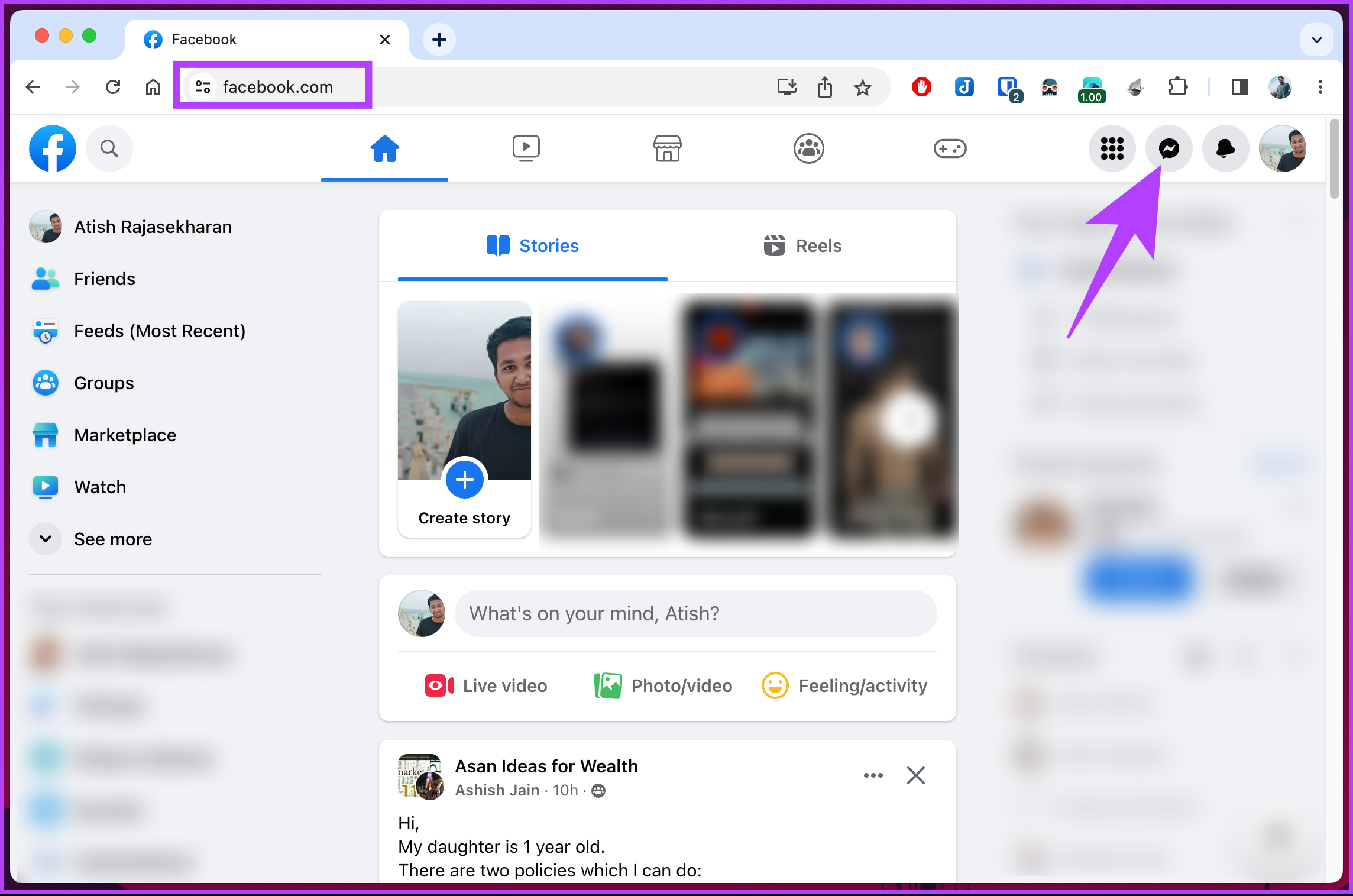
Step 2: From the drop-down menu, click on the three-dot icon.
Step 3: In the Chat Settings menu, select Active Status.
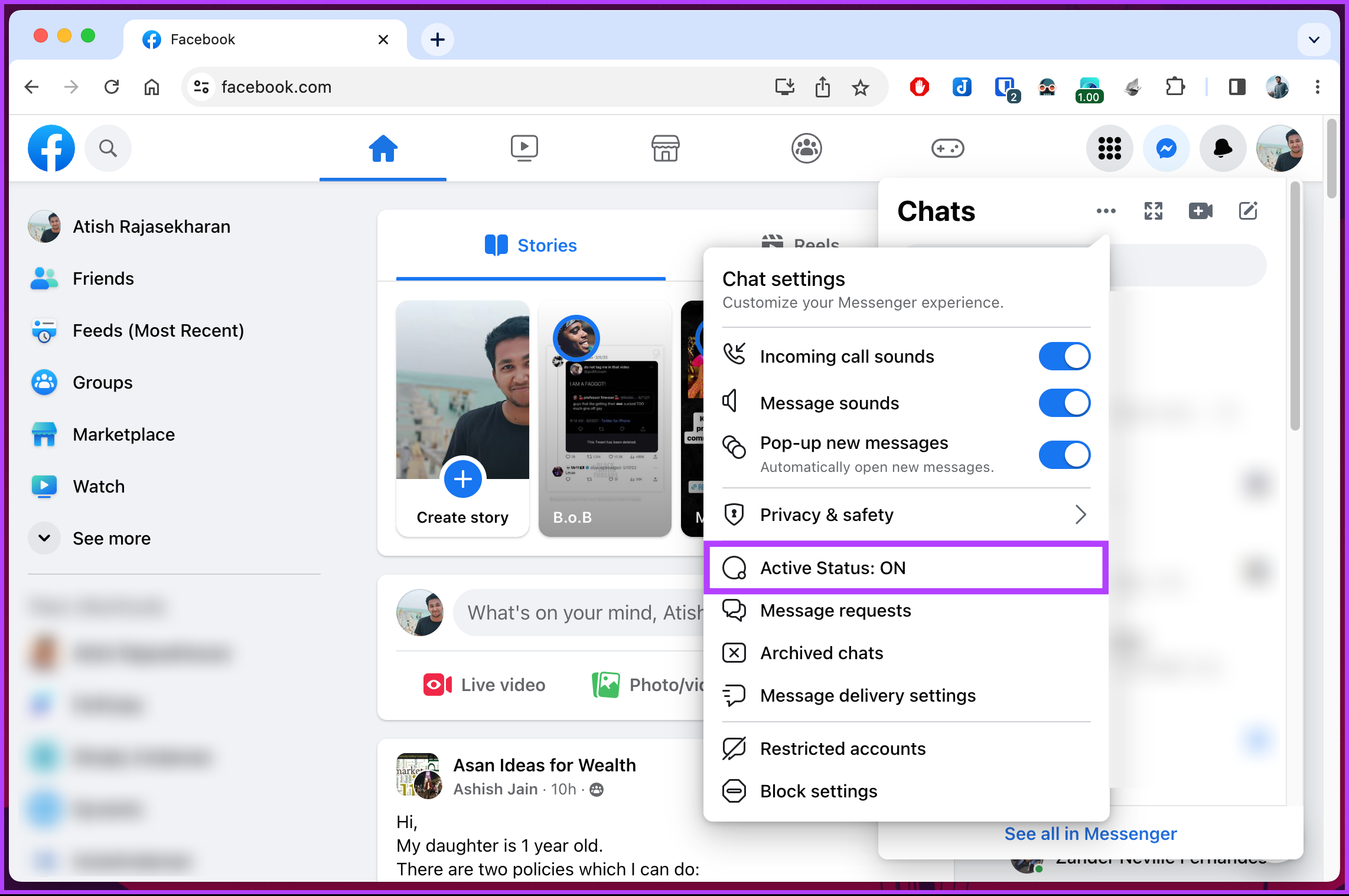
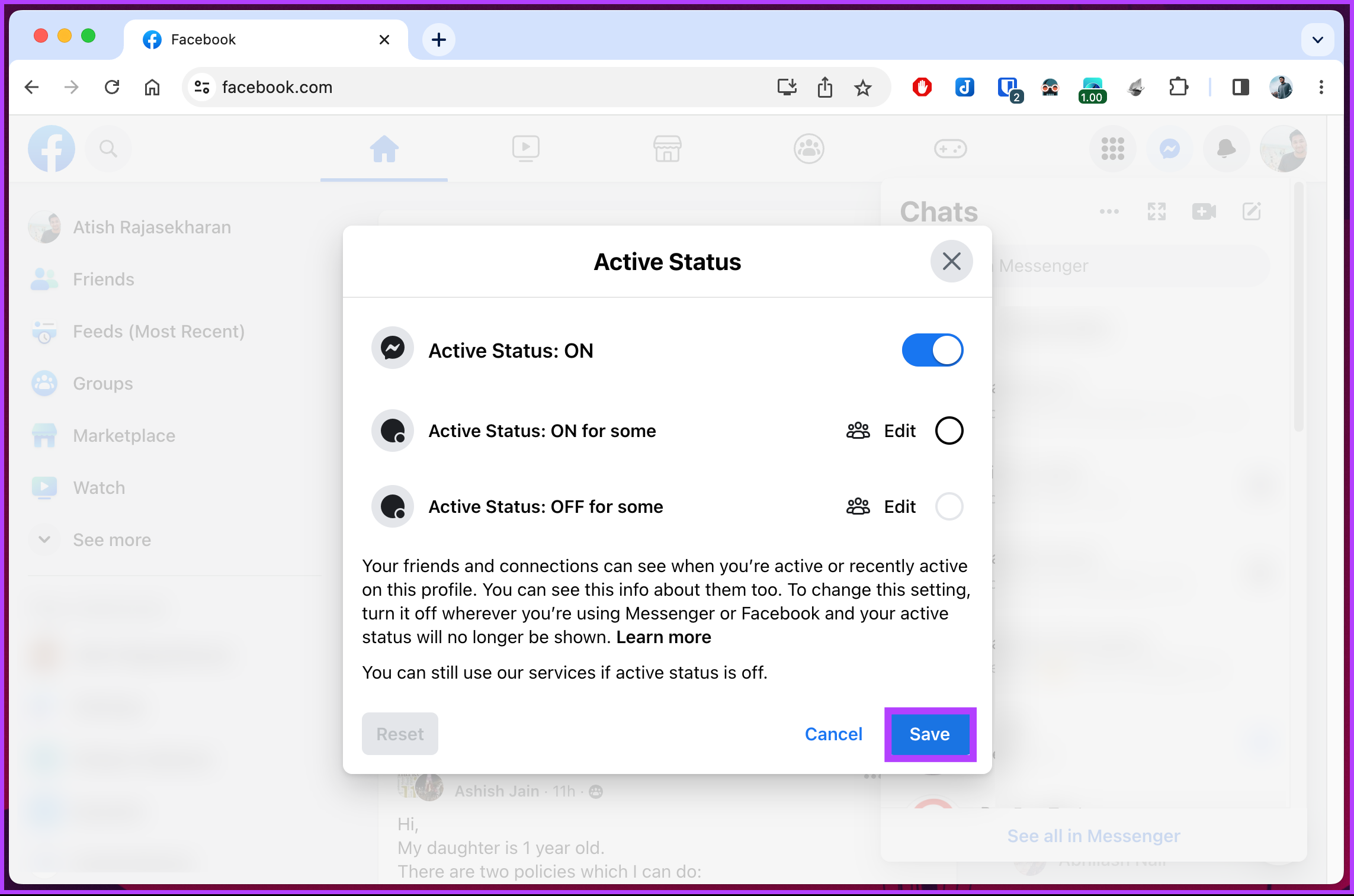
Step 4: You will see an Active Status pop-up; toggle off the slider and press the Save button.
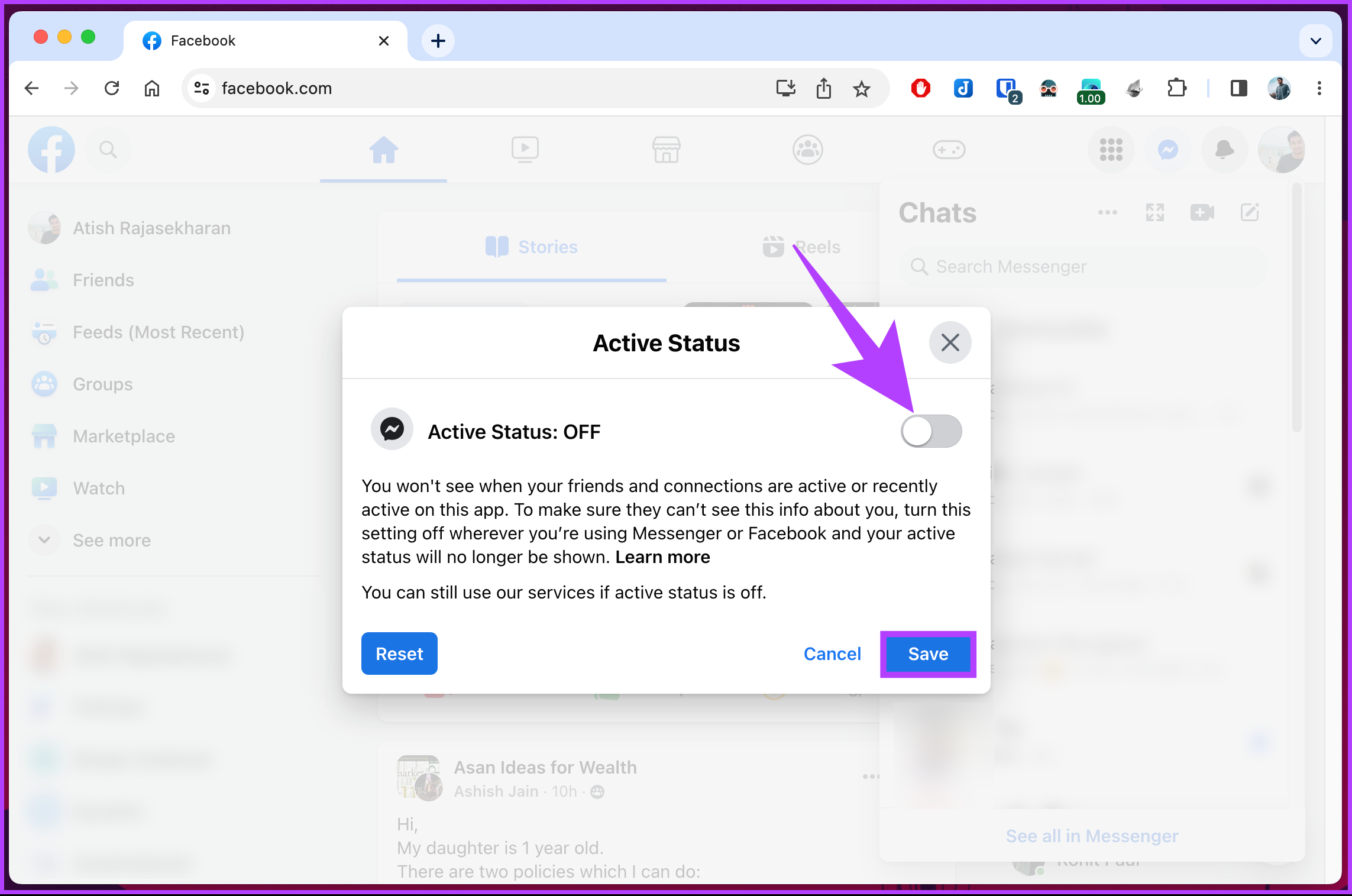
There you go. You have successfully turned off your green light on Facebook with ease. Sometimes, you will be shown as available even after turning off the active status. Well, in these cases, we recommend logging out of your account.
How to Turn Off Online Status on the Facebook App
Step 1: Open the Facebook app > tap on your profile picture at the upper right corner.
Step 2: Scroll down and select Settings & Privacy. From the drop-down, tap on Settings.

Step 3: Scroll to the Audience and visibility section and tap Active Status. On the next screen, toggle off Show when you’re active.
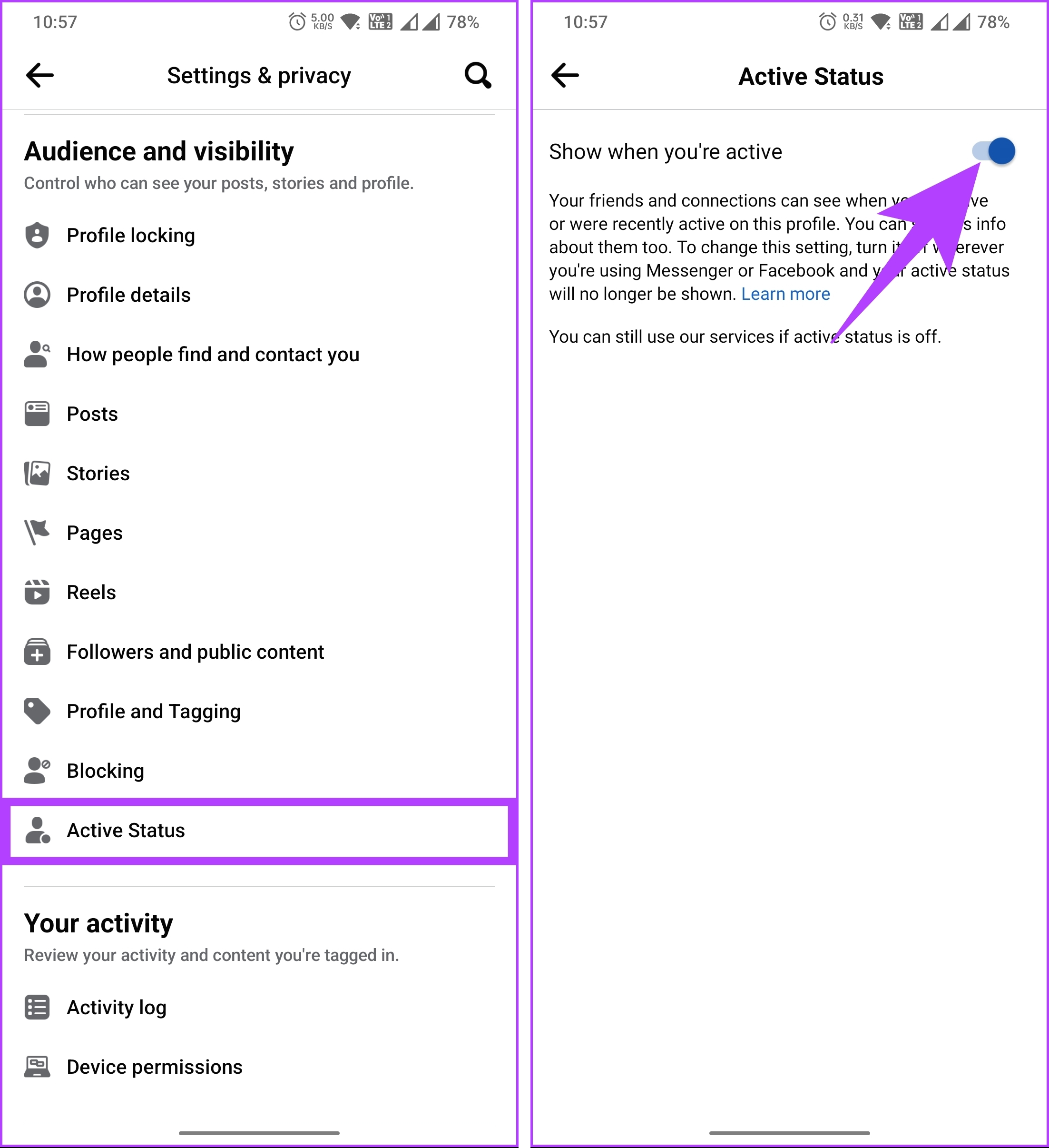
Step 4: In the pop-up, tap Turn Off to confirm.
That’s it. The green dot indicating your availability will be disabled, and you will appear offline on FB. If you want to turn off your active status on your mobile device, continue reading.
How to Turn Off Active Status on Messenger
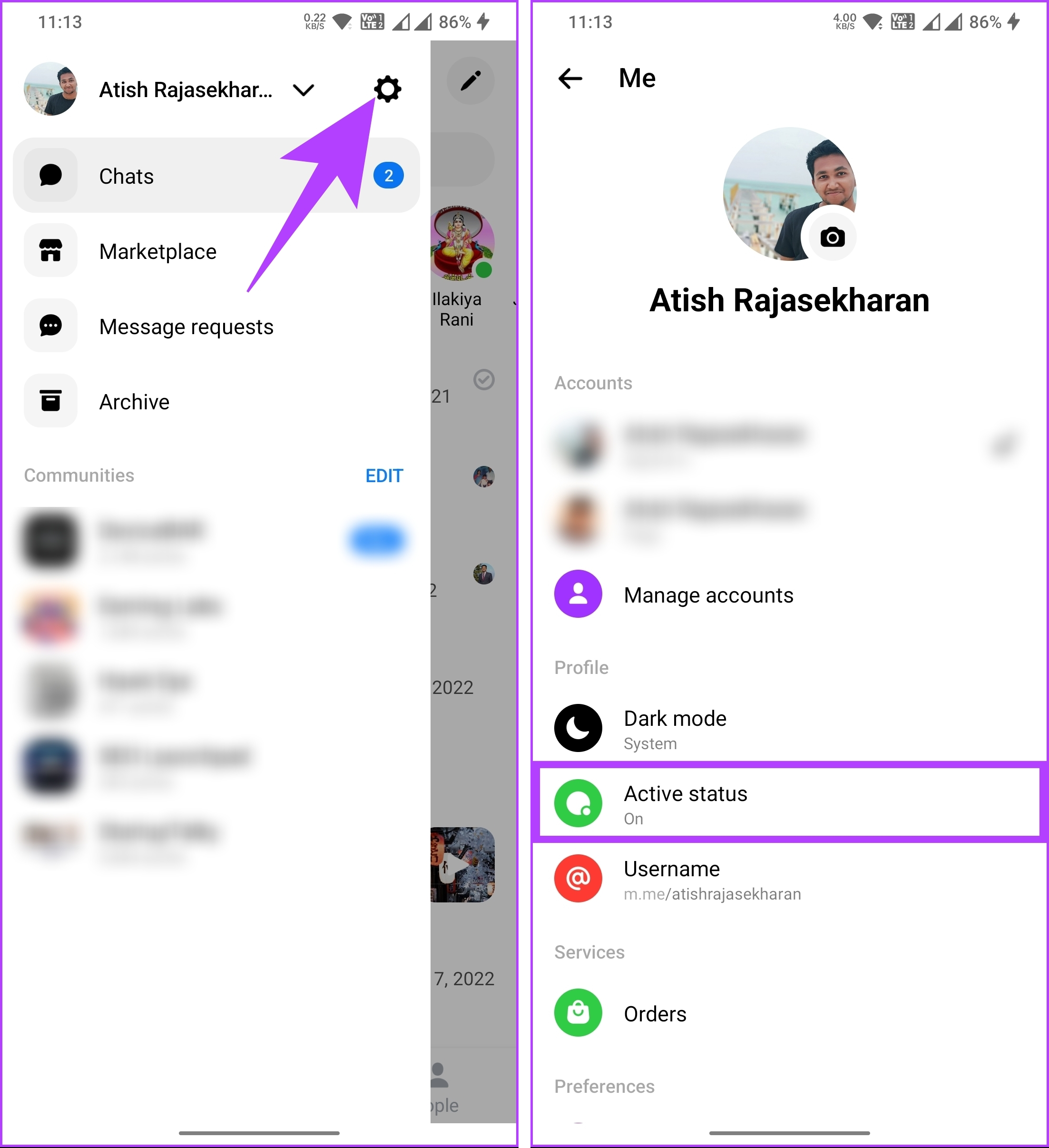
Step 1: Open the Messenger app. Then, navigate to the three horizontal lines icon at the top left.
Step 2: Tap the Settings (gear) icon > tap on Active status under Profile.
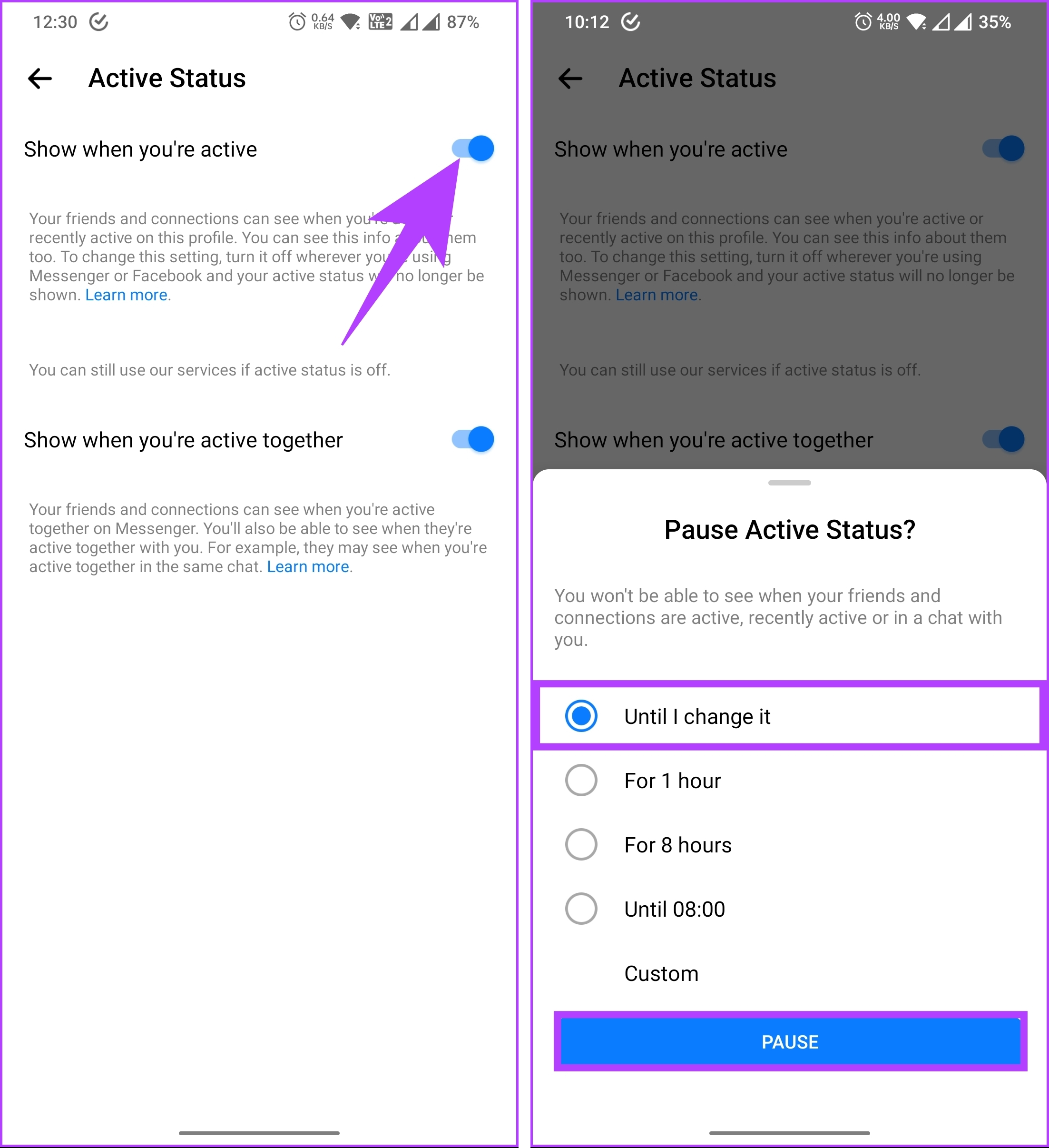
Step 3: On the next screen, toggle off Show when you’re active. Now, select your preference and tap Pause.
Also Read: Can I see who viewed my Facebook Story?
How to Control Who Can See You Online on Facebook From Web
Note that you don’t have the same options to execute using Facebook or Messenger apps. So, it would help if you stuck to the web browser to execute the method.
Step 1: Open Facebook and click on the Messenger icon in the upper right corner.
Step 2: From the drop-down menu, click on the three-dot icon.
Step 3: In the Chat Settings menu, select Active Status.

Step 4: You will see an Active Status pop-up toggle on the slider. Enable it.
Step 5: Click on Edit next to Active Status: ON for some.

Step 6: In the Add people pop-up, search, add friends, and click Save.
Step 7: Finally, click Save to make yourself visible to selected profiles.
FAQs
When you turn off your active status on Facebook, it takes effect immediately. You will no longer appear active to other users, and they won’t see when you were last active on the platform.
No, when your active status is turned off on Facebook Messenger, other users can’t see if you are online or active on the platform.
Was this helpful?
Last updated on 20 August, 2024
Read Next
 How to Turn Off Active Status on Instagram
Instagram is easily one of the most-used apps at the moment.
How to Turn Off Active Status on Instagram
Instagram is easily one of the most-used apps at the moment.
 Top 4 Ways to Fix Facebook Messenger Not Showing Active Status
https://youtu.be/BQ7VyEtSDlI Preliminary Fixes The Person Has Disabled Active Status: If the person whose active status you’re trying to see has disabled their active status, you won't be able to see
Top 4 Ways to Fix Facebook Messenger Not Showing Active Status
https://youtu.be/BQ7VyEtSDlI Preliminary Fixes The Person Has Disabled Active Status: If the person whose active status you’re trying to see has disabled their active status, you won't be able to see
 How to Hide Active Status From Someone on Facebook Messenger
Hide Active Status From a Particular Person on Messenger Although Facebook offers native Messenger apps on iOS, Android, Windows, and Mac, the ability to hide active status from one person
How to Hide Active Status From Someone on Facebook Messenger
Hide Active Status From a Particular Person on Messenger Although Facebook offers native Messenger apps on iOS, Android, Windows, and Mac, the ability to hide active status from one person
 How to Keep Slack Status Active All the Time
Things to Know Before Setting Your Slack Status Your Slack status stays active as long as you keep using your device.
How to Keep Slack Status Active All the Time
Things to Know Before Setting Your Slack Status Your Slack status stays active as long as you keep using your device.
 3 Ways to Fix Instagram Not Showing Last Active
Why Can't You See if Someone is Active on Instagram Not following each other: While you have the option to communicate in Instagram DM with anyone once they approve your
3 Ways to Fix Instagram Not Showing Last Active
Why Can't You See if Someone is Active on Instagram Not following each other: While you have the option to communicate in Instagram DM with anyone once they approve your
 Can You See When Someone Was Last Active on Snapchat
Snapchat has made a name for itself through its short-form content-sharing features.
Can You See When Someone Was Last Active on Snapchat
Snapchat has made a name for itself through its short-form content-sharing features.
 How to Use HP Active Pen: A Guide with Tips
First of all, congrats on buying that new HP Active Pen or a touch HP laptop.
How to Use HP Active Pen: A Guide with Tips
First of all, congrats on buying that new HP Active Pen or a touch HP laptop.
 What Does iCloud Private Relay Is Active Mean on iPhone
What Is iCloud Private Relay Anyone on your local network can glance over the websites you have visited via DNS queries when you browse the web.
What Does iCloud Private Relay Is Active Mean on iPhone
What Is iCloud Private Relay Anyone on your local network can glance over the websites you have visited via DNS queries when you browse the web.
The article above may contain affiliate links which help support Guiding Tech. The content remains unbiased and authentic and will never affect our editorial integrity.