


What Is Facebook Stalking
Facebook Stalking basically means that someone is keeping a close eye on your social media activities. The person checks all your posts, videos, photos, and other activities on the platform.
There are two types of stalking on Facebook. If you have met someone recently, the person may glance over your profile to check your posts and interests. However, sometimes someone regularly tracks your visited places and other media.
For example, maybe your neighbor, who you rarely interact with knows too many things about you. One possible explanation for how they learned so much information about you is that they’re stalking you on Facebook.
Can You See Who Is Stalking You on Facebook
Facebook doesn’t let you track who views your profile and posts. This means that you cannot extract a list of the people who checked your profile or posts over a given period. However, You can notice clues indicating someone is suspiciously interested in your Facebook activity.
How To Deduce Who’s Stalking You on Facebook
As mentioned earlier, there are certain ques that you can observe to know if someone is religiously following your every move on Facebook.
Method 1. Check Who Views Your Stories Regularly

Facebook Stories can only be viewed within 24 hours after you publish them. The good news is that you can track who views them. Run an experiment, and post a new story every day for two weeks. Then, list all the users who regularly checked your stories out. Most likely, your stalker is one of them.
Method 2. Check What You Have in Common
Stalkers generally follow you everywhere. If they notice you joined a new Facebook group, they might join the same group shortly after. Check who keeps popping up in the groups you’re a member of.
The good news is that you can quickly check that information out. Facebook lets you see who’s in the same group. Simply click Members to list all the group members. Check if someone’s in all or nearly all of the groups you’re a member of.

Some stalkers may even send friend requests to the people you often interact with on Facebook. Check if your Facebook friends have recently become friends with the same people.
Method 3. Getting Friend Requests
Did you reject someone’s friend request and yet receive the same from the person? Someone is definitely interested in knowing more about you.
Method 4. Getting Likes and Comments on Old Posts

Stalkers often go through your timeline to learn more about your online activities. Sometimes, they may like your old posts and even comment on them.
If you notice that someone suddenly started liking or commenting on posts from months or years ago, that’s a good indication they might be your stalker.
Method 5. Find Your Top Viewers Using Your Profile’s Source Code
You can use your Facebook profile’s source code to check the top viewers. However, the method isn’t foolproof, as it may simply display the people you have interacted with the most on Facebook.
Step 1: Visit Facebook on the web and sign in with your account. Go to your profile.
Step 2: Right-click on the page and select View Source Code.
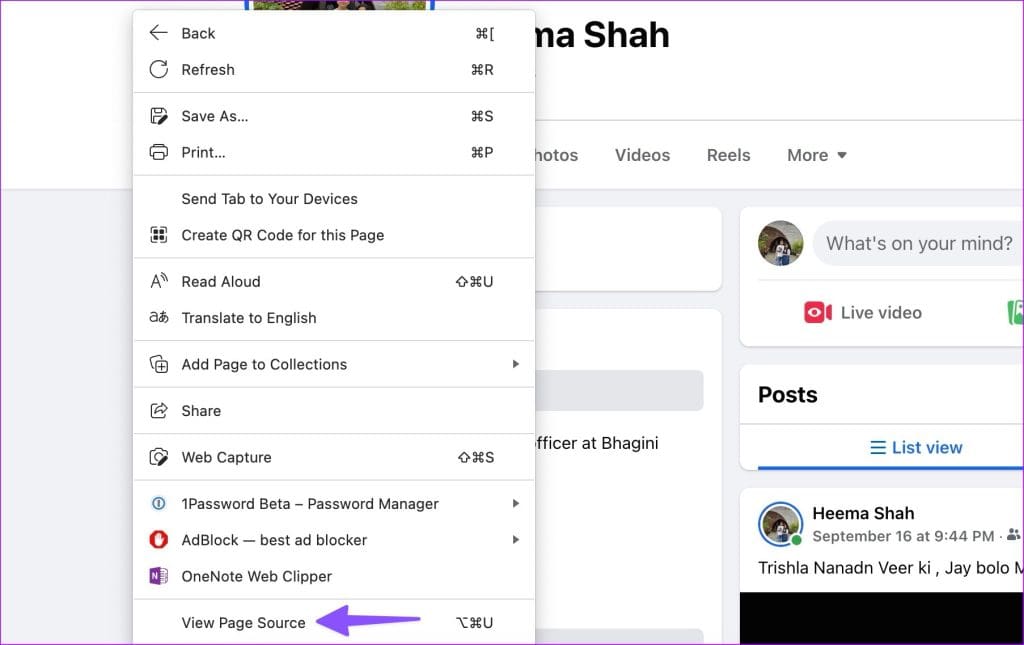
Step 3: Press Ctrl + F or Command + F on your keyboard. Search for buddy_id.
Step 4: Check the list of names that appear under the code.

How to Prevent Stalking on Facebook
If you’re 100 percent convinced you’ve successfully identified the stalker, the first step is to restrict or block them. Then, enable stricter privacy settings. For example, hide your old and new posts from prying eyes.
The idea is to limit who can see your Facebook activities and interact with you on the platform. Additionally, you can also report their profile to Facebook. Explain what made you fill out the report form.
Notably, if the stalker becomes aggressive and you feel they could potentially harm you or the people you know, don’t hesitate to contact your local law enforcement.
FAQs Regarding Facebook Stalking
As per Facebook’s support page, no third party can help you with that information. And if an app claims to show you who is stalking you on Facebook, then you must report the app to Facebook.
The straight answer is no. Facebook shows such suggestions based on your mutual friends, location, education, workplace, and other factors. The same profiles aren’t stalking your Facebook account.
Was this helpful?
Last updated on 31 July, 2024
Read Next
 Can I See Who Viewed My Facebook Profile?
Can You See Who Viewed Your Profile?
Can I See Who Viewed My Facebook Profile?
Can You See Who Viewed Your Profile?
 How to Add Music to Facebook Profile and Story
How to Add Music to Your Facebook Profile You can add multiple songs to your Facebook profile.
How to Add Music to Facebook Profile and Story
How to Add Music to Your Facebook Profile You can add multiple songs to your Facebook profile.
 How to Lock Facebook Profile and What Does It Do
How to Lock Your Facebook Profile Note: The ability to lock your Facebook profile is limited to a few countries such as the UK, Bangladesh, India, etc.
How to Lock Facebook Profile and What Does It Do
How to Lock Your Facebook Profile Note: The ability to lock your Facebook profile is limited to a few countries such as the UK, Bangladesh, India, etc.
 How to Properly Link Instagram to Facebook Page and Profile
Link Instagram to Facebook Page Before following these steps, ensure you are the admin (owner) of the Facebook page you want to link with Instagram.
How to Properly Link Instagram to Facebook Page and Profile
Link Instagram to Facebook Page Before following these steps, ensure you are the admin (owner) of the Facebook page you want to link with Instagram.
 How to Lock Facebook Profile on Mobile and Web
What Happens When You Lock Your Facebook Profile?
How to Lock Facebook Profile on Mobile and Web
What Happens When You Lock Your Facebook Profile?
 How to Change Profile Picture on Facebook Without Anyone Knowing
Note: We will use Google Chrome and Android phone to demonstrate the steps in this guide.
How to Change Profile Picture on Facebook Without Anyone Knowing
Note: We will use Google Chrome and Android phone to demonstrate the steps in this guide.
 4 Ways to Fix Profile Error in Microsoft Edge
Fix 1: Delete the Web Data File Such errors in Microsoft Edge can also occur if the "Web Data" file stored on your PC becomes corrupted.
4 Ways to Fix Profile Error in Microsoft Edge
Fix 1: Delete the Web Data File Such errors in Microsoft Edge can also occur if the "Web Data" file stored on your PC becomes corrupted.
 How to Fix Discord Profile Theme and Other Changes Not Saving
Basic Fixes Check your network connection: Ensure your device has a good internet connection.
How to Fix Discord Profile Theme and Other Changes Not Saving
Basic Fixes Check your network connection: Ensure your device has a good internet connection.
The article above may contain affiliate links which help support Guiding Tech. The content remains unbiased and authentic and will never affect our editorial integrity.

