Method 1: Use Forgot Password to Recover Account
Snapchat’s forgot password feature can help you regain access to your account even if there have been changes to the password. This can be helpful if you’ve noticed suspicious login activity and want to change your account’s password or simply want to recover your Snapchat account. Here’s how to do it.
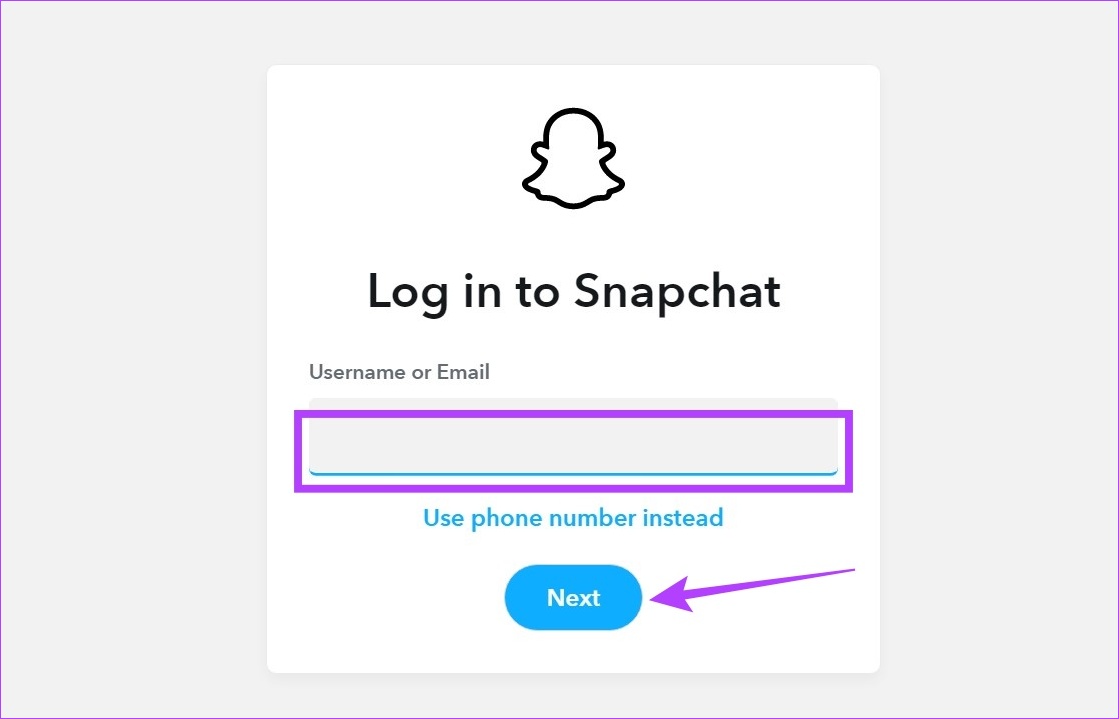
Step 1: Open the Snapchat Accounts page on any web browser and enter your email ID or username. Click on Next.
Tip: You can also click on the use mobile number option to sign in using your mobile number.
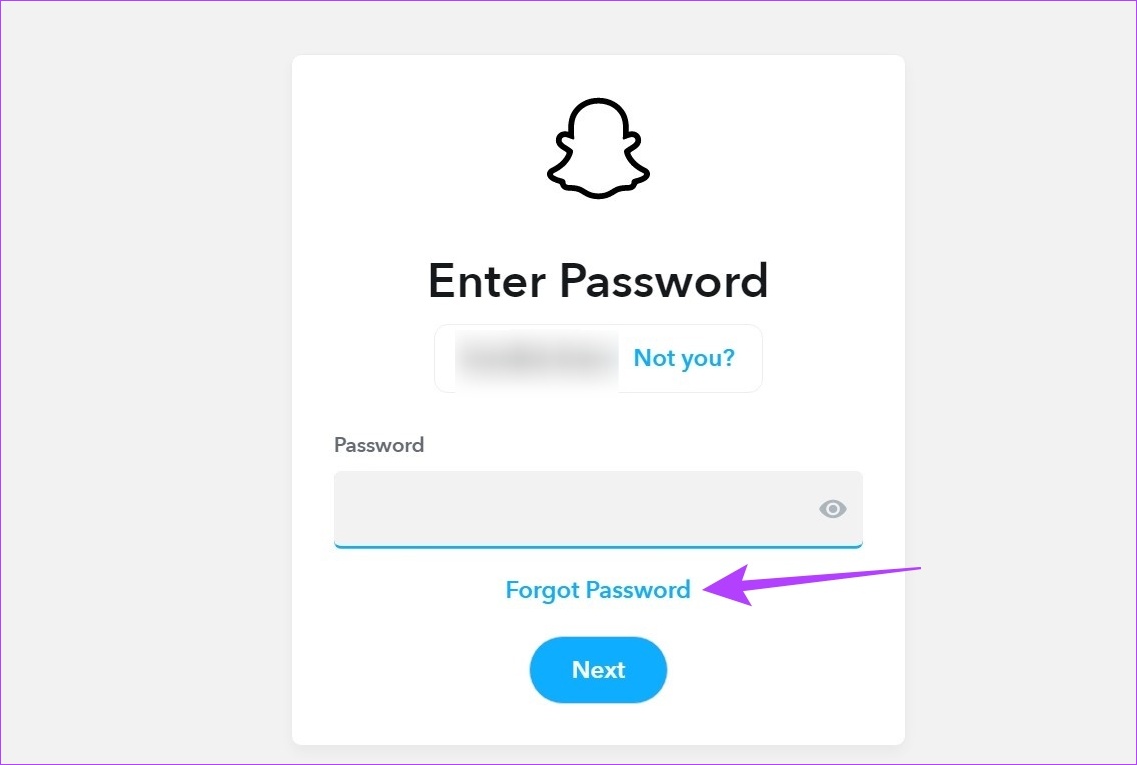
Step 2: Then, click on Forgot Password.
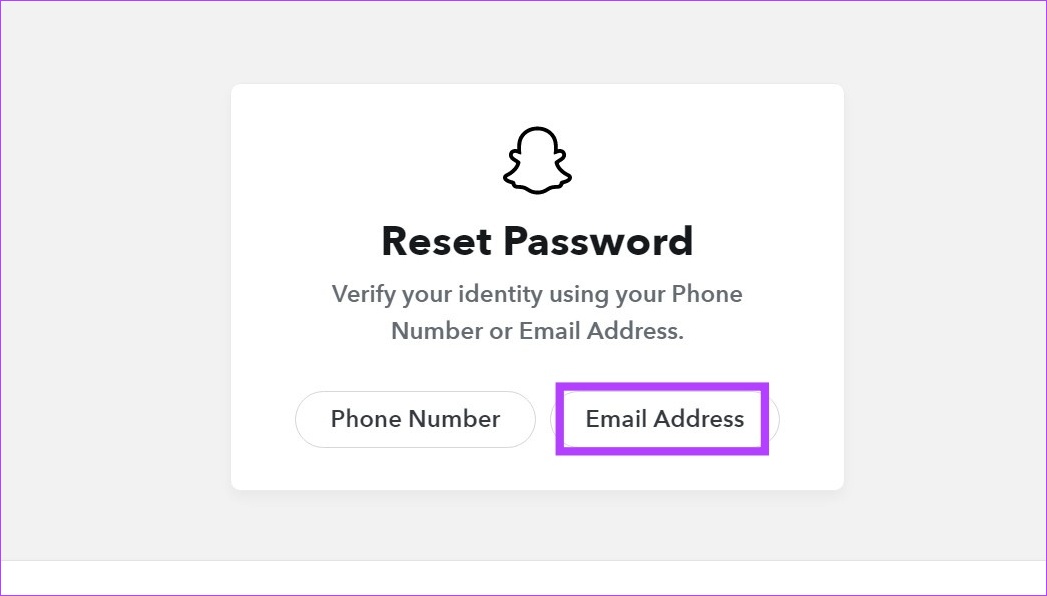
Step 3: Select the option you want to use to verify your identity.
Step 4: Then, enter your email ID and click on Submit.
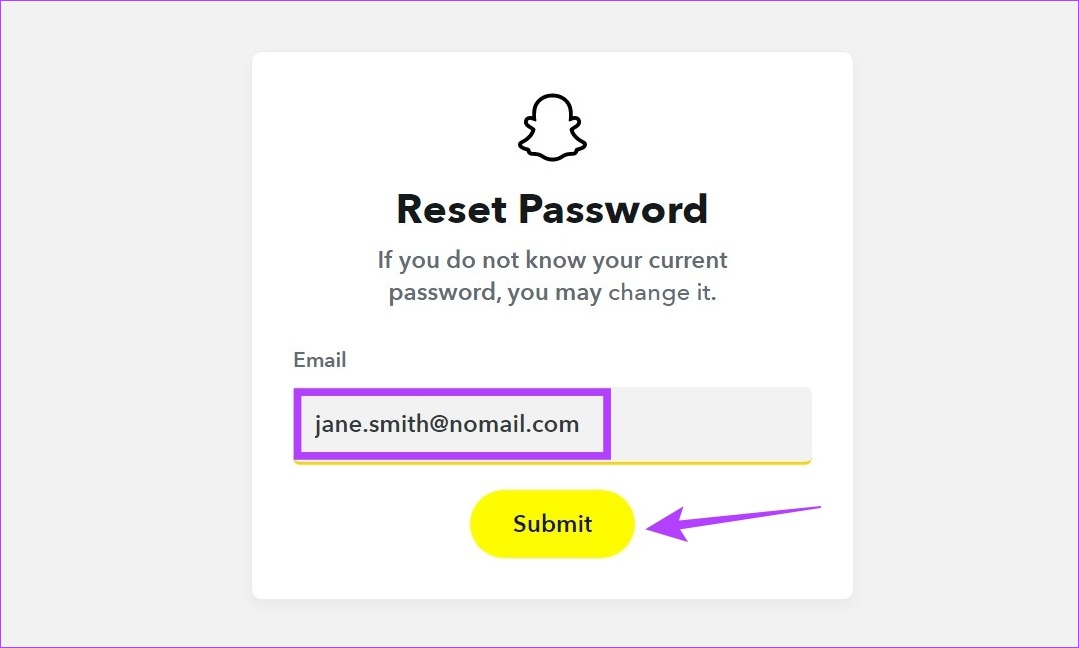
This will send a password reset link to your email address. Click on the link and reset your password. Or if you’ve chosen your phone number, you will receive a verification code to do the same.
Also Read: How to fix Snapchat not sending a security code
Method 2: File a Report to Snapchat
The forgotten password option is only available if your email ID or mobile number is still in use with your Snapchat account. However, there have been instances where the login information has been replaced. If so, submit a report to Snapchat to recover your account. Here’s how to do it.
Step 1: Open the Snapchat support page on any web browser and click on My Account Is Compromised.

Step 2: Select the option that applies to you.
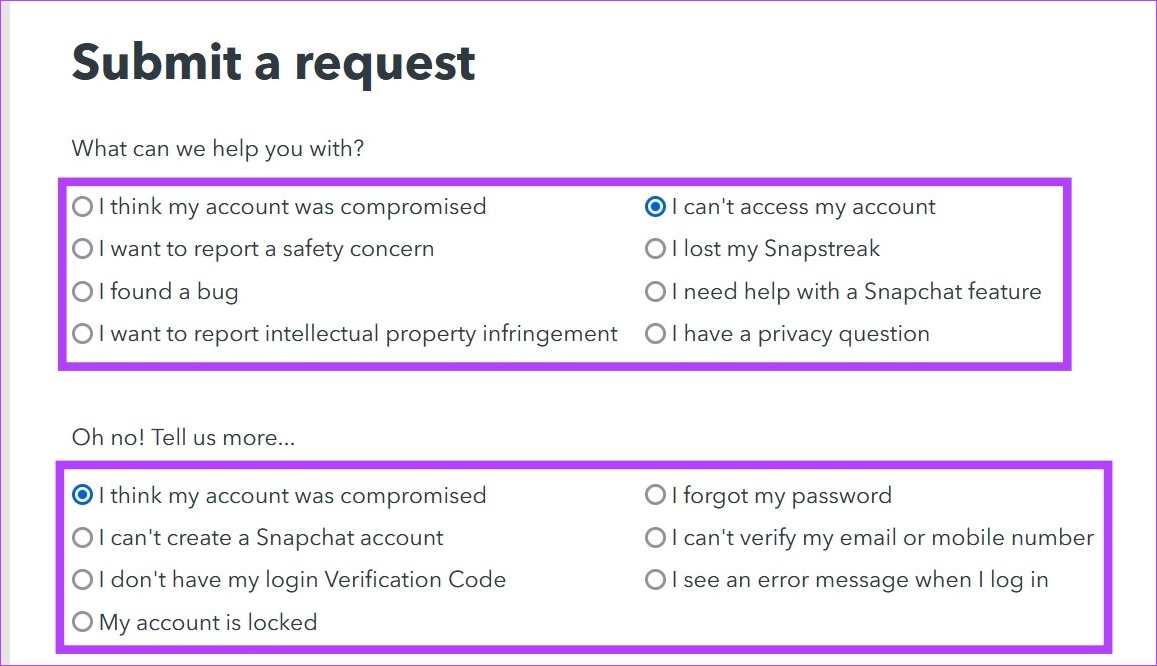
Step 3: Fill out the form.

Step 4: Once done, click on Submit.
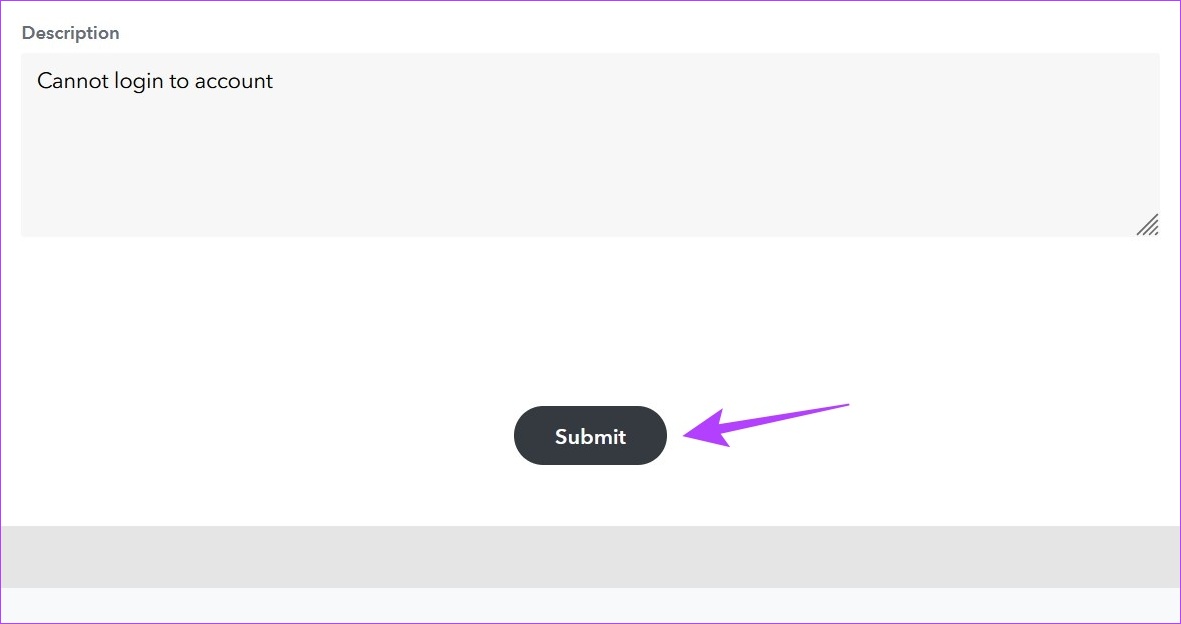
This will submit the request to the Snapchat support team. They will get back to you for more details to help recover your Snapchat account.
Also Read: How to fix unable to log in to Snapchat on Android and iPhone
Method 3: Contact the FTC
Changes in your account can also help you check if your Snapchat account has been hacked. If so, after changing the account password, you can proceed to contact the Federal Trade Commission (FTC) to submit a report. Here’s how to access and use the FTC’s website.
Note: Depending on the severity of your situation, FTC might either provide you with advice on how to protect your account or ask you to report the incident.
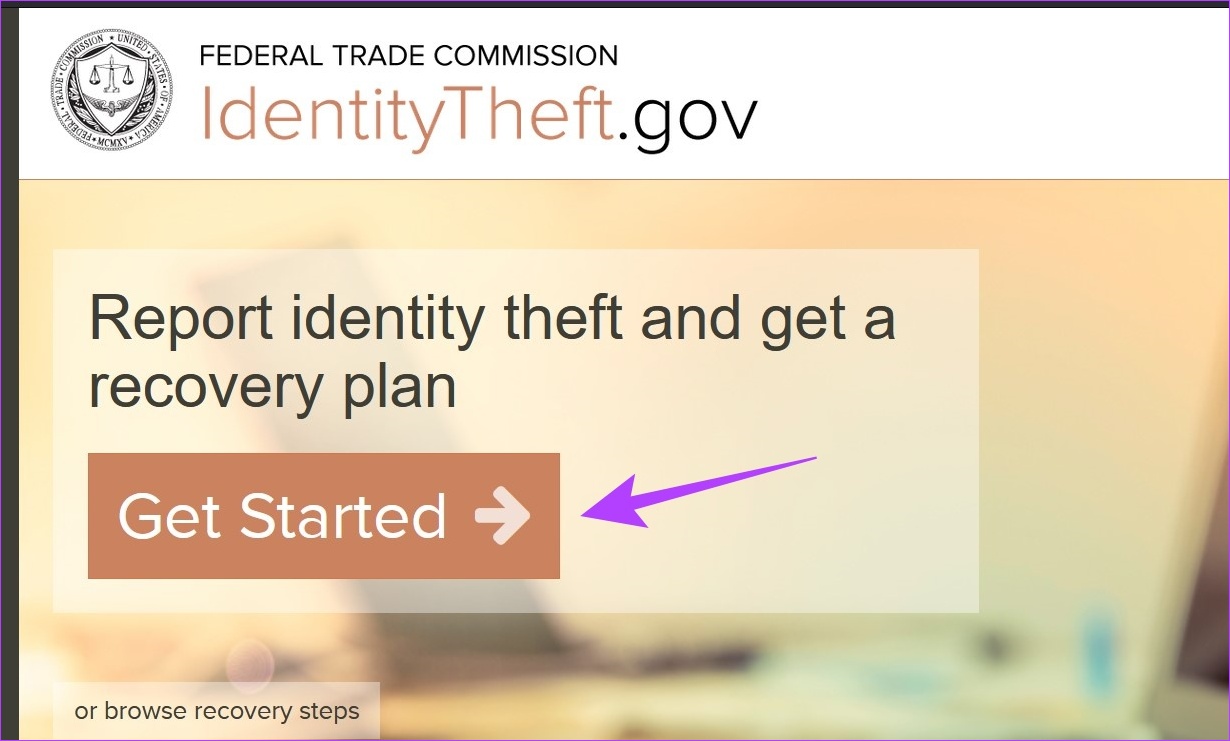
Step 1: Go to the Federal Trade Commission’s website on any web browser and click on Get Started.
Step 2: Click on Someone has my information or tried to use it, and I’m worried about identity theft.

Step 3: Select Online login or password and click on Continue.
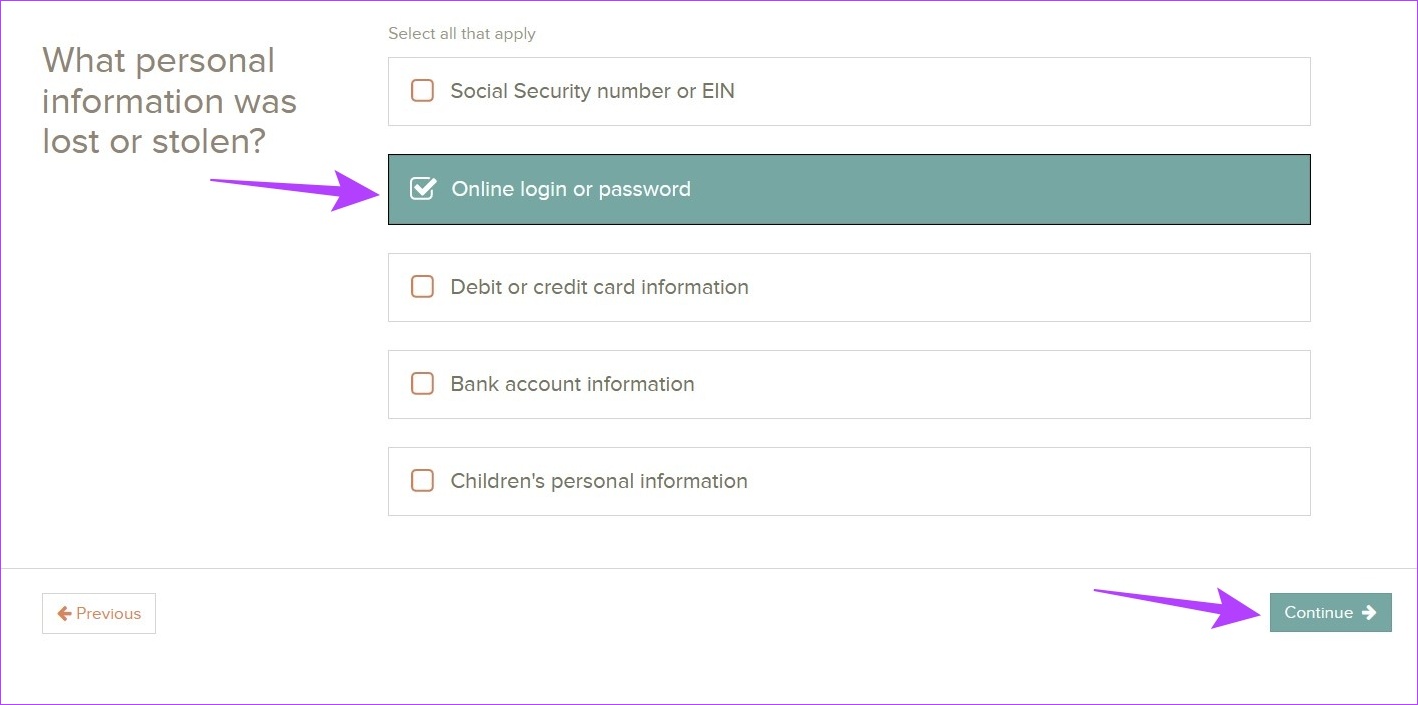
Follow the on-screen instructions to submit the complaint to the FTC. You can also use FTC’s Chatbot to seek resolution for issues that might not have been available in the recovery options.
Method 4: Consult a Legal Professional
Once hackers gain access to your account, they might be able to see sensitive account information that can leave you vulnerable. This can include photos, videos, personal chats, etc. A legal professional can help you understand how to fight against and protect yourself from the hacker.
Tip: You can also check out Snapchat’s support page for more help options.
Pro Tip: Change Other Social Media Account Passwords
If you remember sharing the link or other information of your social media accounts while using Snapchat, it is highly advisable to change the password and, if available, even the ID of that account. This can help protect it from hackers who might end up gaining access through your Snapchat account.
Tips to Protect Your Snapchat Account in the Future
If you were able to gain access to your Snapchat account, it is better to take precautions to prevent the same from happening in the future. Here are a few things to consider:
- Use a strong password
- Add your email ID and phone number to your Snapchat account
- Enable two-factor authentication for Snapchat
FAQs
While adding unknown users does not affect hackers gaining access to your account, it is advisable to only add known users, as your friends can gain access to your user information. This can leave you vulnerable to hacking if the users in your friend list are not trustworthy.
Yes, you can delete a Snapchat account. Go into your account settings and submit a request for account deletion. After 30 days from the date of the request, Snapchat will delete your account.
Was this helpful?
Last updated on 27 August, 2024
Read Next
 What Happens When Your Google Account Is Disabled and How to Recover It
Why Does Google Disable an Account There are multiple reasons Google disables the account of a user, and we shall cover everything below.
What Happens When Your Google Account Is Disabled and How to Recover It
Why Does Google Disable an Account There are multiple reasons Google disables the account of a user, and we shall cover everything below.
 How to Recover and Access Your Old Hotmail Account
How to Recover a Hotmail Account Microsoft already migrated Hotmail accounts to Outlook.com.
How to Recover and Access Your Old Hotmail Account
How to Recover a Hotmail Account Microsoft already migrated Hotmail accounts to Outlook.com.
 3 Ways to Remove Saved Snapchat Account From Any Device
Method 1: Remove Account Information From Snapchat App When you log out from Snapchat on your phone, the app doesn’t ask you to delete saved login information.
3 Ways to Remove Saved Snapchat Account From Any Device
Method 1: Remove Account Information From Snapchat App When you log out from Snapchat on your phone, the app doesn’t ask you to delete saved login information.
 How to Recover Deleted Instagram Posts, Stories, Reels, and IGTV Videos
To save people from losing their Instagram data when their account gets hacked, Instagram launched the Recently Deleted feature.
How to Recover Deleted Instagram Posts, Stories, Reels, and IGTV Videos
To save people from losing their Instagram data when their account gets hacked, Instagram launched the Recently Deleted feature.
 How to Recover Deleted Passwords in Google Chrome
Recover Deleted Passwords in Google Chrome Step 1: Launch Google Chrome on the computer you have previously logged into your Google account.
How to Recover Deleted Passwords in Google Chrome
Recover Deleted Passwords in Google Chrome Step 1: Launch Google Chrome on the computer you have previously logged into your Google account.
 Why Do WhatsApp Messages Disappear and Can You Recover Them?
Why Do WhatsApp Messages Disappear?
Why Do WhatsApp Messages Disappear and Can You Recover Them?
Why Do WhatsApp Messages Disappear?
 3 Ways to Recover Deleted Snaps on iPhone and Android
Method 1: Recover Deleted Snaps Using Snapchat Memories With Memories, you can recover Snapchat pictures on iOS and Android devices without a computer.
3 Ways to Recover Deleted Snaps on iPhone and Android
Method 1: Recover Deleted Snaps Using Snapchat Memories With Memories, you can recover Snapchat pictures on iOS and Android devices without a computer.
 How to Recover a Deleted Item or Folder in Outlook
 Desktop If you have not cleared it from your deleted items or trash folder, you can recover it.
How to Recover a Deleted Item or Folder in Outlook
How to Recover a Deleted Item or Folder in Outlook Desktop If you have not cleared it from your deleted items or trash folder, you can recover it.
The article above may contain affiliate links which help support Guiding Tech. The content remains unbiased and authentic and will never affect our editorial integrity.