Method 1. Save WhatsApp Status via File Manager (Android)
Unlike iOS, WhatsApp status media on Android are stored temporarily in a user-accessible directory that can be saved without a third-party app.
You can go there and download or save WhatsApp statuses using a file manager to your desired location. Here are the simple steps:
Note: This method lets you download only watched WhatsApp statuses from your contacts.
Step 1: Launch the Files app on your Android phone. Tap the hamburger menu (three-line icon).
Step 2: Tap Settings.
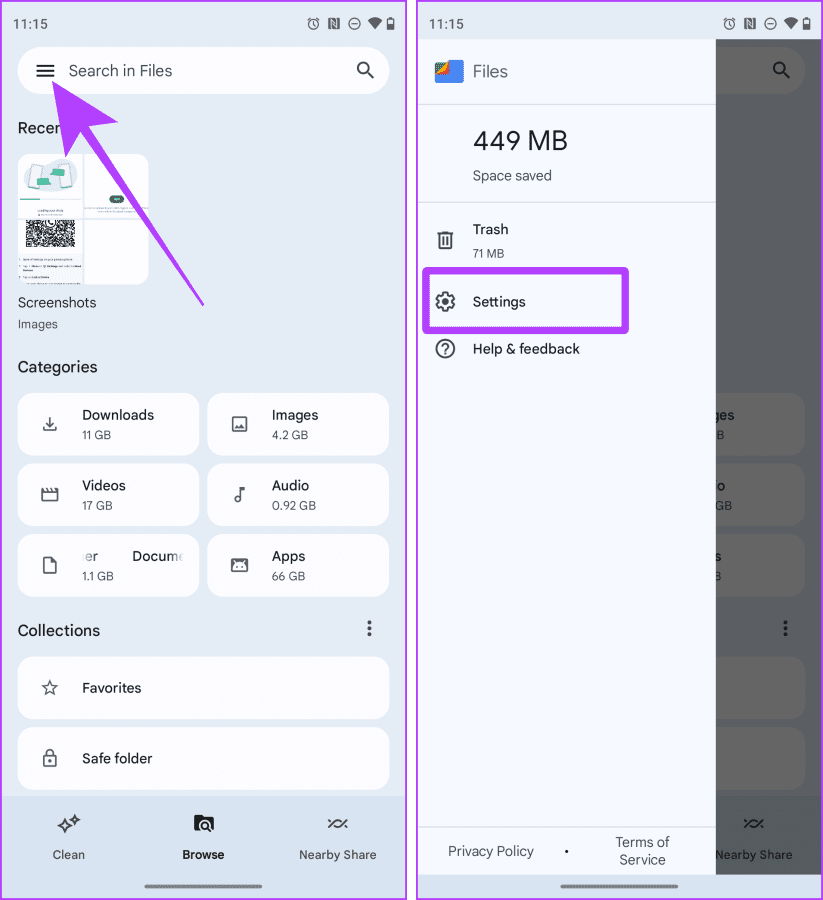
Step 3: Enable Show hidden files. Next, tap the back arrow to go back. Here, tap Internal Storage.

Step 4: Now, go to Android → media.
Step 5: Go to com.whatsapp → WhatsApp.

Step 6: Now, go to Media → .Statuses.

Step 7: Select photos and videos you want to save by tapping and holding them. Tap the three dots (kebab menu).
Step 8: Tap Copy to from the drop-down menu. Tap Internal storage.

Step 9: Go to your desired folder and tap Copy here to paste the WhatsApp status
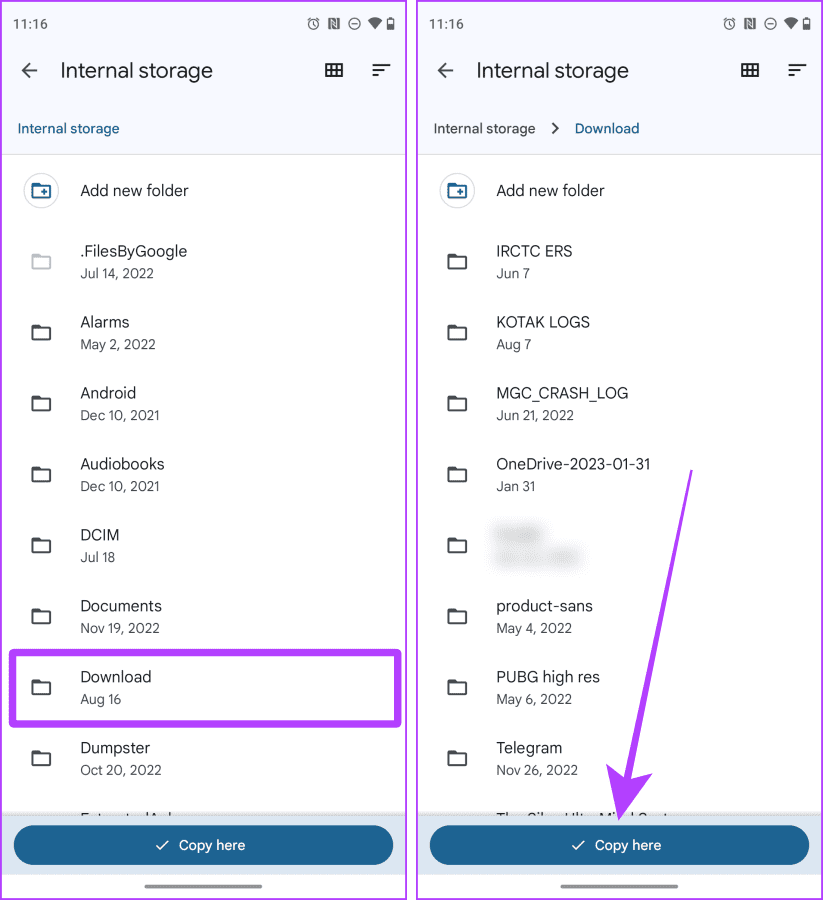
And that’s it; now these WhatsApp Status photos and videos will appear on your smartphone in the Gallery or Photos app.
Note: If you use WhatsApp on an iPhone and have an extra Android device, you can link the device and download WhatsApp Status on the Android device.
Method 2. Record Your Entire Screen (iPhone and Android)
You can record your entire screen to save a video from someone’s WhatsApp status. Notably, this recording will also include the status bar of your device and WhatsApp’s UI (person’s name, etc.). Although, you can always crop the video to get rid of it.
On iPhone
Step 1: Launch WhatsApp. Swipe down from the top right to access the Control Center.
Step 2: Tap the Screen Recording button to start recording.
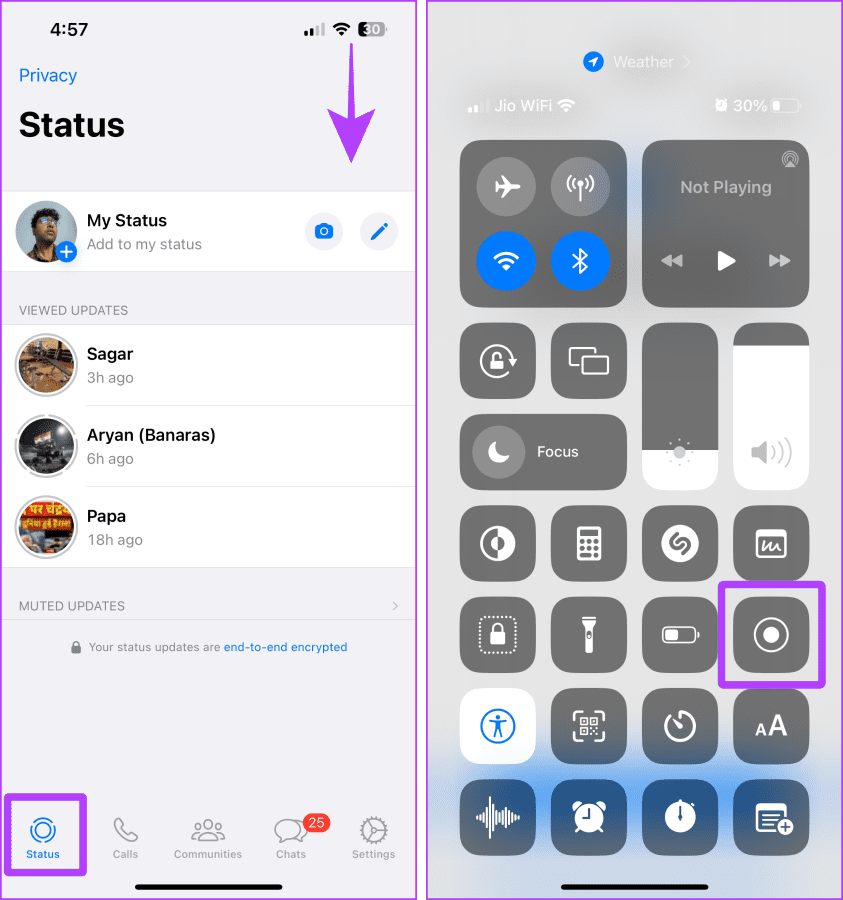
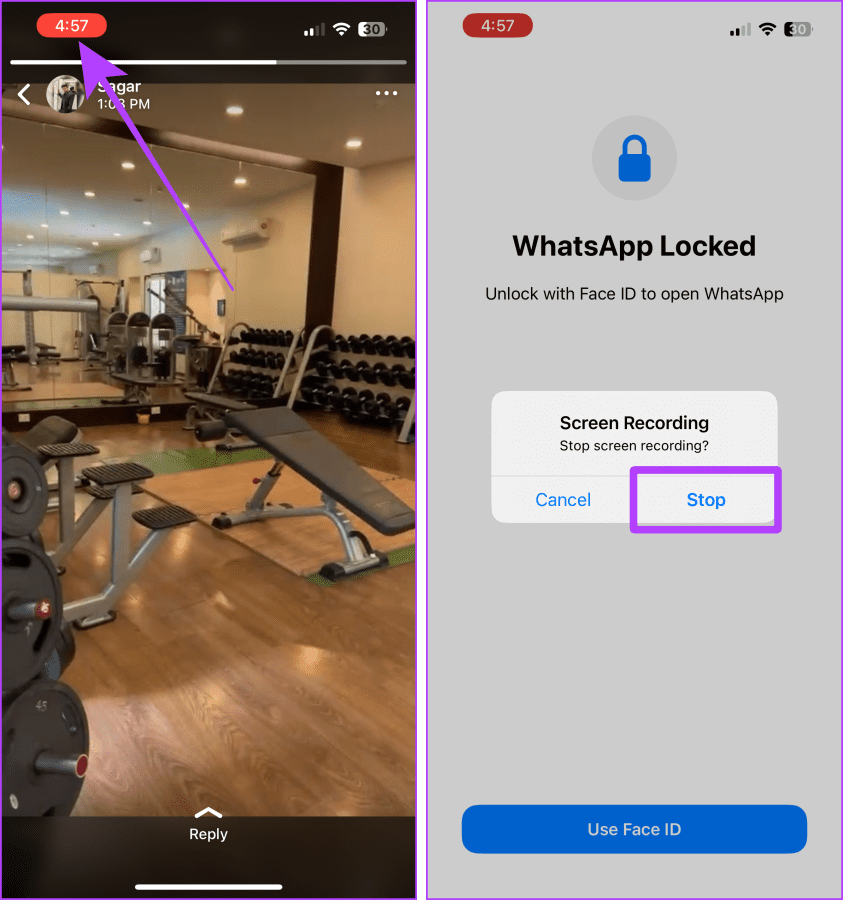
Step 4: Now, tap to open status in full screen and let it record. Once done, tap the red button to stop recording.
Step 5: Tap Stop.
On Android
Note: The steps to record your screen vary from one Android to another. For this demonstration, we’re using a Google Pixel phone.
Step 1: Launch WhatsApp and go to the Status tab. Swipe down from the top to access Quick Settings.
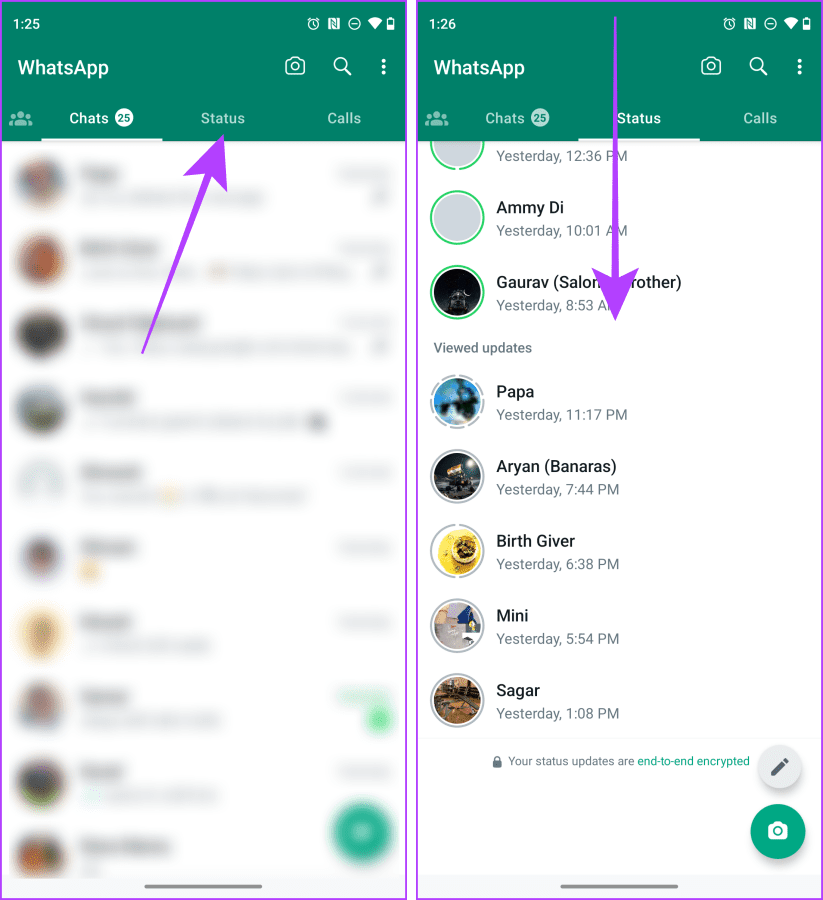
Step 3: Swipe one more time to expand Quick Settings. Tap Screen record.
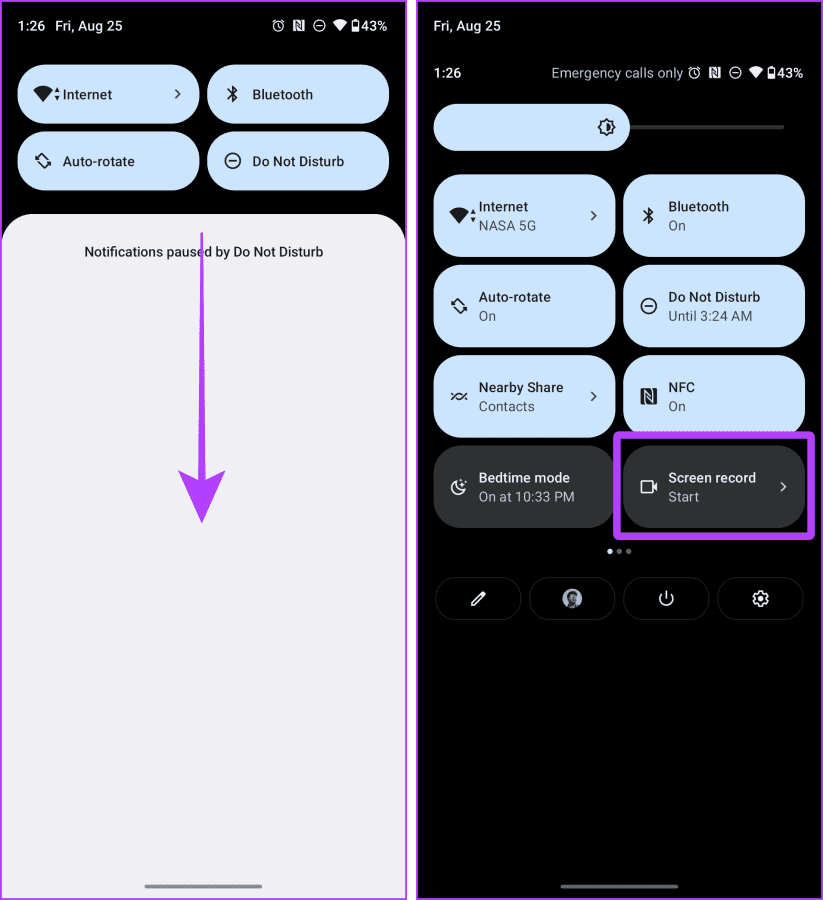
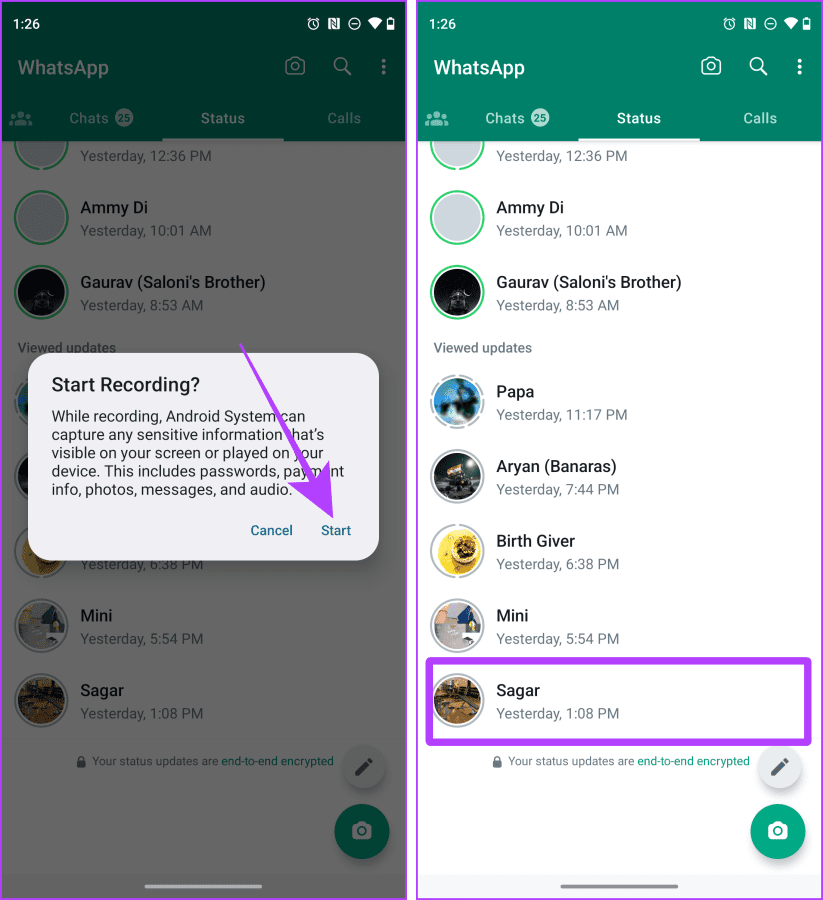
Step 4: A pop-up will appear on the screen; tap Start.
Step 5: Tap the status you wish to save. Record the screen, and when done, lock the screen. The recording will be saved to your phone.
Tip: Learn how to blur a video or screen recording on iPhone
Method 3. Download Image From Status Using WhatsApp Web (Mac or Windows)
WhatsApp web allows you to download images from any WhatsApp status in the most straightforward way, i.e., drag and drop. Let’s look at the steps to do so.
Note: This trick works on photos only.
Step 1: Open WhatsApp web in your choice of browser. Link your device if needed.
Step 2: Click the Status icon.

Step 3: Tap on the contact whose status you want to download to view it in full screen.

Step 4: Now, click the image and drag and drop it to your desktop or desired folder to download and save the image.

Method 4. Use a Third-party App (Android)
Note: This method comes with an associated risk of data breach. Since you’ll have to give the app access to your WhatsApp, proceed only if necessary.
WhatsApp on Android also allows you to download status using a third-party app. While several apps are available, we will use Status Saver. Let’s look at the steps:
Step 1: Download and install the Status Saver. Tap Ok and grant permission to the app.

Step 2: In the next window, tap Use this folder and Allow to set up the app properly.
Step 3: All statuses viewed by you will now appear in the app. Tap the status you want to download to open it on the full screen.
Step 4: Tap the download button to initiate the download.

If prompted, allow the app permission to access photos and media. Once done, the app will save all selected statuses to your device.
Was this helpful?
Last updated on 02 September, 2024
Read Next
 How to Upload WhatsApp Status Videos of More Than 30 Seconds
How to Upload WhatsApp Status of More Than 30 seconds WhatsApp now allows you to upload video status for up to 60 seconds for your contacts.
How to Upload WhatsApp Status Videos of More Than 30 Seconds
How to Upload WhatsApp Status of More Than 30 seconds WhatsApp now allows you to upload video status for up to 60 seconds for your contacts.
 How to Save WhatsApp Photos or Videos to Gallery on Any Device
How to Save WhatsApp Media on iPhone Save a Single Photo or Video WhatsApp lets you save photos or videos one by one to the gallery on your iPhone.
How to Save WhatsApp Photos or Videos to Gallery on Any Device
How to Save WhatsApp Media on iPhone Save a Single Photo or Video WhatsApp lets you save photos or videos one by one to the gallery on your iPhone.
 5 Ways to Fix WhatsApp Status Not Loading on Android and iPhone
Try Basic Fixes Check if WhatsApp is down: Services like WhatsApp can experience server outages at times.
5 Ways to Fix WhatsApp Status Not Loading on Android and iPhone
Try Basic Fixes Check if WhatsApp is down: Services like WhatsApp can experience server outages at times.
 5 Ways to See WhatsApp Status Without Being Seen
Method 1: Turning off Read Receipts Read receipts help you know who has seen your message, status, story, etc., on WhatsApp.
5 Ways to See WhatsApp Status Without Being Seen
Method 1: Turning off Read Receipts Read receipts help you know who has seen your message, status, story, etc., on WhatsApp.
 5 Ways to Download Photos and Videos From Threads
1.
5 Ways to Download Photos and Videos From Threads
1.
 17 WhatsApp Status Tips and Tricks You Should Know
Tip 1: Create a Status The process for creating a status is different for Android and iOS devices.
17 WhatsApp Status Tips and Tricks You Should Know
Tip 1: Create a Status The process for creating a status is different for Android and iOS devices.
 How to See Who Viewed Your WhatsApp Status
Can I See Who Viewed My WhatsApp Status?
How to See Who Viewed Your WhatsApp Status
Can I See Who Viewed My WhatsApp Status?
 How to Hide Last Seen and Online Status in WhatsApp
Hide Last Seen and Online Status For Everyone in WhatsApp Used by over two billion users worldwide, WhatsApp eventually added privacy features to hide your status, profile picture, and About
How to Hide Last Seen and Online Status in WhatsApp
Hide Last Seen and Online Status For Everyone in WhatsApp Used by over two billion users worldwide, WhatsApp eventually added privacy features to hide your status, profile picture, and About
The article above may contain affiliate links which help support Guiding Tech. The content remains unbiased and authentic and will never affect our editorial integrity.