


How to Export Data Before Deleting the Telegram Account
Before proceeding with this step, you must know that you can only do this from Telegram’s desktop app. That said, now, follow the instructions below to back up your Telegram account data.
Step 1: Open the Telegram desktop app and go to Settings.
Step 2: Go to Advanced and select Export Telegram data.
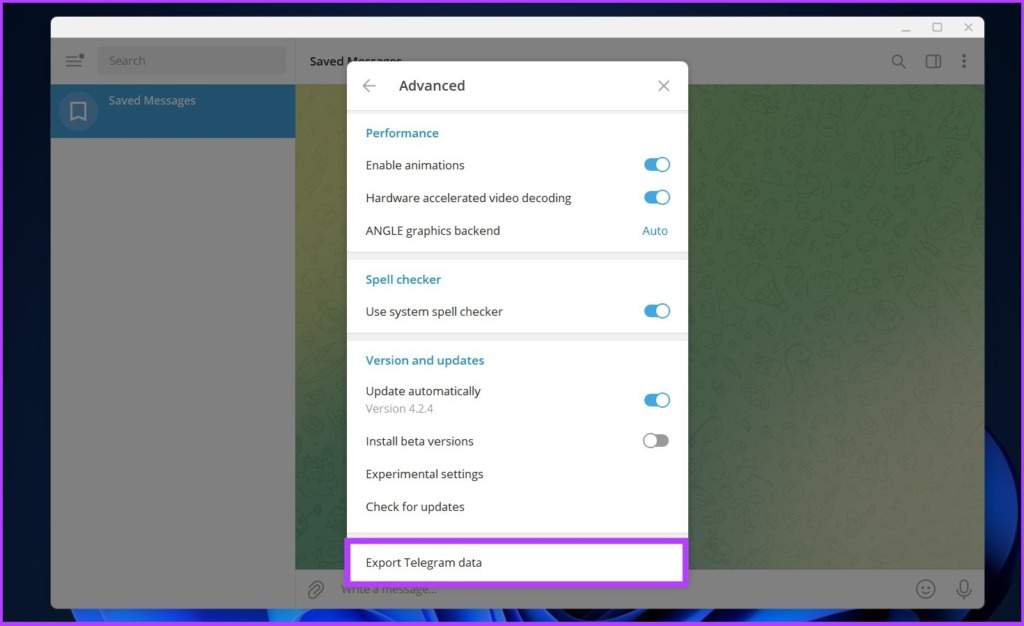
Step 3: Select the messages and media you want to export. You can set a size limit for downloading media files.
Step 4: Finally, select the format in which you want to export the data and click on Export. We recommend downloading it in HTML.

Once you’ve completed this step, you can delete your Telegram account forever. There are two ways to do this: manually deleting the account and self-destructing it after a set period.
How to Delete Telegram Account
Before proceeding, it is necessary to note that Telegram does not allow you to delete your account through the Telegram Android app. However, if you are an iOS user, you can do so. We mentioned both processes below. Follow along based on the device you use.
Using Desktop
Step 1: Go to the Telegram deactivation page and enter your phone number with your country code.
Step 2: Fill in the confirmation code sent to your Telegram app and click on Sign In.
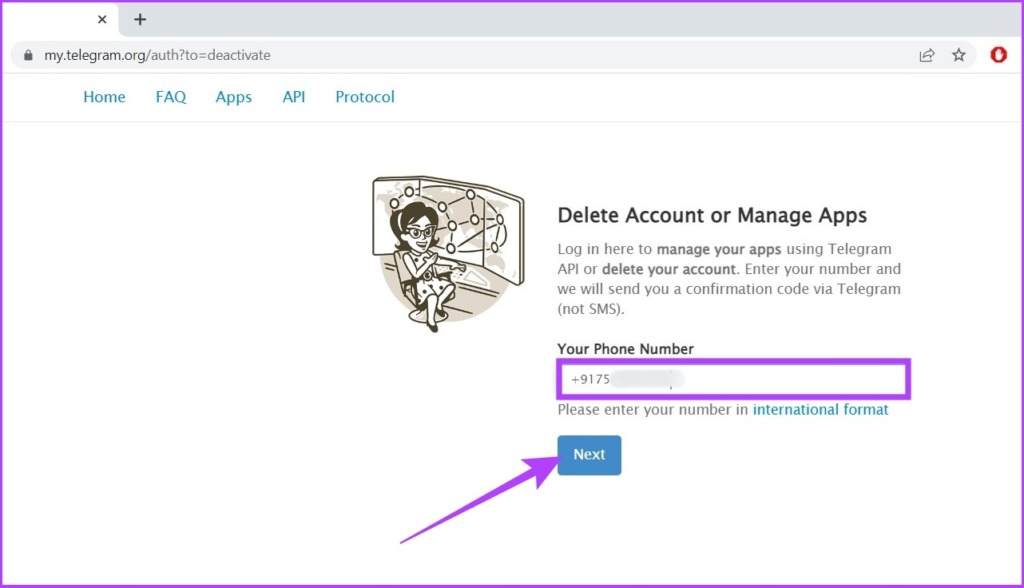
Step 3: You will be directed to a page explaining the consequences of deleting your account. Read thoroughly and click on the Delete My Account button. You can add your reason for leaving Telegram.

Step 4: Finally, confirm by clicking on Yes, delete my account.

Once you click on Yes, you’re permanently out of Telegram. If you wish to return, you must wait a few days to create a new account.
Using iPhone
It is pretty odd, but the Telegram app on iOS allows you to delete your account from the app. Here’s how to do it.
Step 1: Open the Telegram app on your iPhone and go to Settings.
Step 2: Under Settings, click on Privacy and Security.
Step 3: Now, tap on If Away For under Automatically Delete my Account. Then, choose Delete Account Now.

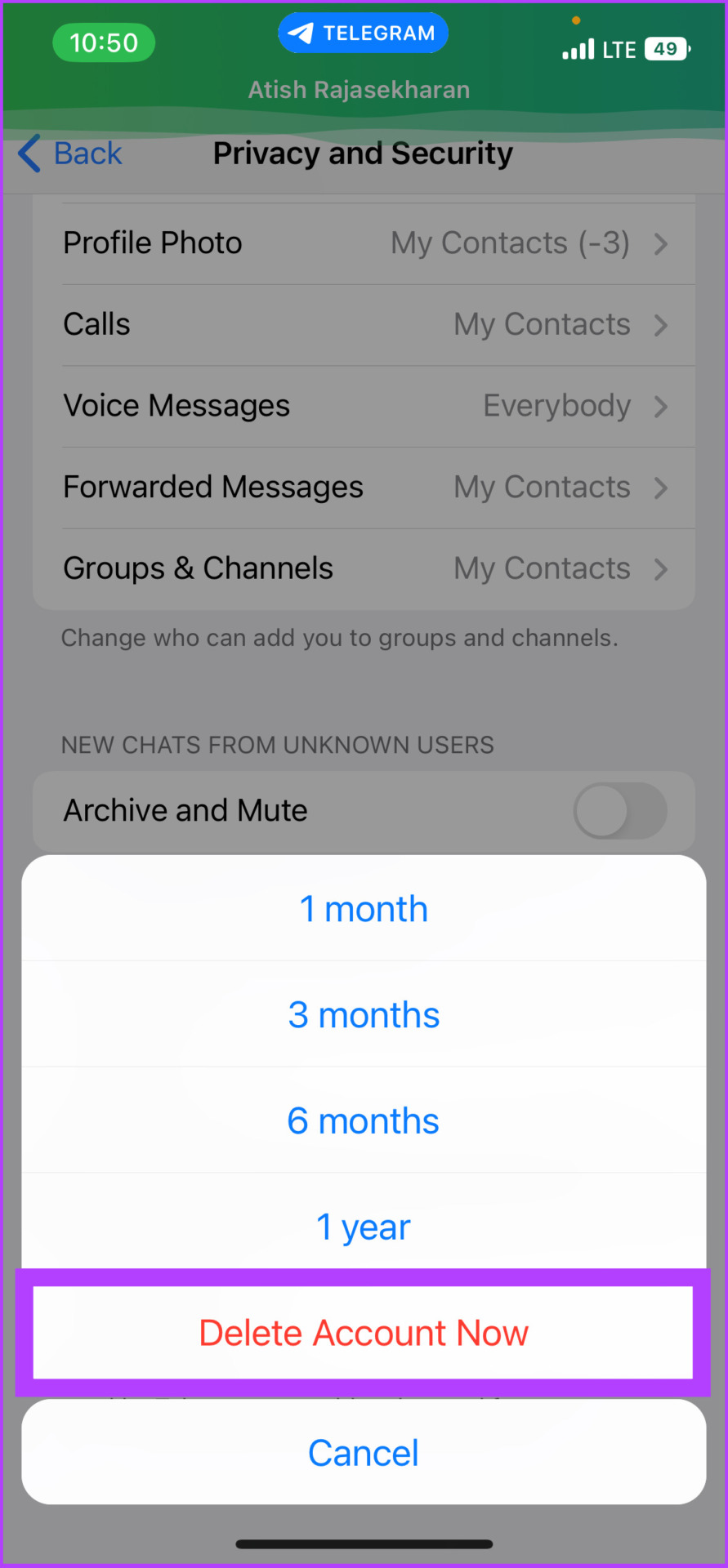
And there you go. Your Telegram account will be deleted permanently.
But what if you don’t want to delete your account right away and would rather give Telegram one more shot? You can set a time of inactivity, after which your account will be deleted automatically. This also gives you time to reconsider if you wish to change your decision.
How to Automatically Delete Your Telegram Account After a Specific Time
This is a few-step process, and it doesn’t matter what device you use. The steps are common among all operating systems, such as Android, iOS, Windows, and Mac. We are using an Android device to demonstrate the steps.
Open Telegram > go to Settings > tap on If away for under Delete my account > select the duration to self-destruct your account.


That’s that. Now, wait and be inactive for the specified time for your account to be deleted automatically.
What Happens When You Delete Your Telegram Account
As was mentioned at the beginning, all your data, such as messages, groups, and contacts, will be flushed from Telegram’s server. Moreover, before deleting your Telegram account, we recommend cancelling your Telegram subscription if you are a premium user.
Mind you, all the groups and channels you made will be orphaned and left without a creator, but admins will keep their rights. Moreover, the group users can still chat without any hindrance and will have a copy of the messages you sent them.
FAQs
If you delete your account once, it gets deleted forever.
No. Telegram only allows you to have one account per mobile number.
No, your contacts will not know if you uninstall Telegram.
Yes. Telegram is a club-based messaging platform. So, you can access your older messages after reinstalling the Telegram app.
Deleting your Telegram account will remove all your messages, contacts, channels, groups, and other data from Telegram’s servers. So, if you delete your Telegram account, you can’t get your old messages back.
Was this helpful?
Last updated on 18 July, 2024
1 Comment
Leave a Reply
Read Next
 How to Log Out Devices From Telegram Account
Log Out Device From Telegram on Mobile Telegram is available for a wide variety of device platforms.
How to Log Out Devices From Telegram Account
Log Out Device From Telegram on Mobile Telegram is available for a wide variety of device platforms.
 How to Delete Telegram Contacts on iPhone, Android, or PC
How to Delete Telegram Contacts on Android 1.
How to Delete Telegram Contacts on iPhone, Android, or PC
How to Delete Telegram Contacts on Android 1.
 What Happens When You Delete WhatsApp Account
What Happens to Existing Message History and Backup Deleting WhatsApp will clear all the chat records on your phone.
What Happens When You Delete WhatsApp Account
What Happens to Existing Message History and Backup Deleting WhatsApp will clear all the chat records on your phone.
 How to Delete a LinkedIn Account Permanently
Things to Know Before Deleting Your LinkedIn Account Before you delete your LinkedIn account, you should know a few things.
How to Delete a LinkedIn Account Permanently
Things to Know Before Deleting Your LinkedIn Account Before you delete your LinkedIn account, you should know a few things.
 How to Delete Twitch Account on PC, iPhone, and Android
While we can agree Twitch is one of the best streaming services out there, there might be a few reasons to move away from it.
How to Delete Twitch Account on PC, iPhone, and Android
While we can agree Twitch is one of the best streaming services out there, there might be a few reasons to move away from it.
 How to Delete ChatGPT Account (With or Without Login)
Things to Know Before Deleting Your ChatGPT Account You need to know some significant points before deleting your ChatGPT account because there is no going back after your account has
How to Delete ChatGPT Account (With or Without Login)
Things to Know Before Deleting Your ChatGPT Account You need to know some significant points before deleting your ChatGPT account because there is no going back after your account has
 How to Delete a Fortnite Account on All Platforms
What Happens When You Delete Your Epic Games Account Deleting your Fortnite account will also delete your Epic Games account.
How to Delete a Fortnite Account on All Platforms
What Happens When You Delete Your Epic Games Account Deleting your Fortnite account will also delete your Epic Games account.
 How to Deactivate or Delete Your Viber Account
Closing the door on any online account can feel monumental, and the weight might be heavier, considering your Viber account's connections and conversations.
How to Deactivate or Delete Your Viber Account
Closing the door on any online account can feel monumental, and the weight might be heavier, considering your Viber account's connections and conversations.
The article above may contain affiliate links which help support Guiding Tech. The content remains unbiased and authentic and will never affect our editorial integrity.


Thank you