Social media platforms are considered the simplest medium through which many small companies can market their products and services. Restaurants can present special offers on Instagram. Real estate agents can upload property tours on TikTok. Fitness studios can upload workout sessions on Facebook and YouTube Shorts.
The challenge is that social media now runs on video.
Buyers today expect to see product demos and learn more about offered services through short videos. On the other hand, smaller businesses that do not have marketing departments or the necessary equipment may find it difficult to shoot such videos consistently. The gap is narrowing, however. Better video content no longer depends on expensive setups. Modern AI-powered video tools are helping businesses improve the content they already have.
Why Video Quality Affects Local Business Marketing

People scroll fast. When a video looks blurry or unstable, viewers rarely stick around for long. That split-second judgment matters more than most business owners realize.
Your video is usually the first impression your future customer has of your brand. High-quality videos convey professional competence. Grainy videos raise doubts, not only consciously but also unconsciously, about the actual quality of the product or service you are offering.
In addition to making an impression, high-quality video impacts directly on:
- Social engagement: Instagram and TikTok tend to reward videos that keep viewers watching. If a video looks low quality, people often move on quickly. As a result, engagement and visibility can drop.
- Ad performance: Clear visuals in ads placed on Facebook and Instagram tend to perform better in comparison with blurry videos in terms of clicks.
- Trust: For local businesses especially, video helps build trust. It is because people would like to see how you really look before entering your shop.
Common Problems with Small-Business Video Content
Social media platforms and search engines rely heavily on automated visual ranking signals. As user search habits evolve and more people ask AI before opening Google, keeping your brand’s digital presence polished across video feeds ensures your content remains discoverable.
Here’s what typically goes wrong:
- Handheld phone video footage with shakiness
- Dull lighting when filmed inside restaurants, gyms, retail stores
- Lower-resolution videos that date back two or three years
- Background noise from street traffic, kitchen sounds, or AC units
- Watermarks on clips that came from another app or editing tool
- Brand inconsistency on different social media posts and channels
The RESULT? It leads to inconsistency across all your posts, which results in an amateur, unprofessional, and inconsistent feed regardless of how good the product you offer might be.
How AI Video Enhancer Tools Help
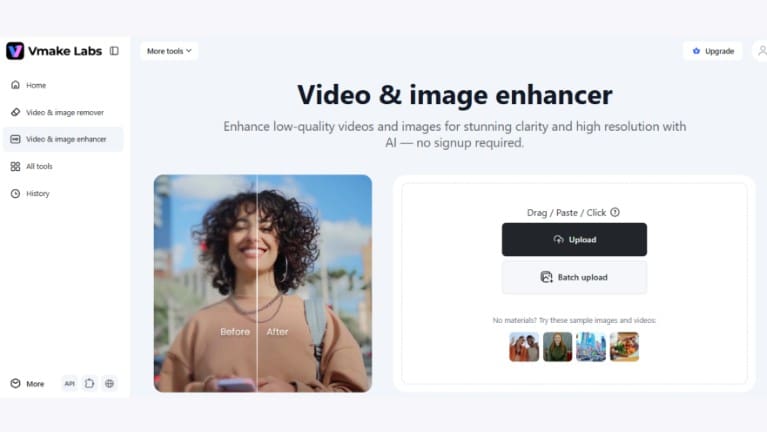
AI video enhancement tools have become popular with small businesses. They make it easier to improve existing videos without learning complex editing software. Users can upload their footage and let the tool handle much of the work automatically.
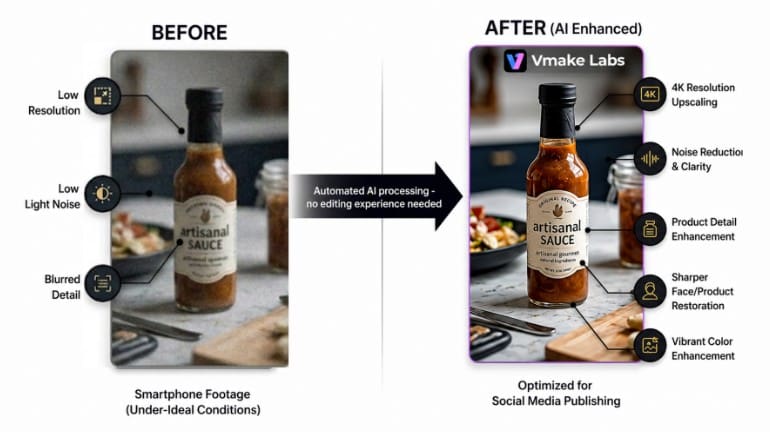
One example is Vmake. It is an AI video platform built for businesses that create content for social media and marketing. Its video enhancer is designed to improve footage that may have been recorded under less-than-ideal conditions.
Some of the improvements the Vmake video enhancement tool can provide include:
- Resolution upscaling
- Sharper visual details
- Low-light enhancement
- Noise reduction
- Face restoration
- Product detail enhancement
- Improved clarity for social media publishing
For businesses that rely on smartphone recordings, these features make a massive difference. While modern smartphones are increasingly adopting on-device AI to handle heavy processing locally, cloud-based tools step in to bridge the gap for older hardware and low-light video files.
Vmake also offers tools that help users remove watermarks from videos. It is important for businesses that are working on their archive content or reusing old marketing material.

The best benefit here would be the efficiency factor. Rather than scheduling another shoot or hiring outside editors, businesses can often improve footage they already have.
Practical Examples by Business Type
The benefits become clearer when looking at examples of how it can help in the real world through various cases for different companies. The major issue most cafes encounter is lighting problems, which are quite prevalent during the evening hours, while fitness centers usually face problems with motion blur in the videos. An AI video enhancer is capable of making improvements to such videos by adding sharpness, improving quality, and ensuring that they look good enough to be shared on social media channels.
Other practical use cases include refreshing old property videos for realtors, enhancing salon clients’ transformation videos, and making improvements to the promotional content of retailers in less than ideal shooting conditions. Features such as watermark removal also help businesses repurpose older assets and get more value from content they have already created.
A Simple Workflow That Actually Works
Small companies do not require a complex production process at all. Just as professionals use an AI book summarizer to read smarter and digest information efficiently, applying a structured AI workflow to your marketing strategy helps you produce high-quality videos without wasting hours in post-production.
Record on phone → enhance video → add captions → create thumbnail → resize for platforms → publish
Step 1: Record Content on a Smartphone
You may record product demos, customer reviews, employee intros, backstage scenes, or even events through your smartphone camera. You should always aim to create natural-looking videos and not overly polished videos.
Step 2: Enhance Video Quality

Next, upload your footage to Vmake’s AI video enhancement tool and have it enhance aspects of your video that might be hampering its quality. Such aspects include sharpness, clarity, and noise reduction in the video.

Marketing videos are usually filmed with mobile phones and under not-so-favorable conditions. A few minutes of enhancement can often turn an ordinary recording into content that looks far more polished and ready to publish.
Step 3: Add Captions

Many social media users watch videos with the sound off. Captions improve accessibility and help communicate key messages.
Step 4: Create a Thumbnail
With Vmake Thumbnail Creator, create an attractive thumbnail visual that will stop people from scrolling down. The thumbnail image is usually the first element that users will spot even before starting the video. Just by having a clear image frame with simple text and one central element, you can affect the number of clicks.
Step 5: Resize for Different Platforms
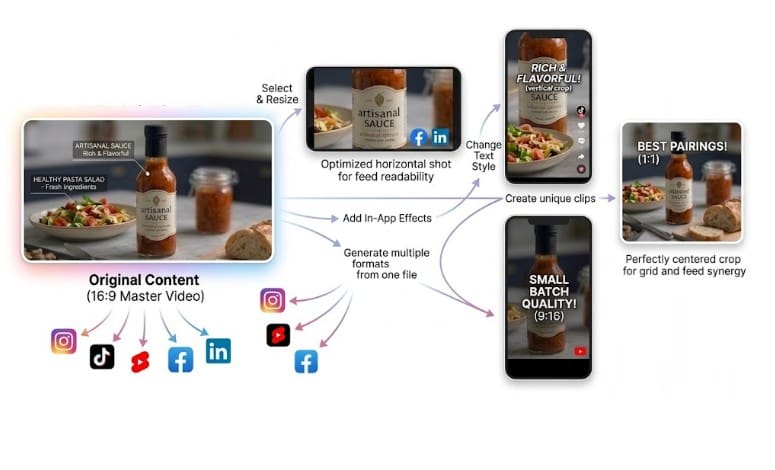
It is important to resize videos based on the platforms they will appear on. Each platform, whether Instagram Reels, TikTok, YouTube Shorts, Facebook, or LinkedIn, has its own guidelines in terms of formatting. Resizing the same content for each platform helps it reach more viewers and perform better across channels.
Step 6: Publish & Monitor Results
Analyze your data about views, likes, shares, and conversions in order to be able to see what type of content works best. After some time, you will learn what works best in video content and how to improve further.
Conclusion
Video is no longer optional for small-business marketing: consumers demand it, and social media sites encourage it. And small businesses that utilize video may find themselves at an advantage over their competitors. The challenge has always been balancing quality with limited resources.
However, now AI technologies make it possible to solve that problem. With the help of modern video generation tools like Vmake, businesses can enhance already shot videos, utilize stored information in a more effective way, and produce quality social media content, doing all this while not adding additional costs of production.
Local businesses with a limited budget can benefit greatly from that. They can save more time and money that can be invested in something more useful and less time-consuming.
Was this helpful?
Last updated on 22 October, 2026
Read Next
 13 Awesome (and Free) Tools to Rip Audio From Video
Has it ever happened that you come across a music video video on YouTube and just feel like downloading the audio track, not the entire video?
13 Awesome (and Free) Tools to Rip Audio From Video
Has it ever happened that you come across a music video video on YouTube and just feel like downloading the audio track, not the entire video?
 How to Create Newsletters Using LinkedIn’s Creator Tools
Advertising tools might come and go, but newsletters are firmly planted in the “helpful” section.
How to Create Newsletters Using LinkedIn’s Creator Tools
Advertising tools might come and go, but newsletters are firmly planted in the “helpful” section.
 Understanding and Resolving the “This content isn’t available” Error on Facebook
Why Do I See "This Content Isn’t Available at the Moment" on Facebook There can be various reasons behind the ‘Content is not available right now’ error on Facebook.
Understanding and Resolving the “This content isn’t available” Error on Facebook
Why Do I See "This Content Isn’t Available at the Moment" on Facebook There can be various reasons behind the ‘Content is not available right now’ error on Facebook.
 What Are Safari Content Blockers and Should You Use Them
How Do Safari Content Blockers Work Content blockers are tiny apps that contain lots of rules, each with their specific triggers and actions.
What Are Safari Content Blockers and Should You Use Them
How Do Safari Content Blockers Work Content blockers are tiny apps that contain lots of rules, each with their specific triggers and actions.
 How to Manage the Content Shown on Your Instagram Explore Page
A large number of Instagram users scroll through the app discover new content.
How to Manage the Content Shown on Your Instagram Explore Page
A large number of Instagram users scroll through the app discover new content.
 How to See Sensitive Content on X (Twitter)
While Twitter is quite an evolved social media app, it isn't fully free from inappropriate and NFSW content.
How to See Sensitive Content on X (Twitter)
While Twitter is quite an evolved social media app, it isn't fully free from inappropriate and NFSW content.
 How to Allow or Turn off Explicit Content on Apple Music
Enable or Disable Explicit Songs on Apple Music On iPhone The content restrictions module controls Apple Music's explicit content, which now resides inside the Screen Time setting.
How to Allow or Turn off Explicit Content on Apple Music
Enable or Disable Explicit Songs on Apple Music On iPhone The content restrictions module controls Apple Music's explicit content, which now resides inside the Screen Time setting.
 3 Best Ways to Clear the Cell Content in Google Sheets
Google Sheets is ranked high in the list of popular spreadsheet tools.
3 Best Ways to Clear the Cell Content in Google Sheets
Google Sheets is ranked high in the list of popular spreadsheet tools.
The article above may contain affiliate links which help support Guiding Tech. The content remains unbiased and authentic and will never affect our editorial integrity.