How to Enable Live Views on iOS and Android
In most cases, Google Maps already has access to your location and camera by default. This is essential for Live View to work since Live View will use your camera. You should follow the steps below to use Live View.
Note that we have used an iOS device, but the steps are the same on Android.
Step 1: Launch the Live View app on your mobile device.
Step 2: Tap the search field, type an address, and tap your location or long-tap the location on the map you wish to locate.


Step 3: Click Directions.
Step 4: Click the Walking option. Now, you should see Live View at the bottom of the page.

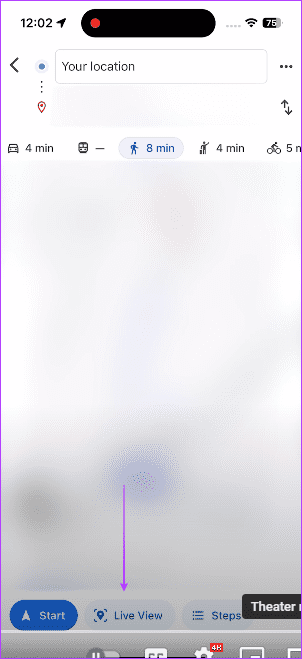
Now, simply point your camera at buildings, stores, or signs around, and it will start scanning and directing you to the location you need to be.
Availability and Requirements for Google Maps Live View
While Live View is available for Android and iPhone, there are a few limitations and requirements for the feature. Most importantly, it is available for a select list of countries and cities. There is no official list. However, you may use it in London, Los Angeles, New York City, Paris, San Francisco, and Tokyo, among a few other locations.
The feature requires you to be outside and have sufficient lighting. Additionally, you can only use this feature if you switch to walking mode on Google Maps.
Was this helpful?
Last updated on 19 July, 2024
Read Next
 How to View and Manage Your Location History in Google Maps
While Google Maps helps you to look for new places and find the best routes, it also saves these things in your Location History.
How to View and Manage Your Location History in Google Maps
While Google Maps helps you to look for new places and find the best routes, it also saves these things in your Location History.
 Google Maps vs Maps Go Comparison: Explaining the Difference
Last year, Google announced the optimized version of Android Oreo operating system, Android Go.
Google Maps vs Maps Go Comparison: Explaining the Difference
Last year, Google announced the optimized version of Android Oreo operating system, Android Go.
 How to Switch Between KM and Miles in Google Maps and Apple Maps
How to Change Kilometers to Miles in Apple Maps To change KM to Miles (or vice versa) on iPhone, iPad, and Mac, all you need to do is change your
How to Switch Between KM and Miles in Google Maps and Apple Maps
How to Change Kilometers to Miles in Apple Maps To change KM to Miles (or vice versa) on iPhone, iPad, and Mac, all you need to do is change your
 5 Ways to Fix Live Location Not Updating on Android and iPhone
Fix 1: Ensure Location Services Are Enabled Enabling location services on your phone is the most basic step before you can share your live location.
5 Ways to Fix Live Location Not Updating on Android and iPhone
Fix 1: Ensure Location Services Are Enabled Enabling location services on your phone is the most basic step before you can share your live location.
 How to Save Live Photo as Video or GIF on Android
On Google Photos Here's how you can download the motion photo as a video or GIF.
How to Save Live Photo as Video or GIF on Android
On Google Photos Here's how you can download the motion photo as a video or GIF.
 4 Fixes for Telegram Live Location Not Updating on iPhone and Android
Basic Fixes: Check internet access: For apps to access your location, you require internet access on your mobile.
4 Fixes for Telegram Live Location Not Updating on iPhone and Android
Basic Fixes: Check internet access: For apps to access your location, you require internet access on your mobile.
 How to Send Fake Current and Live Locations on WhatsApp
WhatsApp allows sending multimedia and even locations apart from messages.
How to Send Fake Current and Live Locations on WhatsApp
WhatsApp allows sending multimedia and even locations apart from messages.
 5 Fixes for “GPS Signal Lost” Problem in Google Maps on Android
Try Basic Fixes Turn off battery saver mode: When you enable battery saver mode, Android restricts certain resource-intensive tasks like GPS tracking to conserve battery life.
5 Fixes for “GPS Signal Lost” Problem in Google Maps on Android
Try Basic Fixes Turn off battery saver mode: When you enable battery saver mode, Android restricts certain resource-intensive tasks like GPS tracking to conserve battery life.
The article above may contain affiliate links which help support Guiding Tech. The content remains unbiased and authentic and will never affect our editorial integrity.