Basic Fixes
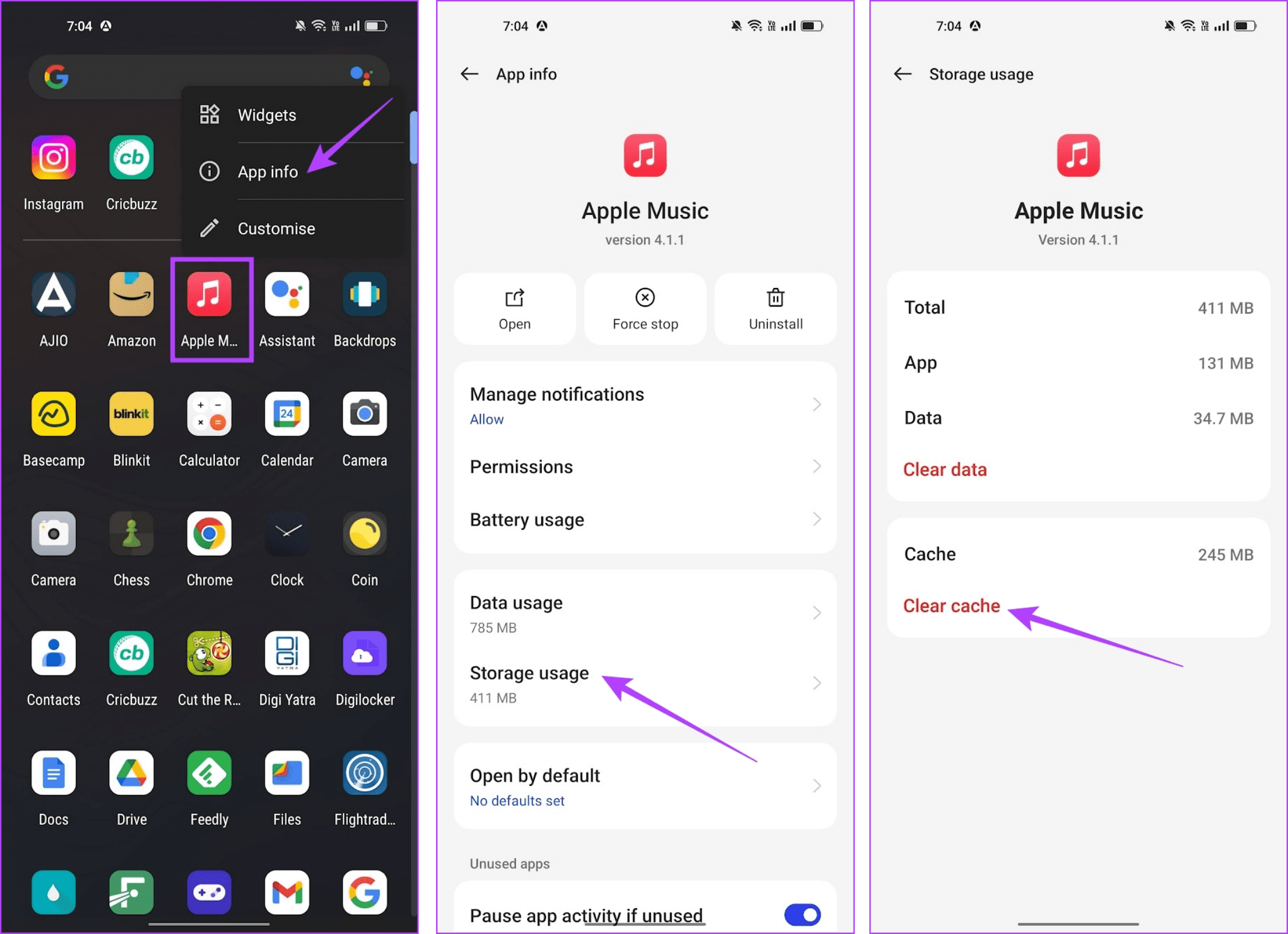
- Force stop and restart app: Tap and hold the app icon, and go to app info, Force Stop the app and restart it.
- Check network connectivity: Ensure there are no problems with network connectivity on your device. Further, avoid using a VPN while accessing Apple Music.
- Update Apple Music: Update the Apple Music app for a bug-free experience. Consider reinstalling the app if issues persists.
- Close unwanted apps: Close unwanted apps on your device to free up resources for Apple Music.
Fix 1: Enable Cellular Data Access
If you find that Apple Music is not working on cellular data but works without an issue on Wi-Fi – then you may have denied Apple Music permission to use cellular data.
Step 1: Tap and hold the Apple Music icon in your app drawer. Tap on the info button.
Step 2: Tap on Data Usage. Turn off the toggle that disables mobile data access for Apple Music.

Fix 2: Enable Autostart and Background Activity
If you find that Apple Music is working fine when the app is open but has a problem playing music in the background or when you exit the app – consider enabling autostart for the app and background activity. This makes sure that the app isn’t closed in the background and continues to run unless you manually shut it down.
Step 1: Tap and hold the Apple Music app icon in your app drawer. Tap on App Info.
Step 2: Tap on Battery Usage. Turn on Allow Auto Launch and Allow Background Activity for Apple Music.

Fix 3: Clear Cache
If the Apple Music app on your Android device is crashing intermittently, clearing the app cache could help fix it.
Tap and hold the Apple Music app icon, and select App info. Tap on Storage usage, and select Clear Cache.
Additionally, try using the Clear Data option as well. Doing so will delete corrupted files from the app, but it will also sign you out and remove all downloads.
Also Read: 3 ways to fix Apple Music not downloading songs
Was this helpful?
Last updated on 30 June, 2024
Read Next
 Top 7 Ways to Fix Siri Not Playing Music from Apple Music
Siri not recognizing your voice and not playing music from Apple Music can lead to an undesirable experience.
Top 7 Ways to Fix Siri Not Playing Music from Apple Music
Siri not recognizing your voice and not playing music from Apple Music can lead to an undesirable experience.
 3 Ways to Fix YouTube App Crashing or Not Working on iPhone
Try Basic Fixes Check iPhone storage status: Low storage can affect your iPhone's efficiency, subsequently leading the apps to crash or freeze, especially demanding apps.
3 Ways to Fix YouTube App Crashing or Not Working on iPhone
Try Basic Fixes Check iPhone storage status: Low storage can affect your iPhone's efficiency, subsequently leading the apps to crash or freeze, especially demanding apps.
 3 Ways to Fix Telegram Keeps Crashing on Android and iPhone
Try Basic Fixes Force stop and reopen Telegram: When an app on your phone starts misbehaving, the first thing to do is force close it and open it again.
3 Ways to Fix Telegram Keeps Crashing on Android and iPhone
Try Basic Fixes Force stop and reopen Telegram: When an app on your phone starts misbehaving, the first thing to do is force close it and open it again.
 How to Add Downloaded Music to Apple Music Library
If you download songs on your iPhone and use the Files app to listen to them, you are doing it wrong.
How to Add Downloaded Music to Apple Music Library
If you download songs on your iPhone and use the Files app to listen to them, you are doing it wrong.
 3 Ways to Fix Instagram Not Working, Loading, or Crashing
Fix 1: Reinstall Instagram Most apps release bug fixes through regular updates, and Instagram is no different.
3 Ways to Fix Instagram Not Working, Loading, or Crashing
Fix 1: Reinstall Instagram Most apps release bug fixes through regular updates, and Instagram is no different.
 How to Fix Samsung Notes App Not Working
Basic Fixes Disable Add-Ons: Open the Notes app > Settings > Toolbar Add-on > Disable the Add-Ons.
How to Fix Samsung Notes App Not Working
Basic Fixes Disable Add-Ons: Open the Notes app > Settings > Toolbar Add-on > Disable the Add-Ons.
 3 Ways to Transfer Playlists From YouTube Music to Apple Music
There are three services you can use to perform the transfer based on your preferences.
3 Ways to Transfer Playlists From YouTube Music to Apple Music
There are three services you can use to perform the transfer based on your preferences.
 6 Ways to Fix Apple Music Family Sharing Not Working on iPhone
Are you facing issues with Apple Music Family Sharing on your iPhone?
6 Ways to Fix Apple Music Family Sharing Not Working on iPhone
Are you facing issues with Apple Music Family Sharing on your iPhone?
The article above may contain affiliate links which help support Guiding Tech. The content remains unbiased and authentic and will never affect our editorial integrity.