

Basic Fixes
- Check if the contact has blocked you: You should check if someone has blocked you on WhatsApp
- Switch to Wi-Fi: If you are using Mobile Data, you might need better internet speeds at your current location.
- Force quit and relaunch WhatsApp: This will give the app a fresh start.
- Update or reinstall WhatsApp: Installing the latest version has a higher probability of fixing this issue.
Fix 1: Check Your WhatsApp Status Settings
If the WhatsApp Status of your contact still needs to show up, check your WhatsApp Status settings. The app allows you to hide your WhatsApp Status from specific contacts. So, check the same on your iPhone and Android. You may have blocked a few contacts previously. You can suggest the same to your contact who can’t see your WhatsApp Status. The steps apply to both iPhone and Android phone users.
Step 1: Open WhatsApp > Settings > Privacy.
Step 2: Tap on Status > select My Contacts if ‘My Contacts Except’ or ‘Only Share With’ is selected.


Step 3: Go back to the Status tab and see if the problem is solved.
Fix 2: Refresh the Contacts List on WhatsApp
You can disable and enable contact access again for WhatsApp on your device. This will sync all your chats again.
On iPhone
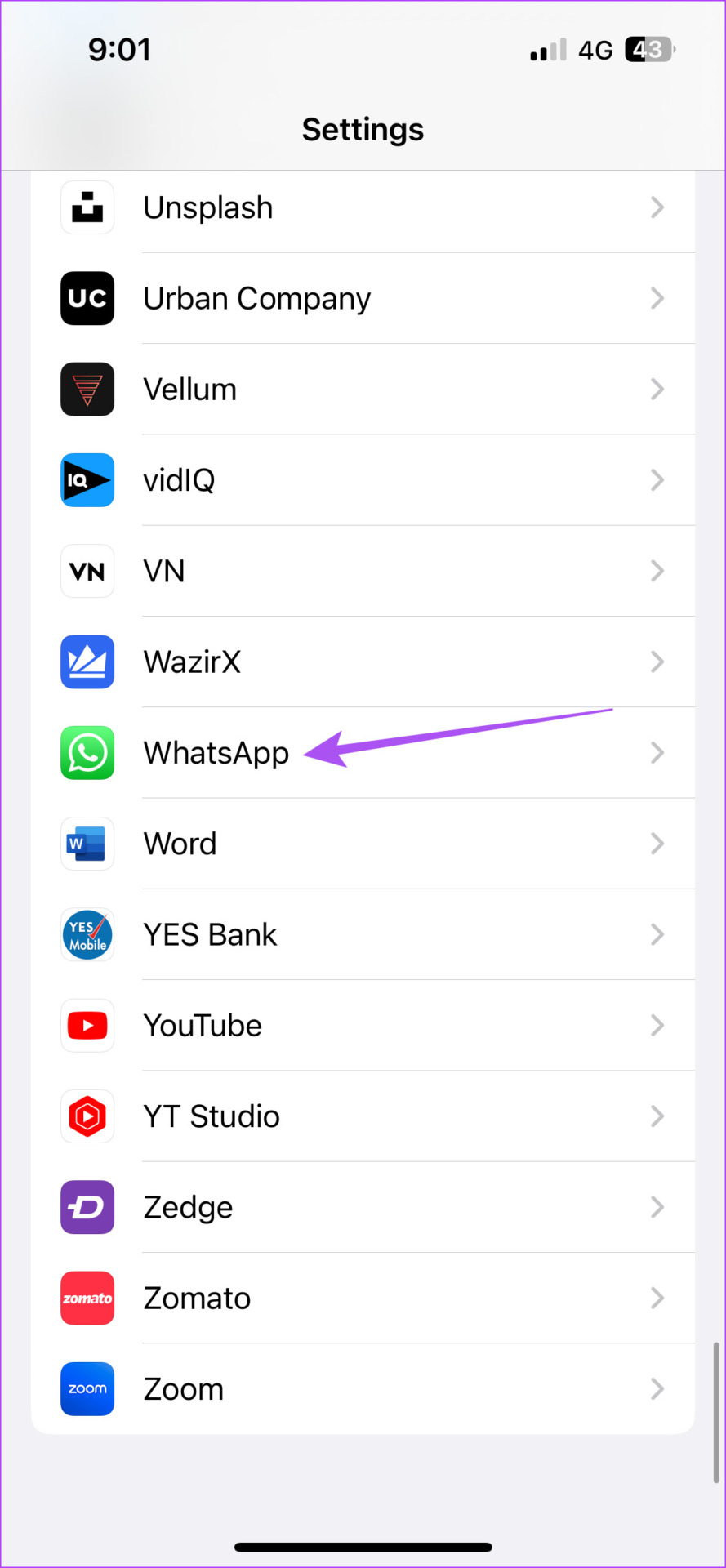
Open Settings > WhatsApp > disable Contacts > enable it again.

On Android
Step 1: Open WhatsApp App Info > Permissions > Contacts > select Don’t allow > wait a few seconds and select Allow again.


Fix 3: Clear WhatsApp App Cache
Clearing the app cache will remove all WhatsApp preferences from your device. You will have to log in again to your account. Refer to our post to learn more about clearing WhatsApp cache.
Alternative: Use WhatsApp Web if Nothing Works
If none of the solutions work, switch to WhatsApp Web to check the Status of your contacts. WhatsApp Web also allows you to post your WhatsApp Status from your computer. Here’s how to sign in.
Step 1: Open the WhatsApp Web in a browser on your computer.
Step 2: After you see the QR code on your computer screen, open WhatsApp on your iPhone or Android.
Step 3: Open Settings > Linked Devices.
Step 4: Tap on Link A Device on your iPhone or Android.

Step 5: Now, scan the WhatsApp Web QR code to sign in and check the WhatsApp Status of your contacts.
Was this helpful?
Last updated on 29 August, 2024
1 Comment
Leave a Reply
Read Next
 4 Best Ways to Fix WhatsApp Reconnecting Issues on iPhone
Basic Fixes Restart iPhone: Restart your iPhone to fix any temporary bugs and glitches.
4 Best Ways to Fix WhatsApp Reconnecting Issues on iPhone
Basic Fixes Restart iPhone: Restart your iPhone to fix any temporary bugs and glitches.
 5 Ways to Fix WhatsApp Status Not Loading on Android and iPhone
Try Basic Fixes Check if WhatsApp is down: Services like WhatsApp can experience server outages at times.
5 Ways to Fix WhatsApp Status Not Loading on Android and iPhone
Try Basic Fixes Check if WhatsApp is down: Services like WhatsApp can experience server outages at times.
 5 Ways to Fix Google Docs Not Downloading Issues
Basic Fixes Disable Extension: There can be a few extensions in your browser that are actually preventing downloads from Google Docs.
5 Ways to Fix Google Docs Not Downloading Issues
Basic Fixes Disable Extension: There can be a few extensions in your browser that are actually preventing downloads from Google Docs.
 5 Ways to Fix Audio Issues in Zoom
Basic Fixes Join using computer audio: The Zoom app will offer a pop-up to let you join with Computer Audio when you tap on the New Meeting option.
5 Ways to Fix Audio Issues in Zoom
Basic Fixes Join using computer audio: The Zoom app will offer a pop-up to let you join with Computer Audio when you tap on the New Meeting option.
 6 Ways to Fix Sync Issues on Microsoft Edge
Fix 1: Ensure Sync Is Enabled Microsoft Edge may fail to sync your browsing data across devices if sync is disabled.
6 Ways to Fix Sync Issues on Microsoft Edge
Fix 1: Ensure Sync Is Enabled Microsoft Edge may fail to sync your browsing data across devices if sync is disabled.
 7 Ways to Fix Netflix Black Screen With Sound Issues on Mobile and Desktop
Fix 1: Disable Extensions (Windows and macOS) While third-party extensions can help you watch Netflix with friends or enhance your experience in many ways, they can also interfere with Netflix's
7 Ways to Fix Netflix Black Screen With Sound Issues on Mobile and Desktop
Fix 1: Disable Extensions (Windows and macOS) While third-party extensions can help you watch Netflix with friends or enhance your experience in many ways, they can also interfere with Netflix's
 4 Ways to Fix Discord Connection Issues on Android and iPhone
Try These Basic Fixes Check if Discord is down: If its server is having problems, Discord may encounter connection issues.
4 Ways to Fix Discord Connection Issues on Android and iPhone
Try These Basic Fixes Check if Discord is down: If its server is having problems, Discord may encounter connection issues.
 8 Ways to Fix Microsoft Teams Black Screen Issues
Work productivity applications are indispensable in the post-COVID era.
8 Ways to Fix Microsoft Teams Black Screen Issues
Work productivity applications are indispensable in the post-COVID era.
The article above may contain affiliate links which help support Guiding Tech. The content remains unbiased and authentic and will never affect our editorial integrity.


I can’t see any status on my phone