Basic Fixes
- Check network connection: Ensure there isn’t a problem with your device’s cellular network or Wi-Fi.
- Check audio output device: Check if your device is connected to and routing the audio to an external/Bluetooth device.
- Restart Zoom: Try exiting the meeting and joining it again. Further, restart the Zoom app or your device.
- Check if the speakers are damaged: If audio problems persist on other apps, reset your Android device and check if the speakers are damaged.
Fix 1: Join Audio
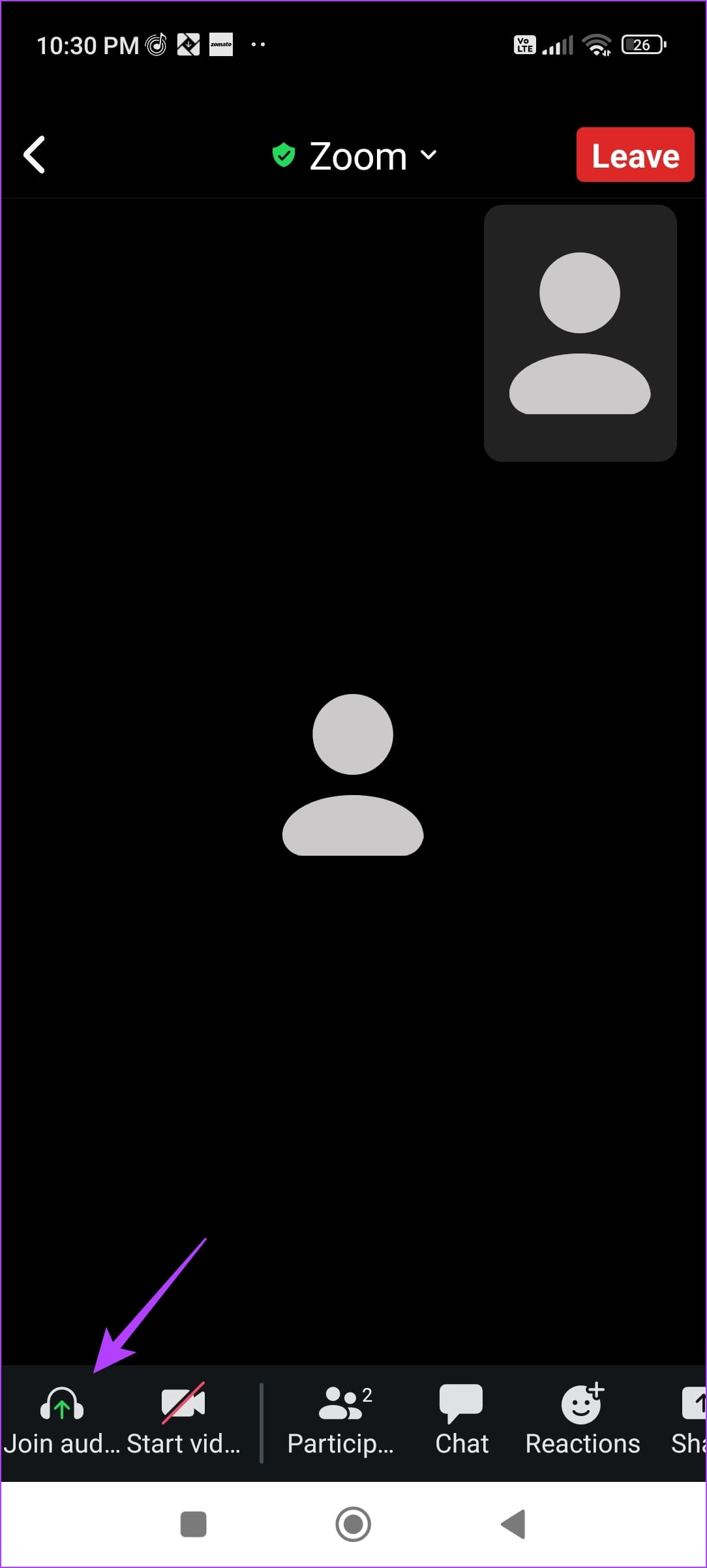
If you can’t hear participants in a meeting, ensure you connect to the audio. Tap on the Join Audio button and select Wi-Fi or Cellular Data.

Also Read: How to fix background blur not working in Zoom
Fix 2: Unmute Output Audio
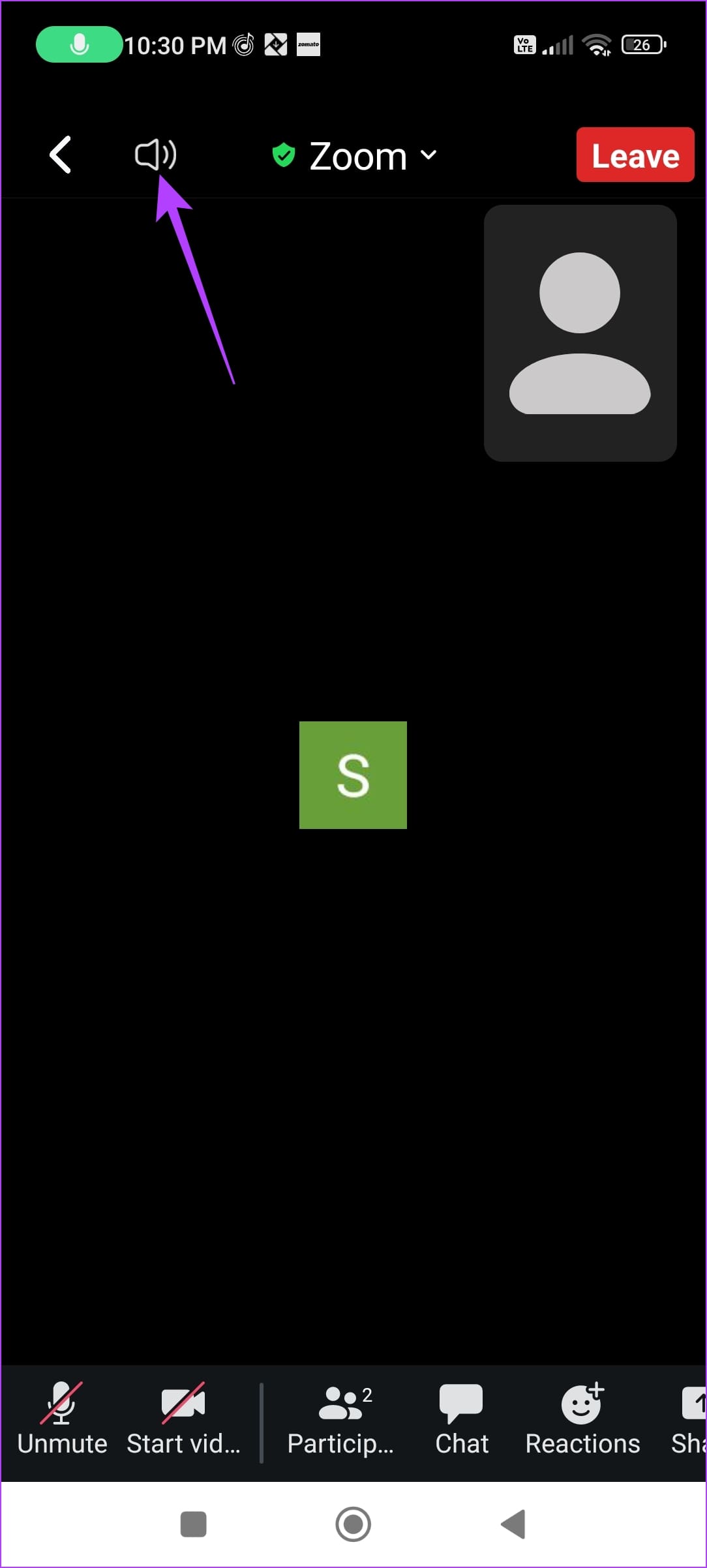
Check the loudspeaker icon at the top left corner. If it is on mute, you can’t listen to any audio. Tap on the speaker icon to unmute.

Fix 3: Increase Media Volume
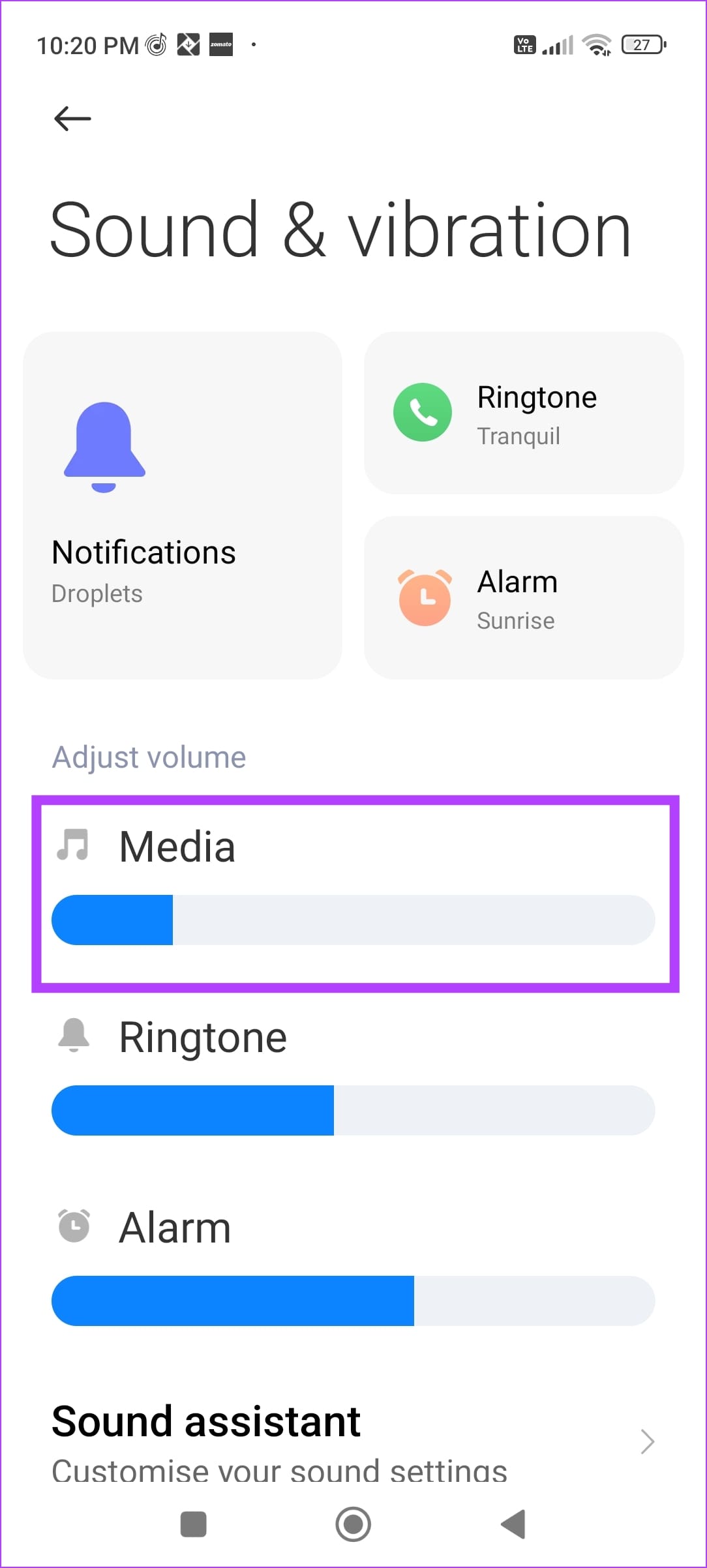
Ensure to increase the audio output volume on your device. Use the volume keys to do so while you are in the meeting.
Alternatively, go to the Settings app > open the Sounds menu > increase the Media Volume.

Fix 4: Clear Cache
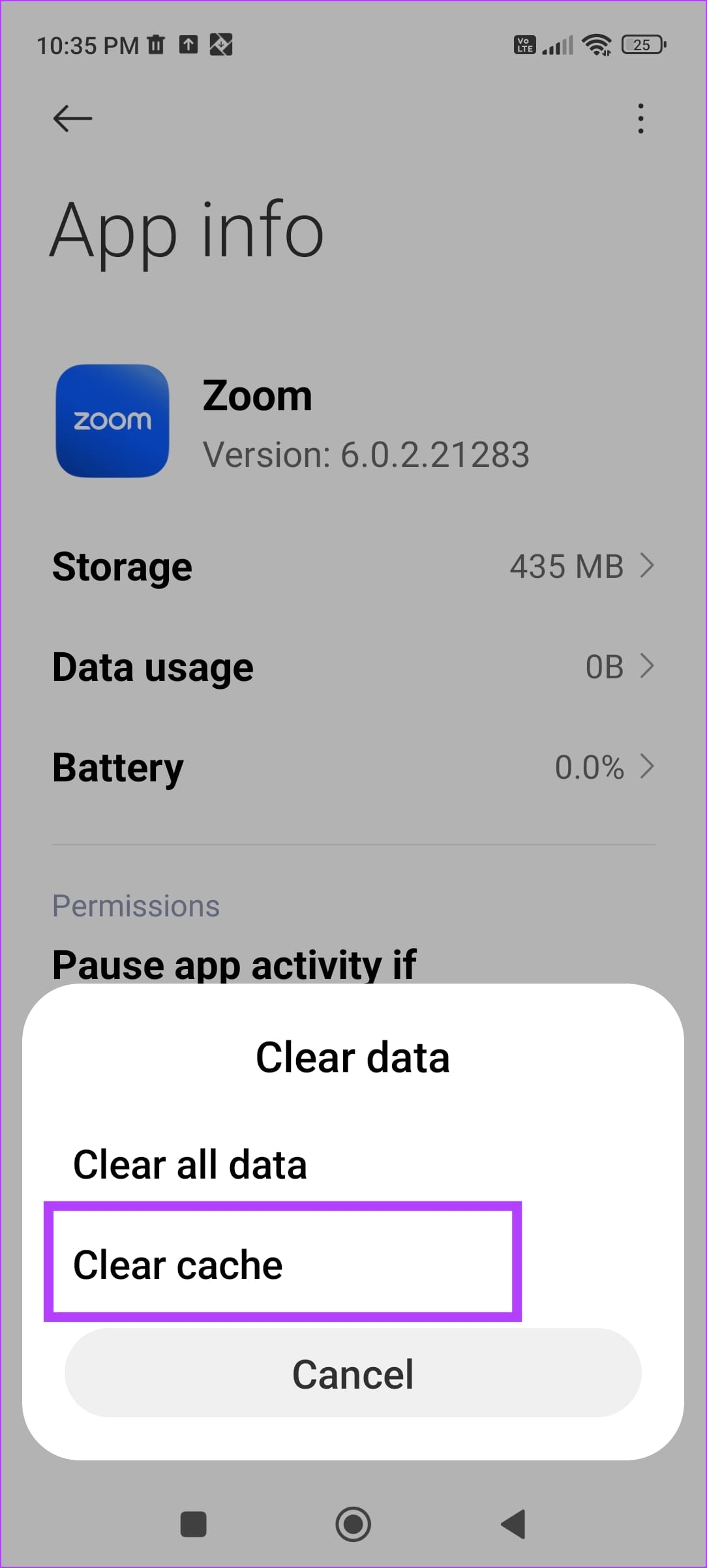
Accumulated cache and junk files can cause issues within an app. To clear them, tap and hold the Zoom app icon, select Clear Data, and tap on Clear Cache. Don’t worry; you won’t be signed out of Zoom when you do this.


Also Read: How to use animated reactions in Zoom
Was this helpful?
Last updated on 09 July, 2024
Read Next
 5 Ways to Fix Audio Issues in Zoom
Basic Fixes Join using computer audio: The Zoom app will offer a pop-up to let you join with Computer Audio when you tap on the New Meeting option.
4 Ways to Fix Zoom Audio Delay on Windows 11
Basic Fixes Check your network connection: Ensure your PC has a good internet connection.
5 Ways to Fix Audio Issues in Zoom
Basic Fixes Join using computer audio: The Zoom app will offer a pop-up to let you join with Computer Audio when you tap on the New Meeting option.
4 Ways to Fix Zoom Audio Delay on Windows 11
Basic Fixes Check your network connection: Ensure your PC has a good internet connection.
 How to Change Zoom App Ringtone and Notification Sound
How to Change Zoom Incoming Call Ringtone on Android, iPhone, and iPad If you use Zoom daily, you might be bored of its same ringtone or notification sound.
How to Change Zoom App Ringtone and Notification Sound
How to Change Zoom Incoming Call Ringtone on Android, iPhone, and iPad If you use Zoom daily, you might be bored of its same ringtone or notification sound.
 How to Share Video With Sound on Zoom, Microsoft Teams, and Google Meet
How to Share Video With Audio in Microsoft Teams The feature to share your screen containing the video and its sound in Microsoft Teams is limited to the Windows app
How to Share Video With Sound on Zoom, Microsoft Teams, and Google Meet
How to Share Video With Audio in Microsoft Teams The feature to share your screen containing the video and its sound in Microsoft Teams is limited to the Windows app
 5 Ways to Fix Text Messaging Sound Not Working on Android
Basic Fixes Restart device: If there's any bug preventing you from receiving notifications, restarting your device will help.
5 Ways to Fix Text Messaging Sound Not Working on Android
Basic Fixes Restart device: If there's any bug preventing you from receiving notifications, restarting your device will help.
 3 Ways to Fix Notification Sound Not Working on Android
Basic Ways: Adjust notification volume: Use the volume buttons or go to the Settings menu to check the current notification volume.
3 Ways to Fix Notification Sound Not Working on Android
Basic Ways: Adjust notification volume: Use the volume buttons or go to the Settings menu to check the current notification volume.
 4 Fixes When Zoom Screen Sharing Is Not Working on Windows
Basic Fixes: Turn off your video before screen-sharing: Lower-end CPUs may find it challenging to keep up with both the video feed and screen-sharing over a Zoom call.
4 Fixes When Zoom Screen Sharing Is Not Working on Windows
Basic Fixes: Turn off your video before screen-sharing: Lower-end CPUs may find it challenging to keep up with both the video feed and screen-sharing over a Zoom call.
 How to Fix WhatsApp Notification Sound Not Working
Basic Fixes Ensure silent mode is turned off - The first thing you should do is to check and turn off Vibrate/Silent mode on your iPhone or Android.
How to Fix WhatsApp Notification Sound Not Working
Basic Fixes Ensure silent mode is turned off - The first thing you should do is to check and turn off Vibrate/Silent mode on your iPhone or Android.
The article above may contain affiliate links which help support Guiding Tech. The content remains unbiased and authentic and will never affect our editorial integrity.