Try Basic Fixes
- Check iPhone storage status: Low storage can affect your iPhone’s efficiency, subsequently leading the apps to crash or freeze, especially demanding apps. Head to Settings > General > iPhone Storage to check your device’s storage status.
- Update the app: A buggy YouTube app might give you problems. Hence, it’s a good idea to update the YouTube app from the App Store.
- Install iOS updates: You should also install pending iOS updates by heading to Settings > General > Software update on your iPhone. If the issue is caused by a buggy iOS build, this should help.
Fix 1: Ensure the App Has the Required Permissions
Even with a stable connection, YouTube may have trouble accessing it if it does not have the necessary permission. Here’s how to fix it:
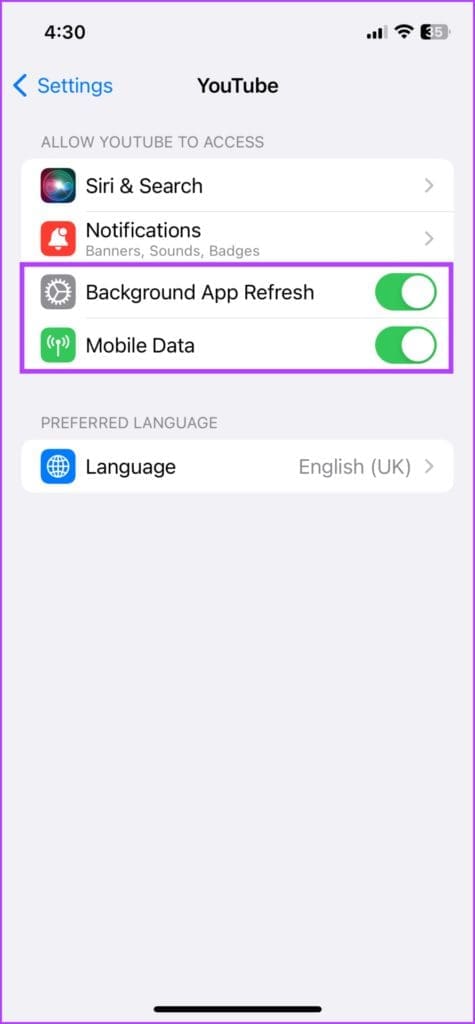
Step 1: Go to Settings and scroll down to YouTube.
Step 2: Enable the toggles next to Mobile Data and Background App Refresh.

Fix 2: Remove and Reinstall the App
Another thing you can do is reinstall the YouTube app on your iPhone. Doing so will fix issues caused by corrupted app files or improper installation.
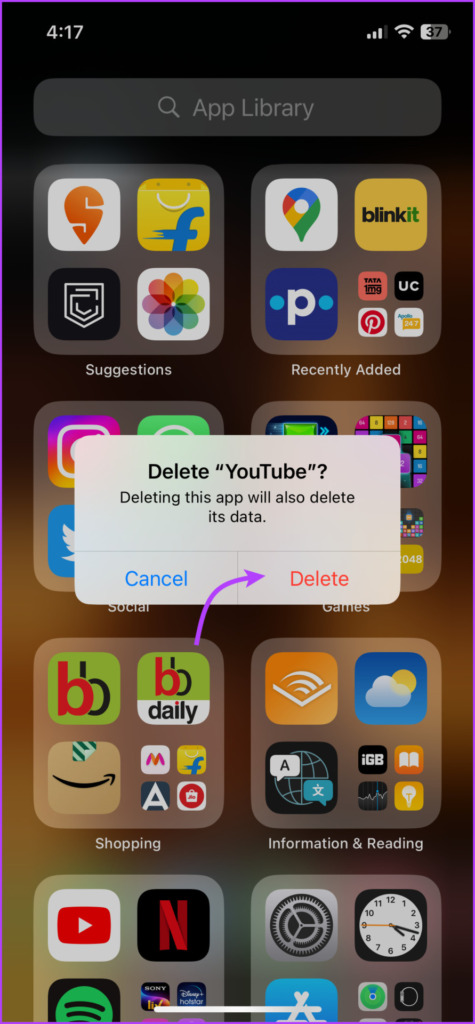
Step 1: Long-press the YouTube app and select Delete App. Select Delete to confirm the action.
Step 3: Head to the App Store to download the YouTube app again.

Fix 3: Reset All Settings on iPhone
We often reserve this step as a last resort because it resets all settings on your iPhone, including network, location, privacy settings, dictionary, stored cards, and more. However, don’t worry-your data and media files will remain intact.
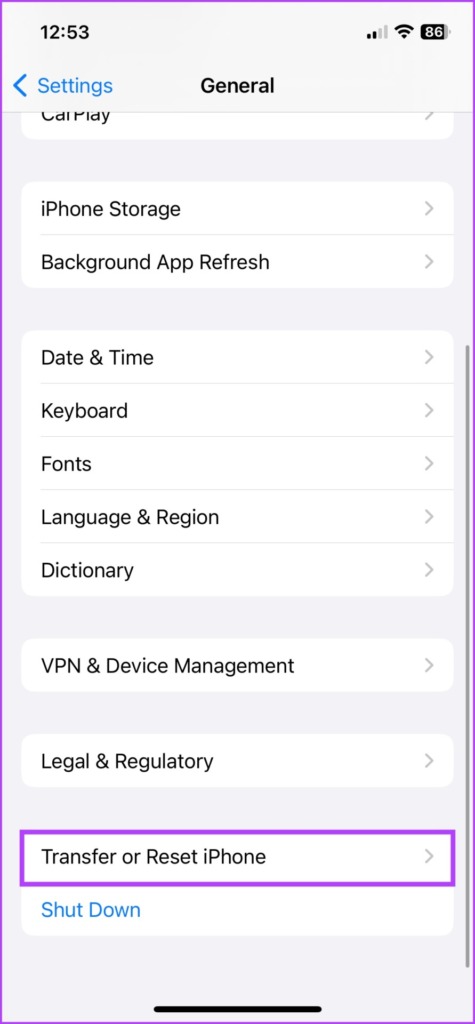
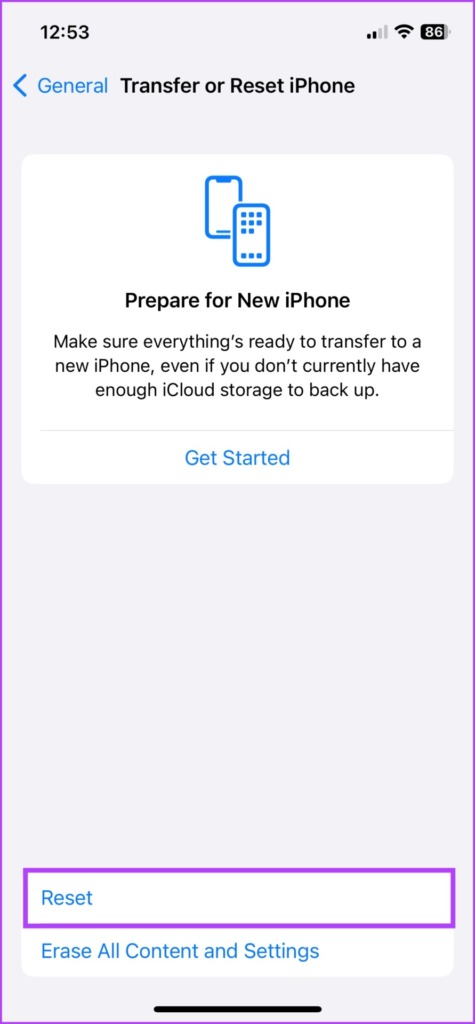
Step 1: Launch Settings and head to General > Transfer or Reset iPhone.
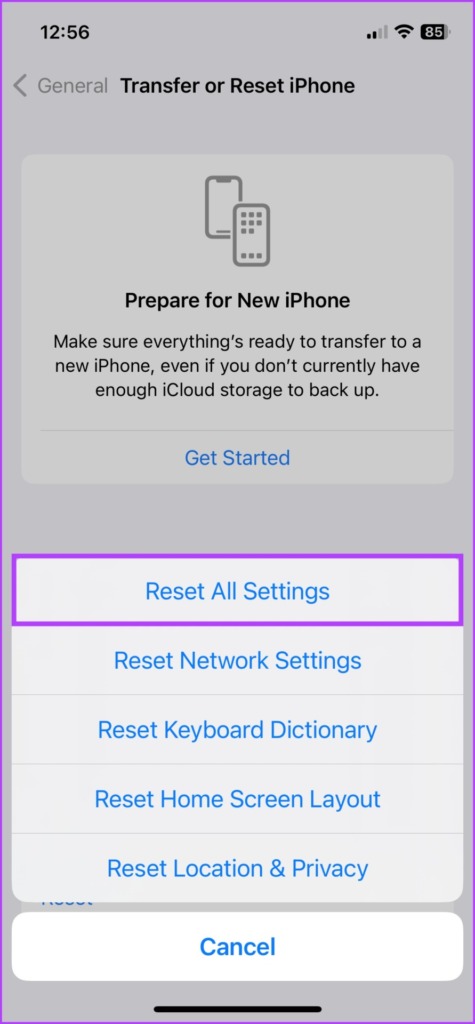
Step 2: Tap Reset and select Reset All Settings.
Was this helpful?
Last updated on 05 September, 2024
Read Next
 3 Ways to Fix Messages App Keeps Crashing or Freezing on iPhone
Basic Fixes: Check the Messages app server status: If there is an issue with Apple's servers, it can affect the functioning of the Messages app.
3 Ways to Fix Messages App Keeps Crashing or Freezing on iPhone
Basic Fixes: Check the Messages app server status: If there is an issue with Apple's servers, it can affect the functioning of the Messages app.
 3 Ways to Fix if YouTube Keeps Crashing on Android
https://youtu.be/q1GnaH9pC58 Basic Fixes Free up storage space: The YouTube app requires sufficient storage space to stream content on your Android.
3 Ways to Fix if YouTube Keeps Crashing on Android
https://youtu.be/q1GnaH9pC58 Basic Fixes Free up storage space: The YouTube app requires sufficient storage space to stream content on your Android.
 3 Ways to Fix Instagram Not Working, Loading, or Crashing
Fix 1: Reinstall Instagram Most apps release bug fixes through regular updates, and Instagram is no different.
3 Ways to Fix Instagram Not Working, Loading, or Crashing
Fix 1: Reinstall Instagram Most apps release bug fixes through regular updates, and Instagram is no different.
 3 Ways to Fix Apple Music Not Working or Crashing on Android
Basic Fixes Force stop and restart app: Tap and hold the app icon, and go to app info, Force Stop the app and restart it.
3 Ways to Fix Apple Music Not Working or Crashing on Android
Basic Fixes Force stop and restart app: Tap and hold the app icon, and go to app info, Force Stop the app and restart it.
 3 Ways to Fix Telegram Keeps Crashing on Android and iPhone
Try Basic Fixes Force stop and reopen Telegram: When an app on your phone starts misbehaving, the first thing to do is force close it and open it again.
3 Ways to Fix Telegram Keeps Crashing on Android and iPhone
Try Basic Fixes Force stop and reopen Telegram: When an app on your phone starts misbehaving, the first thing to do is force close it and open it again.
 2 Ways to Fix the Telegram App Crashing on Windows 11
Basic Fixes Check the Telegram server status: Visit Downdetector to check for an active Telegram server outage.
2 Ways to Fix the Telegram App Crashing on Windows 11
Basic Fixes Check the Telegram server status: Visit Downdetector to check for an active Telegram server outage.
 6 Ways to Fix OBS Keeps Crashing on Windows
Preliminary Fixes Run OBS Studio as Administrator: If OBS crashes on startup, it's best to give it a shot by giving the app an administrative privilege.
6 Ways to Fix OBS Keeps Crashing on Windows
Preliminary Fixes Run OBS Studio as Administrator: If OBS crashes on startup, it's best to give it a shot by giving the app an administrative privilege.
 How to Fix Photos App Crashing Issue on Windows 10
The Photos app on Windows 10 isn’t one of the most optimized of apps around.
How to Fix Photos App Crashing Issue on Windows 10
The Photos app on Windows 10 isn’t one of the most optimized of apps around.
The article above may contain affiliate links which help support Guiding Tech. The content remains unbiased and authentic and will never affect our editorial integrity.