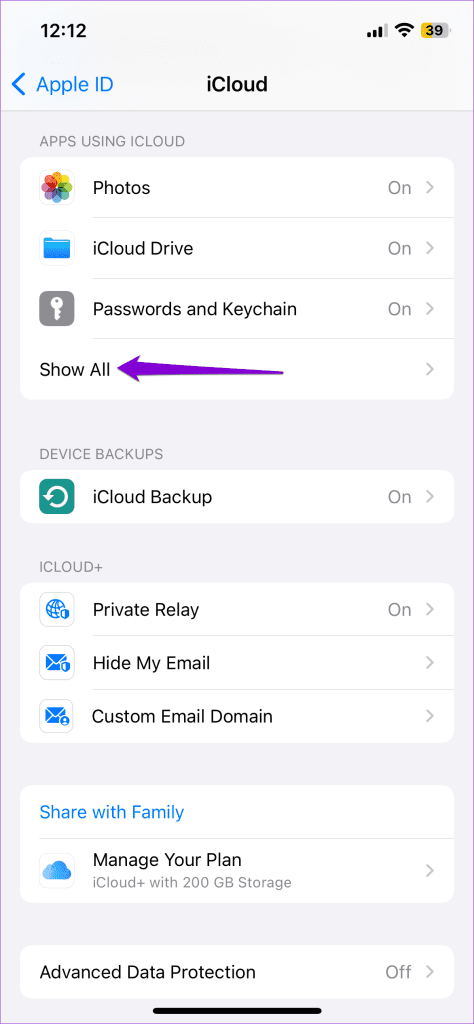
Fix 1: Disable and Re-Enable iCloud Sync for WhatsApp
If WhatsApp has trouble retrieving chats from iCloud, it may get stuck when using the search tool. You can try refreshing WhatsApp’s iCloud sync permission and see if that fixes the problem.
Step 1: Open the Settings app on your iPhone and tap on your name at the top.
Step 2: Tap iCloud. Under Apps Using iCloud, tap Show All.
Step 3: Locate and disable the toggle for WhatsApp. Wait for a few seconds and turn it back on.


Fix 2: Disable Background App Refresh for WhatsApp
This may seem odd, but several Reddit users reported success in resolving issues with WhatsApp search by disabling the Background App Refresh permission for the app. You can also give this method a shot.
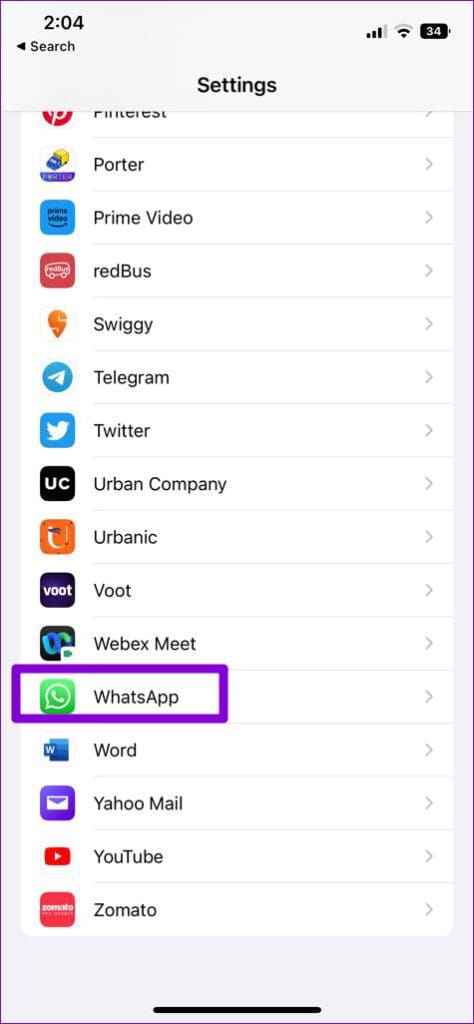
Step 1: Open the Settings app > scroll down to tap on WhatsApp.
Step 2: Disable the toggle for Background App Refresh.

Fix 3: Turn off Siri Suggestions for WhatsApp
On iOS, Apple’s virtual assistant—Siri—analyzes information from third-party apps like WhatsApp to provide relevant search suggestions. This feature can interfere with WhatsApp and prevent you from searching for messages. To avoid this, disable Siri suggestions for WhatsApp by following the steps below.
Step 1: Open the Settings app and scroll down to tap on WhatsApp.
Step 2: Tap on Siri & Search and disable the toggles for Learn from this App and Show App in Search.


Was this helpful?
Last updated on 12 August, 2024
Read Next
 4 Ways to Fix App Store Search Not Working on iPhone
Try Basic Fixes Check the App Store server status: Sometimes, the App Store can suffer from service outages.
4 Ways to Fix App Store Search Not Working on iPhone
Try Basic Fixes Check the App Store server status: Sometimes, the App Store can suffer from service outages.
 6 Ways to Fix Spotlight Search Not Working On iPhone and iPad
Before you begin, try restarting your iPhone or updating it to the latest version to get rid of any bugs that are affecting Spotlight Search.
6 Ways to Fix Spotlight Search Not Working On iPhone and iPad
Before you begin, try restarting your iPhone or updating it to the latest version to get rid of any bugs that are affecting Spotlight Search.
 4 Ways to Fix iPhone Calendar Search Not Working
Basic Troubleshooting Restart the Calendar app: Restarting the app can usually fix minor bugs or system errors.
4 Ways to Fix iPhone Calendar Search Not Working
Basic Troubleshooting Restart the Calendar app: Restarting the app can usually fix minor bugs or system errors.
 A Guide to Using the Search Bar and Search Operators in Microsoft Outlook
How to Use the Microsoft Outlook Search Bar There are two ways to use the Microsoft Outlook Search bar.
A Guide to Using the Search Bar and Search Operators in Microsoft Outlook
How to Use the Microsoft Outlook Search Bar There are two ways to use the Microsoft Outlook Search bar.
 Top 8 Ways to Fix Messenger Search in Conversation Not Working on Android and iPhone
As your Messenger conversations grow and the number of messages increases, it can be quite difficult to find specific messages during a conversation.
Top 8 Ways to Fix Messenger Search in Conversation Not Working on Android and iPhone
As your Messenger conversations grow and the number of messages increases, it can be quite difficult to find specific messages during a conversation.
 3 Ways to Fix iPhone Gets Stuck on Search Screen
Try Basic Fixes Force restart your iPhone: Press and quickly release the volume up button.
3 Ways to Fix iPhone Gets Stuck on Search Screen
Try Basic Fixes Force restart your iPhone: Press and quickly release the volume up button.
 7 Best Fixes for iMessage Search Not Working on iPhone
Like other messaging apps, iMessage also comes packed with features for iPhone.
7 Best Fixes for iMessage Search Not Working on iPhone
Like other messaging apps, iMessage also comes packed with features for iPhone.
 5 Ways to Fix File Explorer Search Not Working on Windows 11
Basic Fixes Perform a clean boot: An installed PC software may conflict with the File Explorer app, causing the search issue.
5 Ways to Fix File Explorer Search Not Working on Windows 11
Basic Fixes Perform a clean boot: An installed PC software may conflict with the File Explorer app, causing the search issue.
The article above may contain affiliate links which help support Guiding Tech. The content remains unbiased and authentic and will never affect our editorial integrity.