Try Basic Fixes
- Rule out issues with your internet: A slow or patchy internet connection is commonly why WhatsApp Desktop may encounter sync issues and log you out. Hence, the first thing to do is ensuring that your PC has stable internet access.
- Update WhatsApp: If you’re using an outdated app version, you may encounter problems with WhatsApp Desktop. Open the Microsoft Store app to update WhatsApp on your PC and see if that helps.
Fix 1: Allow WhatsApp to Run in the Background
You can prevent apps from running in the background and using system resources on Windows. However, this can prevent apps like WhatsApp from syncing data when you are not using the app. As a result, WhatsApp Desktop may stop working and log you out unexpectedly. To avoid this, allow WhatsApp to run in the background at all times on Windows. Here’s how to do it.
Step 1: Press the Windows key + I to launch the Settings app > head to Apps > Installed apps.
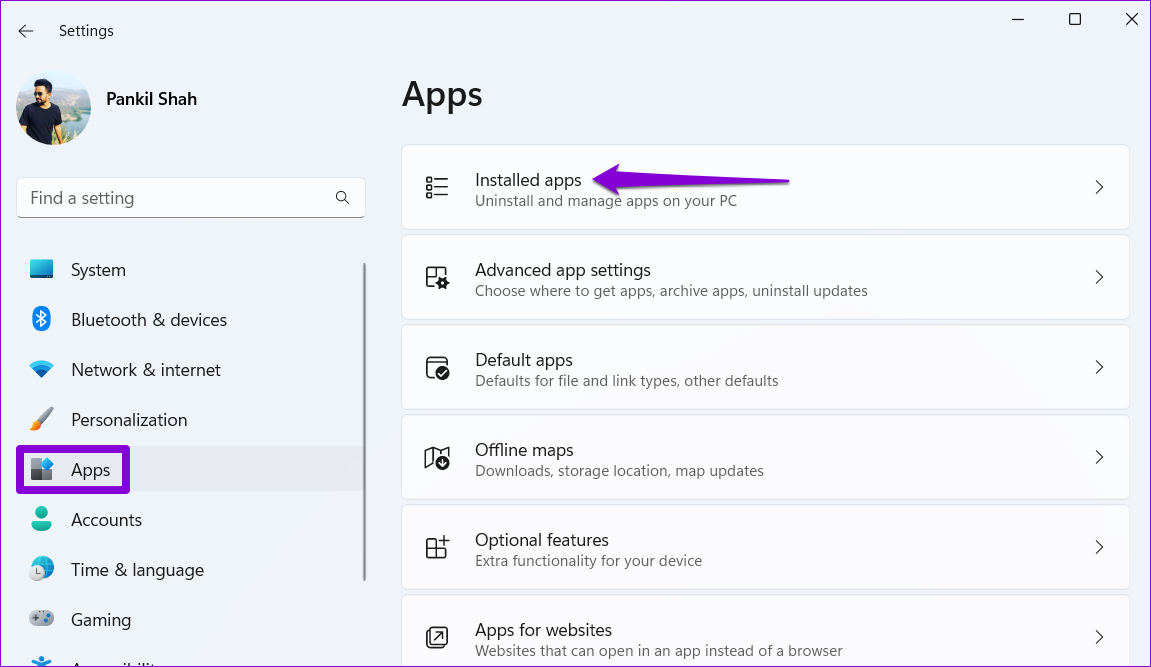
Step 2: Scroll down or use the search tool to locate WhatsApp on the list. Click the three-dot menu icon next to it > select Advanced options.

Step 3: Click the drop-down menu under Background apps permissions and select Always.

Fix 2: Repair or Reset the App
The built-in app repair feature in Windows is effective at fixing common app-related issues without affecting app data. You can use this feature to fix any issues with WhatsApp that might have resulted in unexpected logouts.
To repair WhatsApp on Windows, use these steps:
Step 1: Click the search icon on the taskbar > type WhatsApp > select App settings from the right pane.
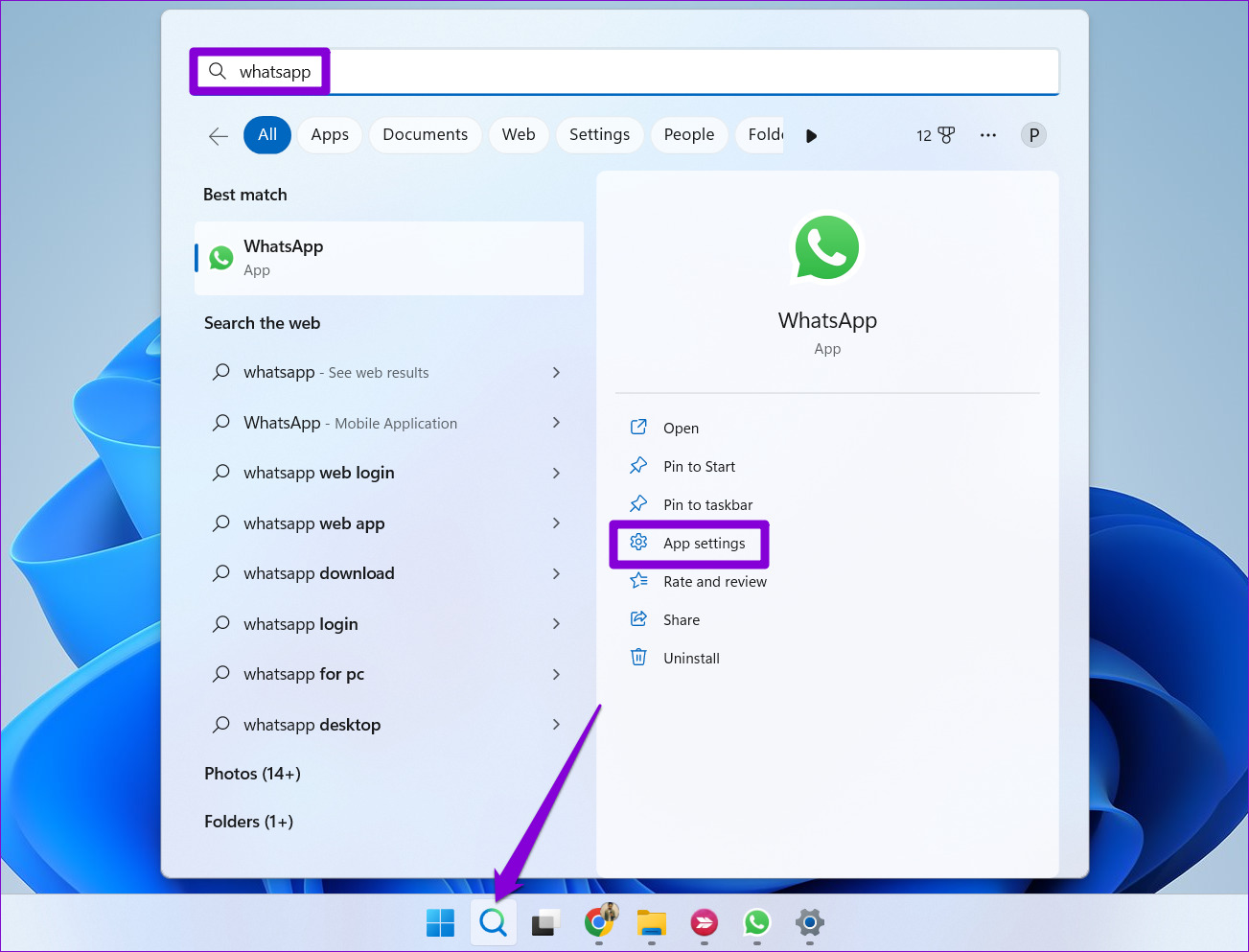
Step 2: Scroll to the Reset section and click on Repair. Once the process is complete, a checkmark will appear next to it.
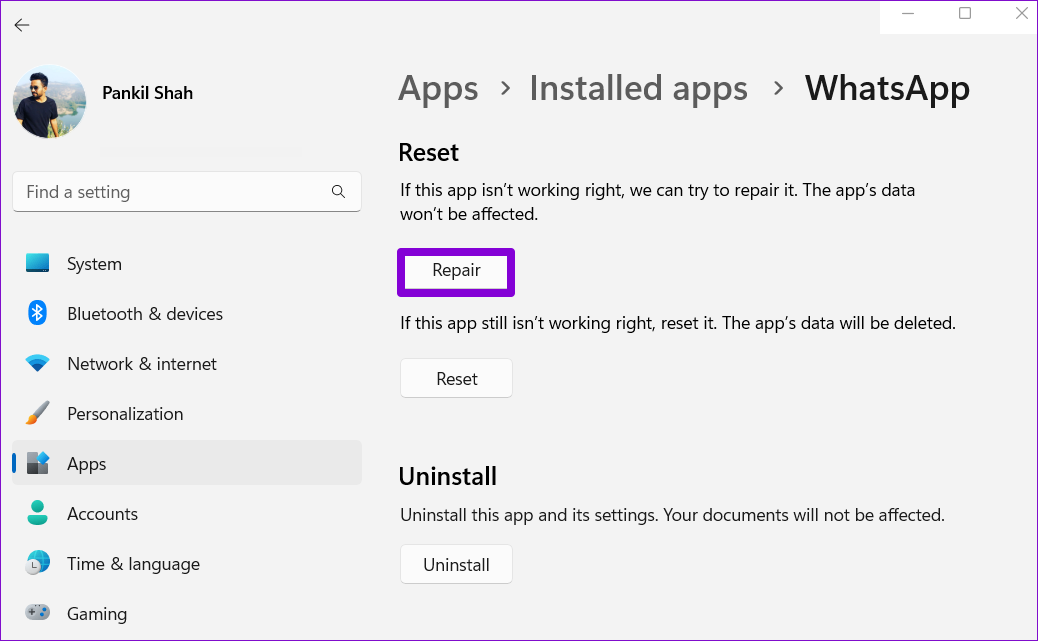
If the issue persists, try resetting the app from the above menu. Note that this will erase all the app data from your PC and restore the app to its default settings.
Was this helpful?
Last updated on 09 August, 2024
Read Next
 3 Fixes for Telegram Keeps Logging Me Out on Mobile and Desktop
Basic Fixes Force quit and relaunch the Telegram app: This will give the app a fresh start on your device.
3 Fixes for Telegram Keeps Logging Me Out on Mobile and Desktop
Basic Fixes Force quit and relaunch the Telegram app: This will give the app a fresh start on your device.
 2 Ways to Fix Discord Keeps Logging Me Out
Basic Fixes: Log out of unknown devices: You should log out from unknown devices and try again.
2 Ways to Fix Discord Keeps Logging Me Out
Basic Fixes: Log out of unknown devices: You should log out from unknown devices and try again.
 6 Ways to Fix Chrome Keeps Logging Me Out Issue
Basic Fixes Disable Chrome extensions: Select the vertical three-dot menu at the top right of Google Chrome, and click Extensions > Manage Extensions.
6 Ways to Fix Chrome Keeps Logging Me Out Issue
Basic Fixes Disable Chrome extensions: Select the vertical three-dot menu at the top right of Google Chrome, and click Extensions > Manage Extensions.
 4 Ways to Fix Facebook Keeps Logging You Out
Fix 1: Clear Cache and Cookies Cache and cookies data stored by your browser can sometimes cause problems, such as Facebook logging you out randomly.
4 Ways to Fix Facebook Keeps Logging You Out
Fix 1: Clear Cache and Cookies Cache and cookies data stored by your browser can sometimes cause problems, such as Facebook logging you out randomly.
 5 Things to Try If X (Twitter) Keeps Logging You Out
Try These Things First Disable VPN: If you're using a VPN connection, X may log you out due to unusual or suspicious account activity.
5 Things to Try If X (Twitter) Keeps Logging You Out
Try These Things First Disable VPN: If you're using a VPN connection, X may log you out due to unusual or suspicious account activity.
 Why Does Netflix Keep Logging Me Out and 3 Ways to Fix It
Why Netflix Logged You Out Automatically There are a few reasons why Netflix asks for sign-in every time you open the service.
Why Does Netflix Keep Logging Me Out and 3 Ways to Fix It
Why Netflix Logged You Out Automatically There are a few reasons why Netflix asks for sign-in every time you open the service.
 5 Ways to Fix Desktop Background Keeps Changing in Windows 11
Fix 1: Check Desktop Background Settings Enabling wallpaper slideshow in Windows can cause your desktop background to change at regular intervals.
5 Ways to Fix Desktop Background Keeps Changing in Windows 11
Fix 1: Check Desktop Background Settings Enabling wallpaper slideshow in Windows can cause your desktop background to change at regular intervals.
 5 Fixes for Windows 11 Desktop That Keeps Refreshing
Try Basic Fixes Close background apps: Open the Task Manager and go through the list of apps running in the background.
5 Fixes for Windows 11 Desktop That Keeps Refreshing
Try Basic Fixes Close background apps: Open the Task Manager and go through the list of apps running in the background.
The article above may contain affiliate links which help support Guiding Tech. The content remains unbiased and authentic and will never affect our editorial integrity.