

Basic Fixes
- Switch to Wi-Fi: Contact syncing on Telegram requires faster internet speeds. So we suggest connecting to a Wi-Fi network.
- Force quit and relaunch: This will give the app a fresh start and once you relaunch, the syncing should finish smoothly.
- Update or reinstall Telegram: Install the latest version of the Telegram app to get rid of bugs or glitches.
Fix 1: Enable Contact Sync in Telegram App
If Telegram fails to sync contacts, you’ll need to enable the contact syncing feature in the app on your iPhone or Android.
On Android, open Telegram > Settings > Privacy and Security > Sync Contacts.


For iPhone, open Telegram > Settings > Privacy and Security > Data Settings > Sync Contacts.


Fix 2: Enable Contact Access for Telegram
The Telegram app should needs to access your contacts to sync them and show them in the app. So the next solution, if your newly added contacts are not showing in Telegram, is to enable contact syncing.
On iPhone
Open Settings > Telegram > enable Contacts access.


On Android
Open Contacts app info > Permissions > Contacts > enable permissions.


Fix 3: Clear Telegram App Cache
The App Cache saves all your app preferences and login information. But with time, large amounts of cached data can lead to the malfunctioning of the app. In the case of Telegram, you can try clearing its App Cache on your Android and iPhone.
On iPhone
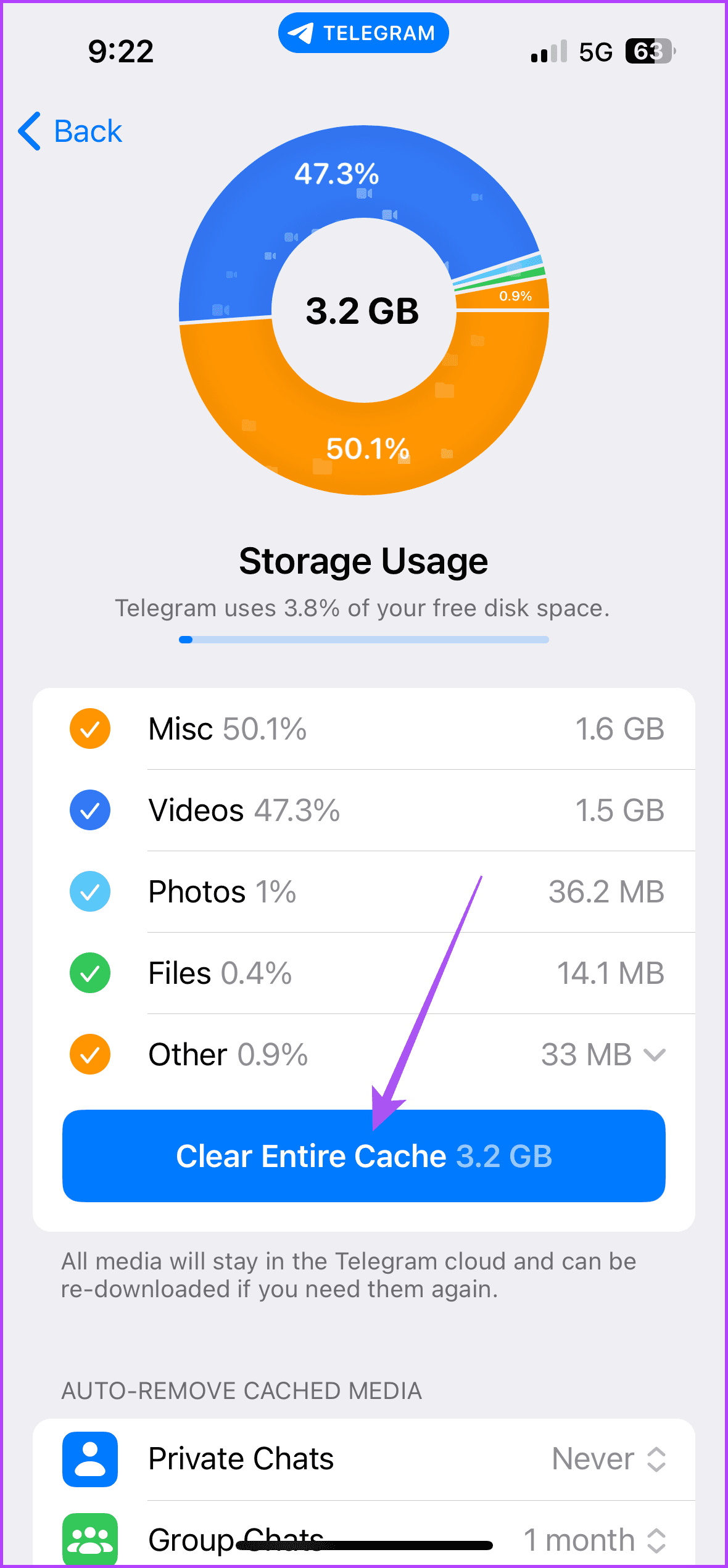
Open Telegram > Data and Storage > Storage Usage > Clear Entire Cache.

On Android
Open Telegram app info > Storage and cache > Clear cache.


Tip: You can also read our post about how to log out of devices from your Telegram account.
Was this helpful?
Last updated on 03 September, 2024
1 Comment
Leave a Reply
Read Next
 3 Fixes for Outlook Contacts Not Syncing on iPhone and Mac
Basic Fixes Check internet speed: Check if you are getting good internet speeds on your mobile network or Wi-Fi.
3 Fixes for Outlook Contacts Not Syncing on iPhone and Mac
Basic Fixes Check internet speed: Check if you are getting good internet speeds on your mobile network or Wi-Fi.
 Google Contacts vs Samsung Contacts: Which App Is Best for Saving and Managing Contacts
Apart from phones running Stock Android, all other Android phones have their own set of basic apps.
Google Contacts vs Samsung Contacts: Which App Is Best for Saving and Managing Contacts
Apart from phones running Stock Android, all other Android phones have their own set of basic apps.
 iCloud Contacts vs Google Contacts: Where Should You Save Contacts on Your iPhone
When you are using an Android phone, one prefers using Google Contacts to store and manage contacts.
iCloud Contacts vs Google Contacts: Where Should You Save Contacts on Your iPhone
When you are using an Android phone, one prefers using Google Contacts to store and manage contacts.
 How to Stop Syncing Google Contacts to iPhone
How to Remove Google Contacts from iPhone Open the Settings app, go to Contacts > Accounts, select the Gmail account, and turn off contacts.
How to Stop Syncing Google Contacts to iPhone
How to Remove Google Contacts from iPhone Open the Settings app, go to Contacts > Accounts, select the Gmail account, and turn off contacts.
 Top 7 Ways to Fix iCloud Contacts Not Syncing on iPhone
Most iPhone users sync their data to iCloud, thanks to the free 5GB storage with every Apple account.
Top 7 Ways to Fix iCloud Contacts Not Syncing on iPhone
Most iPhone users sync their data to iCloud, thanks to the free 5GB storage with every Apple account.
 A Guide to Syncing iPhone Contacts to Google Account
Here's a guide to syncing iPhone contacts to your Google Account.
A Guide to Syncing iPhone Contacts to Google Account
Here's a guide to syncing iPhone contacts to your Google Account.
 4 Ways to Fix Contacts App Not Syncing on Samsung Galaxy Phones
Common Fixes Verify correct date and time - Incorrect date and time prevents the Contacts app from syncing data.
4 Ways to Fix Contacts App Not Syncing on Samsung Galaxy Phones
Common Fixes Verify correct date and time - Incorrect date and time prevents the Contacts app from syncing data.
 How to Suggest Profile Picture to Your Telegram Contacts
How to Suggest a Picture Photo on Telegram Mobile App You can suggest a profile photo to your Telegram contacts on the Telegram mobile app.
How to Suggest Profile Picture to Your Telegram Contacts
How to Suggest a Picture Photo on Telegram Mobile App You can suggest a profile photo to your Telegram contacts on the Telegram mobile app.
The article above may contain affiliate links which help support Guiding Tech. The content remains unbiased and authentic and will never affect our editorial integrity.
Friends cannot find me on Telegram; they only find me when they delete my number from their phone. books and re-save. Can you help?