Fix 1: Turn On Reduced Motion
Is Roblox showing a black screen when you try to join an experience? You can enable the Reduce Motion option, which helped several Reddit users fix the issue almost instantly.
Step 1: Launch Roblox and open any game. Click the Roblox icon at the top-left corner.
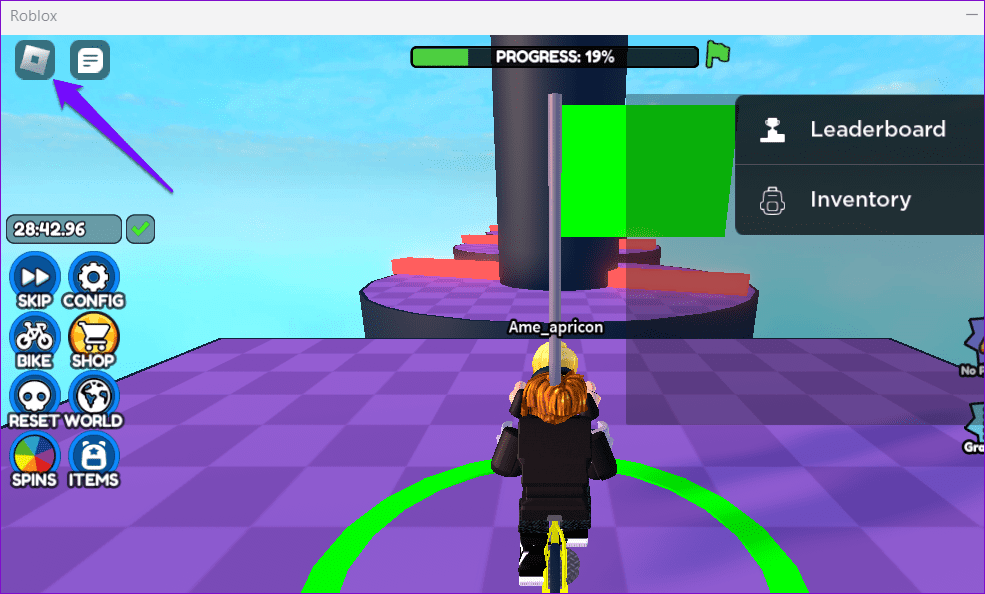
Step 2: Switch to the Settings tab and set Reduce Motion to On. Return to your game and check if it loads fine.

Fix 2: Lower Graphics Settings
Another reason the Roblox screen may turn black when entering a game is if the in-game graphics quality is too high and your computer’s hardware can’t process it. To resolve this issue, lower the quality of the in-game graphics, which will also make Roblox feel less laggy.
Step 1: Open Roblox and start your favorite game. Click the Roblox icon at the top-left corner.
Step 2: Switch to the Settings tab and set the Graphics Mode to Manual. Then, click the minus icon next to Graphics Quality to lower the quality of the in-game graphics.

Fix 3: Update the Graphics Driver (Windows)
If you are encountering a black screen issue on Windows with other apps and games, the graphics driver on your PC may be outdated. In that case, you can try updating the problematic driver using these steps:
Step 1: Press the Windows key + S to access the search menu. Type device manager and select the first result that appears.

Step 2: In the Device Manager window, expand Display adapters. Right-click on your driver and select the Update driver option.
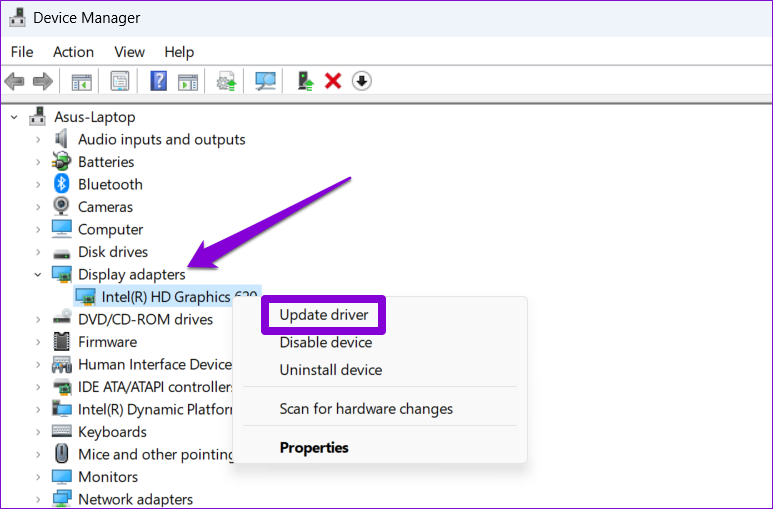
From there, follow the on-screen instructions to update the driver.
Fix 4: Clear Roblox Cache
Outdated or corrupt Roblox cache data on your phone or computer can also cause such anomalies. You can clear the existing Roblox cache data to see if that restores normalcy.
Windows
Step 1: Press the Windows key + R to open the Run dialog box. Type %localappdata%\Temp in the Open field and press Enter.
Step 2: In the File Explorer window that opens, select the Roblox folder and click the trash icon at the top to delete it.

Mac
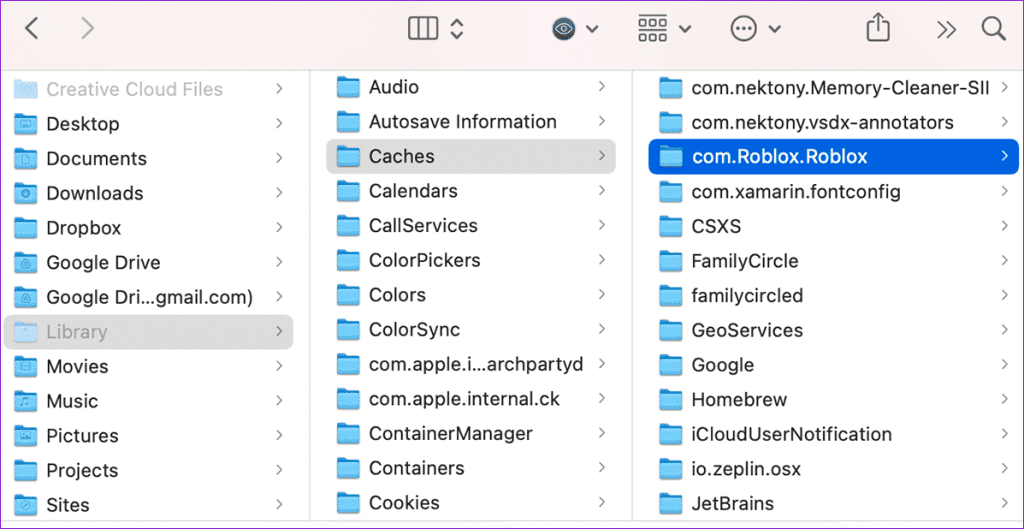
Step 1: Press the Shift + Command + G keyboard shortcut, type in ~/Library/Caches, and press Enter.

Step 2: Select the com.Roblox.Roblox folder and press the Delete key.
Android
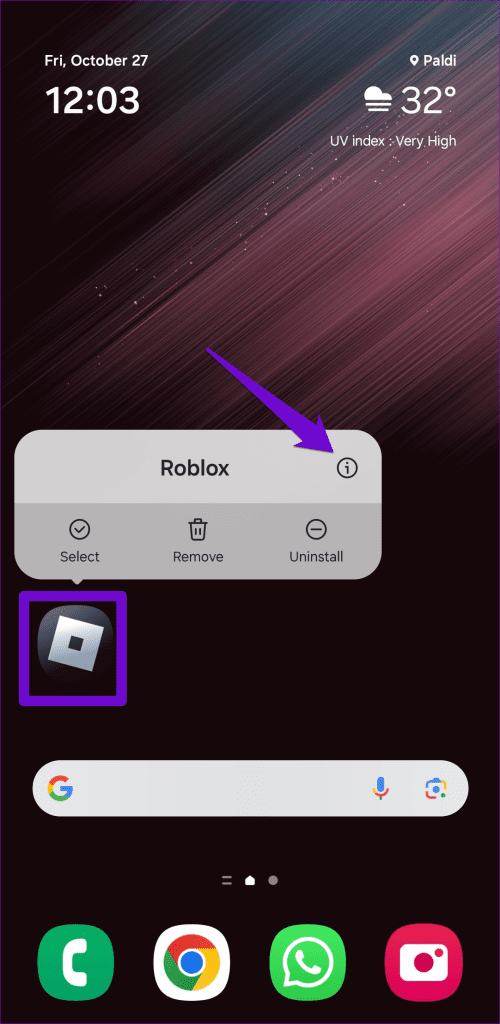
Step 1: Long-press on the Roblox app icon on your phone and tap the info icon from the resulting menu.
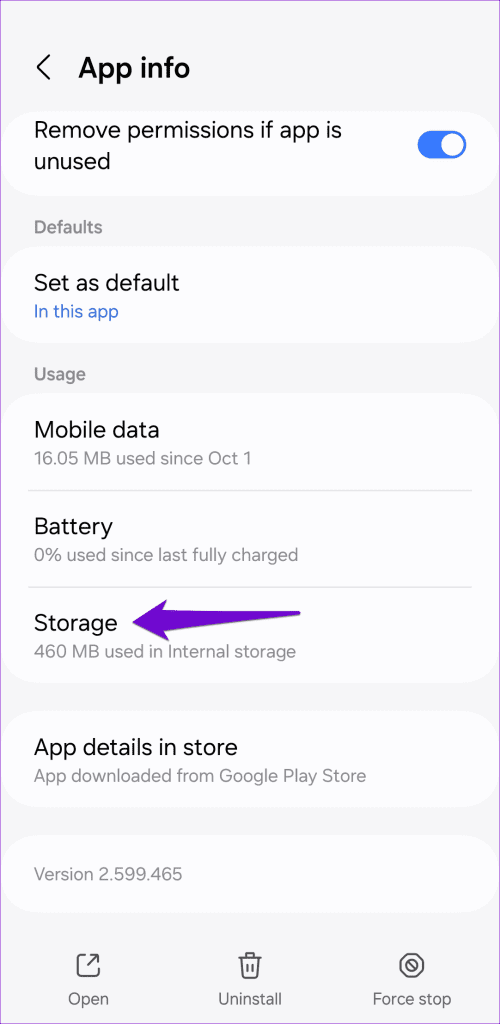
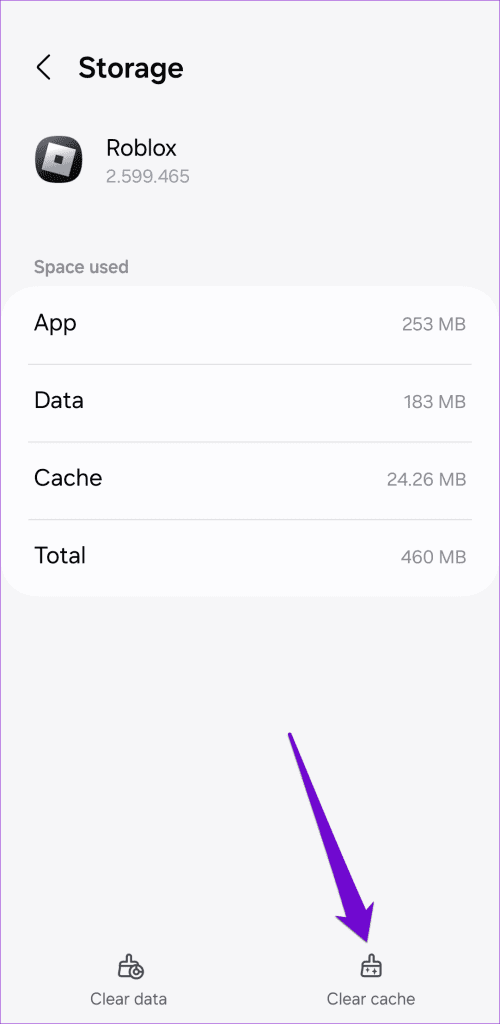
Step 2: Go to Storage and tap the Clear cache option.
Since there’s no way to clear the cache for Roblox on iPhone, you’ll need to delete it and reinstall it.
Fix 5: Reinstall Roblox
Still no luck? You can try uninstalling Roblox from your device and then reinstalling it. Doing so will help you get rid of any problematic app data and also update the app to its most recent version.
Desktop
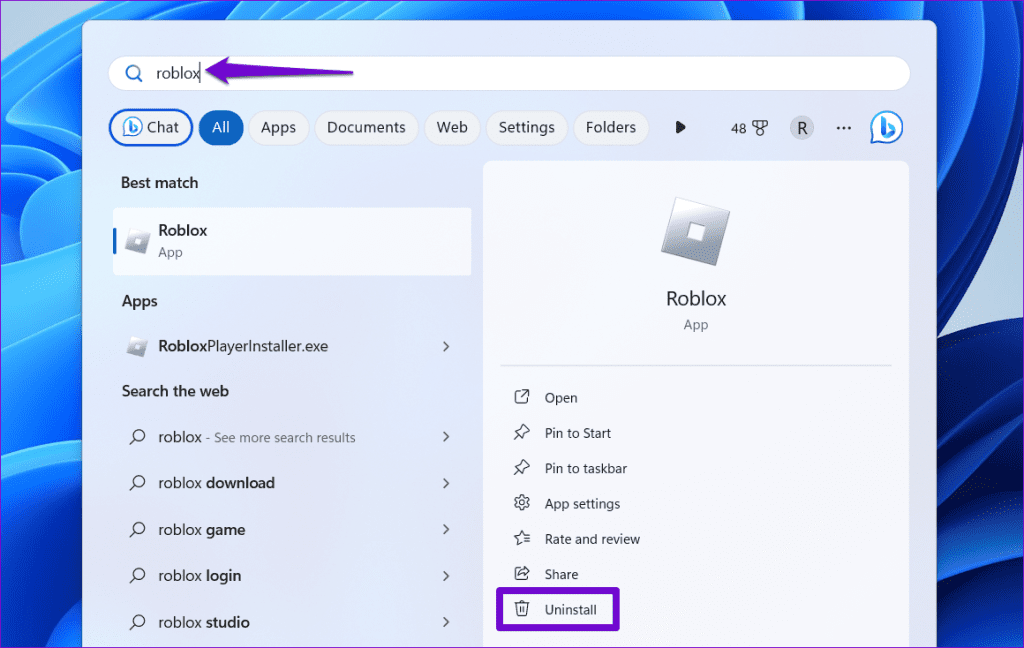
On Windows, press the Windows + S keyboard shortcut to access the search menu. Type Roblox in the search box and select Uninstall.
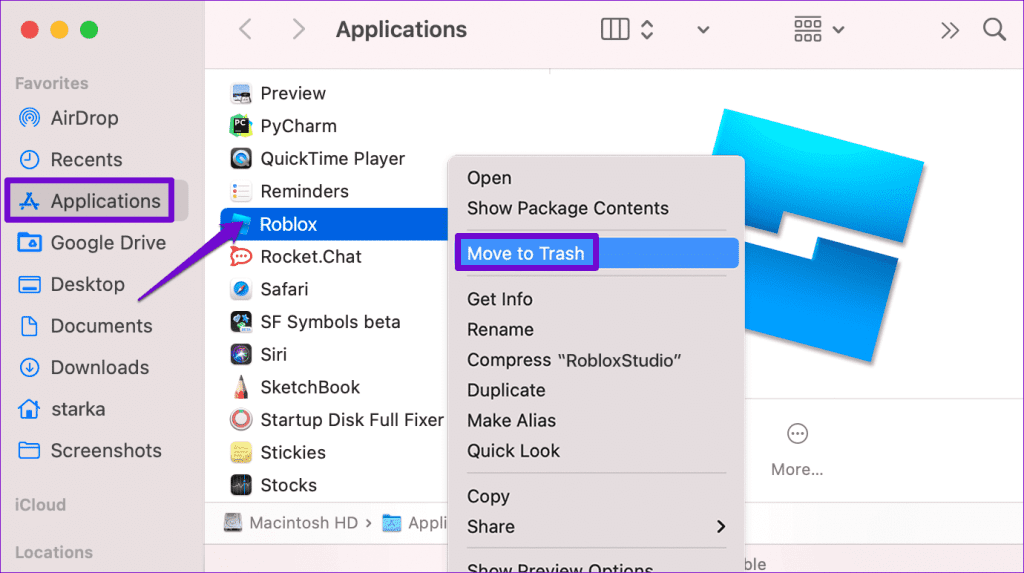
On Mac, open the Finder app and select Applications from the sidebar. Right-click on the Roblox app and select Move to Trash.
Mobile
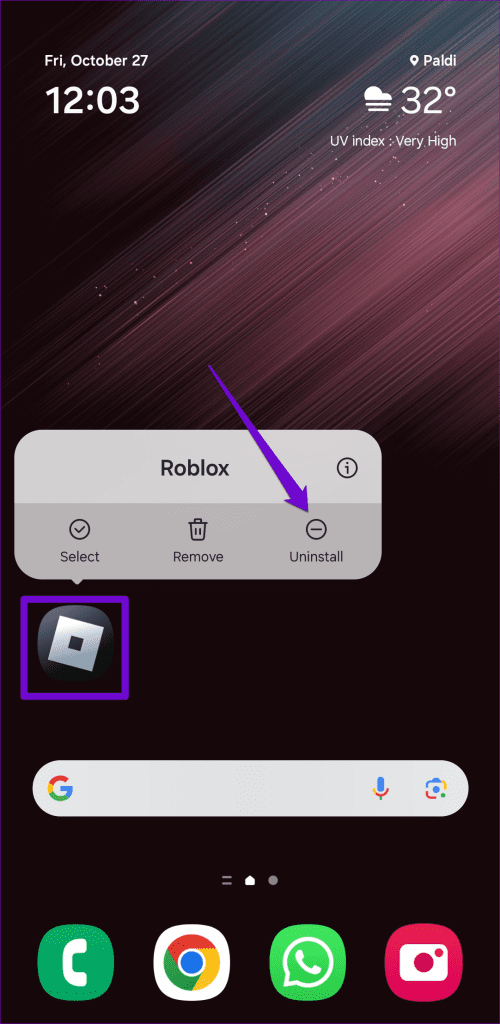
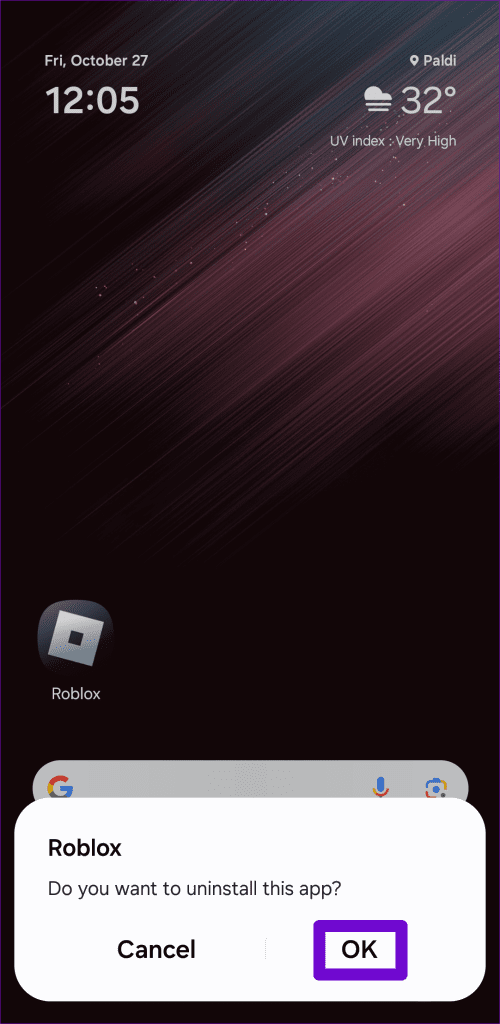
To remove Roblox from an Android, long press on its app icon and tap the Uninstall option. Then, tap OK to confirm.
On an iPhone, long-press the Roblox app icon and select Remove App. Then, tap on Delete App to confirm.


Download and install Roblox on your mobile or desktop and check if the issue still occurs after that.
Was this helpful?
Last updated on 28 August, 2024
Read Next
 8 Ways to Fix Crunchyroll Showing Black Screen Issue
Streaming on Crunchyroll is extremely convenient, thanks to the desktop and mobile app support.
8 Ways to Fix Crunchyroll Showing Black Screen Issue
Streaming on Crunchyroll is extremely convenient, thanks to the desktop and mobile app support.
 3 Fixes for Roblox Cursor Going Off Screen on Windows
Fix 1: Repair or Reset Roblox First, you should use the app repair feature on Windows to fix Roblox.
3 Fixes for Roblox Cursor Going Off Screen on Windows
Fix 1: Repair or Reset Roblox First, you should use the app repair feature on Windows to fix Roblox.
 4 Ways to Fix Windows 11 Black Screen Issue
Try Basic Fixes Check connections: If you are using a Windows 11 desktop, check the wired connections between your CPU and the monitor.
4 Ways to Fix Windows 11 Black Screen Issue
Try Basic Fixes Check connections: If you are using a Windows 11 desktop, check the wired connections between your CPU and the monitor.
 2 Ways to Fix Android Auto Black Screen Issue
Basic Fixes Let your phone cool down if it's overheating: If your phone has been sitting in your car for a long time and it's sunny outside, it's possible your
2 Ways to Fix Android Auto Black Screen Issue
Basic Fixes Let your phone cool down if it's overheating: If your phone has been sitting in your car for a long time and it's sunny outside, it's possible your
 5 Ways to Fix the Black Screen Issue in Amazon Prime Video on Windows
Try Basic Fixes Temporarily disable your VPN connection: Although VPNs are great for maintaining privacy, they can often cause problems with streaming services such as Prime Video, especially if you
5 Ways to Fix the Black Screen Issue in Amazon Prime Video on Windows
Try Basic Fixes Temporarily disable your VPN connection: Although VPNs are great for maintaining privacy, they can often cause problems with streaming services such as Prime Video, especially if you
 3 Ways to Fix iPhone Screen Black and White Issue
Basic Fixes: Connect to a charger: If your device has low battery levels, it might automatically switch to the Grayscale setting to extend battery life.
3 Ways to Fix iPhone Screen Black and White Issue
Basic Fixes: Connect to a charger: If your device has low battery levels, it might automatically switch to the Grayscale setting to extend battery life.
 4 Fixes for Can’t Join Roblox Games
Try Basic Fixes Check if your Roblox account is banned: Roblox may suspend your account for a certain time and restrict your access to games if you violate its Community
4 Fixes for Can’t Join Roblox Games
Try Basic Fixes Check if your Roblox account is banned: Roblox may suspend your account for a certain time and restrict your access to games if you violate its Community
 4 Fixes for Roblox Not Letting Me Log In
Try Basic Fixes Check if Roblox is down: Sometimes, server congestion or other related issues can prevent you from accessing your Roblox account.
4 Fixes for Roblox Not Letting Me Log In
Try Basic Fixes Check if Roblox is down: Sometimes, server congestion or other related issues can prevent you from accessing your Roblox account.
The article above may contain affiliate links which help support Guiding Tech. The content remains unbiased and authentic and will never affect our editorial integrity.