

Try Basic Fixes
- Toggle airplane mode: Turning airplane mode on and off is an easy way to refresh all the network connections on your Android. If it’s just a minor network glitch preventing Play Store from connecting to the internet, toggling the airplane mode should help.
- Temporarily disable VPN: Although a VPN connection protects your privacy and allows you to bypass region-specific restrictions, it can occasionally cause internet connectivity issues. To check for this possibility, you can temporarily disable the VPN connection on your phone.
Fix 1: Clear Play Store Cache
The Google Play Store accumulates cache data on your phone to perform certain tasks faster. Over time, this data could become outdated or corrupted for various reasons and conflict with app processes. You can try clearing this cache data and see if that gets the Play Store to work.
Step 1: Long-press the Play Store app icon and tap the info icon from the resulting menu.
Step 2: Go to Storage and tap the Clear cache option at the bottom.


Fix 2: Check System Date and Time Settings
Having your phone set to an incorrect date or time can prevent the Play Store from connecting to the servers and lead to various errors. This usually happens when you disable the automatic date and time feature on your Android. Here’s how to enable it.
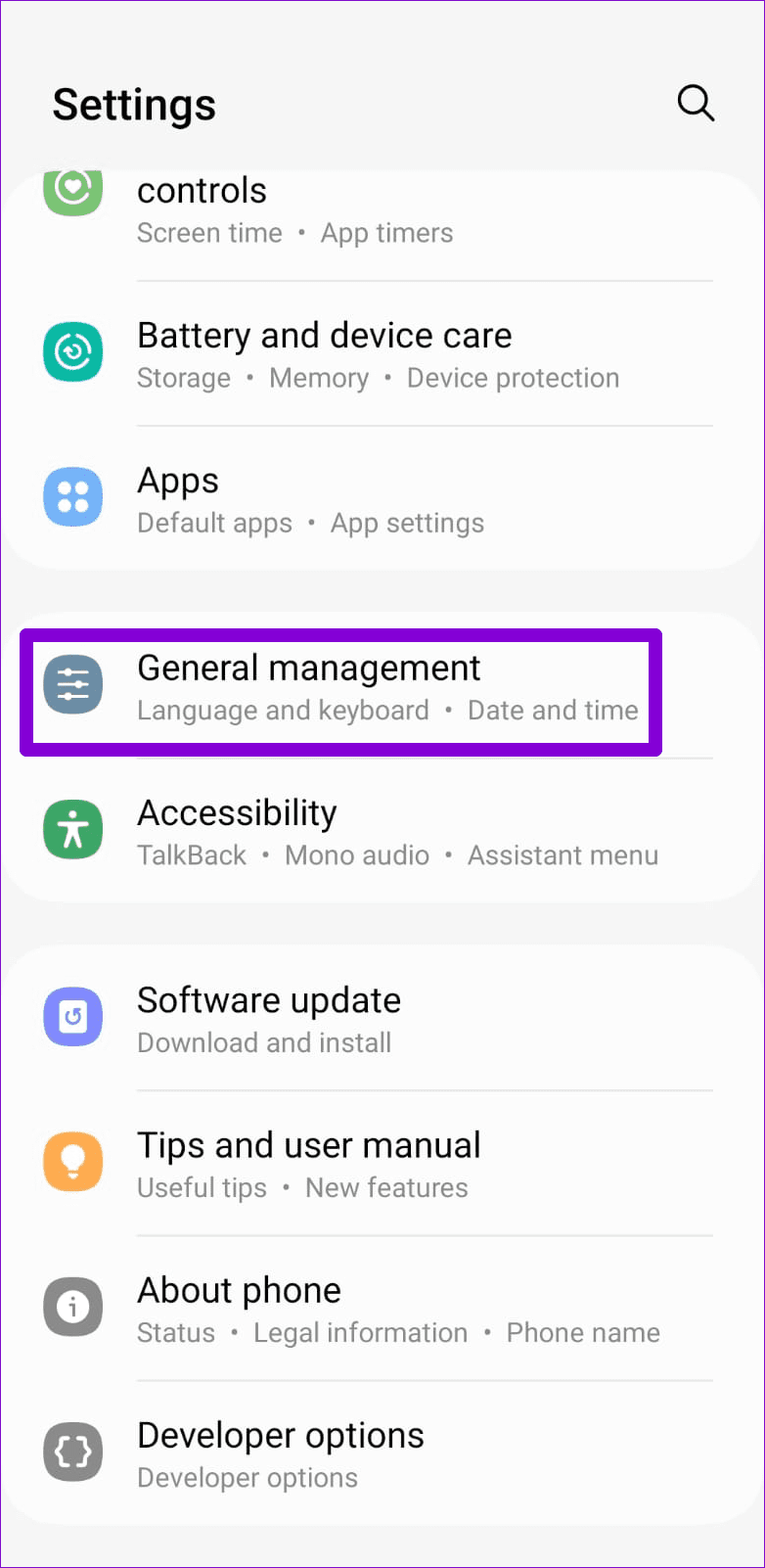
Step 1: Open the Settings menu on your phone and go to General management.
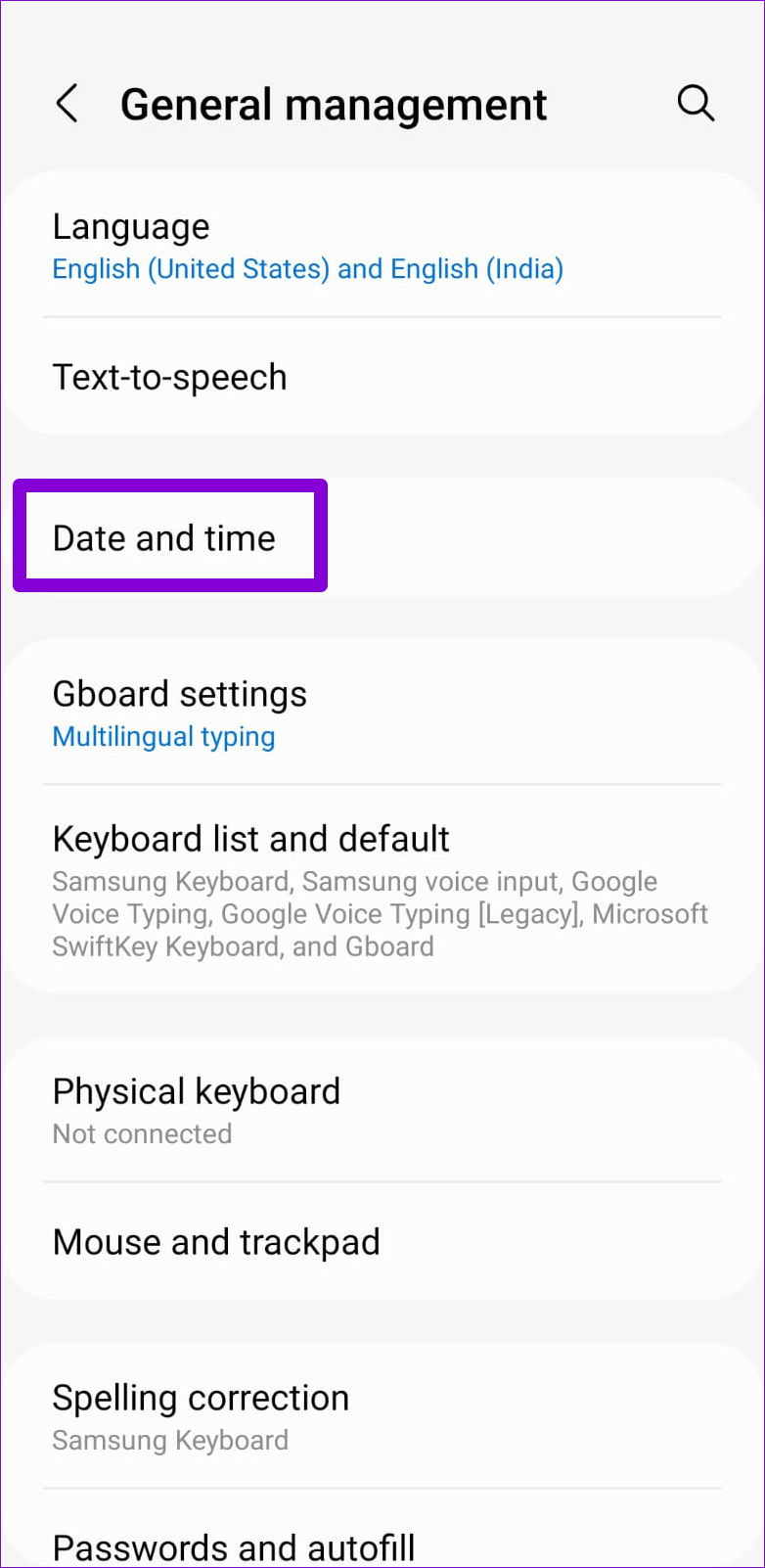
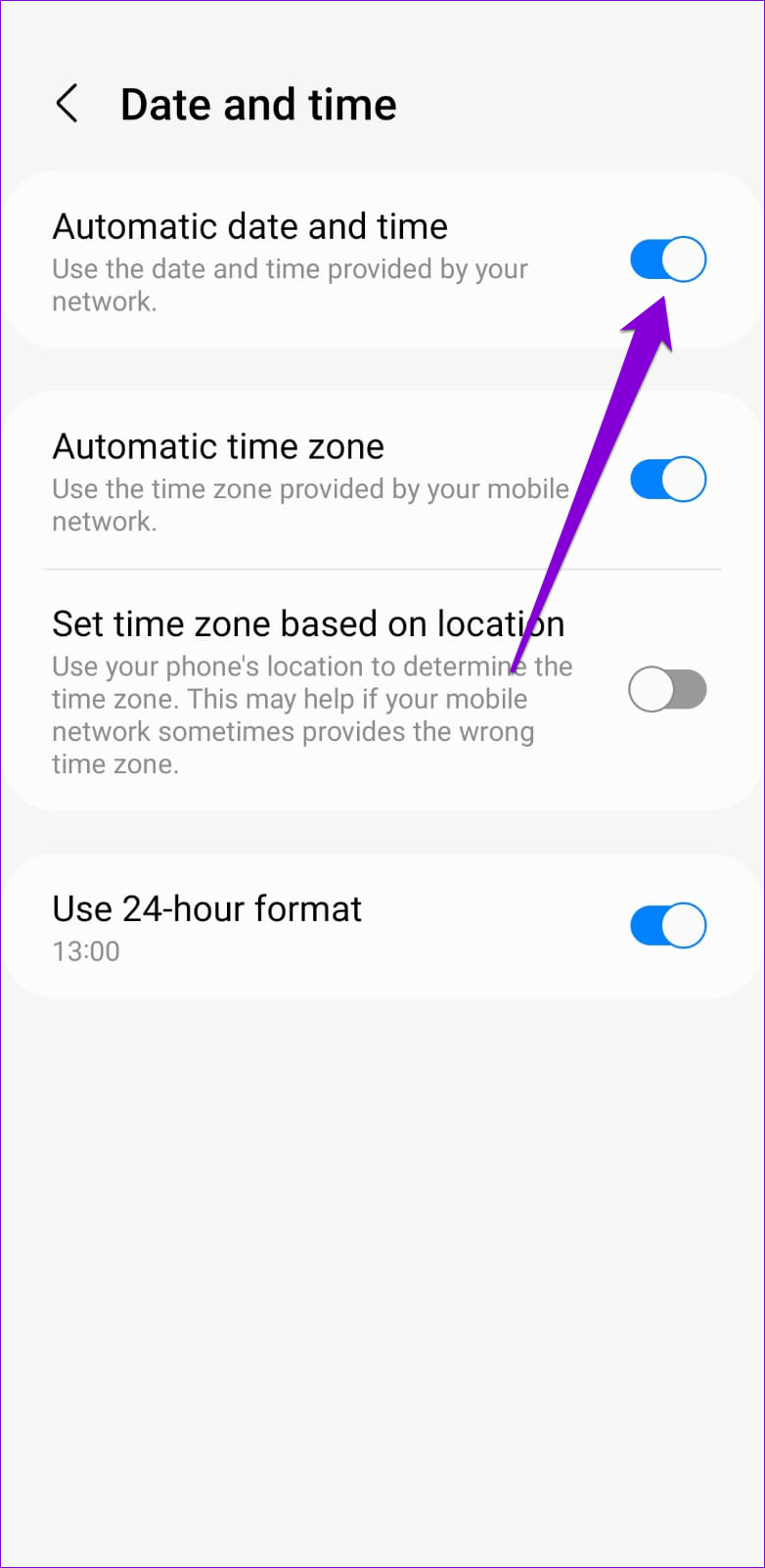
Step 2: Tap on Date and time and enable the toggle for Automatic date and time from the following menu.
Fix 3: Reset Google Play Services
Google Play Services is a system app that works behind the scenes to connect apps and Google services together. If Google Play Services is experiencing any issues, it may affect your other apps. In most cases, you can fix such issues by resetting Google Play Services on your phone.
Step 1: Open the Settings app and navigate to Apps.
Step 2: Scroll down to tap on Google Play Services.


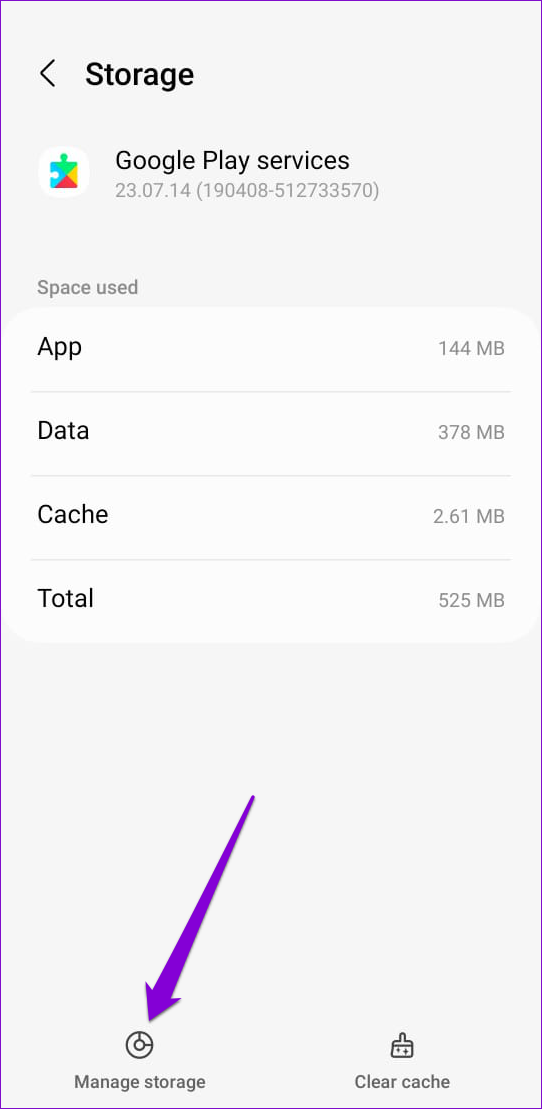
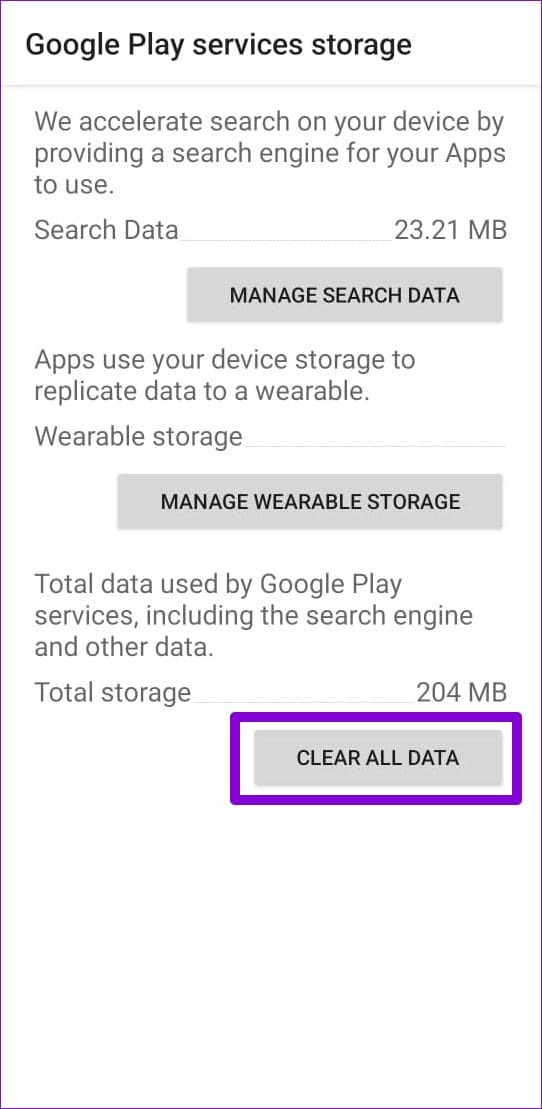
Step 3: Go to Storage > Manage storage and hit the Clear All Data button.

Fix 4: Uninstall Google Play Store Updates
The Google Play Store, like any other app, receives regular updates. Since these updates are installed automatically in the background, you may not notice them. It’s possible that a recent Play Store update installation has gone wrong and caused this issue. If that’s the case, uninstalling Play Store updates should help.
Step 1: Long-press on the Play Store icon and tap the info icon from the resulting menu.
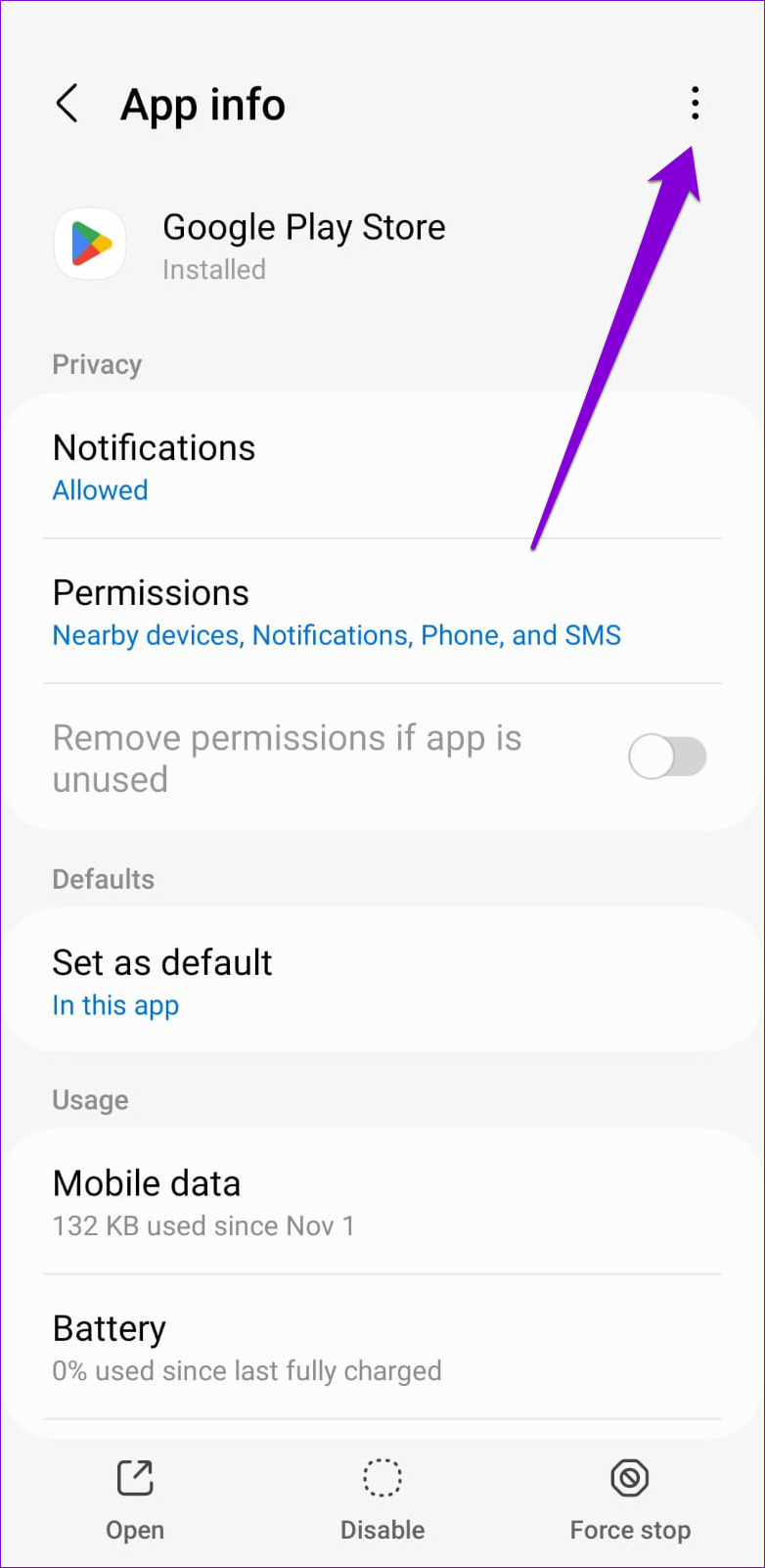
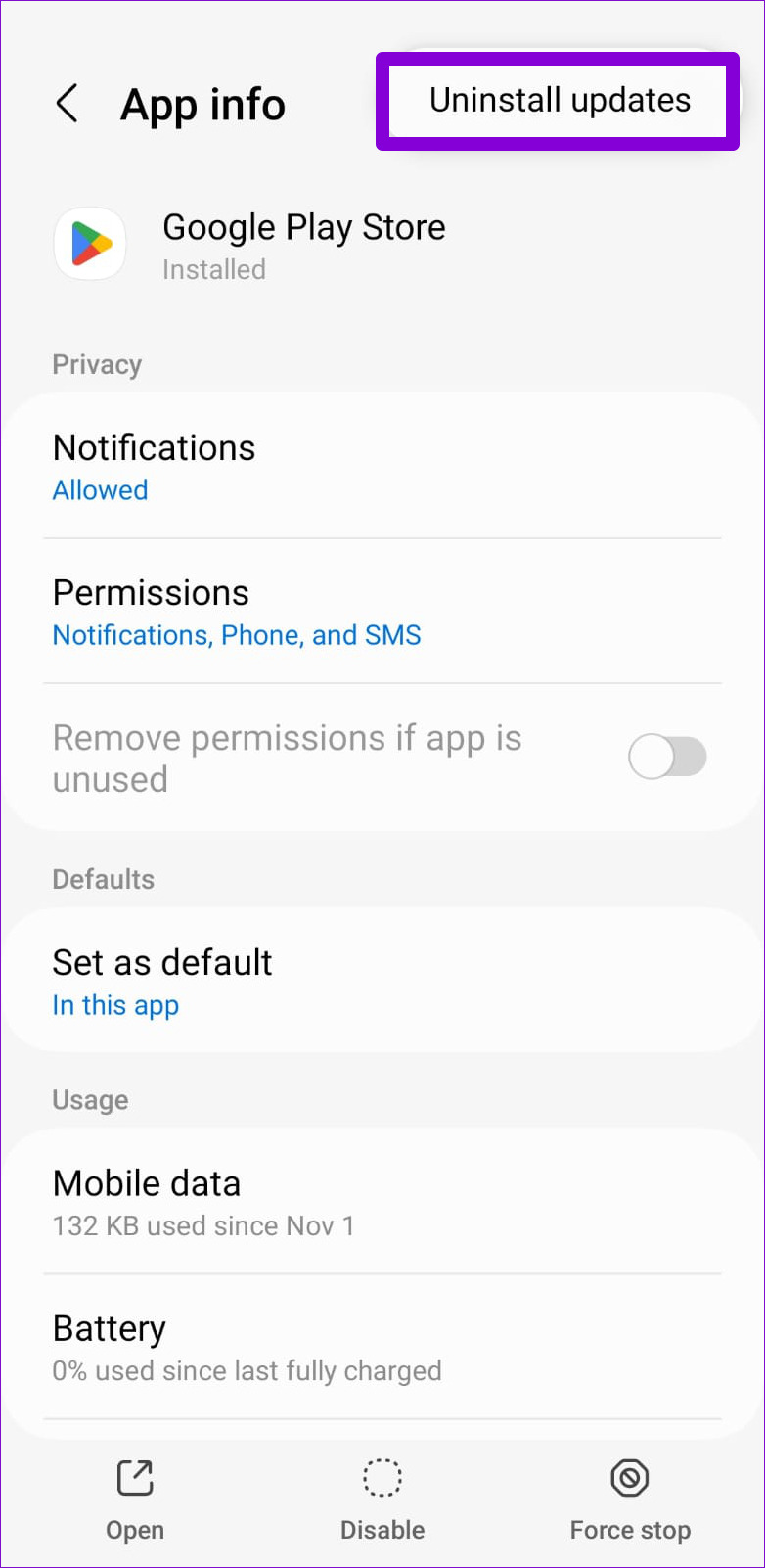
Step 2: Tap the three-dot menu icon in the top right corner and select Uninstall updates. Then, hit OK to proceed.
Open the Play Store again and see if it loads fine. If it does, you can update the Play Store app manually and start using it.
Was this helpful?
Last updated on 30 June, 2024
2 Comments
Leave a Reply
Read Next
 6 Best Ways to Fix Windows 11 Apps Won’t Connect to the Internet
Computers have a myriad of apps that enhance the performance of certain features.
6 Best Ways to Fix Windows 11 Apps Won’t Connect to the Internet
Computers have a myriad of apps that enhance the performance of certain features.
 6 Ways to Fix Google Play Store Has Stopped Error on Android
Common Fixes Restart the device: Long-press the physical Power button and select Restart in the power menu.
6 Ways to Fix Google Play Store Has Stopped Error on Android
Common Fixes Restart the device: Long-press the physical Power button and select Restart in the power menu.
 5 Ways to Fix Google Play Store White Screen Problem
Basic Fixes Restart Play Store: Tap and hold the Play Store app, select App Info, and tap on Force Stop.
5 Ways to Fix Google Play Store White Screen Problem
Basic Fixes Restart Play Store: Tap and hold the Play Store app, select App Info, and tap on Force Stop.
 6 Ways to Fix Google Play Store Not Opening on Android
Basic Fixes Check the Google Play server: Access the Google Play Status Dashboard to verify the Play Store service availability.
6 Ways to Fix Google Play Store Not Opening on Android
Basic Fixes Check the Google Play server: Access the Google Play Status Dashboard to verify the Play Store service availability.
 5 Ways to Fix Error Checking for Updates in the Google Play Store
Basic Fixes Check the app update preference: If you can't update apps manually, check the app update preference to automate it.
5 Ways to Fix Error Checking for Updates in the Google Play Store
Basic Fixes Check the app update preference: If you can't update apps manually, check the app update preference to automate it.
 6 Fixes for Google Play Store Not Working on Samsung Galaxy Phones or Tablets
Try Basic Fixes Free up storage space: The Google Play Store may not download or update apps on your Samsung device if there is not enough storage space.
6 Fixes for Google Play Store Not Working on Samsung Galaxy Phones or Tablets
Try Basic Fixes Free up storage space: The Google Play Store may not download or update apps on your Samsung device if there is not enough storage space.
 7 Ways to Fix Google Play Store Not Showing Installed Apps
Fix 1: Turn Off Parental Controls on Play Store Parental control on Play Store allows you to prevent unauthorized transactions and hide inappropriate apps on Play Store.
7 Ways to Fix Google Play Store Not Showing Installed Apps
Fix 1: Turn Off Parental Controls on Play Store Parental control on Play Store allows you to prevent unauthorized transactions and hide inappropriate apps on Play Store.
 5 Ways to Fix Google Play Store ‘No Connection’ Error
Basic Ways: Restart your phone: Restarting your Android phone will help restart all device services, eliminating any temporary glitches that might be erroring out the Google Play Store app.
5 Ways to Fix Google Play Store ‘No Connection’ Error
Basic Ways: Restart your phone: Restarting your Android phone will help restart all device services, eliminating any temporary glitches that might be erroring out the Google Play Store app.
The article above may contain affiliate links which help support Guiding Tech. The content remains unbiased and authentic and will never affect our editorial integrity.

I did all the above steps but problem did not solve.
if phone is not connected to internet for a long it force me to connect to internet otherwise i can not use the phone. once the internet is connected phone is ok. then i can disconnect internet and the phone is working.
but why is it forcing me to connect to internet?
this problem has started just from a few days. i have Vivo V20 phone.
I recently purchased my first android phone, as I Google play Store on Android 14 only functions over wifi. Whenever I want to sgn in on the Google play store app, there appears the message “Something went wrong. Waiting on connection.”.
Somewhere else it says google play Store only connects and updates over wifi
“I want to access over mobile data which seemed impossible, til I stumbled upon a workaround.
I haven’t installed the Reddit app, and when I visit a reddit searchresult from DuckDuckGo, the system asks open in Reddit app or chrome.
I have disabled chrome so DuckDuckGo functions over android system webview.
When I select reddit as the app to view the page within, the page goes to reddit’s google play store page. From there it’s possible to search the store, and upon a click on “install”, the request to sign in to the store appears, upon which the sign in occurs over mobile data, as I keep my Android device’s wifi off permanently.
As I couldn’t find a solution to this problem online, I hope this helps all of you that searched for a solution.