

Fix 1: Sign Out of Your Google Account and Sign Back In
Authentication issues with your Google account can cause Google Maps to stop working in your browser. Most of the time, you can fix such issues by signing out of your Google account and back in.
Open the Google Maps website in a browser tab. If Google Maps does not load at all, visit Google Search or Gmail. Then, click on your profile icon at the top right and select Sign out of all accounts.

That will log you out of all Google services, including Maps. After a minute, sign back into your account to check if Google Maps works properly.
Fix 2: Disable Extensions
A conflicting third-party extension could prevent websites like Google Maps from loading or functioning properly in your browser. To check for this possibility, disable all browser extensions and try to load Google Maps.
Type chrome://extensions (Chrome) or edge://extensions (Edge) in the address bar at the top and press Enter. To disable the extensions, turn off the toggles next to them.
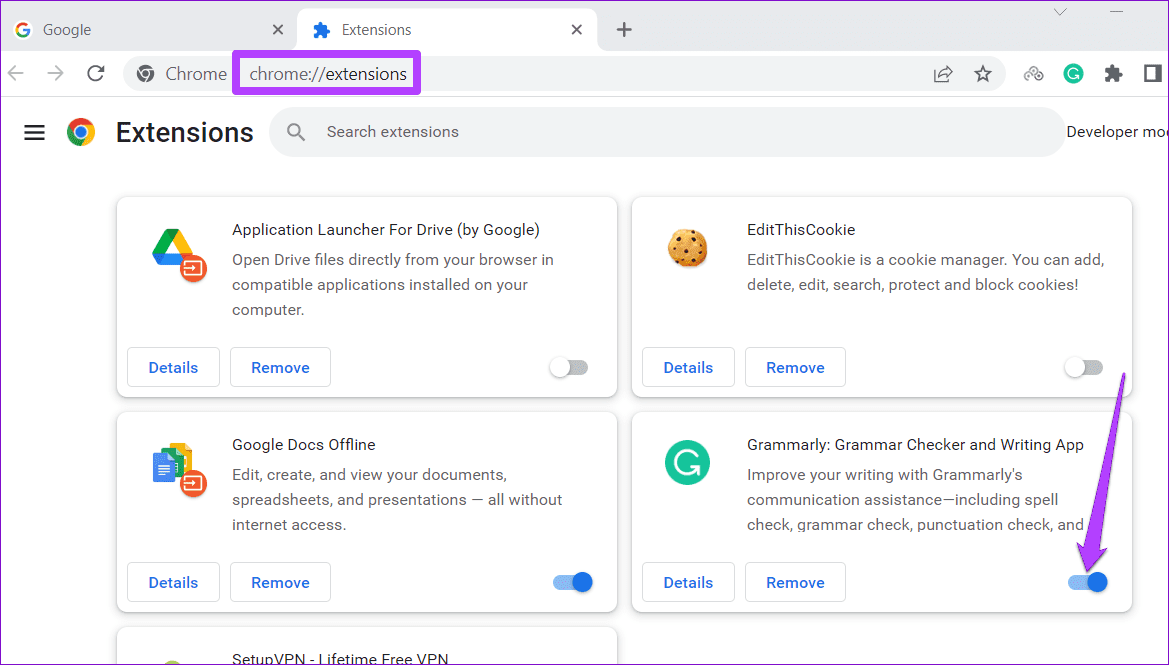
Restart your browser after this, and try using Google Maps again. If this solves your problem, re-enable your extensions one by one until the issue occurs again. After you’ve identified the culprit, consider removing the extension from the browser.
Fix 3: Clear Browser Cache and Cookies
As you surf the web, your browser saves cache and cookies to improve your experience. Although this data improves browser performance, it may cause issues if it becomes outdated or corrupted.
To clear the browser cache in Chrome or Edge:
Step 1: Press Ctrl + Shift + Delete keys on your keyboard to open the Clear browsing data panel. Select All time from the drop-down under Time range.
Step 2: Check the boxes for Cookies and other site data and Cached images and files. Then, hit Clear now.

Was this helpful?
Last updated on 14 August, 2024
1 Comment
Leave a Reply
Read Next
 5 Ways to Fix Google Chat Not Loading in Browser
Fix 1: Disable Browser Extensions One of your third-party extensions may be interfering with and blocking Google Chat.
5 Ways to Fix Google Chat Not Loading in Browser
Fix 1: Disable Browser Extensions One of your third-party extensions may be interfering with and blocking Google Chat.
 5 Ways to Fix Samsung Internet Browser Not Loading Pages
Try Basic Fixes Check your internet connection: The Samsung Internet browser may have trouble loading web pages if there is a problem with your internet connection.
5 Ways to Fix Samsung Internet Browser Not Loading Pages
Try Basic Fixes Check your internet connection: The Samsung Internet browser may have trouble loading web pages if there is a problem with your internet connection.
 2 Ways to Fix Microsoft OneDrive Not Loading in Browser
Basic Fixes Check if OneDrive is down: Visit StatusTicker to see if OneDrive servers are down in your region.
2 Ways to Fix Microsoft OneDrive Not Loading in Browser
Basic Fixes Check if OneDrive is down: Visit StatusTicker to see if OneDrive servers are down in your region.
 4 Fixes for Instagram Not Loading in Browser
Try Basic Fixes Check if Instagram is down: If Instagram servers are facing an outage, it may keep showing the "There's an issue and the page could not be loaded"
4 Fixes for Instagram Not Loading in Browser
Try Basic Fixes Check if Instagram is down: If Instagram servers are facing an outage, it may keep showing the "There's an issue and the page could not be loaded"
 How to Switch Between KM and Miles in Google Maps and Apple Maps
How to Change Kilometers to Miles in Apple Maps To change KM to Miles (or vice versa) on iPhone, iPad, and Mac, all you need to do is change your
How to Switch Between KM and Miles in Google Maps and Apple Maps
How to Change Kilometers to Miles in Apple Maps To change KM to Miles (or vice versa) on iPhone, iPad, and Mac, all you need to do is change your
 Kiwi Browser vs Google Chrome: Which Android Browser Should You Use
The Google Play store is chock-full of browser apps, all of which boast of a single stand out feature that differentiates them from the rest.
Kiwi Browser vs Google Chrome: Which Android Browser Should You Use
The Google Play store is chock-full of browser apps, all of which boast of a single stand out feature that differentiates them from the rest.
 Google Maps vs Maps Go Comparison: Explaining the Difference
Last year, Google announced the optimized version of Android Oreo operating system, Android Go.
Google Maps vs Maps Go Comparison: Explaining the Difference
Last year, Google announced the optimized version of Android Oreo operating system, Android Go.
 3 Ways to Fix TikTok App Not Loading on Your Phone
Basic Fixes Check your network connection: Ensure your smartphone has a robust internet connection.
3 Ways to Fix TikTok App Not Loading on Your Phone
Basic Fixes Check your network connection: Ensure your smartphone has a robust internet connection.
The article above may contain affiliate links which help support Guiding Tech. The content remains unbiased and authentic and will never affect our editorial integrity.
In my case where Google maps did not function properly on my PC, did not show the menus on the left, did not load a map after a search etc, , was the Zoom extension. After I removed it everything went back to normal.