


Preliminary Fixes
- Make Google Chrome open at startup: Open System Preferences > select Users & Groups > slide to Login Items > select + icon > select Google Chrome > hit the Add button.
- Update or reinstall Google Chrome: Google frequently releases updates to add new features and bug fixes to Google Chrome. To do so, click on the three-dot icon > click Settings > navigate to About Chrome.
Fix 1: Free RAM and Try Again
macOS comes with a memory swap function to utilize SSD storage as RAM. But even a memory swap might not be sufficient to free up RAM on Mac.
Step 1: Open Activity Monitor using Spotlight Search on your Mac.
Step 2: Click on the Memory tab.
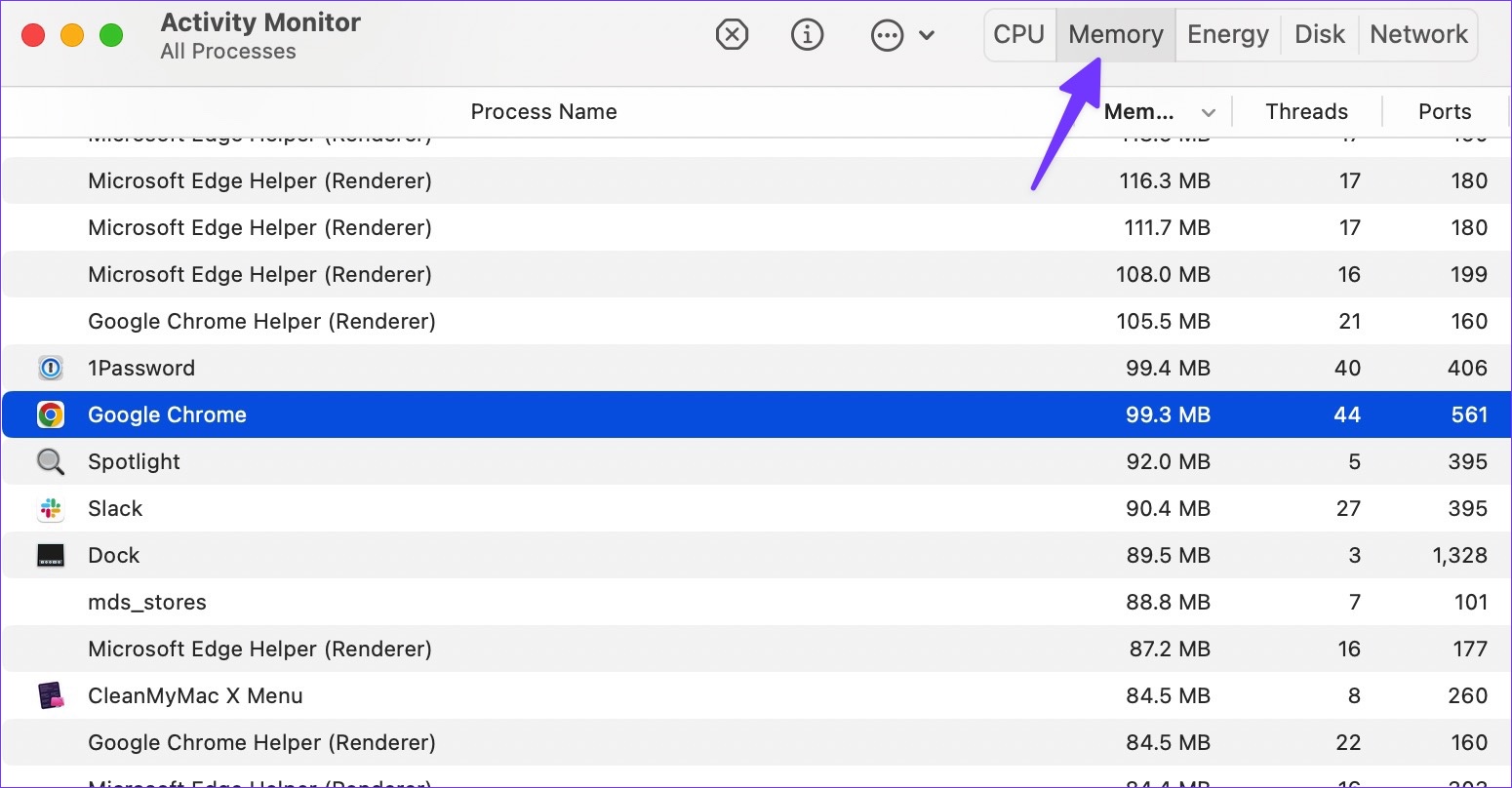
Step 3: Select apps you no longer need and hit the X mark to free up RAM.

After you have sufficient RAM on your Mac, open Google Chrome and enjoy an ideal web-browsing experience.
Fix 2: Clear Google Chrome Data
Step 1: Open Finder > select Go in the menu bar.
Step 2: Select Library.

Step 3: Double-click on Application Support to open it.
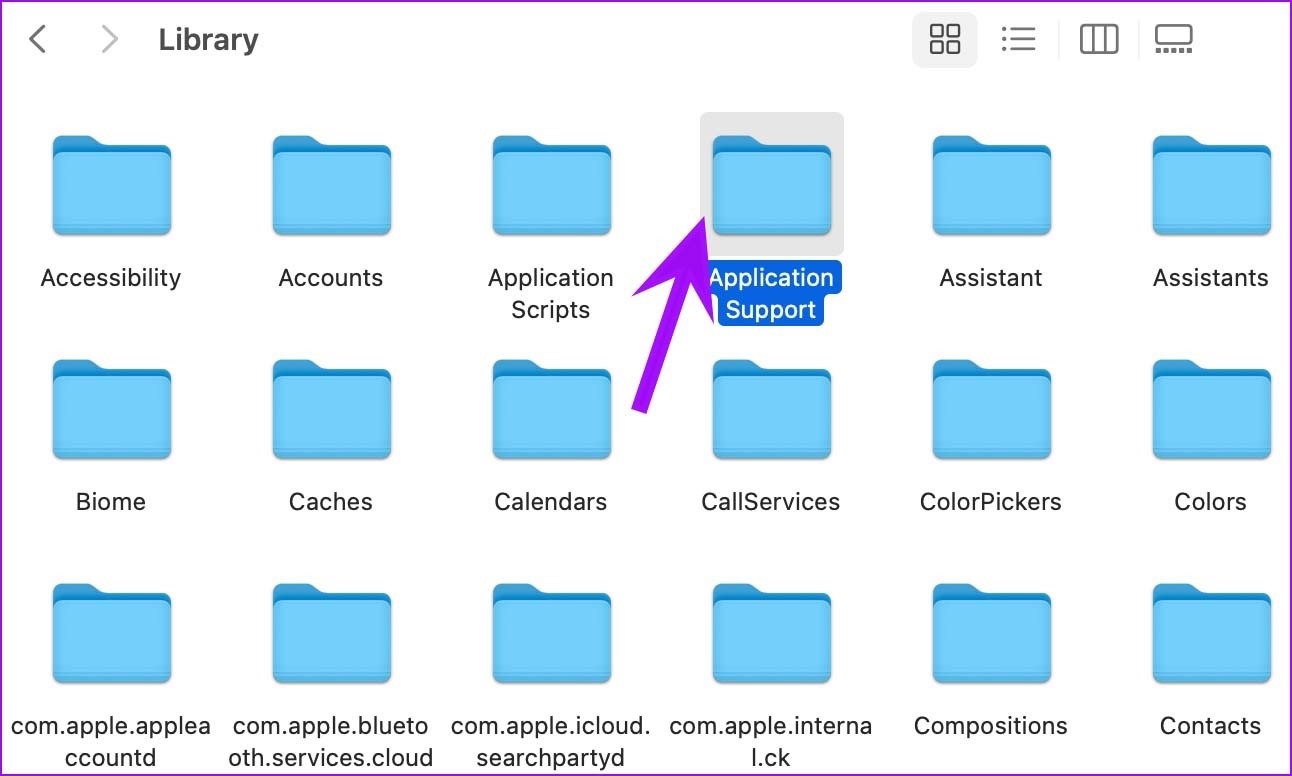
Step 4: Select the Google folder.
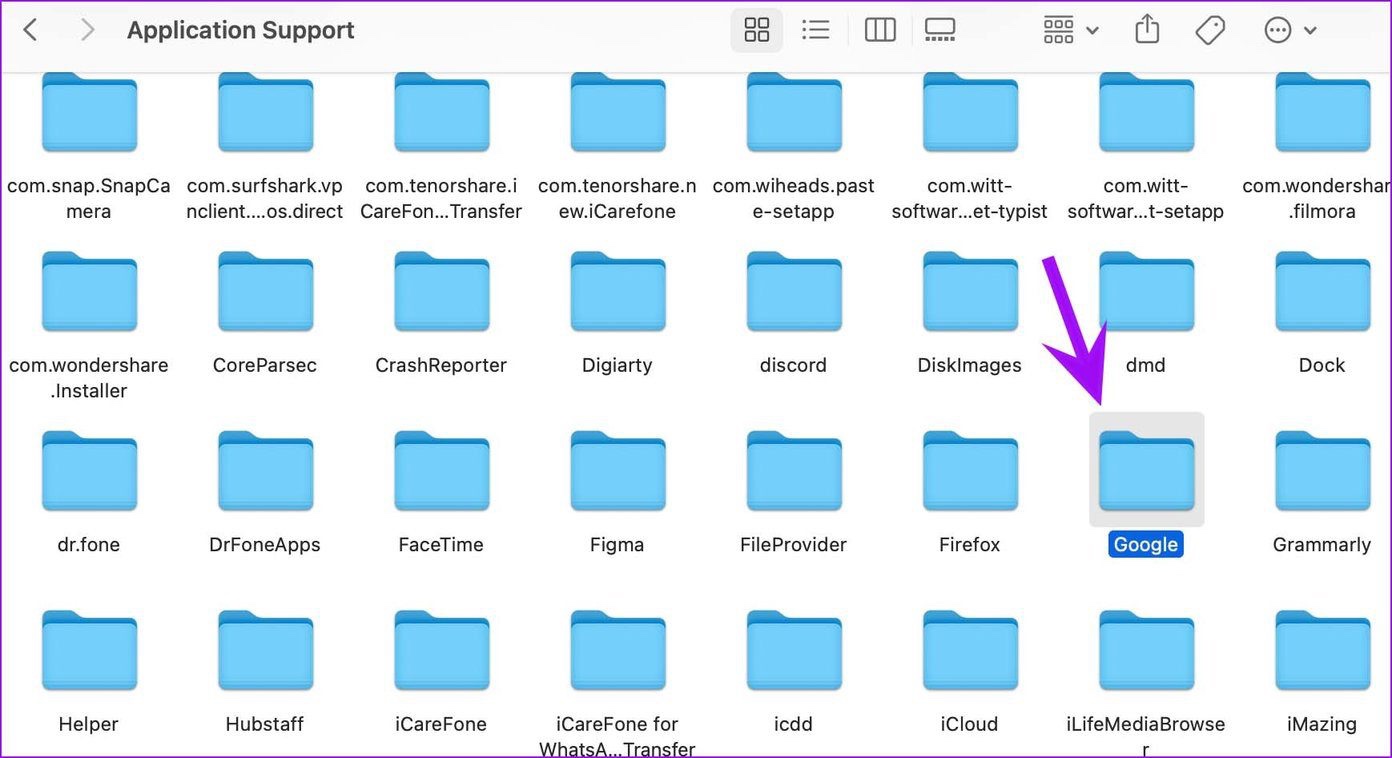
Step 5: Delete the Chrome folder by right-clicking on it and choosing Move to Trash.

Step 6: Select the Apple icon in the menu bar > reboot the Mac.
There you go. You should be able to open Google Chrome on Mac without any issues. If Chrome is still not opening on Mac, switch to Microsoft Edge, Opera, or Brave to enjoy your existing extensions (as they are all based on Chromium).
Was this helpful?
Last updated on 30 May, 2024
1 Comment
Leave a Reply
Read Next
 3 Ways to Fix Links Not Opening in Google Chrome
Fix 1: Disable Browser Extensions (for Desktop Only) Using third-party extensions in Chrome allows you to extend the browser's functionality.
3 Ways to Fix Links Not Opening in Google Chrome
Fix 1: Disable Browser Extensions (for Desktop Only) Using third-party extensions in Chrome allows you to extend the browser's functionality.
 Top 9 Ways to Fix Microsoft Teams Not Opening on Mac
While Microsoft Teams is jam-packed with useful features, the software puts a huge question mark over the overall reliability.
Top 9 Ways to Fix Microsoft Teams Not Opening on Mac
While Microsoft Teams is jam-packed with useful features, the software puts a huge question mark over the overall reliability.
 5 Ways to Fix Microsoft Excel Not Opening on Mac
Basic Fixes Check your Microsoft subscription: Visit your Microsoft 365 account and check your subscription status.
5 Ways to Fix Microsoft Excel Not Opening on Mac
Basic Fixes Check your Microsoft subscription: Visit your Microsoft 365 account and check your subscription status.
 4 Ways to Fix Microsoft PowerPoint Not Opening on Mac
Basic Fixes Check file compatibility: The file type of your presentation should be compatible with PowerPoint that supports PPTX, PPSX or ODP.
4 Ways to Fix Microsoft PowerPoint Not Opening on Mac
Basic Fixes Check file compatibility: The file type of your presentation should be compatible with PowerPoint that supports PPTX, PPSX or ODP.
 3 Ways to Fix Chrome Not Opening on Windows 11
Try Basic Fixes Force close Chrome using Task Manager and try again: Press Ctrl + Shift + Esc to open the Task Manager.
3 Ways to Fix Chrome Not Opening on Windows 11
Try Basic Fixes Force close Chrome using Task Manager and try again: Press Ctrl + Shift + Esc to open the Task Manager.
 4 Ways to Fix X (Twitter) Links Not Opening in Chrome and Safari
Basic Fixes: Open page in Incognito Mode: Incognito mode allows you to load your browser without any extensions, cookies, or cache data.
4 Ways to Fix X (Twitter) Links Not Opening in Chrome and Safari
Basic Fixes: Open page in Incognito Mode: Incognito mode allows you to load your browser without any extensions, cookies, or cache data.
 3 Ways to Stop Mac From Opening Links in Safari
Method 1: Change the Default Browser on Your Mac Your Mac comes with Safari as the default browser.
3 Ways to Stop Mac From Opening Links in Safari
Method 1: Change the Default Browser on Your Mac Your Mac comes with Safari as the default browser.
 4 Fixes for Google Chrome Not Opening New Tabs on Windows
Common Fixes Before you delve into complex troubleshooting methods, try these basic fixes and see if they help restore normalcy to Google Chrome: Restart Google Chrome - Restarting the browser
4 Fixes for Google Chrome Not Opening New Tabs on Windows
Common Fixes Before you delve into complex troubleshooting methods, try these basic fixes and see if they help restore normalcy to Google Chrome: Restart Google Chrome - Restarting the browser
The article above may contain affiliate links which help support Guiding Tech. The content remains unbiased and authentic and will never affect our editorial integrity.
Hello. After the latest upgrade google chrome looks be opening then just closes out after showing a blank screen for a few seconds. Never been a problem before. I have done all of the above but not working plus gone back to older chrome versions and the beta version and under a different ID. Any other solutions you can think of? On Mac OSX 10.15.7 on a iMac 21.5″ late 2013.
Tx
Andrew Holmes