


Preliminary Fixes
- Enable and Disable Airplane Mode: Network glitches can prevent Facebook Messenger from sending messages. Enabling and disabling Airplane Mode can refresh your connection and resolve minor network-related issues.
- Check Messenger Servers: Sometimes, the problem might not be on your end but with Facebook Messenger’s servers. Messenger might fail to send messages if the servers are down or experiencing issues. Go to websites like Downdetector or IsItDownRightNow and check if there’s a spike in reported issues.
- Force Stop Messenger and Restart: Force-stopping Messenger can help resolve any background processes that may be causing the app to malfunction.
- Reset Network Settings: If your network settings are misconfigured, it can cause issues with sending messages. Resetting network settings can often resolve these issues. You can read our dedicated guide to resetting network settings on iPhone and Android.
- Another Person Has Blocked/Unfriended You: If the person you’re trying to message has blocked or unfriended you on Facebook, your messages won’t go through. Use the search bar in the Facebook app or Messenger; they may have blocked or unfriended you if you can’t find their profile or view their details.
Fix 1: Disable Data Saver Mode for Messenger
On Android
Step 1: Open Messenger on your phone and go to Settings by tapping the hamburger menu.
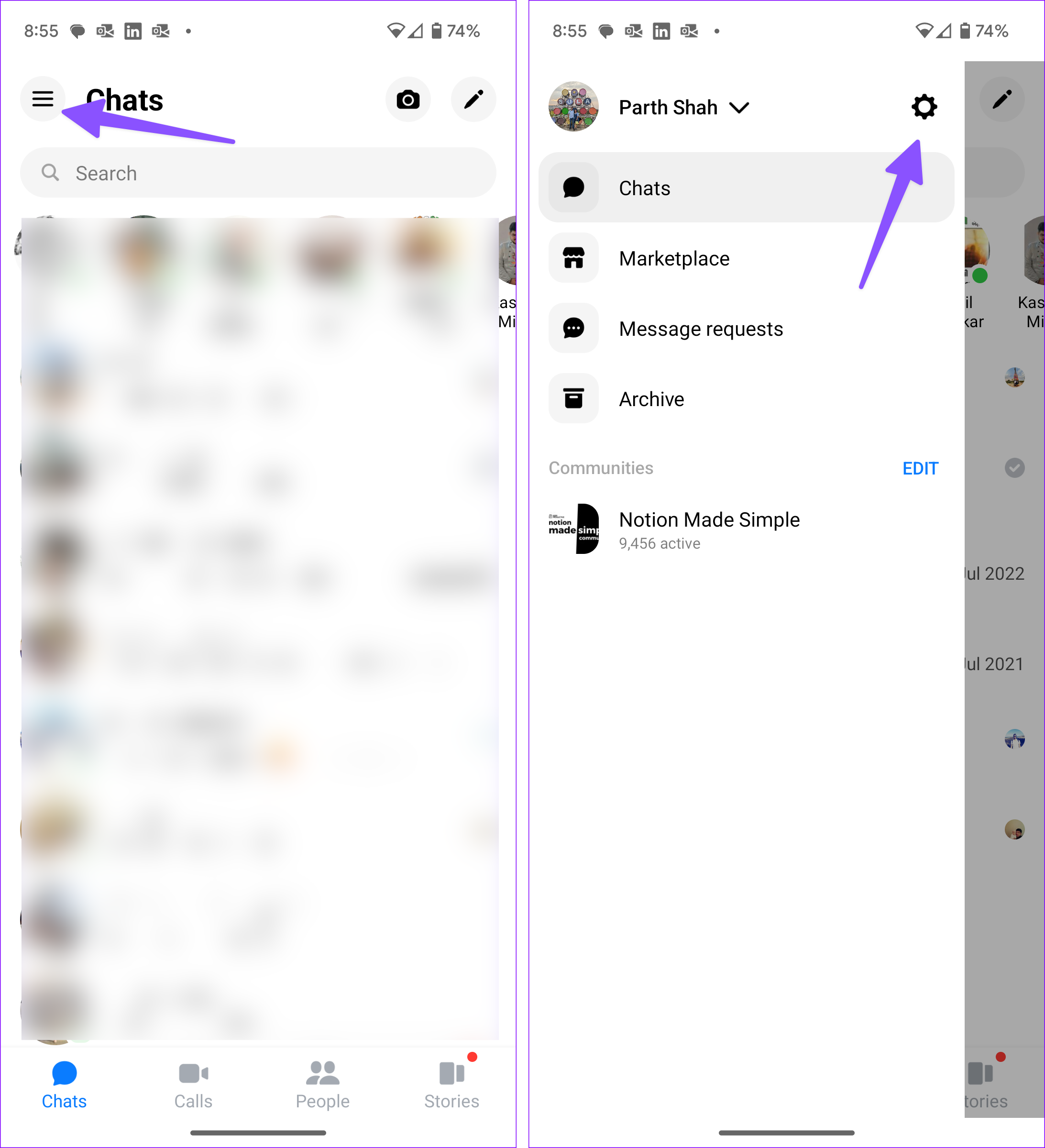
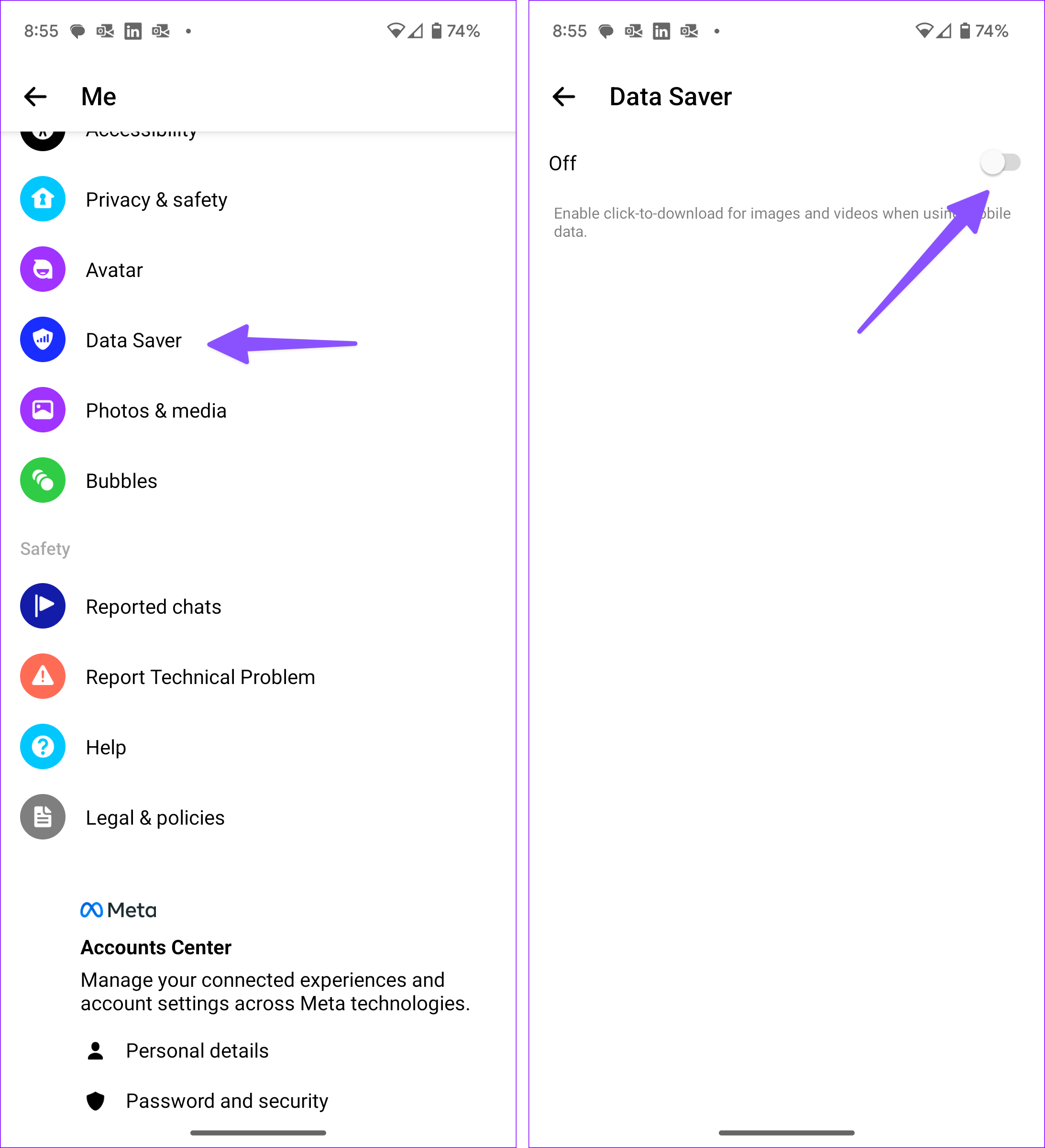
Step 2: Select Data Saver from Preferences.
Step 3: Now, turn off the toggle for Data Saver mode.
On iPhone
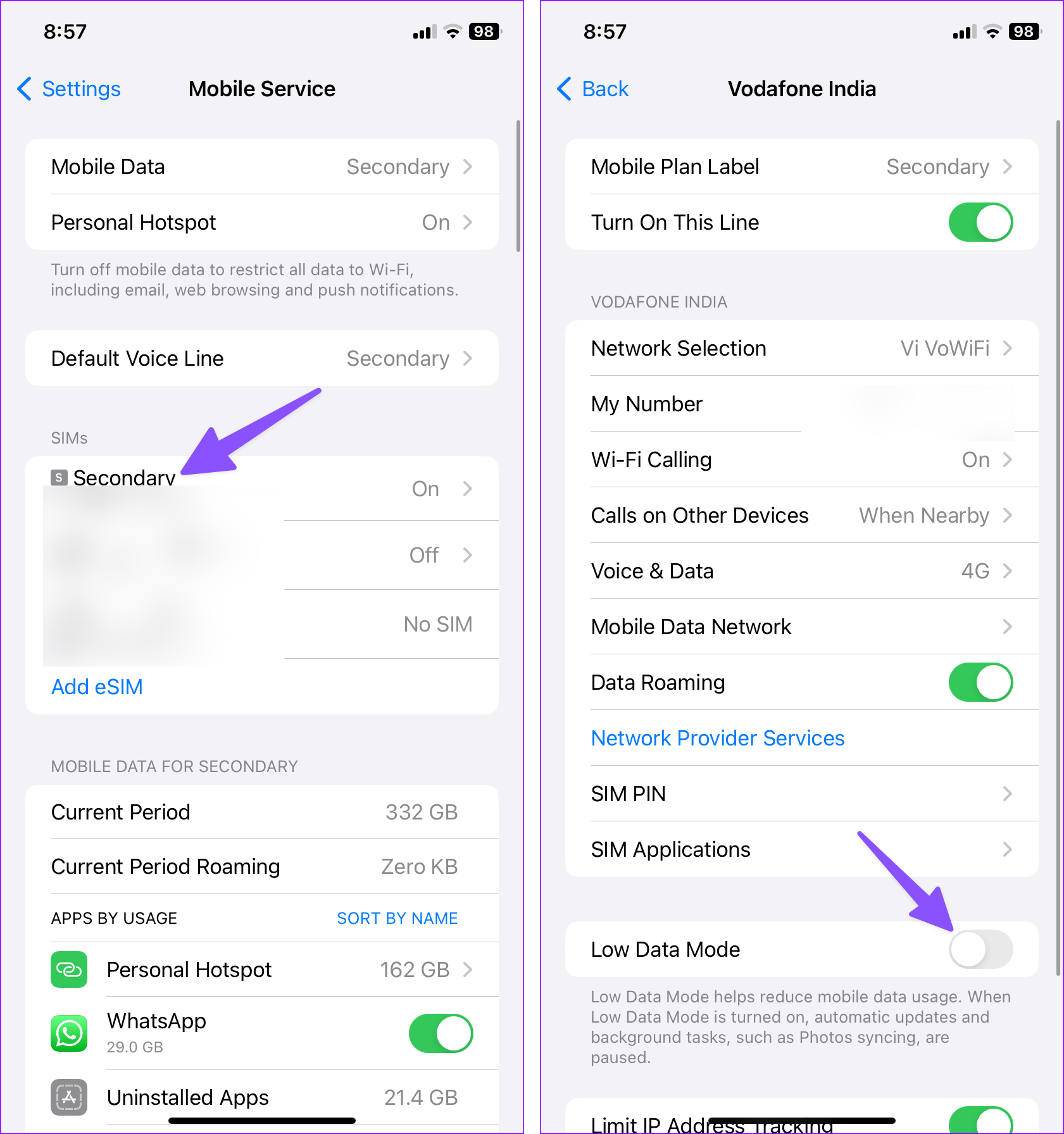
Step 1: Open Settings on your iPhone. Select Mobile Service.
Step 2: Select the primary number and disable the Low Data Mode toggle.
Fix 2: Enable Background Data Usage
On Android
Step 1: Long-tap on the Messenger icon and open the app info menu.
Step 2: Select Mobile Data from the Usage menu.
Step 3: Enable the toggle for Background data.

On iPhone
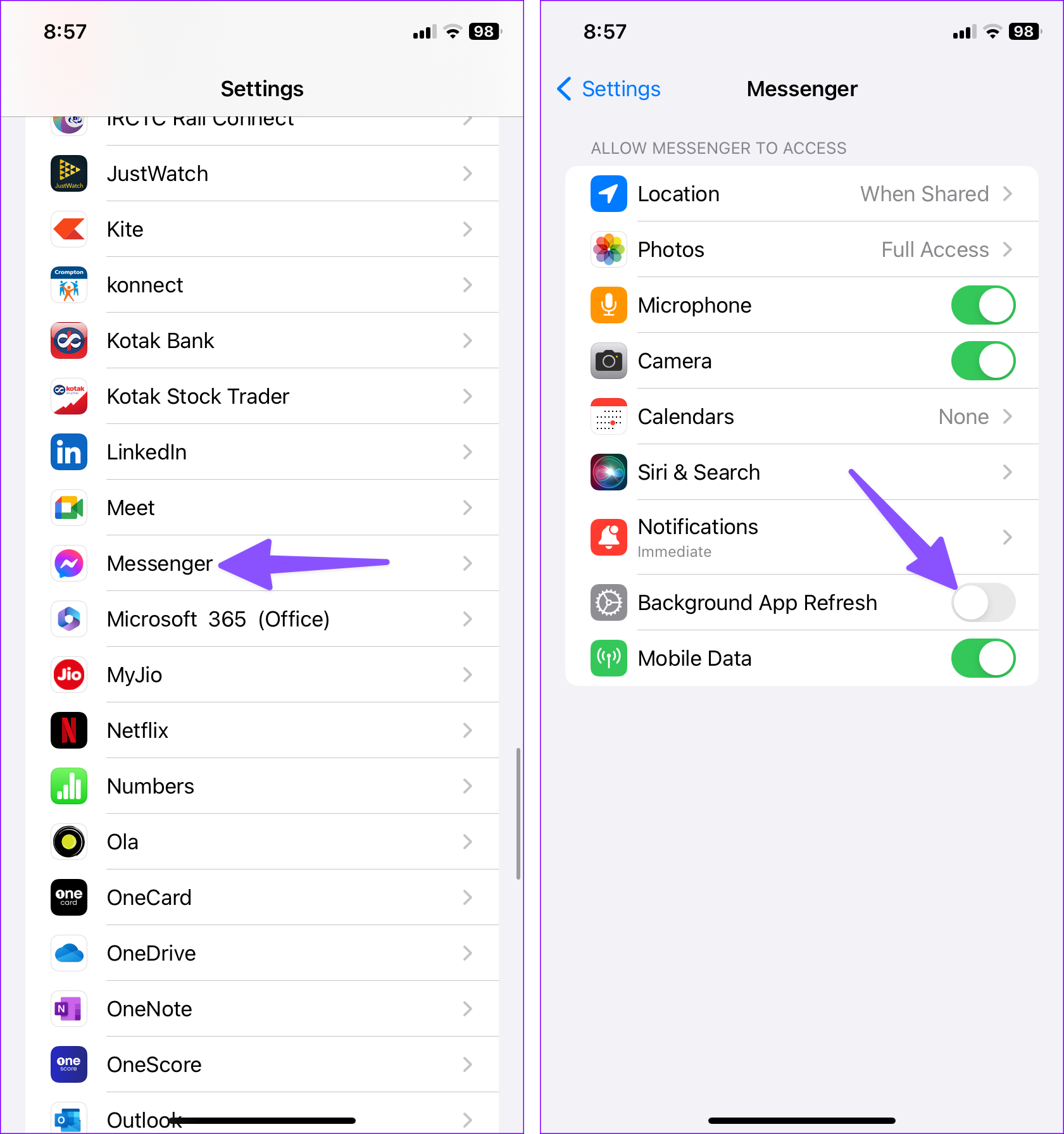
Step 1: Launch Settings and scroll to Messenger.
Step 2: Enable the Background App Refresh toggle.
Fix 3: Allow Data Usage While Data Saver Is On
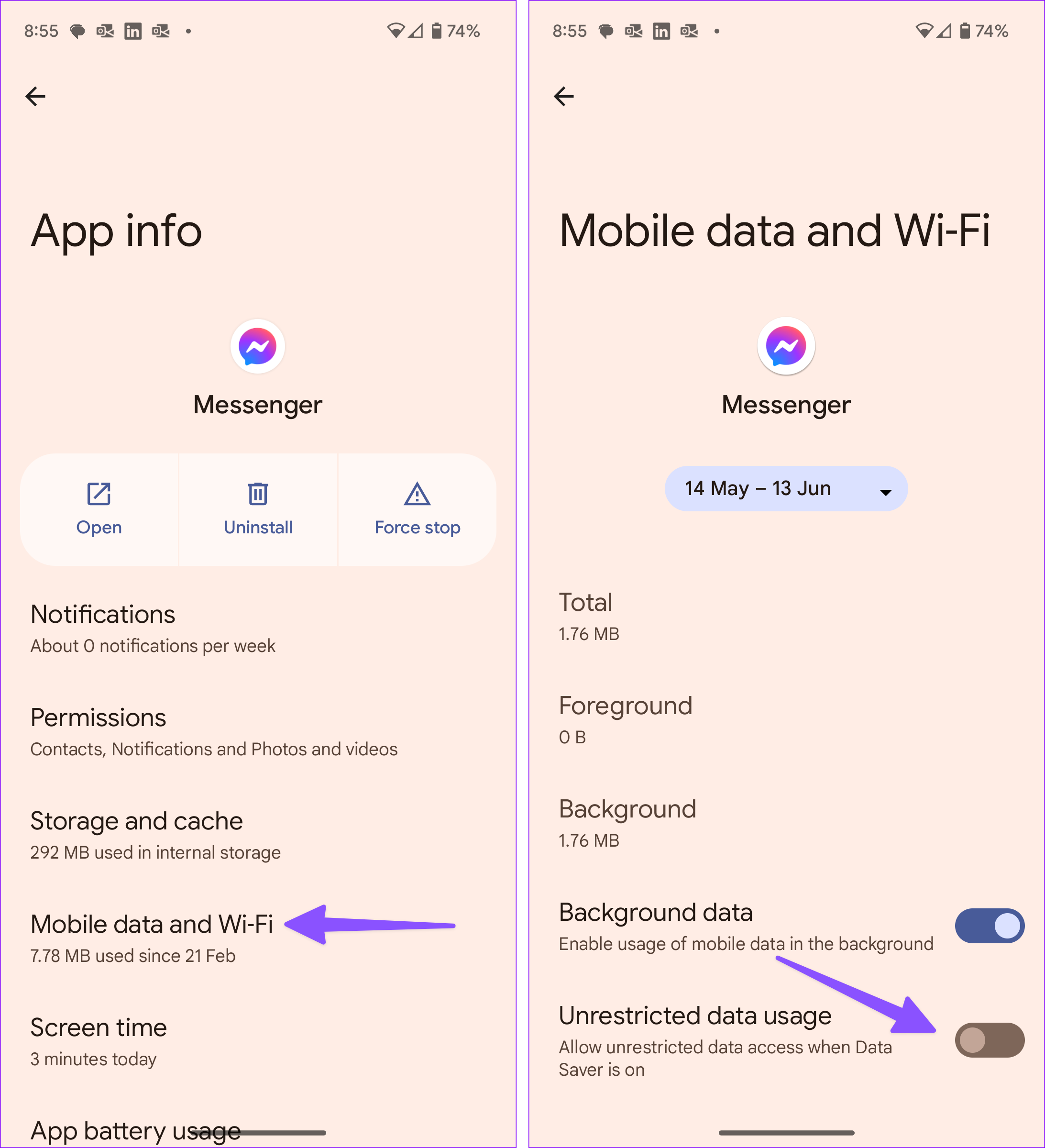
Step 1: Go to the Messenger app info menu.
Step 2: Select Mobile data and Wi-Fi and enable the Unrestricted data usage toggle.
Fix 4: Facebook Restricted Your Account
Facebook might restrict your account for violating community guidelines or due to suspicious activity, which could prevent you from sending messages. Go to the Facebook Help Center > Log into Facebook and check for any notifications regarding restrictions on your account.
If your account is restricted, follow the on-screen instructions to resolve the issue or wait until the restriction is lifted.
Fix 5: Try Facebook Messenger Lite
If the standard Messenger app isn’t working, Facebook Messenger Lite, a lightweight version, may work better, especially on older devices or in areas with poor internet connectivity. Go to the App Store (iPhone) or Google Play Store (Android), search for Messenger Lite, and install it.
Fix 6: Use Messenger Web
If the mobile app is not working, you can use the Messenger web version as an alternative to send messages. To do so, Launch a web browser on your device > Visit Messenger.com and log in with your Facebook credentials > try sending messages through the web interface.
If messages are sent successfully, the issue might be specific to the mobile app.
FAQs on Messenger Not Sending Messages
If you can’t like or comment on existing posts or share new content, it confirms your banned status on the platform.
If your friend or family member blocks you on Facebook, you can send messages, but they won’t be sent.
Was this helpful?
Last updated on 20 August, 2024
15 Comments
Leave a Reply
Read Next
 Top 4 Ways to Fix Facebook Messenger Not Sending Pictures
Preliminary Fixes Check the Network Connection: A stable internet connection is crucial for sending pictures on Messenger.
Top 4 Ways to Fix Facebook Messenger Not Sending Pictures
Preliminary Fixes Check the Network Connection: A stable internet connection is crucial for sending pictures on Messenger.
 4 Fixes if Facebook Messenger Keeps Crashing on Android and iPhone
Basic Fixes Update the Messenger app: Using an outdated version of an app can cause it to behave strangely.
4 Fixes if Facebook Messenger Keeps Crashing on Android and iPhone
Basic Fixes Update the Messenger app: Using an outdated version of an app can cause it to behave strangely.
 3 Fixes for No Sound in Facebook Messenger Video Calls
Basic Fixes Check volume levels: Check whether you have optimum volume levels on your iPhone or Android phone.
3 Fixes for No Sound in Facebook Messenger Video Calls
Basic Fixes Check volume levels: Check whether you have optimum volume levels on your iPhone or Android phone.
 5 Fixes for Links Not Opening in Facebook Messenger for Android and iPhone
Fix 1: Allow Messenger to Open Supported Links (Android) Messenger may fail to open links on your Android phone due to a lack of relevant permissions.
5 Fixes for Links Not Opening in Facebook Messenger for Android and iPhone
Fix 1: Allow Messenger to Open Supported Links (Android) Messenger may fail to open links on your Android phone due to a lack of relevant permissions.
 Top 4 Ways to Fix Facebook Messenger Not Showing Messages
Preliminary Fixes Check Messages Requests in Hidden Inbox: Sometimes, messages from people who are not on your friends list may not appear in your main inbox.
Top 4 Ways to Fix Facebook Messenger Not Showing Messages
Preliminary Fixes Check Messages Requests in Hidden Inbox: Sometimes, messages from people who are not on your friends list may not appear in your main inbox.
 How to Send Disappearing Messages in Facebook Messenger
Send Disappearing Messages in Facebook Messenger Mobile App The process of sending disappearing messages on the mobile app is the same for Android and iOS devices.
How to Send Disappearing Messages in Facebook Messenger
Send Disappearing Messages in Facebook Messenger Mobile App The process of sending disappearing messages on the mobile app is the same for Android and iOS devices.
 How to Delete Old Messages on Facebook Messenger From Both Sides
Can You Permanently Delete Facebook Messages From Both Sides?
How to Delete Old Messages on Facebook Messenger From Both Sides
Can You Permanently Delete Facebook Messages From Both Sides?
 4 Ways to Fix Facebook Marketplace Messages Not Showing up in Messenger
Basic Fixes Check your network connection: Ensure your device has a good internet connection.
4 Ways to Fix Facebook Marketplace Messages Not Showing up in Messenger
Basic Fixes Check your network connection: Ensure your device has a good internet connection.
The article above may contain affiliate links which help support Guiding Tech. The content remains unbiased and authentic and will never affect our editorial integrity.
Yes I cannot send messages I need help
I cannot sent messeges on my messenger
My messenger can not send messages. Help
My messenger won’t send messages please help
My messenger keeps sending my messages back.Why?
I cant send messages through messenget why
Facebook messenger isnt letting me send messages on messenger
All of these fixes only apply to phones only. Do people realize desktop computers are still in use??
i cant send any link to my friends.what should i do?
How do I fix a person that is blocked? I don’t have the person blocked they don’t have me blocked. This is annoying. She has a Samsung phone I have an iPhone I need it fixed and it’s for work related. This happened as of last week. It was working fine.
I do message my hold friend which is not on my friend list but it’s doesn’t go directly to notifications, it goes directly to spamming which my friend might not check on time I need solutions
My messenger will not let me send or reply to messages please help
I can’t send any messages, video and audio from my messenger, Please help ????????????
my messenger will not let me send or reply t messages. what would the problem be.
My messenger will not let me send or even reply the message after I sent a lot of message without my friend list. What would I do please help me