Basic Fixes
- Check storage: Ensure your iPhone has enough storage space left to accommodate new downloads from the Podcasts app.
- Check network connection: If you’re facing problems with the connected network, you won’t be able to download content from the Podcasts app.
- Check if the Podcasts app is down: The Podcasts app may also run into download issues if there are problems on the server side. You can check for that by heading to Apple’s System Status page.
- Check Apple Music subscription: The Podcasts app features some exclusive shows that you can only listen to/download if you have an Apple Music subscription.
Fix 1: Allow Cellular Data
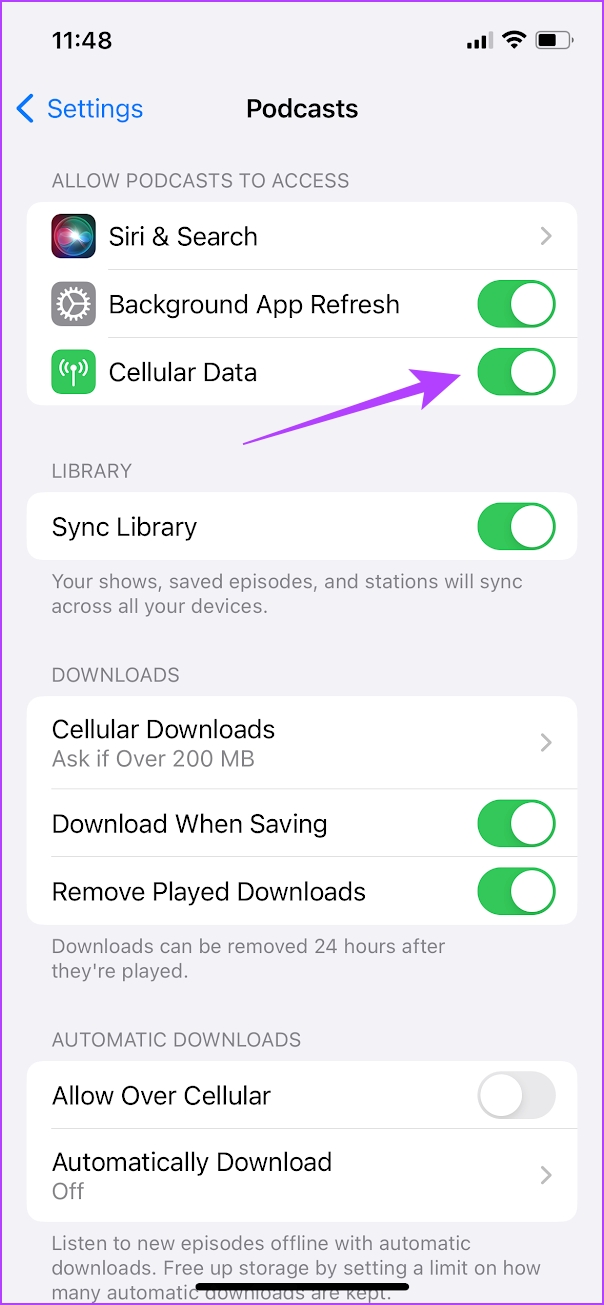
If the content on Apple Podcasts is not downloading while connected to 4G/5G, confirm that the Podcasts app has the permissions required to use cellular data.
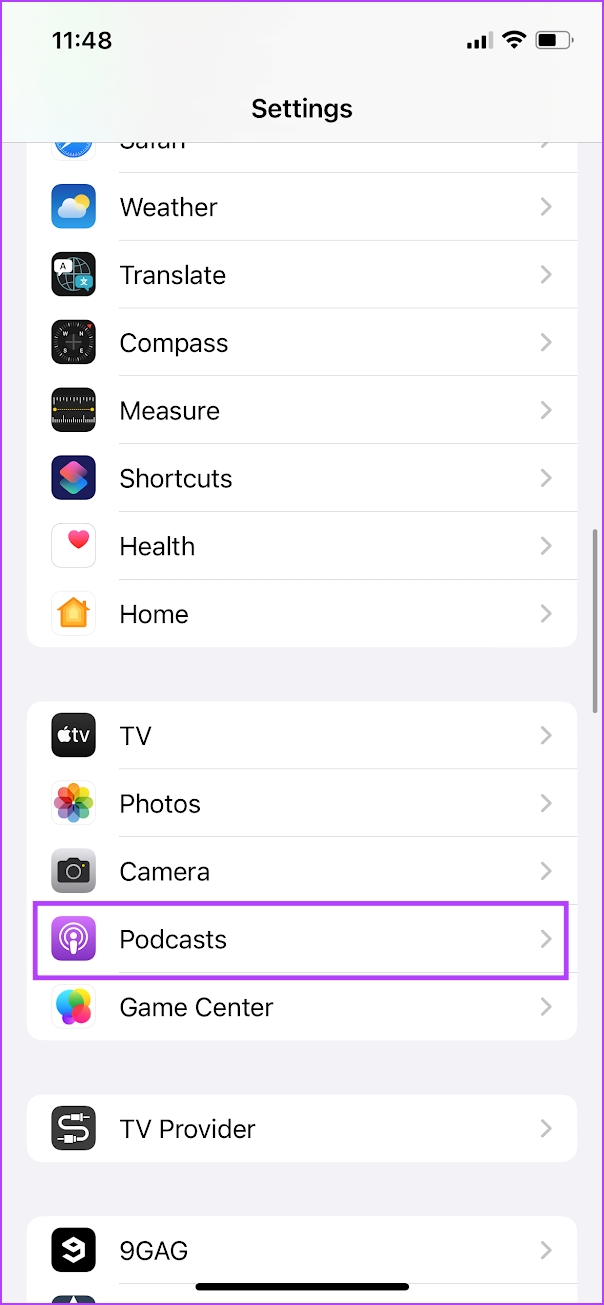
Step 1: Open the Settings app. Select Podcasts.
Step 2: Ensure you have turned on the toggle for Cellular Data.
If you have any further issues, check our guide to fix problems regarding cellular data on your iPhone.
Fix 2: Manage Download Settings
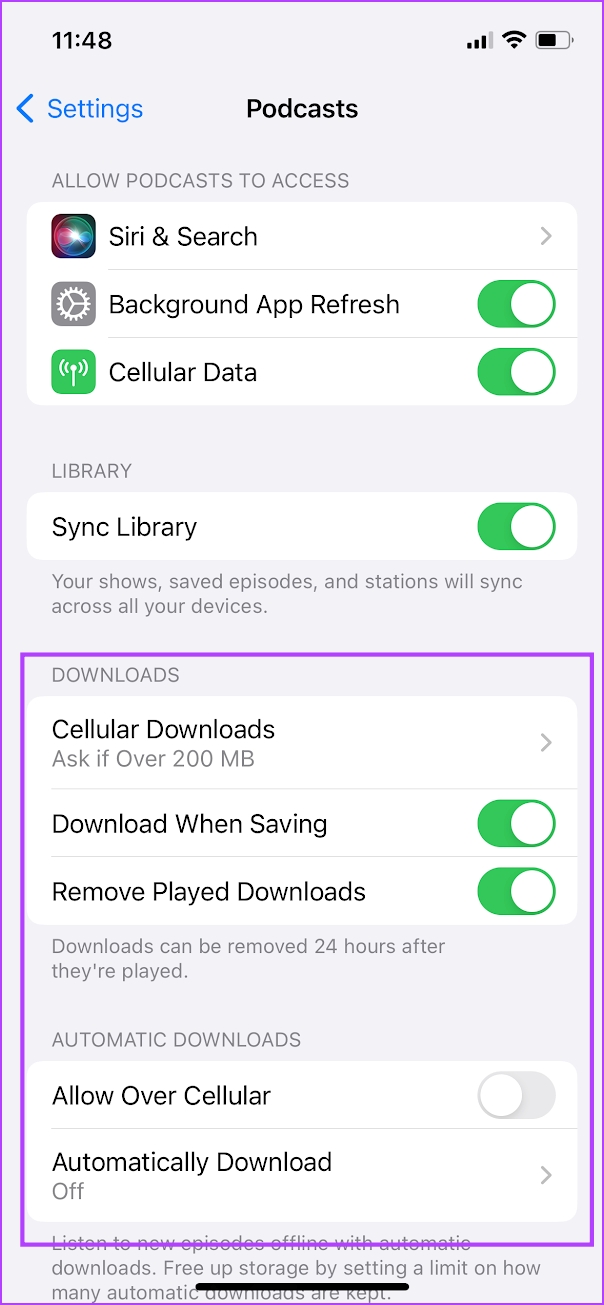
If you experience issues with automatic episode downloads, you must confirm that the Podcasts app’s download preferences are set up properly.
Step 1: Open the Settings app. Select Podcasts.
Step 3: Under the Download section, ensure that you have selected all the relevant options.
You can opt for automatic downloads, download while saving episodes, or allow downloads using cellular data.
Fix 3: Check Content and Privacy Restrictions
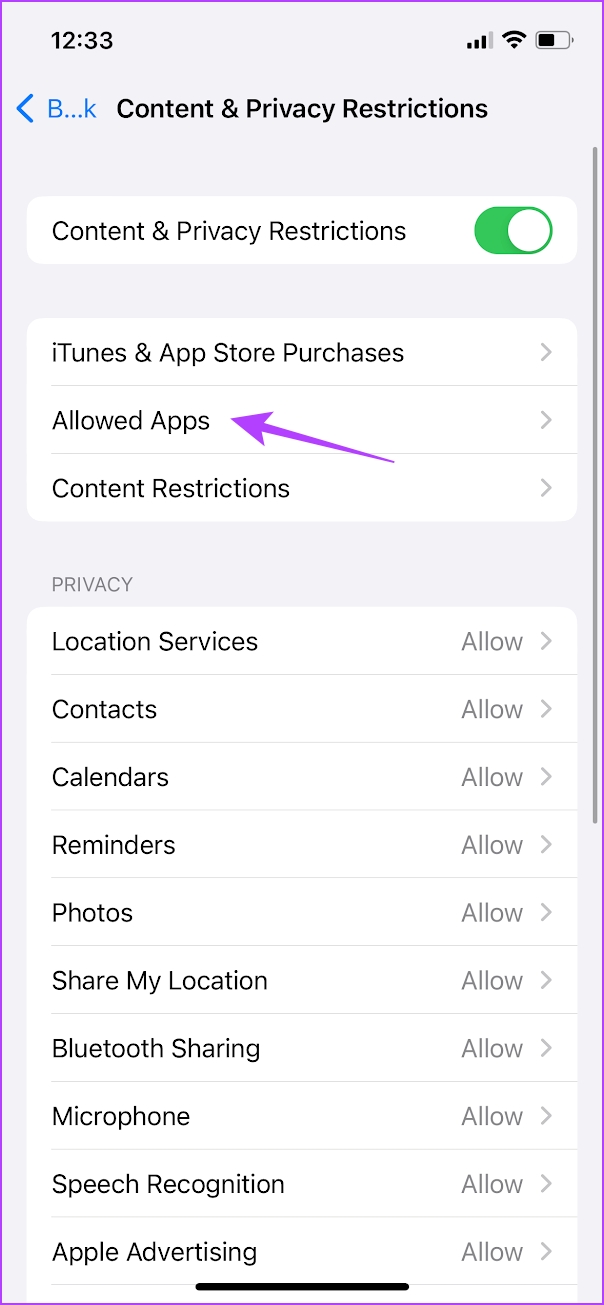
If the content on Apple podcasts is not downloading, ensure that you have not enabled any content restrictions for the same. Here’s how to do it.
Step 1: Open the Settings app, and go to Screen Time.
Step 3: Tap on Content and Privacy restrictions. Tap on Allowed Apps.
Step 5: Turn on the toggle for Podcasts.


Fix 4: Allow Background App Refresh
If the Podcasts app struggles to perform downloads in the background, confirm that it has the permissions necessary to use the iPhone’s Background App Refresh functionality.
Step 1: Open the Settings app. Select Podcasts.
Step 3: Turn on the toggle for Background App Refresh.

Was this helpful?
Last updated on 27 June, 2024
Read Next
 5 Fixes for Podcasts App Not Working on iPhone
Basic Fixes Switch to 5GHz Wi-Fi: If you have a dual-band router, you can connect to a 5GHz frequency band for faster internet speeds.
5 Fixes for Podcasts App Not Working on iPhone
Basic Fixes Switch to 5GHz Wi-Fi: If you have a dual-band router, you can connect to a 5GHz frequency band for faster internet speeds.
 4 Ways to Fix Apple TV Not Downloading Apps
Basic Fixes: Restart Apple TV: You can use the System menu on your Apple TV remote to restart your Apple TV device.
4 Ways to Fix Apple TV Not Downloading Apps
Basic Fixes: Restart Apple TV: You can use the System menu on your Apple TV remote to restart your Apple TV device.
 How to Fix Apple Mail Stuck at Downloading Messages
Basic Fixes Check your network connection: Ensure your device is connected to stable internet.
How to Fix Apple Mail Stuck at Downloading Messages
Basic Fixes Check your network connection: Ensure your device is connected to stable internet.
 3 Ways to Fix Apple Music Not Downloading Songs
Basic Fixes Check network: If you can't download songs on Apple Music, there is likely a problem with your internet connectivity.
3 Ways to Fix Apple Music Not Downloading Songs
Basic Fixes Check network: If you can't download songs on Apple Music, there is likely a problem with your internet connectivity.
 3 Fixes for Apple Books App Not Downloading Books
Basic Fixes Check internet connection: Ensure that you have a strong internet connection on your Apple device.
3 Fixes for Apple Books App Not Downloading Books
Basic Fixes Check internet connection: Ensure that you have a strong internet connection on your Apple device.
 5 Ways to Fix WhatsApp Not Downloading PDFs on Phone
Basic Fixes Check WhatsApp server status: Use Downdetector to check an active WhatsApp service outage.
5 Ways to Fix WhatsApp Not Downloading PDFs on Phone
Basic Fixes Check WhatsApp server status: Use Downdetector to check an active WhatsApp service outage.
 4 Ways to Fix Amazon Prime Video Not Downloading Movies on iPhone
Basic Fixes Restart Prime Video: If there's any bug preventing you from downloading content, restarting your iPhone and the Prime Video app will help.
4 Ways to Fix Amazon Prime Video Not Downloading Movies on iPhone
Basic Fixes Restart Prime Video: If there's any bug preventing you from downloading content, restarting your iPhone and the Prime Video app will help.
 7 Ways to Fix Safari Not Downloading Files on iPhone and Mac
Basic Fixes Check network connection: Safari won’t download media or other files if the data connection on your iPhone or Mac is spotty.
7 Ways to Fix Safari Not Downloading Files on iPhone and Mac
Basic Fixes Check network connection: Safari won’t download media or other files if the data connection on your iPhone or Mac is spotty.
The article above may contain affiliate links which help support Guiding Tech. The content remains unbiased and authentic and will never affect our editorial integrity.