Basic Fixes
- Check Amazon server status: You can visit DownDetector to see if Amazon servers are working fine for your region.
- Check internet speeds: Similarly, check your internet speeds. If you have a dual-band router, we suggest switching to a 5GHz frequency band.
Fix 1: Check if Your TV Is HDCP-Compatible
HDCP (High-bandwidth Digital Content Protection) enables protection against possible copying of audio and video content on streaming platforms.
To stream content in 4K resolution and High Dynamic Range (HDR), check whether your Fire TV Stick 4K is connected to your TV or Monitor via an HDMI port that is HDCP 2.2 compliant. Visit the product page of your TV model and check the same.
Fix 2: Reset Your Fire TV Stick
This will remove all apps and preferences and restore your Fire TV Stick to default.
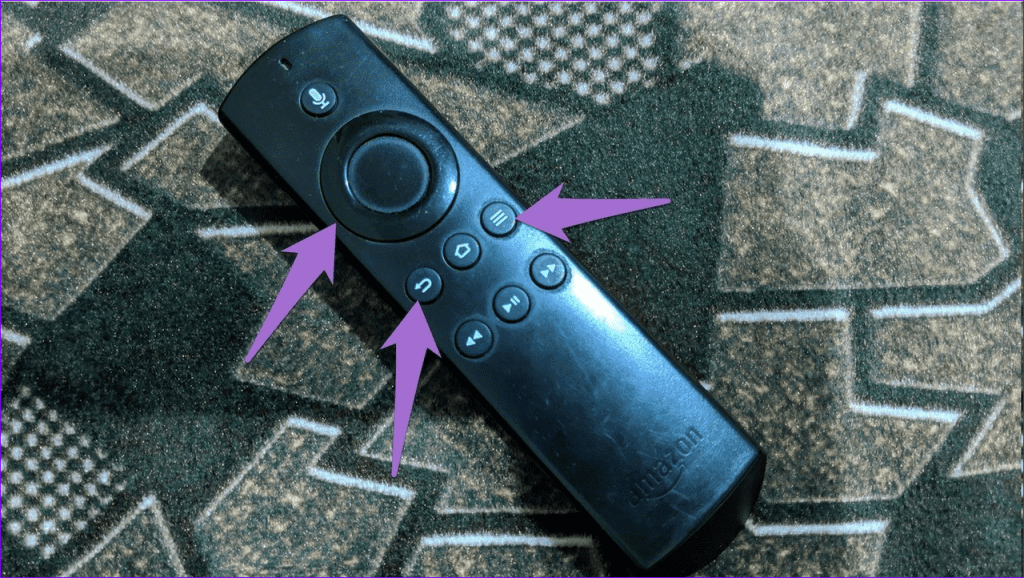
To reset it, press and hold the right and back buttons of your remote at the same time for at least 10 seconds or more. This will initiate the reset process. Follow the on-screen instructions to complete the process.
Was this helpful?
Last updated on 03 July, 2024
Read Next
 3 Ways to Fix Fire TV Stick Stuck on Amazon Logo Screen
Basic Fixes Use the official accessories: Your Fire TV Stick comes with official accessories that help ensure your device gets sufficient power and can work properly.
3 Ways to Fix Fire TV Stick Stuck on Amazon Logo Screen
Basic Fixes Use the official accessories: Your Fire TV Stick comes with official accessories that help ensure your device gets sufficient power and can work properly.
 3 Ways to Fix Amazon Fire TV Stick Keeps Restarting
Basic Fixes Use official accessories: If you aren't using the original accessories with your Firestick, you might use an incompatible USB cable or adapter.
3 Ways to Fix Amazon Fire TV Stick Keeps Restarting
Basic Fixes Use official accessories: If you aren't using the original accessories with your Firestick, you might use an incompatible USB cable or adapter.
 3 Ways to Fix Apple TV App Not Working on Amazon Fire TV Stick
Basic Fixes Force quit and relaunch Apple TV app: This will give the app a fresh start on your Firestick.
3 Ways to Fix Apple TV App Not Working on Amazon Fire TV Stick
Basic Fixes Force quit and relaunch Apple TV app: This will give the app a fresh start on your Firestick.
 5 Ways to Fix Amazon Silk Browser Not Working on Fire TV Stick
Basic Fixes Check your network connection: Open Fire OS settings via the Gear icon at the top right.
5 Ways to Fix Amazon Silk Browser Not Working on Fire TV Stick
Basic Fixes Check your network connection: Open Fire OS settings via the Gear icon at the top right.
 3 Ways to Fix YouTube TV Not Working on Amazon Fire TV Stick
Basic Fixes Check the YouTube server status: Visit Downdetector to check an active YouTube TV server outage.
3 Ways to Fix YouTube TV Not Working on Amazon Fire TV Stick
Basic Fixes Check the YouTube server status: Visit Downdetector to check an active YouTube TV server outage.
 5 Ways to Reset Amazon Fire TV Stick to Factory Settings
Method 1: Using Physical Remote For this method, the remote must be paired to your Fire TV Stick.
5 Ways to Reset Amazon Fire TV Stick to Factory Settings
Method 1: Using Physical Remote For this method, the remote must be paired to your Fire TV Stick.
 How to Fix Netflix Not Working on Amazon Fire TV Stick
Basic Fixes Check Netflix server status: You can visit DownDetector to see if the Netflix servers are working for your area.
How to Fix Netflix Not Working on Amazon Fire TV Stick
Basic Fixes Check Netflix server status: You can visit DownDetector to see if the Netflix servers are working for your area.
 Amazon Fire TV Stick Audio Out of Sync? Here’s How to Fix It
Basic Fixes Check Bluetooth device battery levels: In addition to battery levels, you should also check if you have low-latency Bluetooth earphones.
Amazon Fire TV Stick Audio Out of Sync? Here’s How to Fix It
Basic Fixes Check Bluetooth device battery levels: In addition to battery levels, you should also check if you have low-latency Bluetooth earphones.
The article above may contain affiliate links which help support Guiding Tech. The content remains unbiased and authentic and will never affect our editorial integrity.