Method 1: Browse Instagram’s Audio Suggestions
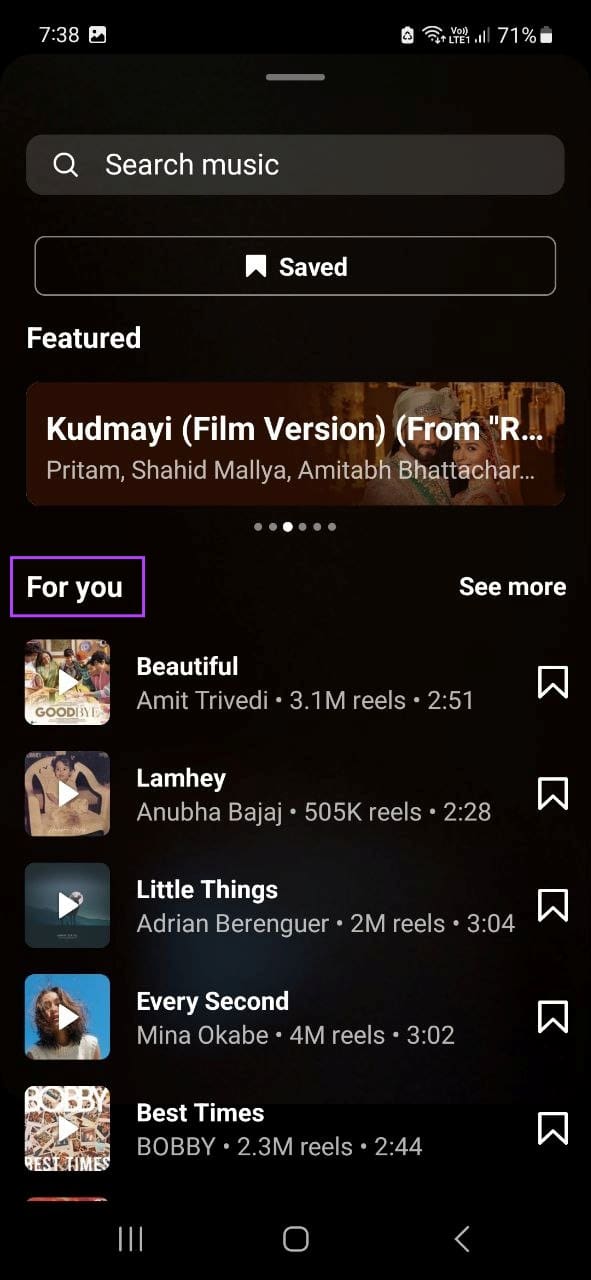
When creating Reels using the Instagram app, you get music recommendations you can add to your Reels. Using this section, you can find trending sounds for Instagram Reels and add them accordingly. Follow the below steps to do it.
Step 1: Open the Instagram mobile app. Use your finger to hold the screen and swipe right.
Step 2: Once the editor opens, select REEL. Then, tap on Audio. Now, scroll to the For you section to find trending Instagram audio.


Also Read: How to edit Reels using Instagram’s built-in editor
Method 2: Using Reels Trends Tool
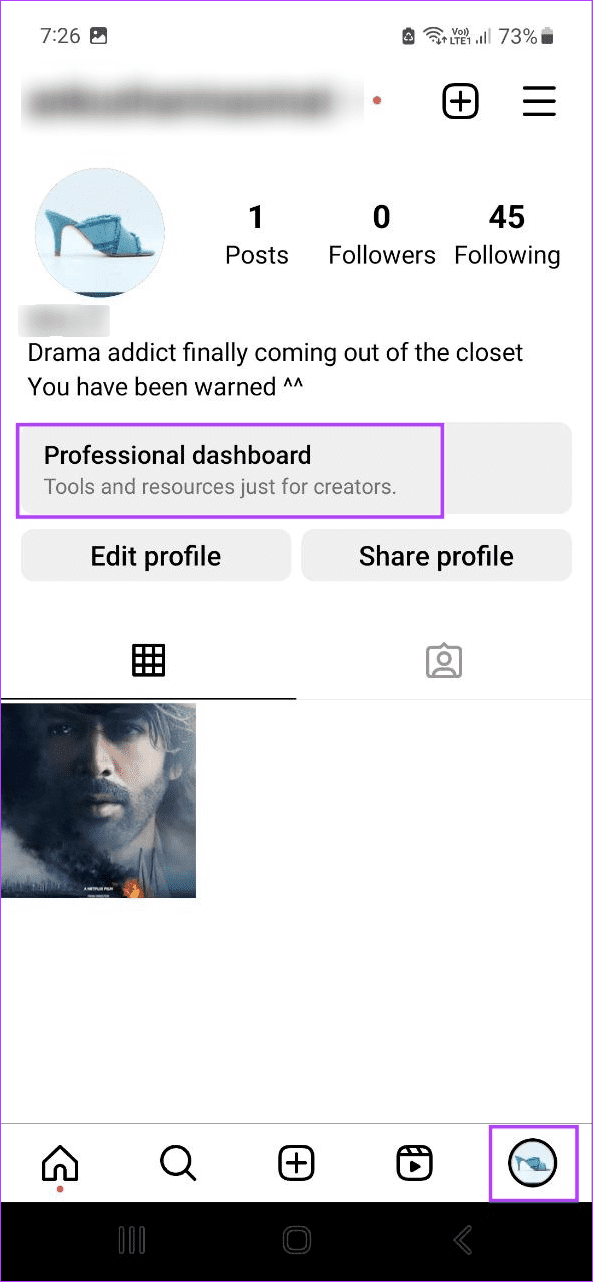
A relatively new addition to Instagram, you can now view ongoing trends using the Reels Trends tool from your Instagram app’s dashboard. Note that you will need a professional Instagram account to use this feature. Follow the below steps to access it.
Step 1: Open the Instagram app and go to your profile page.
Step 2: Here, tap on Professional dashboard. Then, tap on Trending audio. Use this page to see trending music on Instagram.

Method 3: Searching Through Popular Creator’s Feed
You can look up different content creators’ accounts. Go through their recently posted Reels and repeat this process for a few more accounts. Pay special attention to viral Reels or Reels with high view counts. Then, cross-reference and select music for your content accordingly.
Tip: You can also save their stories with music for reference.
Other Ways to Find Trending Audio on Instagram
- By checking the arrow icon next to the audio: There’s a good chance other users will also use trending music on Instagram for their Reels. When they do that, a tiny upward arrow symbol is added next to the track name. So, scroll through the Reels section and look for the trending audio symbol.
- Scrolling through the Reels section: Scrolling through the Reels section on your Instagram app can also take you one step closer to finding that perfect trending song. Because Instagram’s algorithm tailors your search results based on your preferences, most Reels you see will be relevant.
- Checking Instagram’s @creators account: You can use Instagram @creators to find photos and videos from featured creators and curated New Trend Reports to find currently trending songs. You can also follow any of the featured creators to see more of their content in the future.
- Using TikTok/Spotify: Spotify has curated playlists for every occasion. So, it is no surprise that Spotify has playlists for trending songs. Similarly, you can also use TikTok’s Creative Center page to check for any currently trending audio and use it on Instagram accordingly.
Why You Should Use Instagram Trending Songs
As the name suggests, trending songs on Instagram are the ones that are currently the hottest and most used on the platform. But why should we use it? Keep reading to know.
- Appeal to your audience: Certain trends are created around trending music, not content. This means that if you add trending music to your Reels and add your twist to the content, it will have a higher chance of appealing to the audiences.
- Increase audience participation: As more users see your Reel, they may leave comments, add it to their saved lists, or even share it on their Stories. This especially holds if the Reel has a trending song that resonates with the audience.
- Make your brand stand out: For independent creators and brands alike, Instagram Reels are an excellent opportunity to get noticed. So, hopping on the trends train and using the latest viral song is the way to go. However, ensure the song you’re using is copyright-free, or it might cause issues.
- Get noticed: Instagram regularly picks and features up-and-coming creators on its official page to help them grow. And the chances of this happening increase when you create Reels with trending songs.
Was this helpful?
Last updated on 26 June, 2024
Read Next
 How to Turn Off Trending Searches in Google App and Browser
Google products are fantastic, but certain features are just a pain to deal with or outright distracting.
How to Turn Off Trending Searches in Google App and Browser
Google products are fantastic, but certain features are just a pain to deal with or outright distracting.
 5 Ways to Fix Audio Issues in Zoom
Basic Fixes Join using computer audio: The Zoom app will offer a pop-up to let you join with Computer Audio when you tap on the New Meeting option.
4 Ways to Fix Zoom Audio Delay on Windows 11
Basic Fixes Check your network connection: Ensure your PC has a good internet connection.
5 Ways to Fix Audio Issues in Zoom
Basic Fixes Join using computer audio: The Zoom app will offer a pop-up to let you join with Computer Audio when you tap on the New Meeting option.
4 Ways to Fix Zoom Audio Delay on Windows 11
Basic Fixes Check your network connection: Ensure your PC has a good internet connection.
 How to Change WhatsApp Audio Speed on Mobile and Desktop
Change Playback Speed for Audio Messages on WhatsApp WhatsApp allows you to change the playback speed of audio messages in three levels : 1x – 1x means WhatsApp will play
How to Change WhatsApp Audio Speed on Mobile and Desktop
Change Playback Speed for Audio Messages on WhatsApp WhatsApp allows you to change the playback speed of audio messages in three levels : 1x – 1x means WhatsApp will play
 5 Ways to Fix Audio Not Working on Discord
Basic Fixes Unmute yourself on Discord: Ensure you haven't accidentally muted yourself on Discord.
5 Ways to Fix Audio Not Working on Discord
Basic Fixes Unmute yourself on Discord: Ensure you haven't accidentally muted yourself on Discord.
 5 Ways to Fix No Audio on WhatsApp Web
Preliminary Checks Check the video or try playing another/older video: Is the video a GIF?
5 Ways to Fix No Audio on WhatsApp Web
Preliminary Checks Check the video or try playing another/older video: Is the video a GIF?
 6 Free Tools to Remove Background Noise From Audio
1.
6 Free Tools to Remove Background Noise From Audio
1.
 How to Save WhatsApp Audio on iPhone, Android, and Web
How to Save Voice Message From WhatsApp on Android All the WhatsApp data is stored in your device's internal storage, which can be accessed using the File Manager.
How to Save WhatsApp Audio on iPhone, Android, and Web
How to Save Voice Message From WhatsApp on Android All the WhatsApp data is stored in your device's internal storage, which can be accessed using the File Manager.
The article above may contain affiliate links which help support Guiding Tech. The content remains unbiased and authentic and will never affect our editorial integrity.