


Why Does iPhone Keep Showing Liquid Detected in Lighting Connector Error?
Before we discuss the solutions, let’s first understand some of the common reasons your iPhone might display the ‘Liquid detected in Lightning Connector’ error.
- Moisture or dust inside the Lightning port
- The Lightning or USB-C cable is wet
- Use of unsupported charging accessories
- Temporary iOS glitches
If Your iPhone or Charging Cable Is Wet
Notably, charging the iPhone while the connector is wet might harm both your device and the cable. The pins on the connector or cable could corrode, leading to permanent damage, issues with functioning, or connectivity issues.
Fix 1. Dry your iPhone and Lightning cable
The first thing you need to do is unplug any cables or accessories from your iPhone and power it off. After that, gently shake your iPhone with the port facing downward to remove any excess moisture. While you’re at it, wipe the Lightning cable with a soft, dry cloth.
Let your iPhone sit for about 30 minutes, then power it back on. Charge your iPhone again and see if the ‘Liquid detected in Lightning Connector’ error appears. If it does, allow your iPhone to dry completely by placing it in a dry area with some airflow. This process can take several hours.
Fix 2. Use Water Eject Techniques to Get Liquid Out of Port
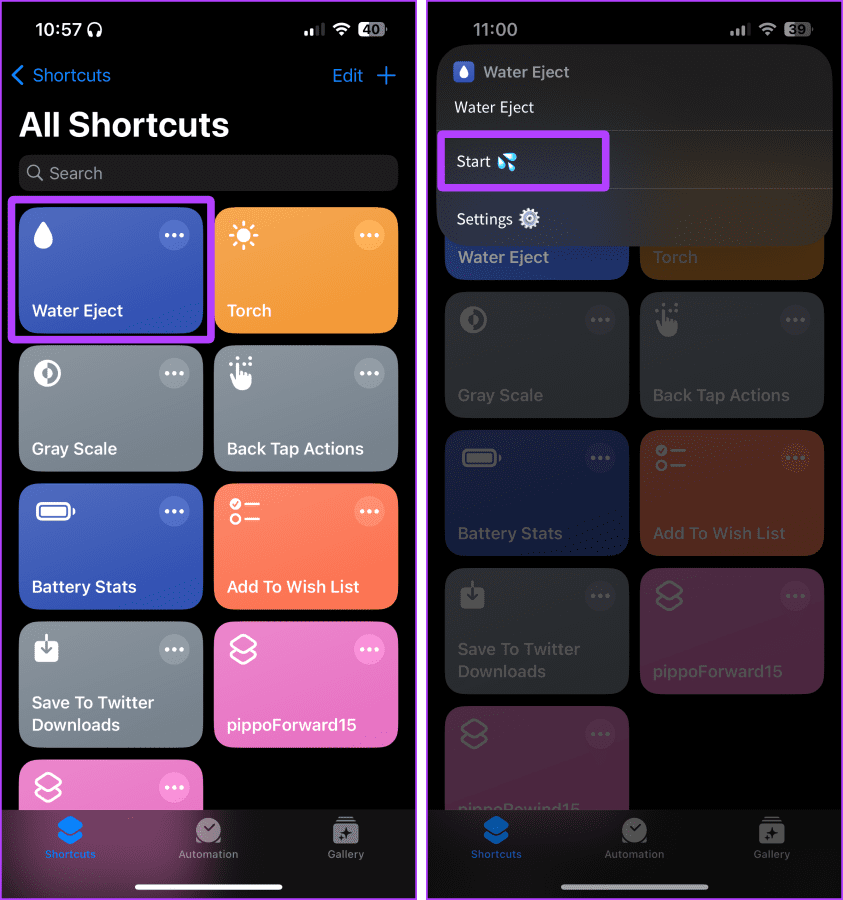
There are multiple techniques to eject water from iPhone speakers, which can also be used to expel water from the charging port. The most common and effective method is to use the Water Eject Shortcut.
Simply download and run the shortcut. Once the sound wave vibrations remove trapped water, try plugging in the charger. Hopefully, you’ll not get the Liquid Detected error again.
What Not to Do When Your iPhone Is Wet
- Don’t use an external heat source or compressed air. While it might speed up the process, it can cause more harm than good.
- Avoid inserting foreign objects, such as cotton swabs or paper towels, into the connector.
- Putting your iPhone in a rice bag is also a bad idea. Small rice particles might damage the charging port rather than heal it.
Fix 3. Use Wireless Charger
Instead of risking it all due to an emergency, it’s wiser to charge your iPhone wirelessly for some time. The workaround should get you through the day while allowing your iPhone to dry itself.
We recommend charging your iPhone with a Qi-certified charger from Apple or a reputable brand. If you plan to buy one, consider getting a standing wireless charger for your iPhone.
If Your iPhone and Accessory Aren’t Wet
While the chances are low, the Liquid detected in Lightning Connector error could occur due to bugs or glitches. In that scenario, try the generic fixes mentioned below.
Fix 4. Try Basic Troubleshooting
- Restart the device
- Try charging with a different cable (preferably MFI-certified).
- Update iOS
- Contact Apple Support (if nothing else works)
Is It Safe to Use the Emergency Override to Charge Your iPhone
The ‘Liquid detected in Lightning Connector’ error on your iPhone also provides an Emergency Override option. This effectively allows you to bypass the error message and charge your iPhone.
However, you should only do this if you are certain that your iPhone is dry. Apple advises using this option only in an emergency, as ignoring the error and charging a wet iPhone can result in other serious issues.
FAQs
Apple recommends waiting at least 5 hours after drying your iPhone before charging it if it has gotten wet.
Your iPhone might stop charging after being exposed to liquid to avoid further damage to the charging port, internal components, or battery.
Was this helpful?
Last updated on 18 July, 2024
2 Comments
Leave a Reply
Read Next
 How to Fix Battery Not Detected in Windows 10 Error in 8 Ways
The battery is what keeps your laptop alive when it’s not connected to a power outlet.
How to Fix Battery Not Detected in Windows 10 Error in 8 Ways
The battery is what keeps your laptop alive when it’s not connected to a power outlet.
 10 Ways to Fix Moisture Detected in Charging Port Error on Samsung Galaxy Phones
Most Samsung Galaxy devices these days come with an IP rating.
10 Ways to Fix Moisture Detected in Charging Port Error on Samsung Galaxy Phones
Most Samsung Galaxy devices these days come with an IP rating.
 4 Ways to Fix No Battery Is Detected on Windows 11 Laptop
Fix 1: Reconnect the Battery and Perform a Power Cycle You can start by removing your laptop’s battery if possible and installing it again.
4 Ways to Fix No Battery Is Detected on Windows 11 Laptop
Fix 1: Reconnect the Battery and Perform a Power Cycle You can start by removing your laptop’s battery if possible and installing it again.
 Top 5 Wireless Mouse With USB-C Connector
In 2020, and consumer gadgets are quickly moving to the USB-C era.
Top 5 Wireless Mouse With USB-C Connector
In 2020, and consumer gadgets are quickly moving to the USB-C era.
 How to Fix USB Connector Disconnected Notification on Android
Why Is My Phone Saying USB Connector Connected and Disconnected?
How to Fix USB Connector Disconnected Notification on Android
Why Is My Phone Saying USB Connector Connected and Disconnected?
 2 Fixes for “We’ve Detected Automated Behavior on Your Account” Warning on Instagram
Try Basic Fixes Avoid engaging in spammy behavior: Activities such as following, unfollowing, or sending direct messages to a large number of people in a short time can trigger this
2 Fixes for “We’ve Detected Automated Behavior on Your Account” Warning on Instagram
Try Basic Fixes Avoid engaging in spammy behavior: Activities such as following, unfollowing, or sending direct messages to a large number of people in a short time can trigger this
 7 Best Apple CarPlay Lightning Cables for Your iPhone
Short and durable lightning cables work best when connecting your iPhone to your car for CarPlay.
7 Best Apple CarPlay Lightning Cables for Your iPhone
Short and durable lightning cables work best when connecting your iPhone to your car for CarPlay.
 Is USB-C on the iPhone 15 Really Better Than Lightning?
Tech enthusiasts -- for the longest time -- have thrown a lot of flak at Apple for sticking to its proprietary lightning connector.
Is USB-C on the iPhone 15 Really Better Than Lightning?
Tech enthusiasts -- for the longest time -- have thrown a lot of flak at Apple for sticking to its proprietary lightning connector.
The article above may contain affiliate links which help support Guiding Tech. The content remains unbiased and authentic and will never affect our editorial integrity.
My phone said liquid detected although it had never been exposed to any liquid whatsoever, that i know of. My friend hid my phone as a joke and maybe they spilled water on it or something, but i doubt it. does anyone have a solution?
just beat up your friends and put them in a water tank