

Basic Fixes
- Check if OneDrive is down: Visit StatusTicker to see if OneDrive servers are down in your region. If so, you must wait for them to resume working.
- Open OneDrive in Incognito mode: Sometimes, websites load faster when there are no extensions or browser preferences, i.e., Incognito mode.
- Disable ad blockers: While ad blockers serve the purpose, they can also limit a few tabs from opening on your browser. So, disable them and try again.
- Check internet connection: Check the status of your internet connection. Switch to 5GHz Wi-Fi if you have a dual-band router.
- Force quit and relaunch your browser: This will give your browser a fresh start and reload all its contents.
- Update or reinstall web browser: Using the updated version of your browser always helps.
Fix 1: Clear Cache for OneDrive
If opening OneDrive in Incognito mode is not helping, you can manually clear the Cache for the OneDrive website on your browser. You can follow the steps depending on your preferred browser.
For Safari
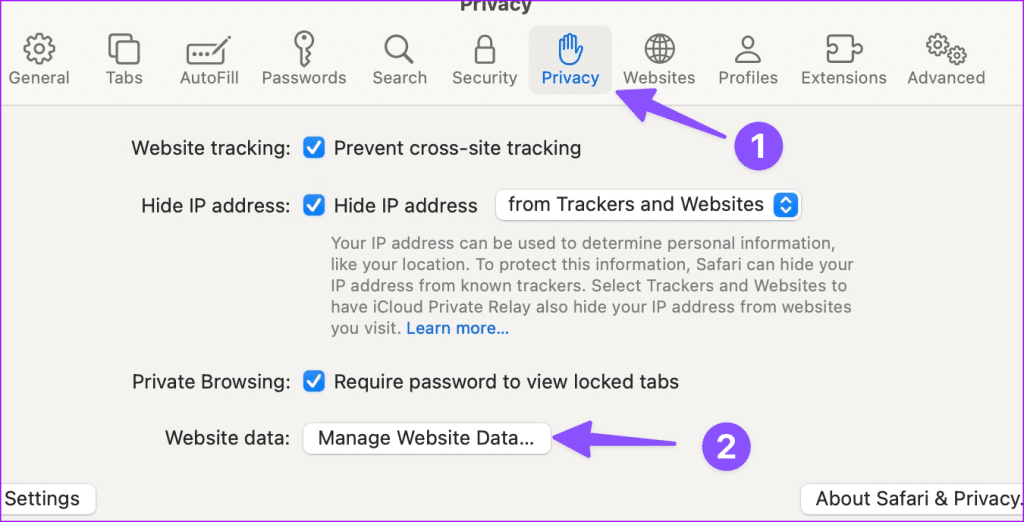
Open Safari > click on Safari at the top left > Settings > Privacy > Manage Website Data > Search for OneDrive > click on Remove.
For Firefox
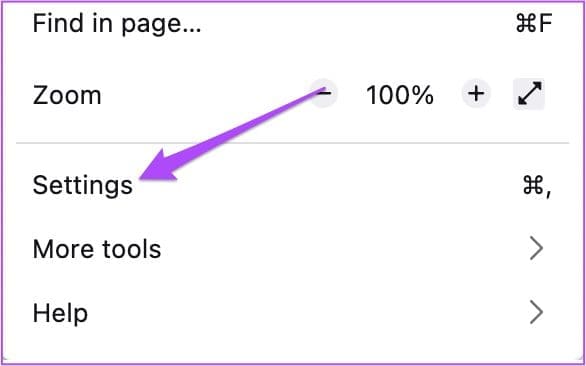
Step 1: Open the browser > go to Settings.
Step 2: Click on Privacy and Security from the left menu.
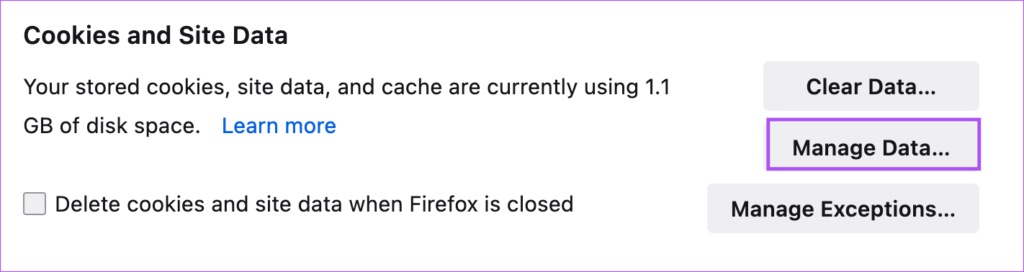
Step 3: Scroll down and click on Manage Data.
Step 4: Click the Search Bar and type live.com to search for OneDrive.

Step 5: Select the search result and click on Remove Selected. Then, click on Done to confirm.
Fix 2: Allow Third-Party Cookies for OneDrive
While opening OneDrive on your browser, allow third-party cookies for the website. Cookies save information about your web browsing choices and help improve the user experience by making a website responsive.
Was this helpful?
Last updated on 31 July, 2024
1 Comment
Leave a Reply
Read Next
 5 Ways to Fix Samsung Internet Browser Not Loading Pages
Try Basic Fixes Check your internet connection: The Samsung Internet browser may have trouble loading web pages if there is a problem with your internet connection.
5 Ways to Fix Samsung Internet Browser Not Loading Pages
Try Basic Fixes Check your internet connection: The Samsung Internet browser may have trouble loading web pages if there is a problem with your internet connection.
 3 Ways to Fix Google Maps Not Loading or Working in Browser
Fix 1: Sign Out of Your Google Account and Sign Back In Authentication issues with your Google account can cause Google Maps to stop working in your browser.
3 Ways to Fix Google Maps Not Loading or Working in Browser
Fix 1: Sign Out of Your Google Account and Sign Back In Authentication issues with your Google account can cause Google Maps to stop working in your browser.
 5 Ways to Fix Google Chat Not Loading in Browser
Fix 1: Disable Browser Extensions One of your third-party extensions may be interfering with and blocking Google Chat.
5 Ways to Fix Google Chat Not Loading in Browser
Fix 1: Disable Browser Extensions One of your third-party extensions may be interfering with and blocking Google Chat.
 4 Fixes for Instagram Not Loading in Browser
Try Basic Fixes Check if Instagram is down: If Instagram servers are facing an outage, it may keep showing the "There's an issue and the page could not be loaded"
4 Fixes for Instagram Not Loading in Browser
Try Basic Fixes Check if Instagram is down: If Instagram servers are facing an outage, it may keep showing the "There's an issue and the page could not be loaded"
 Kiwi Browser vs Google Chrome: Which Android Browser Should You Use
The Google Play store is chock-full of browser apps, all of which boast of a single stand out feature that differentiates them from the rest.
Kiwi Browser vs Google Chrome: Which Android Browser Should You Use
The Google Play store is chock-full of browser apps, all of which boast of a single stand out feature that differentiates them from the rest.
 3 Ways to Fix Microsoft Teams Not Loading or Opening
Basic Fixes Check for downtime: Servers can be down, as many people worldwide rely on Teams.
3 Ways to Fix Microsoft Teams Not Loading or Opening
Basic Fixes Check for downtime: Servers can be down, as many people worldwide rely on Teams.
 4 Ways to Fix Images Not Loading in Microsoft Edge
Fix 1: Check Site Permissions The first thing you should do is review site permissions in Microsoft Edge to ensure websites are allowed to load images.
4 Ways to Fix Images Not Loading in Microsoft Edge
Fix 1: Check Site Permissions The first thing you should do is review site permissions in Microsoft Edge to ensure websites are allowed to load images.
 3 Fixes When Microsoft Store Is Not Opening or Loading
Basic Fixes: Check your Internet connection: Microsoft Store requires a high-speed Internet connection to work correctly.
3 Fixes When Microsoft Store Is Not Opening or Loading
Basic Fixes: Check your Internet connection: Microsoft Store requires a high-speed Internet connection to work correctly.
The article above may contain affiliate links which help support Guiding Tech. The content remains unbiased and authentic and will never affect our editorial integrity.


Thank you Paurush for the fix (OneDrive not opening in Chrome). Appreciate it!