

Basic Fixes
- Disable silent mode: Starting with the basic solution, you should disable Silent Mode on your iPhone to hear the WhatsApp Status video sound.
- Avoid uploading GIFs: It’s obvious that GIFs won’t have any sound if you post them on WhatsApp Status.
- Force quit and relaunch: This is a simple yet effective solution to fix the issue. This will give the app a fresh start on your iPhone.
- Update WhatsApp: Install the latest app version on your iPhone to remove all bugs.
Fix 1: Check the Volume Levels of Your WhatsApp Status
You may have reduced the volume levels of your iPhone to avoid disturbing anyone around you. Of course, you may not realize or remember that all the time. So it’s only obvious that you increase the volume levels to check if you can hear the sound from your or your contact’s WhatsApp Video Status. Here’s how you can check the audio levels of WhatsApp Video Status.
Step 1: Open WhatsApp on your iPhone.
Step 2: Tap on the Status icon at the bottom-left corner.
Step 3: Tap on your status or your contact’s video status.


Step 4: Press the Volume Up button on the left side of your iPhone.
You will see a Volume icon at the top-left corner with a circular progress bar for volume increase and decrease. Increase the volume and see if you can hear the sound.
Fix 2: Enable Status Audio While Uploading
While uploading videos as WhatsApp Status, the app allows you to mute the audio. You should check whether that option to mute audio has been disabled. Here’s how to do it.
Step 1: Open WhatsApp on your iPhone.
Step 2: Tap the Status icon at the bottom-left corner.
Step 3: Tap on Add My Status icon to upload your Video Status.
Step 4: After selecting the video, tap the Audio icon on the top-left corner to enable it.

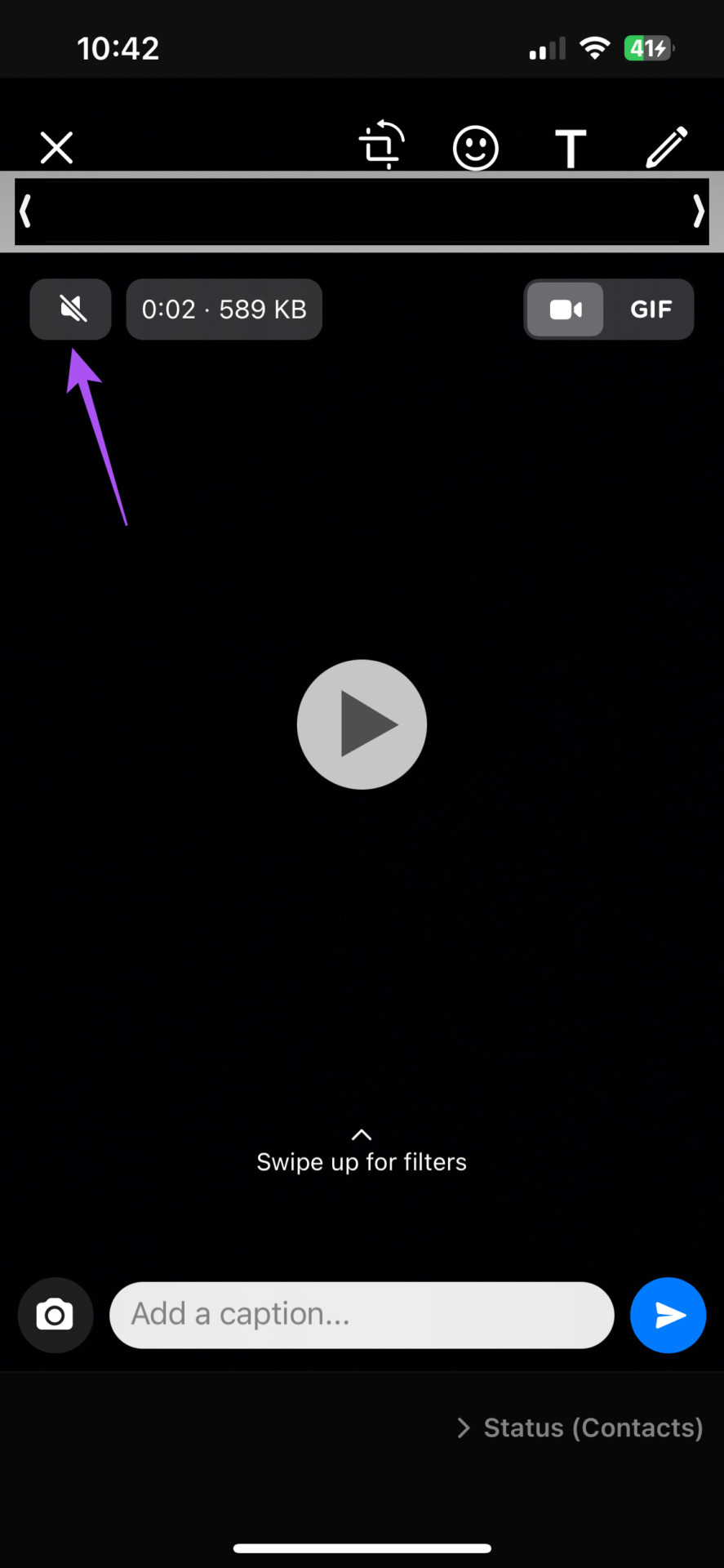
You should also ensure that the option of uploading status as GIF is not selected.
Tip: You can read our post suggesting solutions to fix the WhatsApp Status couldn’t send error on iPhone and Android.
Was this helpful?
Last updated on 08 July, 2024
5 Comments
Leave a Reply
Read Next
 5 Fixes for No Sound in WhatsApp Video Calls on iPhone and Android
Basic Fixes Force quit and relaunch WhatsApp: This will reload the app and give it a fresh start on your iPhone or Android phone.
5 Fixes for No Sound in WhatsApp Video Calls on iPhone and Android
Basic Fixes Force quit and relaunch WhatsApp: This will reload the app and give it a fresh start on your iPhone or Android phone.
 5 Ways to Fix WhatsApp Status Couldn’t Send Error
Try Basic Fixes Try another image or video: Uploading another image or video will help verify whether the issue is related to the specific media file.
5 Ways to Fix WhatsApp Status Couldn’t Send Error
Try Basic Fixes Try another image or video: Uploading another image or video will help verify whether the issue is related to the specific media file.
 Why Do Photos Get Blurry on WhatsApp Status: 3 Ways to Fix This
https://youtu.be/k2MGRKNamFQ Basic Fixes Switch to the stable version of WhatsApp: While beta versions give you early access to new features and cool tricks, they may also introduce several bugs and
Why Do Photos Get Blurry on WhatsApp Status: 3 Ways to Fix This
https://youtu.be/k2MGRKNamFQ Basic Fixes Switch to the stable version of WhatsApp: While beta versions give you early access to new features and cool tricks, they may also introduce several bugs and
 How to Add Music to WhatsApp Status on iPhone and Android
Method 1: Put WhatsApp Status With a Song WhatsApp allows you to record the sound along with the video for the status.
How to Add Music to WhatsApp Status on iPhone and Android
Method 1: Put WhatsApp Status With a Song WhatsApp allows you to record the sound along with the video for the status.
 5 Ways to Fix WhatsApp Status Not Loading on Android and iPhone
Try Basic Fixes Check if WhatsApp is down: Services like WhatsApp can experience server outages at times.
5 Ways to Fix WhatsApp Status Not Loading on Android and iPhone
Try Basic Fixes Check if WhatsApp is down: Services like WhatsApp can experience server outages at times.
 How to Upload WhatsApp Status Videos of More Than 30 Seconds
How to Upload WhatsApp Status of More Than 30 seconds WhatsApp now allows you to upload video status for up to 60 seconds for your contacts.
How to Upload WhatsApp Status Videos of More Than 30 Seconds
How to Upload WhatsApp Status of More Than 30 seconds WhatsApp now allows you to upload video status for up to 60 seconds for your contacts.
 How to Hide Last Seen and Online Status in WhatsApp
Hide Last Seen and Online Status For Everyone in WhatsApp Used by over two billion users worldwide, WhatsApp eventually added privacy features to hide your status, profile picture, and About
How to Hide Last Seen and Online Status in WhatsApp
Hide Last Seen and Online Status For Everyone in WhatsApp Used by over two billion users worldwide, WhatsApp eventually added privacy features to hide your status, profile picture, and About
 How to Fix WhatsApp Status Visibility Issues
Basic Fixes Check if the contact has blocked you: You should check if someone has blocked you on WhatsApp Switch to Wi-Fi: If you are using Mobile Data, you might
How to Fix WhatsApp Status Visibility Issues
Basic Fixes Check if the contact has blocked you: You should check if someone has blocked you on WhatsApp Switch to Wi-Fi: If you are using Mobile Data, you might
The article above may contain affiliate links which help support Guiding Tech. The content remains unbiased and authentic and will never affect our editorial integrity.
It was very helpful and keep up with the amazing help you’re putting out there
Thank you. This was helpful.
Still I am unable to fix the problem ????
Thank you, you solved my problem
Hi Do you have any tips on how to enable sound when video sent via WhatsApp
Tks