Basic Fixes
- Clean Rear Sensors: Dirty Apple Watch sensors can prevent footsteps from being counted or cause them to be counted improperly. So, we suggest cleaning the sensor with rubbing alcohol and cotton.
- Restart Your Apple Watch: When in doubt, restart. So, if your Apple Watch is not tracking your footsteps correctly, start the solution hunt with a simple restart.
- Wear the Watch snugly: The watch tracks your steps using accelerometer and gyroscope sensors. If the watch is loose, your Apple Watch may misreport your step count.
Fix 1: Connect the Watch to iPhone
Your Apple Watch may not track step counts properly due to sync issues. To sync the devices, bring the Control Center. Then, check whether Wi-Fi and Bluetooth toggles are turned on.


Fix 2: Select the Correct Wrist
Apple’s Health app requires you to specify on which wrist you would wear the watch. If you wear the Apple Watch on the incorrect wrist, it may count steps inaccurately. Fret not, as you can change the wrist on which you wear your watch through simple steps. Here’s how.
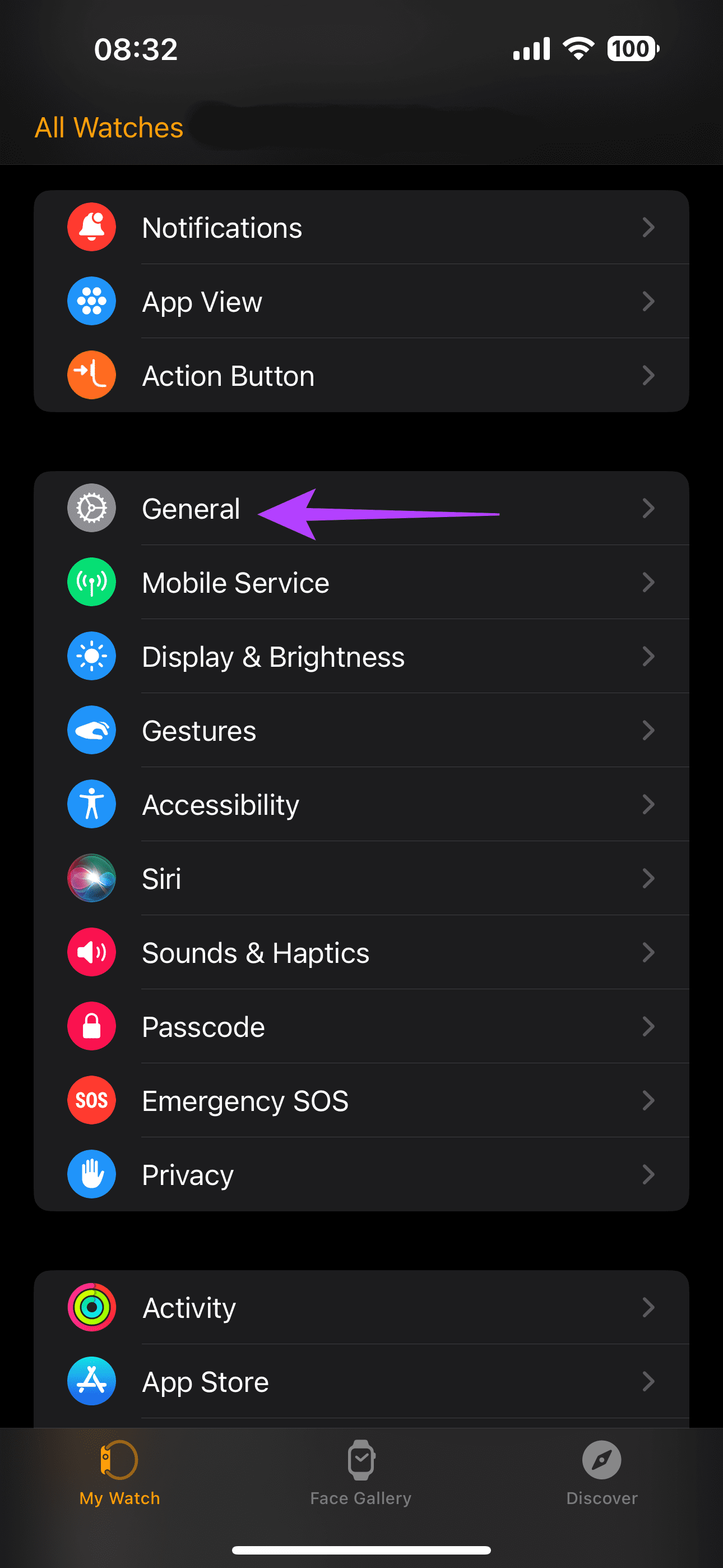
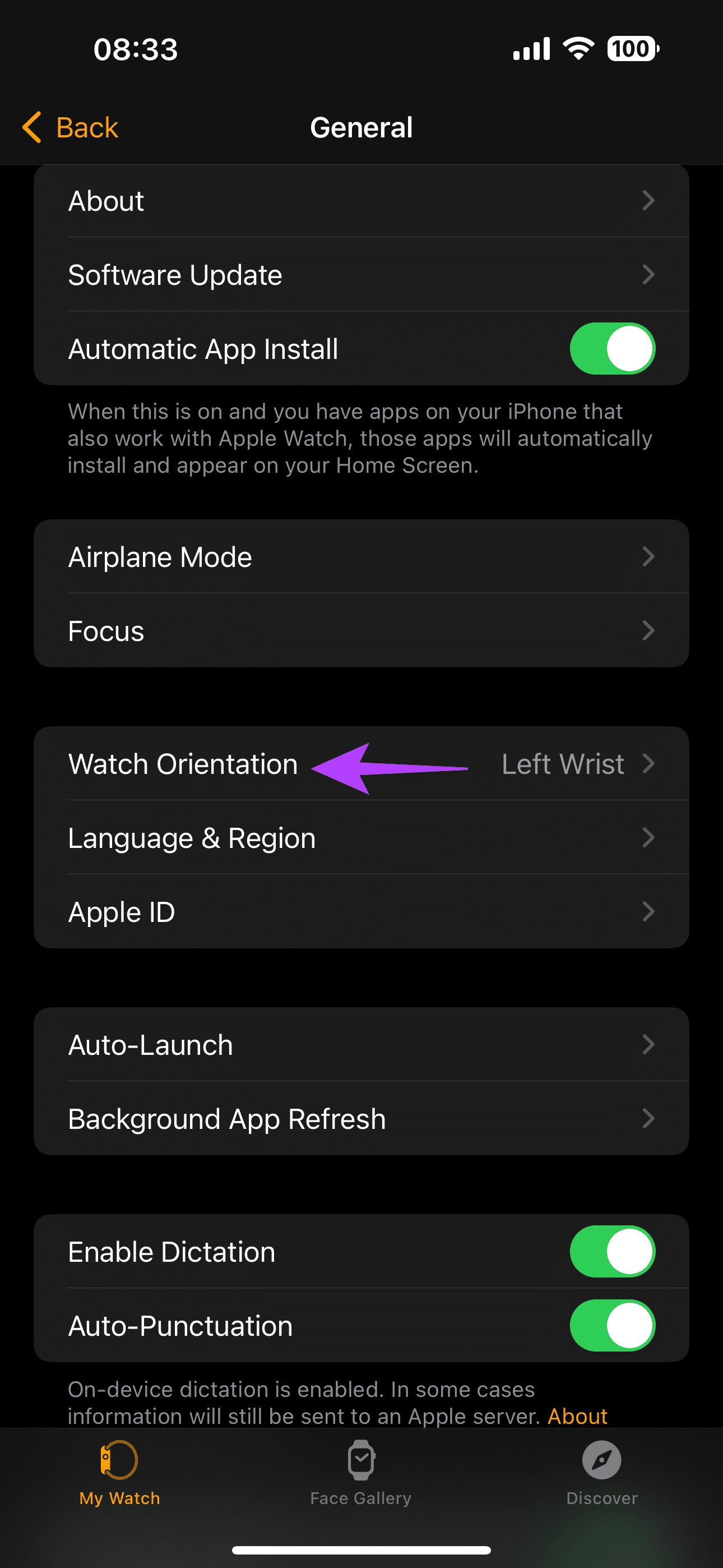
Open the Watch App > go to the General section > tap on Watch Orientation > select the correct watch orientation.

Fix 3: Calibrate Your Apple Watch
Calibrating your Apple Watch can help you attain an improved pace, aiding in step tracking. Here’s how to calibrate your Apple Watch.
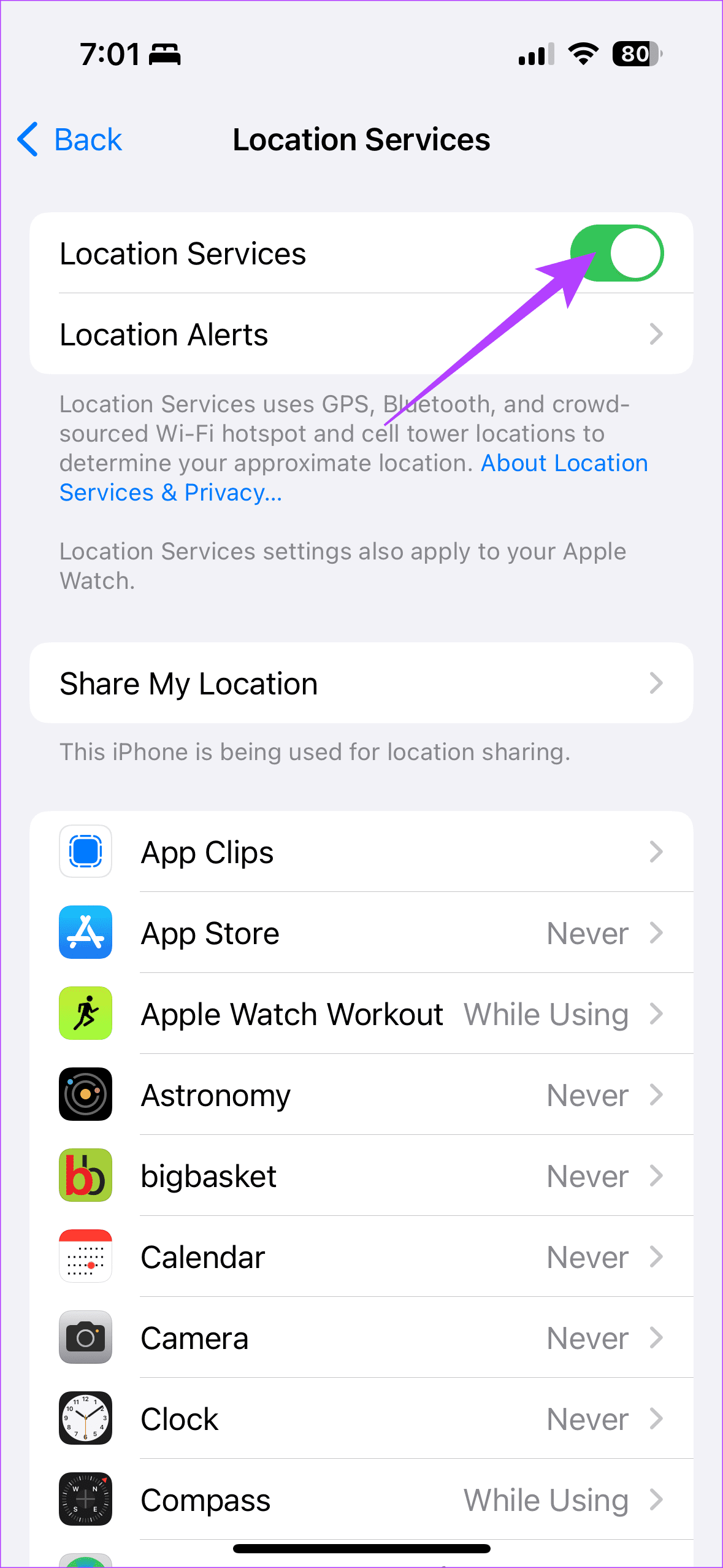
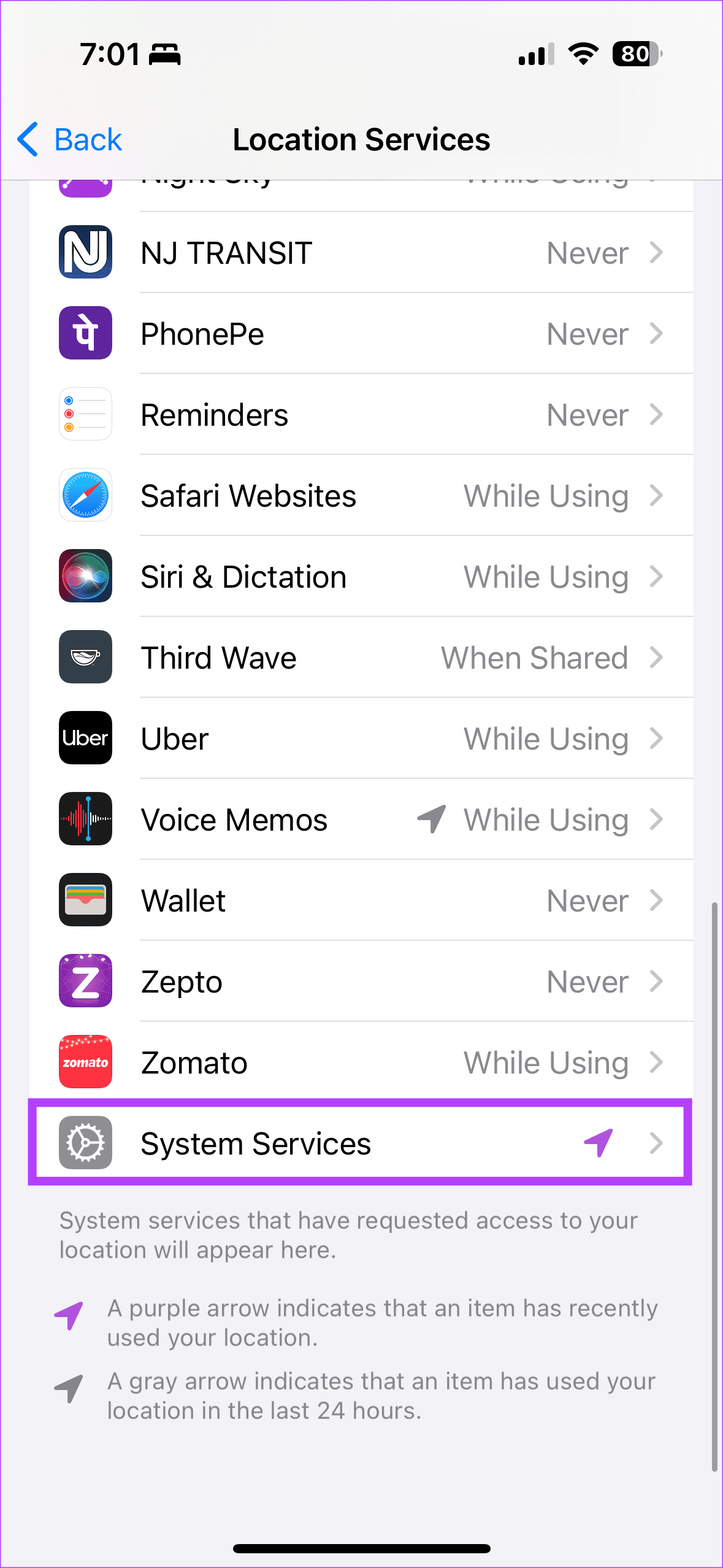
Step 1: Open the Settings app on your iPhone. Scroll down and tap on Privacy & Security > select Location Services.


Step 2: Now, ensure the toggle for Location Services is turned on. Further, tap on System Services. Then, turn on the toggle for Motion Calibration & Distance.

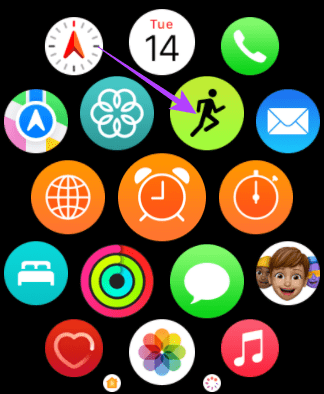
Now, while wearing your Apple Watch, go to an outdoor location with clear skies. Note that if you have the Series 1 Apple Watch, carry your iPhone along. Open the Fitness app on your Watch and opt for an Outdoor Walk or Run.

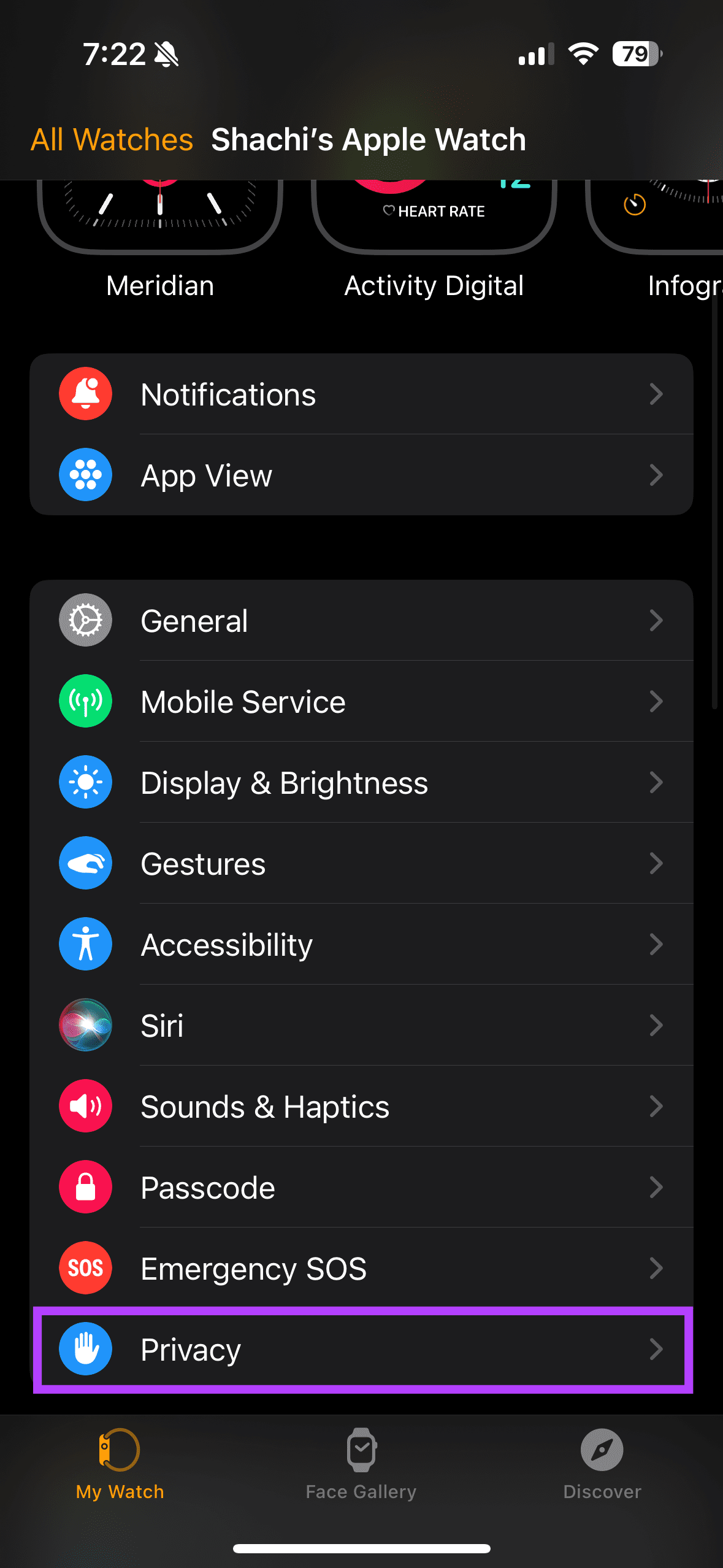
After finishing your workout, we must reset the calibration data. To do so, open the Watch app on your iPhone. Scroll down and tap on Privacy. Then tap on Reset Fitness Calibration Data to complete the calibration process.

Was this helpful?
Last updated on 22 July, 2024
Read Next
 6 Ways to See Steps on Apple Watch
View Daily Steps on Apple Watch or iPhone Method 1: Use the Activity App on Apple Watch Step 1: Press the Digital Crown on your Apple Watch to open the
6 Ways to See Steps on Apple Watch
View Daily Steps on Apple Watch or iPhone Method 1: Use the Activity App on Apple Watch Step 1: Press the Digital Crown on your Apple Watch to open the
 How to Show Steps on an Apple Watch Face
While you can see steps on your Apple Watch, there's no native way to display the metric on any watch face.
How to Show Steps on an Apple Watch Face
While you can see steps on your Apple Watch, there's no native way to display the metric on any watch face.
 Top 6 Ways to Fix Samsung Galaxy Watch Not Tracking Steps
Samsung Galaxy Watch is one of the best alternatives to Apple Watch in the Android camp.
Top 6 Ways to Fix Samsung Galaxy Watch Not Tracking Steps
Samsung Galaxy Watch is one of the best alternatives to Apple Watch in the Android camp.
 4 Ways to Fix Google Docs Not Printing Correctly
Fix 1: Check the Printer Connection and Select the Right Printer You must perform some basic hardware checks to ensure everything is hooked up.
4 Ways to Fix Google Docs Not Printing Correctly
Fix 1: Check the Printer Connection and Select the Right Printer You must perform some basic hardware checks to ensure everything is hooked up.
 12 Tips to Charge Your iPhone Correctly
Tip 1.
12 Tips to Charge Your iPhone Correctly
Tip 1.
 6 Ways to Get Rid of “Chrome Didn’t Shut Down Correctly” Message
Fix 1: Use the Restore Option One of the most straightforward ways to stop Google Chrome from showing this pop-up is to restore tabs from your previous session.
6 Ways to Get Rid of “Chrome Didn’t Shut Down Correctly” Message
Fix 1: Use the Restore Option One of the most straightforward ways to stop Google Chrome from showing this pop-up is to restore tabs from your previous session.
 How to Uninstall Microsoft Teams on Windows 10 Correctly
Uninstalling apps from Windows PC is pretty easy and you can use more than one way to remove apps.
How to Uninstall Microsoft Teams on Windows 10 Correctly
Uninstalling apps from Windows PC is pretty easy and you can use more than one way to remove apps.
 5 Fixes for “Application Was Unable to Start Correctly (0xc0000142)” Error for Office Apps
Fix 1: Run the Office App as Administrator Lack of relevant permissions can prevent Office apps from accessing essential files, triggering the "The application was unable to start correctly (0xc0000142)"
5 Fixes for “Application Was Unable to Start Correctly (0xc0000142)” Error for Office Apps
Fix 1: Run the Office App as Administrator Lack of relevant permissions can prevent Office apps from accessing essential files, triggering the "The application was unable to start correctly (0xc0000142)"
The article above may contain affiliate links which help support Guiding Tech. The content remains unbiased and authentic and will never affect our editorial integrity.