


Facebook is known for its clever algorithms, which allow you to view posts that interest you the most, connect to people you’d love to connect with and use it the way you like. But have you ever wondered what happens behind the scenes of Facebook suggesting new friends? Well, now you may know that in this article, we will learn how Facebook picks people you know.
What Is “People You May Know” Feature on Facebook?
The People You May Know feature on Facebook suggests people you may want to connect with on Facebook. It leverages various sources of tracking data to show you the people you are most likely to connect with. However, some people find it merely intrusive due to the data it tracks to provide precise suggestions, raising concerns about privacy and data tracking.
How Facebook Picks People You May Know
Facebook takes data from various aspects of your profile and device to suggest People you may know on Facebook. Here is a breakdown of the critical factors:
Mutual Friends
Mutual friends have the highest impact on the People you may know and suggestions. In a simple sense, the higher the number of mutual friends you have, the more likely you are to want to connect with the other person because of the same interests and preferences when it comes to friends.
Shared Networks and Communities
The Facebook algorithm analyzes the places you visit, the organizations you work with, your interests, the groups you join, and the conversations you participate in on the platform. This is based on the assumption that people with shared affiliations often have the same interests and personas.
Location and Proximity
Facebook utilizes your location data to suggest people who live in the same city or neighborhood or frequently visit the places that you also visit. Again, this is based on the simple logic of affiliation: if you belong to or visit the same places, you will likely become friends.
Similar Interests and Activities
If you have similar interests and engage in the same activities on the platform, then Facebook will suggest you to People you may know or vice versa. Your interests are based on the Pages you follow, the tags, comments, the content you share, and everything else. Your interests profile is based on what you actively do and your overall user behavior on the platform. There is no clear indication of what your Interests and Activities profile suggests.
Common Background Information And Phone Contacts
If you share standard background information such as workplace, education, hometown, current city, previous work experience, and others, you may show up in other people’s People you may know. Facebook also asks if it can sync your contacts. If you have allowed this, it will automatically match profiles against your contacts and suggest them to the People you may know.
Search History
If you frequently search and visit some person’s profile but don’t add them as friends, you might show up in the people you may know, or vice versa. The logic behind this is pretty straightforward.
If you think enough, you will realize that Facebook’s algorithm for the People You May Know feature is primarily based on how humans organically make friends, whether from proximity, shared interests, familiar friends, workplaces, or communities.
How Does The Algorithm of Facebook People You May Know Work?
We have discussed what factors contribute to your People You May Know suggestions on Facebook. But how does Facebook combine all of these Factors? Facebook uses advanced machine learning and a technology called Graph Representation Learning.
This model creates a vast and almost never-ending web of all the people on Facebook, including factors such as interests, friends, background info, location, and contacts. Then, it analyzes the correlation between these factors and suggests people you may know. It is similar to how most recommendations work online: OTT services, other social media platforms, or e-commerce platforms.
Every platform creates a detailed taste and personal profile on the backend and combines it with other factors to give precise recommendations.
The Facebook People You May Know algorithm is always learning, meaning it will suggest some people you want to add to your friend list and some people with far fewer chances. Then, it evaluates whether you add them and refines its suggestions.
How to Turn off People You May Know on Facebook
Thankfully, if you find the People You May Know popups in the feed and the notifications on your phone, email, and sms too intrusive, you can turn them off:
Step 1. Open Facebook on the web or your smartphone.
Step 2. Next, scroll down until you find a People You May Know section on your feed.
Step 3. Click the triple dot icon in the People You May Know section.
Step 4. Now, click the Hide People You May Know option. This will hide the People You May Know section on any app’s Facebook feed.
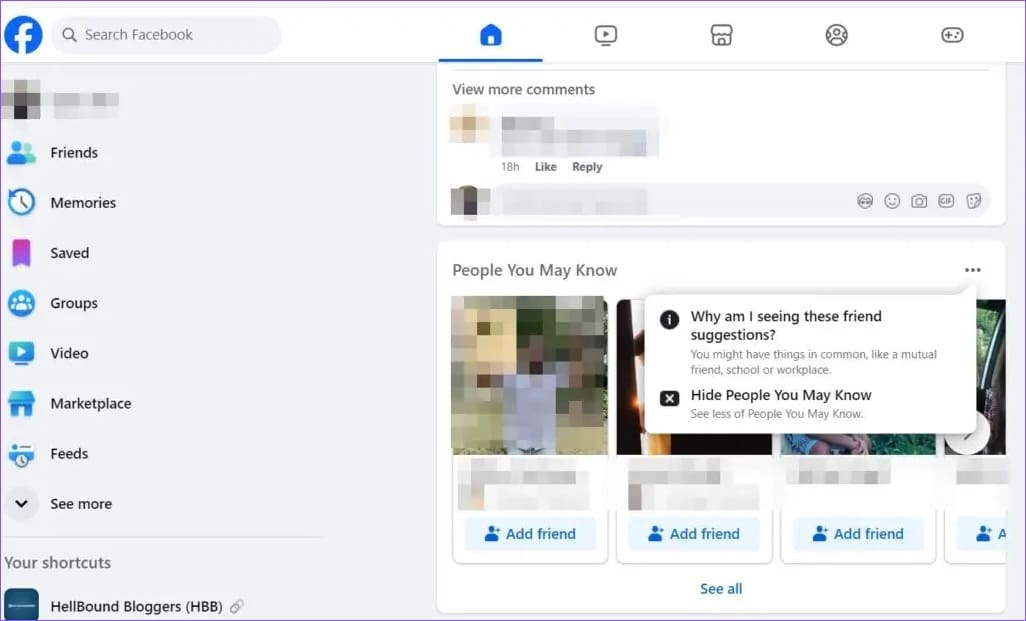
Step 5. To turn off People You May Know notifications, go to Settings and Privacy on Facebook on your smartphone or web.
Step 6. Now, go to Preferences > Notifications > People You May Know.
Step 7. From here, you can either turn off the People You May Know notifications entirely or for select channels, i.e., Push, Email, or SMS.

Was this helpful?
Last updated on 08 August, 2024
1 Comment
Leave a Reply
Read Next
 5 Ways to Fix “A Firewall May Be Blocking Spotify” Error on Windows
Fix 1: Allow Spotify Through Windows Defender Firewall Your first step is to check the Windows Defender Firewall settings and ensure it isn’t blocking Spotify on your PC.
5 Ways to Fix “A Firewall May Be Blocking Spotify” Error on Windows
Fix 1: Allow Spotify Through Windows Defender Firewall Your first step is to check the Windows Defender Firewall settings and ensure it isn’t blocking Spotify on your PC.
 4 Ways to Stop Random People From Adding You on Snapchat
Method 1: Disable Add by Email and Mobile Number If you have this option enabled, anyone who knows either your phone number or email ID will be able to add
4 Ways to Stop Random People From Adding You on Snapchat
Method 1: Disable Add by Email and Mobile Number If you have this option enabled, anyone who knows either your phone number or email ID will be able to add
 6 Ways to Search People on Telegram
Keeping in touch with friends and family has become easier, thanks to messaging apps like Telegram.
6 Ways to Search People on Telegram
Keeping in touch with friends and family has become easier, thanks to messaging apps like Telegram.
 How to Use the People Feature in the iPhone Photos App
Add Someone in Your People Album In the Photos album, you can add names to the people or even add new people.
How to Use the People Feature in the iPhone Photos App
Add Someone in Your People Album In the Photos album, you can add names to the people or even add new people.
 How to Leave a Facebook Group on Mobile or Desktop
Facebook is a hub for community connection.
How to Leave a Facebook Group on Mobile or Desktop
Facebook is a hub for community connection.
 How to Clear Facebook Cache on Android and iPhone
What Does Clearing Facebook Cache Do?
How to Clear Facebook Cache on Android and iPhone
What Does Clearing Facebook Cache Do?
 How to See Who Is Stalking Your Facebook Profile
What Is Facebook Stalking Facebook Stalking basically means that someone is keeping a close eye on your social media activities.
How to See Who Is Stalking Your Facebook Profile
What Is Facebook Stalking Facebook Stalking basically means that someone is keeping a close eye on your social media activities.
 How to See Your Sent Friend Requests on Facebook and Instagram
How to Check and Cancel Your Sent Friend Requests on Facebook The Friend Requests tab on Facebook makes it simple to track all the friend requests you have sent and
How to See Your Sent Friend Requests on Facebook and Instagram
How to Check and Cancel Your Sent Friend Requests on Facebook The Friend Requests tab on Facebook makes it simple to track all the friend requests you have sent and
The article above may contain affiliate links which help support Guiding Tech. The content remains unbiased and authentic and will never affect our editorial integrity.

How do I change FB people I may know criteria? I receive suggestions for foreign reptile smugglers, Asian women who think I am their doctor, people in foreign language/alphabets. Is it possible to prevent objectionable postings, I have no use for these people and I prefer not to cancel FB but I will if necessary.