


Your Contact Is Deleting Your Messages
On WhatsApp, you have a certain time window to delete messages from both sides. Even when you try to remove messages from both sides, the receiving person will indicate that the message is deleted.
There are no such limits on Telegram. You can go back to a two-month-old message and delete it for your convenience. Long-press on a message and tap on the delete icon. Delete for both users, and you are good to go.
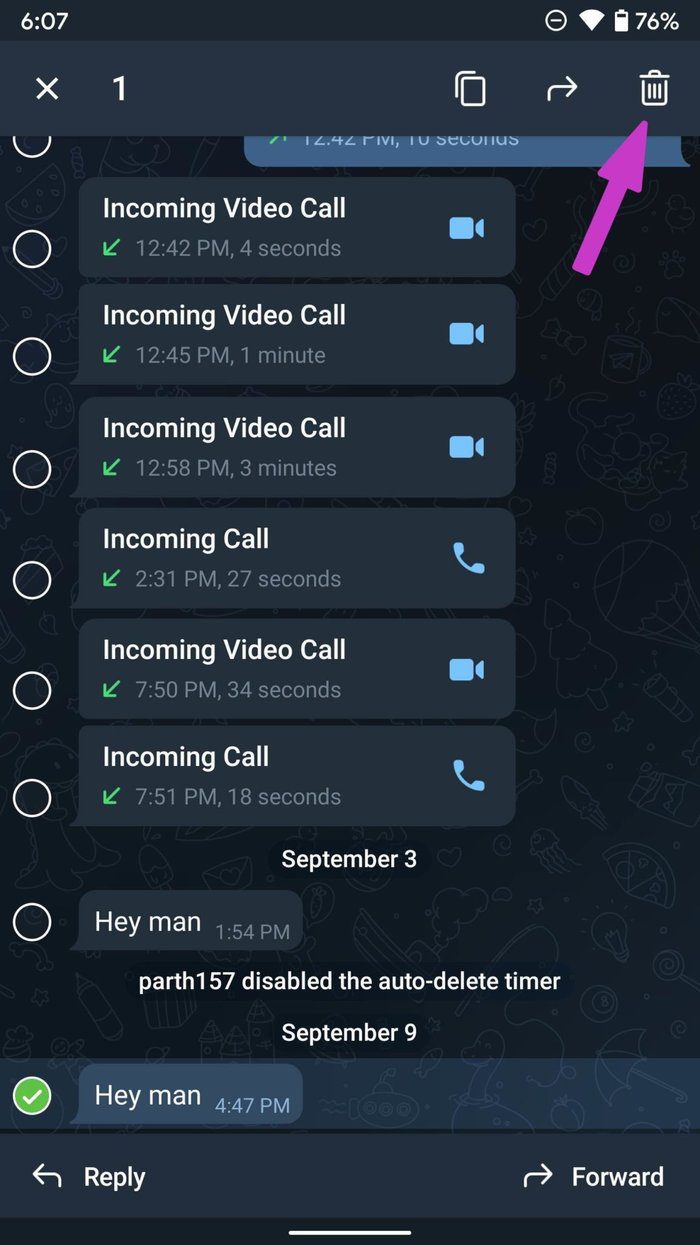
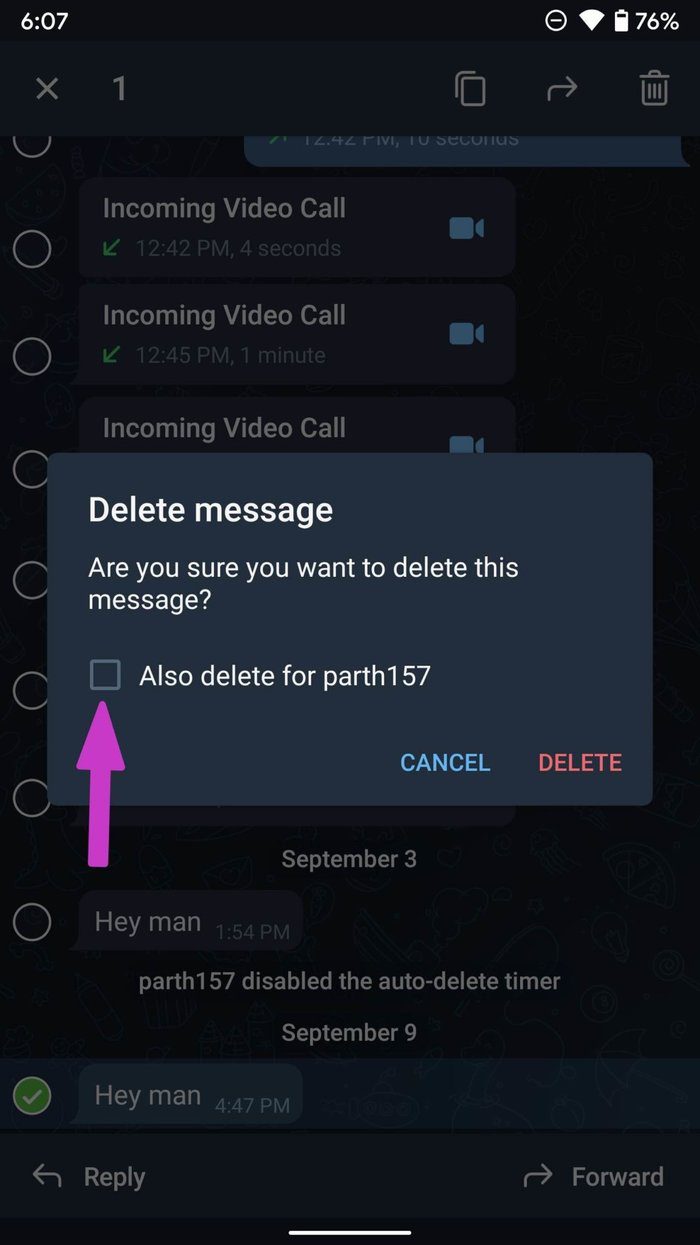
The troubling part is that you don’t see any trace that the message was deleted. It gets deleted without any indication.
Your Contact Is Deleting Entire Conversation
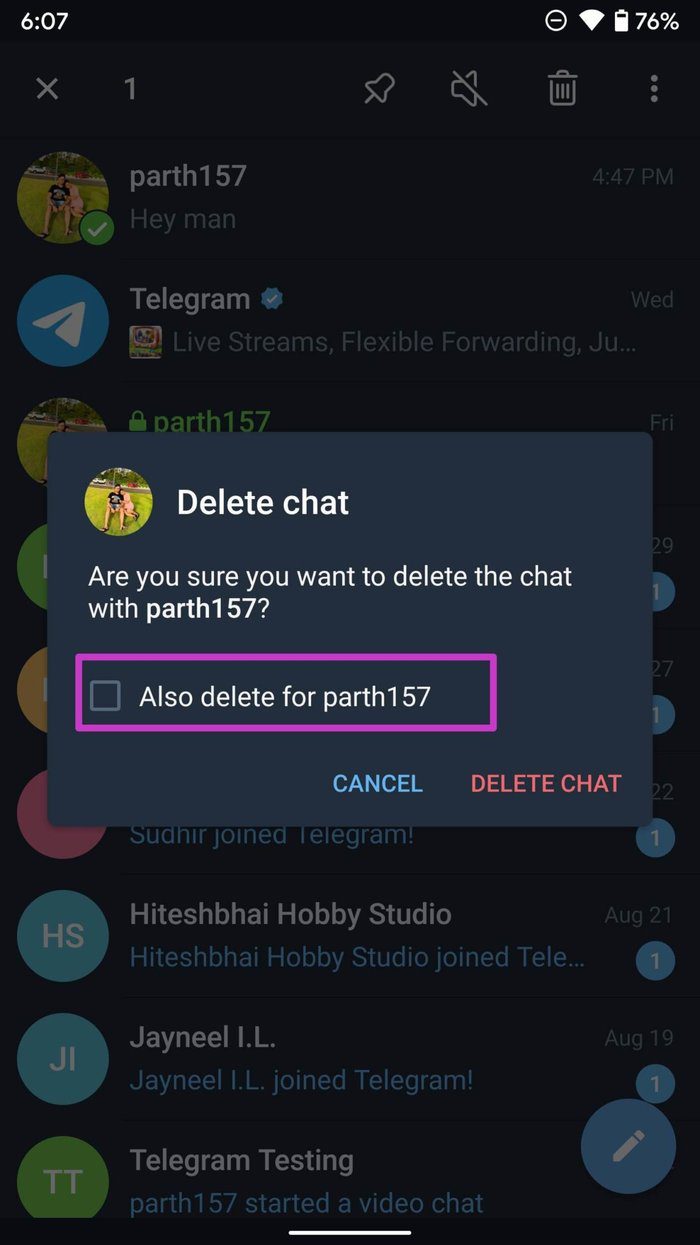
Telegram allows users to delete an entire conversation as well. If the other person uses this trick, you won’t see any chat thread in the Telegram app.
On Android
Long-press on a conversation > tap on the delete icon at the top > enable Also delete for another person > tap on Delete Chat.

On iPhone
Swipe left on a chat thread > tap on Delete > select Delete for me and the other person.


Once again, you will have no idea when the other person has deleted the chat. It disappears from Telegram.
Clear History Automatically
This is one of the prime reasons your Telegram messages are disappearing. Telegram offers an option to clear history automatically in the app. You can also set a timer and remove chat from the other side after a certain time.
Here’s how to set it up so that you can understand the reason behind deleted messages.
On Mobile
Step 1: Open Telegram on your phone.
Step 2: Open any chat > tap on the three-dot menu at the top.
Step 3: Select Clear History, and it will open a bottom menu for more customization.
Step 4: Enable Also clear history for another person.
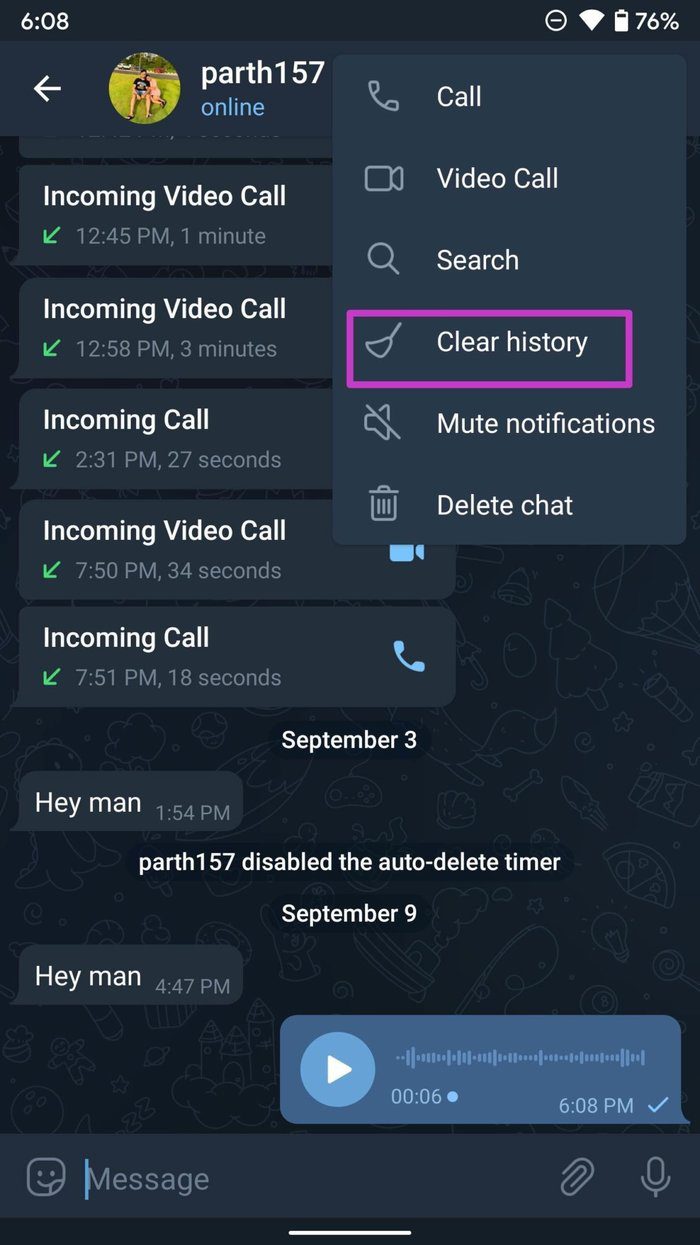

Step 5: Select auto-delete messages timeframe in the app.
You can set Telegram messages to get auto-deleted from 24 hours to 1 month.
On Desktop
Step 1: Launch Telegram on Mac or Windows > click on any chat.
Step 2: Select the three-dot menu at the top > open Clear Chat History.

Step 3: Select the timeframe > click on clear chat history.
Step 4: Enable the option to clear chat history for the other person as well.
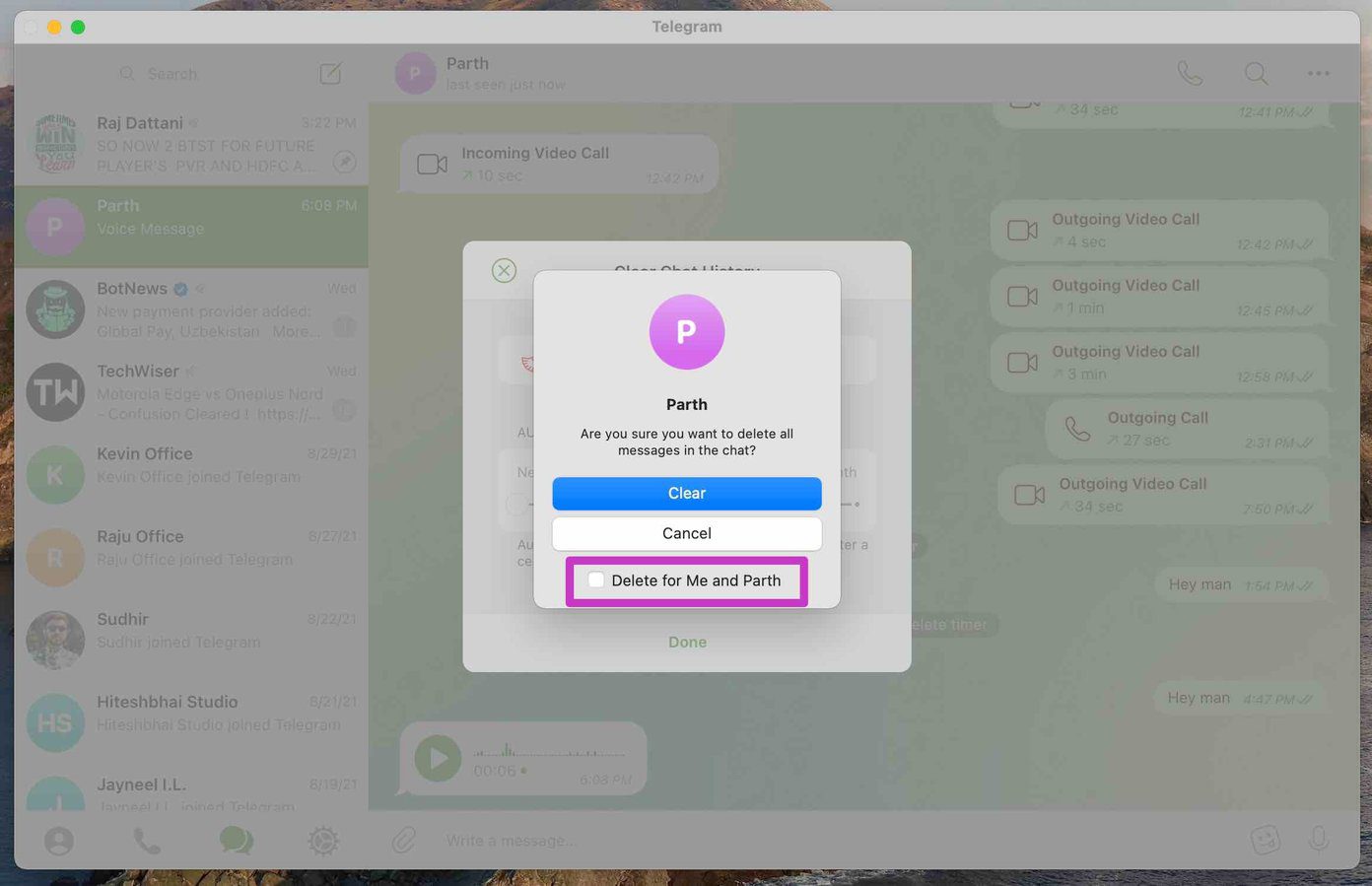
Now, imagine a scenario where the other user has enabled a clear chat history for 24 hours or 1 week. In that case, Telegram messages will disappear automatically in the app.
Using Telegram Secret Chat
Are you using a secret chat in Telegram to communicate with others? In a Secret Chat, the messages self-destruct in a matter of seconds. It’s mostly useful for private or confidential information.
When you start talking with someone over a secret chat in Telegram, you can set a self-destruct timer. From that, you can set a timer of maybe 5 to 7 seconds, and all the messages will auto-delete after the set time.


You will see a small pop-up saying the time duration, after which the message disappears in the app.
Was this helpful?
Last updated on 27 August, 2024
4 Comments
Leave a Reply
Read Next
 What Is Meant by Disappearing Messages Were Turned off in WhatsApp
What Are Disappearing Messages in WhatsApp If the ephemeral WhatsApp status wasn’t enough, Facebook launched another feature on WhatsApp: Disappearing messages.
What Is Meant by Disappearing Messages Were Turned off in WhatsApp
What Are Disappearing Messages in WhatsApp If the ephemeral WhatsApp status wasn’t enough, Facebook launched another feature on WhatsApp: Disappearing messages.
 How to Send Disappearing Messages in Facebook Messenger
Send Disappearing Messages in Facebook Messenger Mobile App The process of sending disappearing messages on the mobile app is the same for Android and iOS devices.
How to Send Disappearing Messages in Facebook Messenger
Send Disappearing Messages in Facebook Messenger Mobile App The process of sending disappearing messages on the mobile app is the same for Android and iOS devices.
 How to Send Silent and Disappearing Messages on Instagram
Send Silent Messages on Instagram Whether the recipient’s phone is on DND (Do Not Disturb) or not, silent messages won’t produce a notification on their phone.
How to Send Silent and Disappearing Messages on Instagram
Send Silent Messages on Instagram Whether the recipient’s phone is on DND (Do Not Disturb) or not, silent messages won’t produce a notification on their phone.
 Why Does Netflix Keep Logging Me Out and 3 Ways to Fix It
Why Netflix Logged You Out Automatically There are a few reasons why Netflix asks for sign-in every time you open the service.
Why Does Netflix Keep Logging Me Out and 3 Ways to Fix It
Why Netflix Logged You Out Automatically There are a few reasons why Netflix asks for sign-in every time you open the service.
 3 Ways to Fix Mouse Pointer Disappearing in Google Chrome
Try Basic Fixes Restart Google Chrome: Press Ctrl + L to access the address bar at the top, type in chrome://restart and press Enter.
3 Ways to Fix Mouse Pointer Disappearing in Google Chrome
Try Basic Fixes Restart Google Chrome: Press Ctrl + L to access the address bar at the top, type in chrome://restart and press Enter.
 7 Top Ways to Fix OneNote Notebook Disappearing Error on Windows
Microsoft OneNote has gone through a number of iterations.
7 Top Ways to Fix OneNote Notebook Disappearing Error on Windows
Microsoft OneNote has gone through a number of iterations.
 How to Fix Desktop Icons Disappearing on Windows 11
Basic Fixes Run a malware scan: Malware is a common source of corruption that may lead to this icon issue.
How to Fix Desktop Icons Disappearing on Windows 11
Basic Fixes Run a malware scan: Malware is a common source of corruption that may lead to this icon issue.
 Why Can’t I Forward Messages on WhatsApp
WhatsApp allows you to forward messages from one conversation to all contacts or groups.
Why Can’t I Forward Messages on WhatsApp
WhatsApp allows you to forward messages from one conversation to all contacts or groups.
The article above may contain affiliate links which help support Guiding Tech. The content remains unbiased and authentic and will never affect our editorial integrity.


Both my wife and I lost all our correspondence for the past 3.5 years (except for the very first message and the very last one). Neither of us had clicked on any of the above-mentioned buttons in order to clear history. Whom do we contact at Telegram in order to have this glitch thoroughly investigated? Is our suddenly lost correspondence still kept on some backup server?
I’m planning to post on LinkedIn about this inexplicable occurrence — perhaps someone else went through this and knows the answer.
Dear Marks Lisnanskis,
I recently had the same issue with my girlfriend. Did you got any feedback from somebody at telegram yet?
Hello, i just experienced the same issue mentionned above, chat history with my husband all deleted for both, telegram support didn t reply to me.
I think I finally found a fix! I’ve been struggling with this issue of our messages deleting since starting using Telegram.
Try deleting all your profile pictures (both yours and the person you’re communicating with) – so that only your initials show. This miraculously worked for us – our conversations are now staying and are not deleting. Not sure if it’s a cache issue, a memory issue or what but delete all images you uploaded to your profile on Telegram and give it a try! Good luck everyone!