Updating your Windows to a new version, or performing a fresh install, can be a traumatic experience for most users, but add to that an error code at the finish line, and things become a nightmare quickly.
Today, we’re looking at error code 0xC004C003, which you might encounter when activating your Windows license, and a few ways to troubleshoot the issue.
It’s in the Key
Let’s dive straight into it. Error code 0xC004C003 is a problem with an invalid Windows activation code. The problem lies with Windows (specifically the licensing code component) deciding the OEM Activation 3.0 (OA3) code you’ve entered is not valid.
Dealing With Error Code 0xC004C003
There might be a chance that your code is invalid, yes, but there’s also a fairly good chance this is a system or Microsoft problem. Let’s take a look at some potential troubleshooting steps.
Double-Check Your Code
Even if you’re sure that you entered that Digital Product Key (DPK) correctly, it’s a good idea to double-check your code and try again.
Use the Activation Troubleshooter
Thankfully, Windows does come with an Activation Troubleshooter to help with problems like error code 0xC004C003 when activating Windows. It should be the next stop with this issue. Here’s what to do:
Step 1. Open Settings (Win + I) and navigate to “System” on the sidebar.
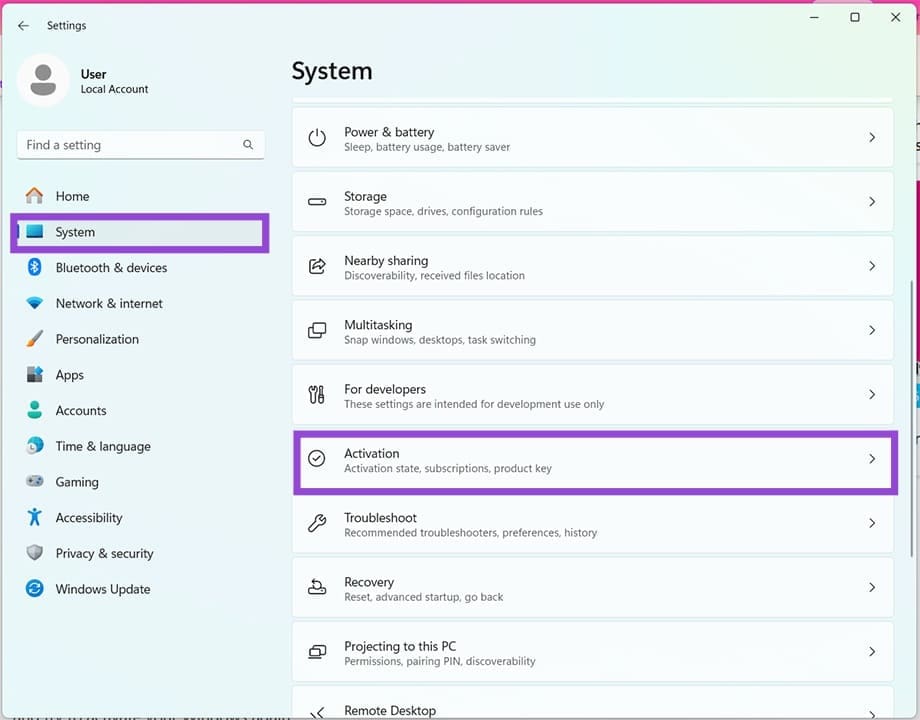
Step 2. Navigate down to “Activation” and select it.
Step 3. Next to your “Activation state,” click the “Troubleshoot” button.
Step 4. Click on “Apply this fix” and allow the repair process to run. See if it resolves the problem. Repeat a few times if not.
Check Your Date and Time Settings
Your date and time settings may also be causing some issues with your product activation. You’ll need to ensure they’re properly in sync with your current location. To do this:
Step 1. Open Settings (Win + I) and navigate to “Time & Language.”

Step 2. Click “Date & Time.”
Step 3. After checking that your time zone’s correct, navigate down to “Additional Settings” and click “Sync Now.”

Step 4. Try the activation process again.
Run the Software Licensing Management Tool
The Software Licensing Management Tool (slmgr.vbs) is a script that runs in Command Prompt and can troubleshoot and confirm the status of your Windows activation. Here’s how to use it:
Step 1. Press (Win + R) to open the Run dialog.
Step 2. Type “cmd” and press (Ctrl + Shift + Enter) to run as Administrator.
Step 3. In Command Prompt, type “slmgr.vbs /dlv” and hit Enter.

Step 4. A Windows Script Host window will pop up with the status. Your next step should be to enter the product ID. Back in Command Prompt, type “slmgr.vbs –ipk [your 25-character product key]” and hit Enter.
Step 5. The last command to complete the activation is “slmgr.vbs –ato” followed by Enter.
Step 6. Restart your machine and check if the issue is resolved.
Contact Microsoft
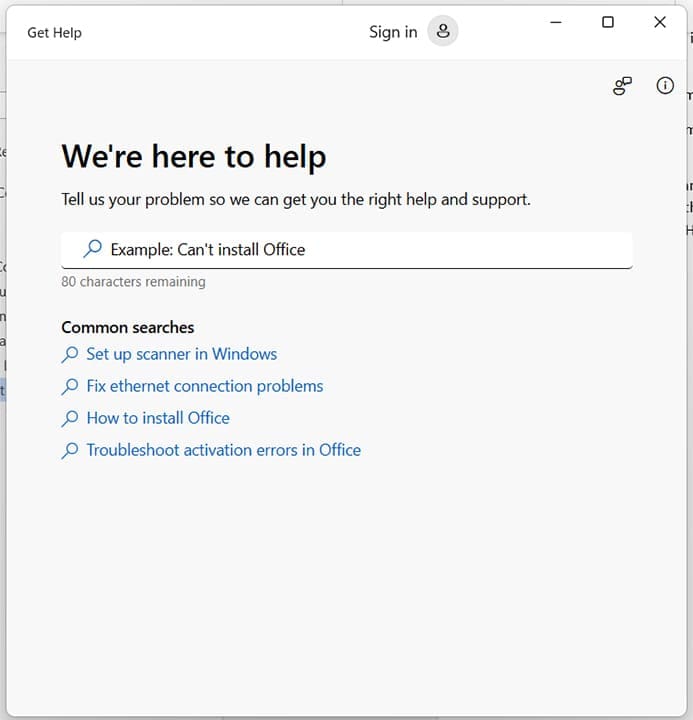
If all else fails, you can try contacting Microsoft to confirm your version of Windows and troubleshoot the issue directly with them. Provided everything is in order, they should have no problem assisting. You can use the Get Help app to do so.
Was this helpful?
Last updated on 10 March, 2026
Read Next
 How to Fix Mouse Drag Issues by Activating ClickLock in Windows
How to Activate ClickLock on Your Windows Device If you're having issues using drag-and-drop on your Windows 11 laptop, you can activate ClickLock.
How to Fix Mouse Drag Issues by Activating ClickLock in Windows
How to Activate ClickLock on Your Windows Device If you're having issues using drag-and-drop on your Windows 11 laptop, you can activate ClickLock.
 4 Ways to Fix iMessage Not Activating on iPhone
Try Basic Fixes Check Apple's iMessage server status: The iMessage servers may be down, which is why your iPhone’s iMessage is not working.
4 Ways to Fix iMessage Not Activating on iPhone
Try Basic Fixes Check Apple's iMessage server status: The iMessage servers may be down, which is why your iPhone’s iMessage is not working.
 Top 3 Ways to Fix OneDrive Connectivity Error Code 0x8004de40 in Windows 10
OneDrive is arguably one of the best cloud storage and backup solutions for Windows computers.
Top 3 Ways to Fix OneDrive Connectivity Error Code 0x8004de40 in Windows 10
OneDrive is arguably one of the best cloud storage and backup solutions for Windows computers.
 4 Ways to Fix the Login Error Code E84 in Steam for Windows
Switch to a different network connection: A slow or intermittent internet connection can also cause login errors in Steam.
4 Ways to Fix the Login Error Code E84 in Steam for Windows
Switch to a different network connection: A slow or intermittent internet connection can also cause login errors in Steam.
 Windows 11: How to Fix Error Code 0xc0000001
What Is 0xc0000001 Error Code in Windows 11?
Windows 11: How to Fix Error Code 0xc0000001
What Is 0xc0000001 Error Code in Windows 11?
 4 Ways to Fix Error Code 0xc000000f in Windows 11
Basic Fixes: Disconnect all external devices: Error code 0xc00000f can indicate issues with the boot configuration data (BCD), but sometimes, it may arise due to conflicts with external devices like
4 Ways to Fix Error Code 0xc000000f in Windows 11
Basic Fixes: Disconnect all external devices: Error code 0xc00000f can indicate issues with the boot configuration data (BCD), but sometimes, it may arise due to conflicts with external devices like
 How to Fix Printer Not Activated (Error Code 30) on Windows 11
Basic Fixes Reconnect printer: If you're using a wired printer, its loose USB connection to your PC may result in 'Printer not activated (Error Code 30)'.
How to Fix Printer Not Activated (Error Code 30) on Windows 11
Basic Fixes Reconnect printer: If you're using a wired printer, its loose USB connection to your PC may result in 'Printer not activated (Error Code 30)'.
 4 Ways to Fix Error Code 0x80070570 in Windows
Fix 1: Re-Download Windows ISO Finding the correct Windows ISO for your PC is crucial for proper installation.
4 Ways to Fix Error Code 0x80070570 in Windows
Fix 1: Re-Download Windows ISO Finding the correct Windows ISO for your PC is crucial for proper installation.
The article above may contain affiliate links which help support Guiding Tech. The content remains unbiased and authentic and will never affect our editorial integrity.