How Does Nearby Share Work?
Android introduced Nearby Share as a universal protocol for transferring files between Android devices. It uses Wi-Fi and Bluetooth to connect two devices and send files wirelessly (similar to AirDrop for Apple devices).
While it’s primarily useful for transferring files between two Android devices, you can now use Nearby Share to transfer files between Android and Windows, and Android and Mac.

There are several ways to transfer files from Android to Mac. However, nothing comes close to the seamlessness and ease of use of Nearby Share.
How to Transfer Files From Android to Mac With Nearby Share
There’s no official version of Nearby Share for Mac. However, the extremely talented developer Gregory K offers an open-source app called NearDrop that replicates a Nearby Share server on your Mac.
So, we will install this app on a Mac to demonstrate how to use Nearby Share.
Setting Up NearDrop
Use this link to download NearDrop on your Mac; download the latest version of the NearDrop.app.zip file. Once downloaded, double-click on the ZIP file to extract it on your Mac. Double-click on the extracted file to open the NearDrop app.
You may encounter an error saying the app can’t be opened since it’s from an unknown source. Click on OK. It’s time to circumvent the error using the System Preferences app.

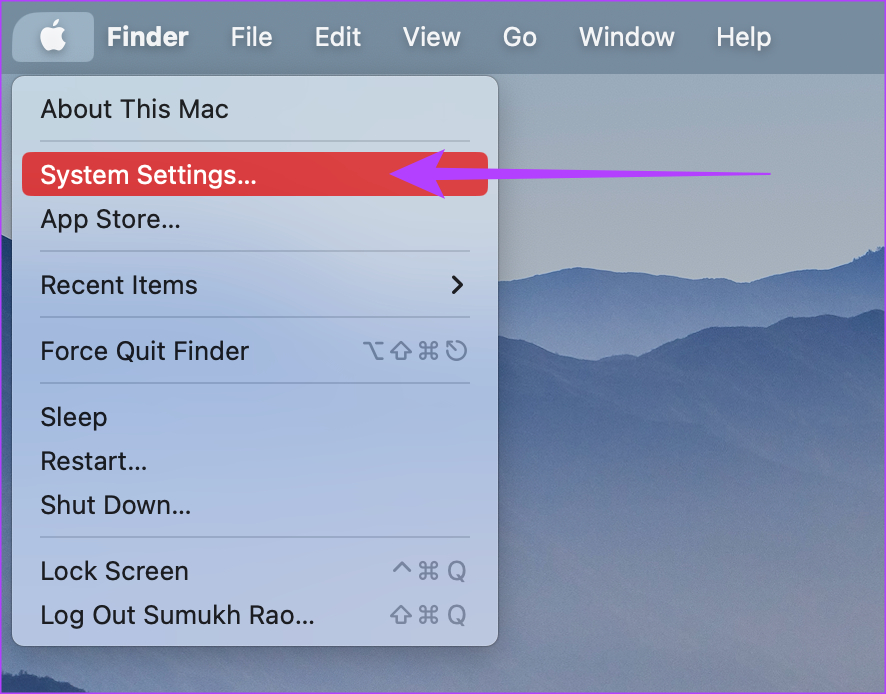
Step 1: Click the Apple logo at the top-left corner and select System Settings.
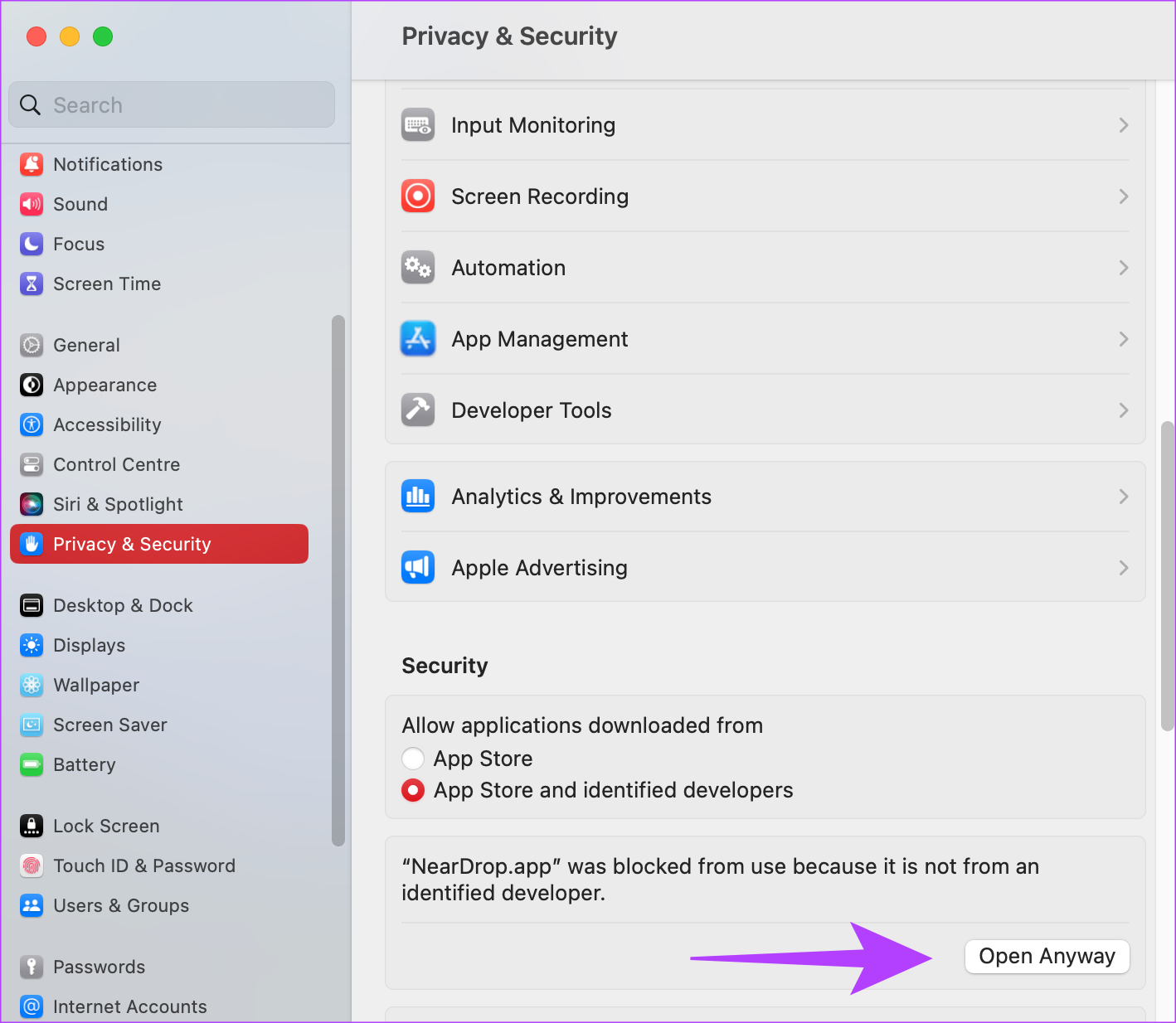
Step 2: Navigate to the Privacy & Security tab. You can find it in the left pane.
Step 3: Scroll down, and you should see a message saying ‘Neardrop.app was blocked…’ Select Open Anyway.
Step 4: Use Touch ID or enter your password to authenticate the app.
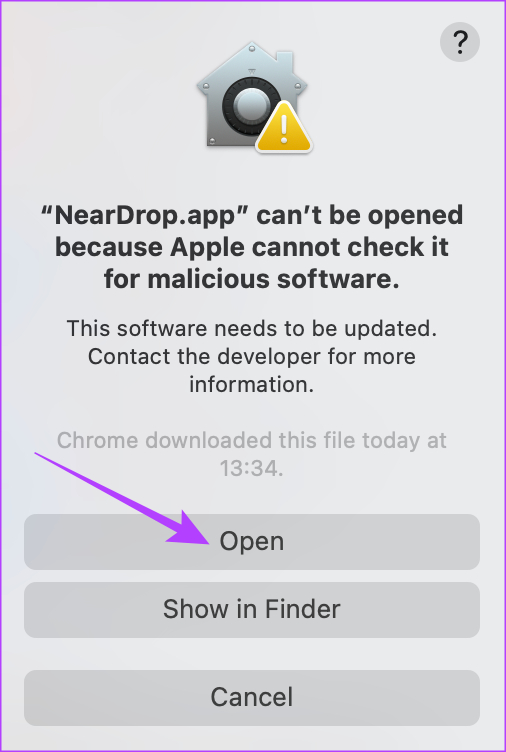
Step 5: You’ll see one last error warning you about a possibly malicious app. Click on Open.
Step 6: Once the app opens, permit it to access your network by clicking Allow.

Well, that’s pretty much it. NearDrop will remain open on your Mac, and you can verify this by checking whether the Nearby Share icon appears in the menu bar.

If it doesn’t, you must double-click on the NearDrop app to open it.
Sending Files Using Nearby Share
Now that you have set up NearDrop, here’s how to send files from your Android phone to your Mac using Nearby Share.
Note: Enable both Wi-Fi and Bluetooth on both Mac and Android devices.
Step 1: Navigate to the file you want to send on your Android phone. We’ll be showing the process using an image from the Gallery app.
Step 2: Press and hold on to the file and select Share.
Step 3: Tap on Nearby Share in the share sheet.
Step 4: Select your Mac from the list of devices shown.

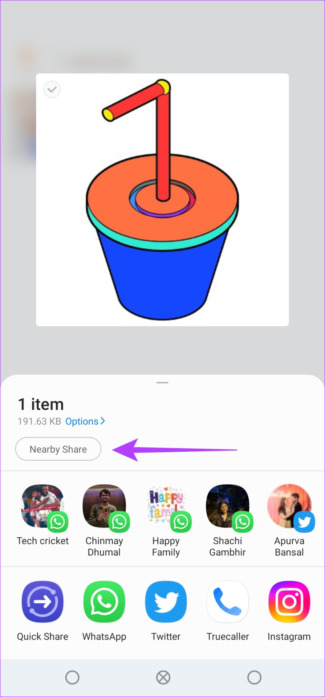
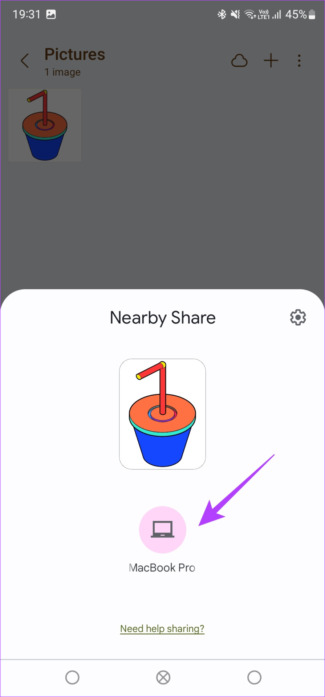
Step 5: Your Mac will instantly prompt you about an incoming file. Click on it to accept the file(s), and the transfer will take place successfully.
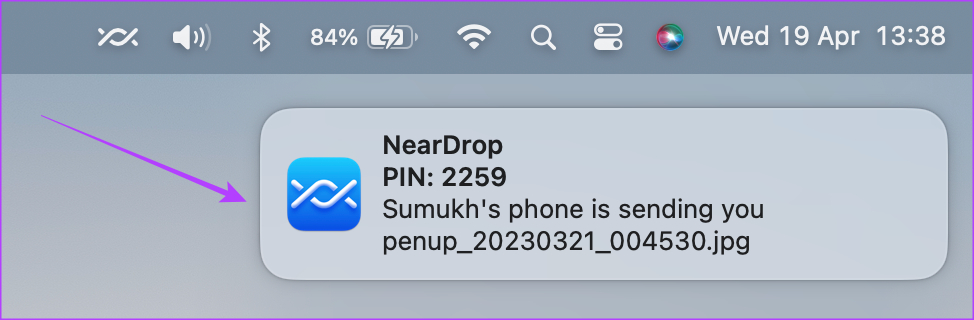
Your received files can be found in the Downloads folder on your Mac.
What to Do if Nearby Share Is Not Working on Mac
If your Mac doesn’t show up in the list of devices or the file transfer gets interrupted midway, here are some possible fixes:
- Enable both Wi-Fi and Bluetooth on your Mac and Android phone.
- Try sending a smaller file to see if it goes through.
- Restart your phone and Mac.
- Ensure you have granted the right permissions to NearDrop.
- Note that you must be near the Mac (within Bluetooth range) to use Nearby Share.
FAQs
NearDrop is an open-source app that allows you to access the source code to check for malware. The app is safe, and you can use it to transfer data from your Android phone to your Mac.
While the technologies are similar, AirDrop is different as it operates only between Apple devices. Nearby Share works between Android devices, Android and Windows, and even Android and Mac.
No, AirDrop is strictly limited to Apple devices only.
Was this helpful?
Last updated on 17 July, 2024
Read Next
 9 Ways to Fix “Update Device Settings to Accept Media Transfers” Error on Windows 11
When you connect your Android or iPhone to your Windows device, you can see most files in the Photos app.
9 Ways to Fix “Update Device Settings to Accept Media Transfers” Error on Windows 11
When you connect your Android or iPhone to your Windows device, you can see most files in the Photos app.
 3 Ways to Fix Android Can’t Find Nearby Bluetooth Devices
Try Basic Fixes Restart your phone and the Bluetooth device: Sometimes, OS-related glitches can prevent your Android from detecting nearby Bluetooth devices.
3 Ways to Fix Android Can’t Find Nearby Bluetooth Devices
Try Basic Fixes Restart your phone and the Bluetooth device: Sometimes, OS-related glitches can prevent your Android from detecting nearby Bluetooth devices.
 How to Share Google Drive File or Its Link on WhatsApp
Method 1: Share the Google Drive Link on WhatsApp Step 1: In the Drive app on your Android or iPhone, tap on the three-dot icon next to the file or
How to Share Google Drive File or Its Link on WhatsApp
Method 1: Share the Google Drive Link on WhatsApp Step 1: In the Drive app on your Android or iPhone, tap on the three-dot icon next to the file or
 Can’t Save Excel Files on Mac? Try These 3 Fixes
Basic Fixes Check internet connectivity. If your Mac experiences internet issues, Microsoft Excel will remain stuck in the ‘Saving’ status.
Can’t Save Excel Files on Mac? Try These 3 Fixes
Basic Fixes Check internet connectivity. If your Mac experiences internet issues, Microsoft Excel will remain stuck in the ‘Saving’ status.
 Where Is My Computer or File Explorer on Mac
How to Use Finder on MacBook Here's what each location entails in the Finder sidebar window.
Where Is My Computer or File Explorer on Mac
How to Use Finder on MacBook Here's what each location entails in the Finder sidebar window.
 How to Share Files Between Android and PC Without Internet
In today's connected world, sharing files between devices has become a necessity, whether for work, study, or personal reasons.
How to Share Files Between Android and PC Without Internet
In today's connected world, sharing files between devices has become a necessity, whether for work, study, or personal reasons.
 2 Ways to Share Apps Between Android Devices
Method 1: Share Apps Between Android Devices Using the Play Store The easiest and quickest way to share apps between Android devices is via the Play Store.
2 Ways to Share Apps Between Android Devices
Method 1: Share Apps Between Android Devices Using the Play Store The easiest and quickest way to share apps between Android devices is via the Play Store.
 Google Now Allows Family Members to Share Passwords on Android: How It Works
Password Sharing in Google Password Manager Have you ever needed the password for your sibling's Amazon Prime account in the middle of the night?
Google Now Allows Family Members to Share Passwords on Android: How It Works
Password Sharing in Google Password Manager Have you ever needed the password for your sibling's Amazon Prime account in the middle of the night?
The article above may contain affiliate links which help support Guiding Tech. The content remains unbiased and authentic and will never affect our editorial integrity.