Basic Fixes
- Check if Telegram is down: Use DownDetector to check if the app is working fine for your current region.
- Update or reinstall Telegram: You can install a new version of Telegram or update the app using the Mac App Store.
Fix 1: Force Quit and Relaunch Telegram
Open Activity Monitor on your Mac. Select Telegram from the list and click on the X mark at the top.

Close Activity Monitor and try opening Telegram again.
Fix 2: Turn off Low Data Mode for Wi-Fi
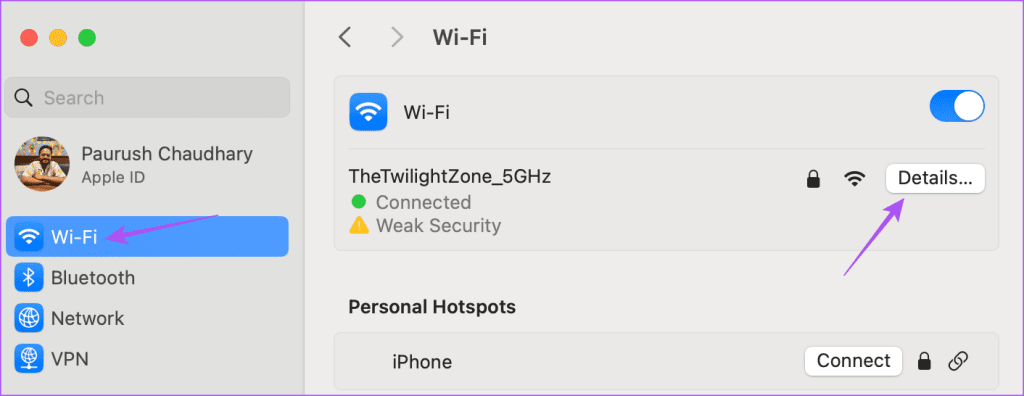
Step 1: Open System Settings > click on Wi-Fi from the left menu > select Details next to your connected Wi-Fi network name.
Step 2: Ensure that Low Data Mode has been disabled.
If the app still fails to work, log in to your account using Telegram Web.
Was this helpful?
Thanks for your feedback!
Last updated on 06 May, 2024
Read Next
 3 Ways to Fix Telegram Web Not Working
Try Basic Fixes Check if Telegram is down: It's a good idea to check Telegram's server status before proceeding with the other solutions on this list.
3 Ways to Fix Telegram Web Not Working
Try Basic Fixes Check if Telegram is down: It's a good idea to check Telegram's server status before proceeding with the other solutions on this list.
 Top 6 Ways to Fix Telegram Web Notifications Not Working
Telegram is one of the most popular instant messaging apps for multiple reasons.
Top 6 Ways to Fix Telegram Web Notifications Not Working
Telegram is one of the most popular instant messaging apps for multiple reasons.
 5 Ways to Fix Telegram Desktop Video Calls Not Working
Basic Fixes Switch to 5GHz Wi-Fi: If you have a dual-band router, try switching to a 5GHz frequency band to get faster internet speeds.
5 Ways to Fix Telegram Desktop Video Calls Not Working
Basic Fixes Switch to 5GHz Wi-Fi: If you have a dual-band router, try switching to a 5GHz frequency band to get faster internet speeds.
 How to Find Telegram Downloaded Files on Android, iPhone, and Mac
Telegram can send large and uncompressed files effortlessly compared to other messaging apps.
How to Find Telegram Downloaded Files on Android, iPhone, and Mac
Telegram can send large and uncompressed files effortlessly compared to other messaging apps.
 5 Ways to Fix Telegram Notifications Not Working on Android
Try Basic Fixes Update the Telegram app: Telegram may fail to show any notifications if you’re running an outdated version of the app.
5 Ways to Fix Telegram Notifications Not Working on Android
Try Basic Fixes Update the Telegram app: Telegram may fail to show any notifications if you’re running an outdated version of the app.
 4 Ways to Fix Telegram Notifications Not Working on Windows 10 and Windows 11
Try Basic Fixes Disable Do Not Disturb mode: The Telegram app may not be showing notifications due to the Do Not Disturb mode on your Windows PC.
4 Ways to Fix Telegram Notifications Not Working on Windows 10 and Windows 11
Try Basic Fixes Disable Do Not Disturb mode: The Telegram app may not be showing notifications due to the Do Not Disturb mode on your Windows PC.
 2 Ways to Fix WhatsApp Calls Not Working on Mac
Basic Fixes Check your internet speed: WhatsApp calls need a stable internet connection.
2 Ways to Fix WhatsApp Calls Not Working on Mac
Basic Fixes Check your internet speed: WhatsApp calls need a stable internet connection.
 3 Ways to Fix Telegram Photos Not Appearing in Gallery
Basic Fixes Check network connection: If your device is not connected to the internet or has an issue, Telegram won't download pictures to your gallery.
3 Ways to Fix Telegram Photos Not Appearing in Gallery
Basic Fixes Check network connection: If your device is not connected to the internet or has an issue, Telegram won't download pictures to your gallery.
The article above may contain affiliate links which help support Guiding Tech. The content remains unbiased and authentic and will never affect our editorial integrity.