Fix 1: Use System Configuration
System Configuration is a utility used to define how your PC starts up and which programs and services run with it. If you’ve entered Safe Mode by modifying System Configuration in Windows, your PC will continue to boot in Safe Mode. Here’s how to change that.
Step 1: Press the Windows key + R to launch the Run dialog box. In the Open field, type in msconfig, and press Enter.
Step 2: In the System Configuration window that opens, switch to the Boot tab. Under Boot options, uncheck the Safe boot option and click Apply followed by OK.

Step 3: Click Restart to confirm.

As your PC restarts, it will exit Safe Mode and should boot normally.
Fix 2: Use the Command Prompt to Exit Safe Mode
If your PC continues to boot into Safe Mode, you can use Command Prompt to resolve the issue. You can use it to remove a boot entry option from the Windows Boot Configuration Data (BCD), which should help you exit Safe Mode on Windows. Here’s how to do it.
Step 1: Press the Windows key + R to launch the Run dialog box and type cmd in the Open field. Hold down Ctrl + Shift and then press Enter to open the command prompt with administrative privileges.
Step 2: In the console, type in the following command and press Enter.
bcdedit /deletevalue {current} safeboot

Step 3: Type the following command in the console to restart your PC.
shutdown /r
Once your PC restarts, it should boot in normal mode.
Fix 3: Try Advanced Startup Settings
If the above solutions don’t work, you can access the advanced startup settings on Windows. Apart from being useful in entering Safe Mode and troubleshooting startup issues, the advanced startup settings on Windows can also help you get out of Safe Mode.
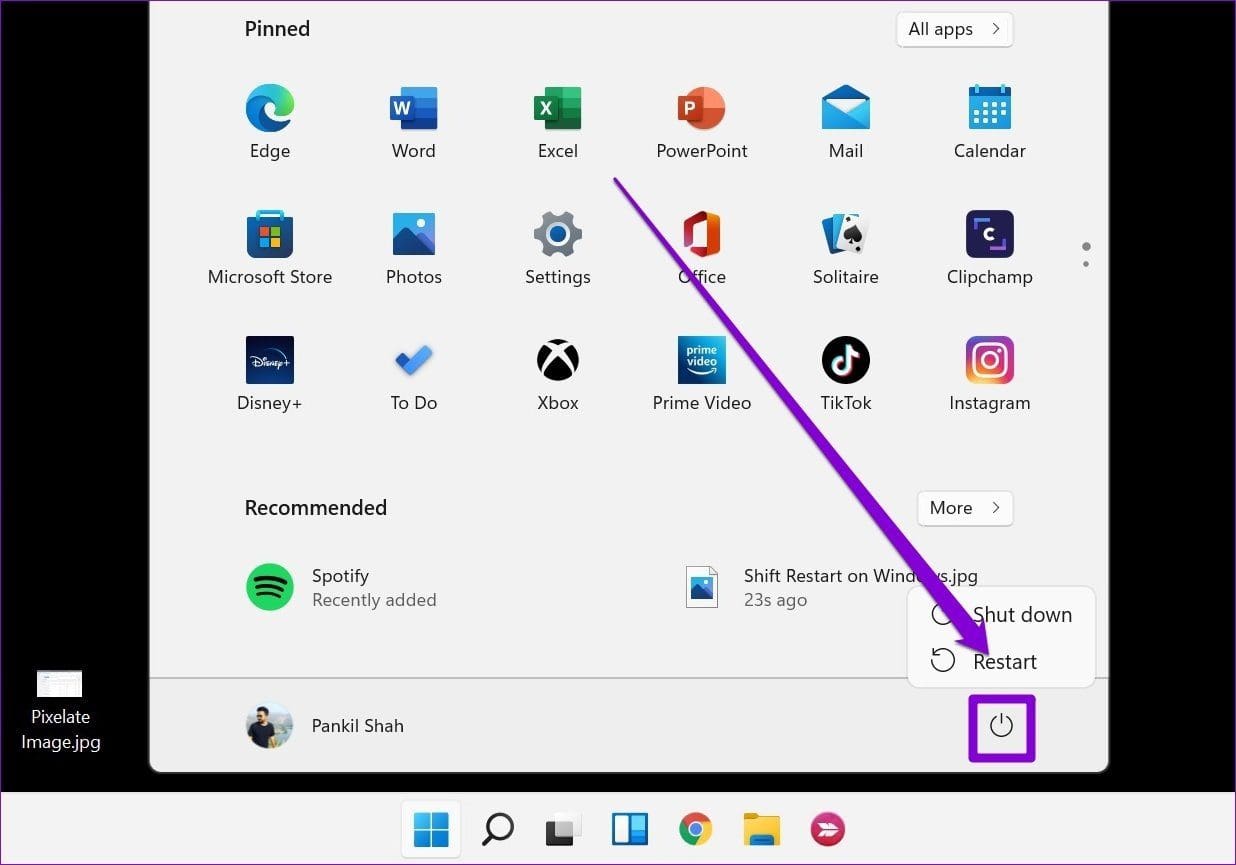
Step 1: Open the Start menu and click the Power icon to explore power options.
Step 2: Hold down the Shift key on your keyboard and select Restart from the power options.
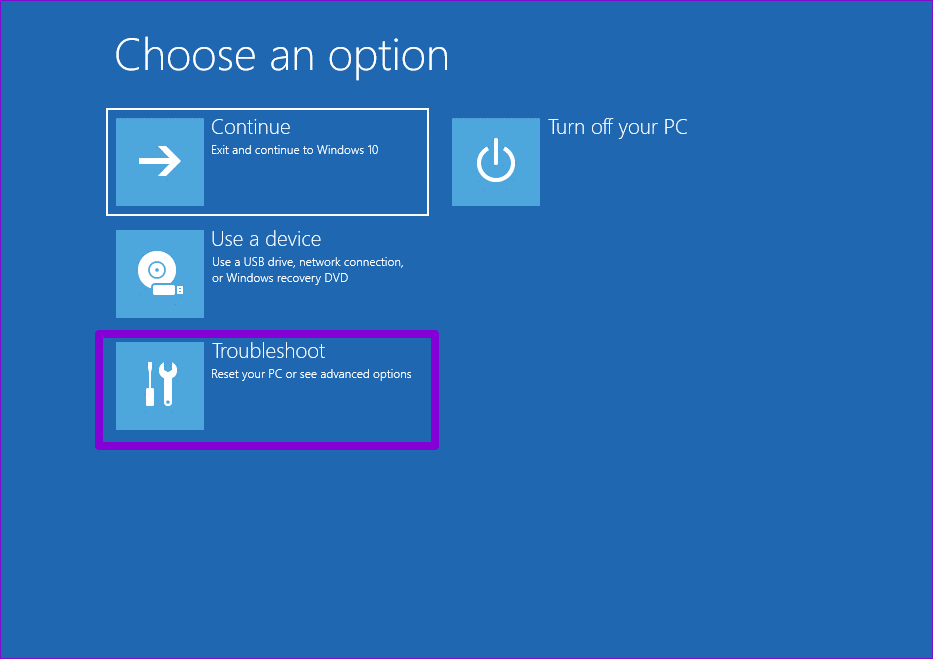
Step 3: Click Troubleshoot.
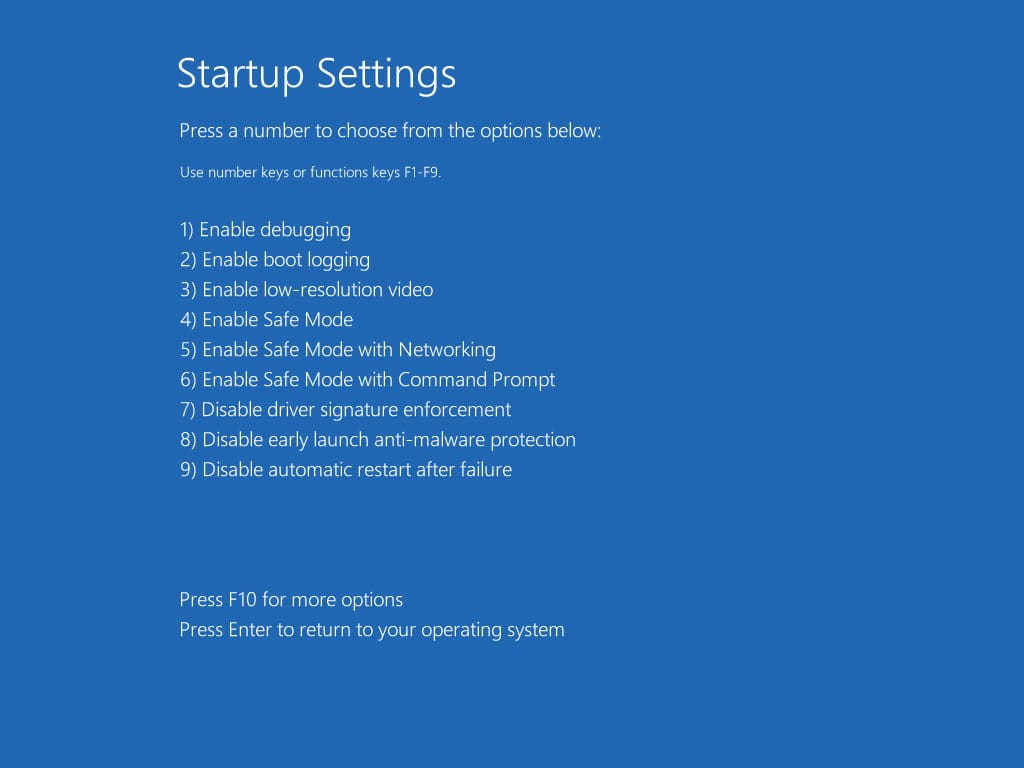
Step 4: Go to Advanced options > Startup Settings. Then, click the Restart button.

Step 5: Press the Enter key on the Startup Settings screen to exit Safe Mode.
Was this helpful?
Last updated on 02 July, 2024
Read Next
 5 Fixes for Android Phone Stuck in Safe Mode
Try Basic Fixes Restart your phone: Restarting your Android is the most straightforward method for disabling Safe Mode.
5 Fixes for Android Phone Stuck in Safe Mode
Try Basic Fixes Restart your phone: Restarting your Android is the most straightforward method for disabling Safe Mode.
 How to Fix Discord Stuck in Fullscreen Mode on Windows 11
Basic Fixes Minimize the full-screen mode via interaction keys: Click the Minimize or Fullscreen buttons at the top right of the Discord app window to disable its full-screen mode.
How to Fix Discord Stuck in Fullscreen Mode on Windows 11
Basic Fixes Minimize the full-screen mode via interaction keys: Click the Minimize or Fullscreen buttons at the top right of the Discord app window to disable its full-screen mode.
 How to Disable Tumblr Safe Mode or Bypass it Without an Account
Tumblr is a great place to get your daily fix of cool GIFs and memes.
How to Disable Tumblr Safe Mode or Bypass it Without an Account
Tumblr is a great place to get your daily fix of cool GIFs and memes.
 5 Ways to Fix Windows Stuck in Airplane Mode
Try Basic Fixes Restart Windows: Restarting any device can fix most temporary issues where a process gets stuck.
5 Ways to Fix Windows Stuck in Airplane Mode
Try Basic Fixes Restart Windows: Restarting any device can fix most temporary issues where a process gets stuck.
 8 Ways to Fix Windows 11 Stuck in Airplane Mode
Basic Fixes: Restart Windows 11: Restarting your device regularly can help keep it running smoothly.
8 Ways to Fix Windows 11 Stuck in Airplane Mode
Basic Fixes: Restart Windows 11: Restarting your device regularly can help keep it running smoothly.
 6 Best Fixes for Windows 10 Stuck in Automatic Repair Loop
Windows 10 PC runs fun until a bad system update, a corrupted file, and even a driver update can cause your it to stop working abruptly.
6 Best Fixes for Windows 10 Stuck in Automatic Repair Loop
Windows 10 PC runs fun until a bad system update, a corrupted file, and even a driver update can cause your it to stop working abruptly.
 4 Fixes When the Windows File Explorer Stuck at ‘Working on It’
Basic Fixes: Update Windows: It's nice to start with a Windows Update since this will fix minor glitches that may trigger the problem.
4 Fixes When the Windows File Explorer Stuck at ‘Working on It’
Basic Fixes: Update Windows: It's nice to start with a Windows Update since this will fix minor glitches that may trigger the problem.
 4 Fixes When the Windows 11 Volume Slider Is Stuck on the Screen
Basic Fixes: Restart the computer: A reboot forces all services and processes to shut down, fixing glitches and temporary bugs.
4 Fixes When the Windows 11 Volume Slider Is Stuck on the Screen
Basic Fixes: Restart the computer: A reboot forces all services and processes to shut down, fixing glitches and temporary bugs.
The article above may contain affiliate links which help support Guiding Tech. The content remains unbiased and authentic and will never affect our editorial integrity.