


What Is the Close Friends List on Instagram?
The Close Friends list allows you to create a whitelist for your stories, posts, notes, and reels. Basically, it’s a special list of your friends/followers with exclusive viewing permissions. You get this feature in both personal and business profiles.
When you post something for your Close Friends on Instagram, only people included in the list can see and react to it. It’s like, you’ve formed a group chat to share your stories, posts, notes, etc. However, the rules of this ‘group’ are slightly different, let’s see how.
Tip: You can also use this feature to create and share stories with that special person.
How to Add People to Instagram’s Close Friends List
If you notice the Close Friends list has zero close friends, do not be disappointed. That’s because it’s not an automatically generated list by Instagram. You need to add or remove people to this list manually.
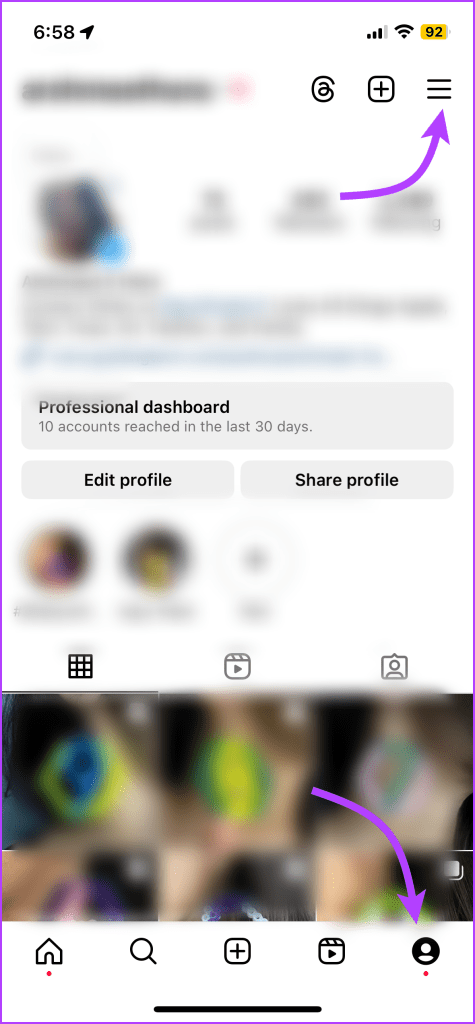
Step 1: Launch the Instagram app > open your profile > tap on the three-bar icon at the top-right corner.
Step 2: Scroll down and select Close Friends from the list.
Step 3: On the Close Friends List screen, mark the circle next to the people you want to add. You can also use search to find specific people.
Step 4: Once the list is ready, tap Done.


Will People Be Notified When They Are Added or Removed?
Thankfully, Instagram doesn’t send notifications to people when you add or remove them from the Close Friends list.
Can Someone Request to Join Your Close Friend List?
The Close Friends feature is strictly based on the creator’s choice. People cannot request to join the Close Friends list. Sure, they can send you a DM to request an in, but there is no dedicated request button on Instagram.
How to Edit Close Friends List
The Close Friends feature isn’t a permanent list. You can edit the list anytime i.e., add or remove people as you go. To remove people from your Close Friends list, follow these steps:
Step 1: Go to Instagram Profile → three-bar menu → Close Friends.
Step 2: To kick a person out of the list, uncheck the button next to their name. Notably, to add someone to the list, check the button next to their name.
Step 3: Tap Done.
Delete Close Friends List
Although you cannot completely delete the list from your profile, you can empty it. To do so, remove everyone from the list as shown above.
Create Story for Close Friends
Instagram provides a one-step way to create stories for close friends only. Once you have created your list, tap the Story icon to create a new story like you normally do. Then, tap the green Close Friends option.
Once you publish the story, only the members of the close friends list can see the story.
Check Who Viewed Your Story
Similar to normal stories, you can view people who have seen your story published under close friends.
What Happens When You Add Close Friends Story to Highlight?
Like normal stories, you can create highlights from the stories published by Close Friends. However, they won’t be visible to everyone. Only the members of your Close Friends list can view them on your profile.
Create Reels, Posts, and Notes for Close Friends
Prep for the Reel or Post as you usually do. However, before posting the content, tap Audience → Close Friends → Done.
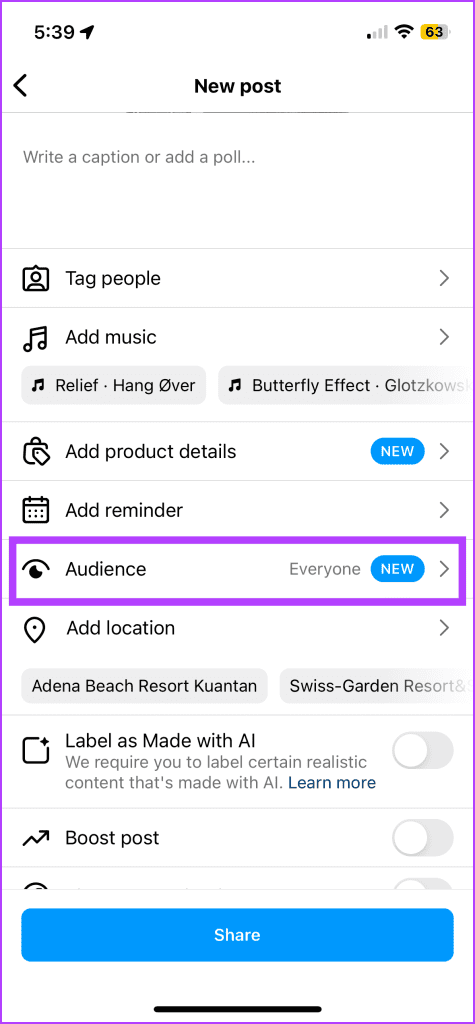

The process is also similar for Notes. Go about creating the Notes as usual. When you’re ready to share, tap the sharing option from the bottom and select Close Friends.


What Happens When You Interact With a Close Friend’s Post or Reel?
If someone from your Close Friend list interacts with the post, i.e., likes, comments, or shares the reel or post, it will be visible to everyone on the Close Friends list. Even if they are not mutual friends, they can see each other’s usernames.
If I Add Someone to Close Friends on Instagram After Posting, Can They See It?
Yes, they can see older posts, reels, and highlights you’ve shared with Close Friends. As for stories and notes, which are active only for 24 hours, they can only view older stories and notes that fall under the time frame.
Share Close Friends Story, Reels, or Posts
For obvious privacy reasons, you can’t share Close Friends stories, posts, or other content with others. Of course, you can still take a screenshot and share it with others.
Note: Instagram doesn’t notify the person when you screenshot a Close Friend’s story.
Can You Have More Than One Close Friends List?
Currently, Instagram supports only one list. It is a single private list. You cannot create multiple versions of this list.
Identify if You’re on Someone’s Close Friends List on Instagram
While Instagram doesn’t directly notify you, there are certain hints or indicators you can pick up on.
- From Stories posted for Close Friends
- A green circle around their profile picture in the story tray.
- Close Friends icon in the story when you are viewing it. (You can tap the button to reveal some options.)
- From Reels, Posts, and Notes posted just for Close Friends
- A Close Friends label when viewing their content.

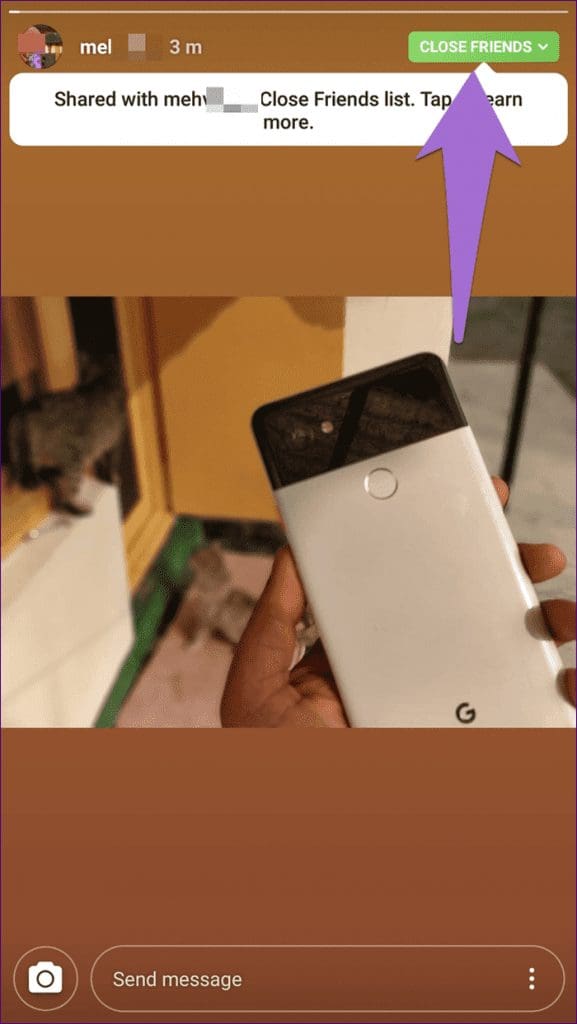

Note: If you don’t see a green circle or Close Friends icon for once, it does not mean they’ve evicted you from the list. It could also mean the person uploaded a normal story or post that is visible to everyone.
How to Remove Yourself From Instagram Close Friends
Did anyone add you to their Close Friends list on Instagram which you don’t want to be a part of? Well, there isn’t much you can do about it. That is, you cannot remove yourself from anyone else’s Close Friends list.
However, you can mute the person’s stories if you don’t want to see them. But that will stop both the regular and close friend stories of that person from appearing in your feed. To do so, touch and hold the story icon in your feed. Select Mute from the menu. Find out in detail how Instagram mute works.
Was this helpful?
Last updated on 29 July, 2024
4 Comments
Leave a Reply
Read Next
 How to Use Secret Chat in Telegram on Android and iPhone
How to Start Secret Chat on Telegram First, let’s see how you can start a Secret Chat in Telegram on Android and iOS.
How to Use Secret Chat in Telegram on Android and iPhone
How to Start Secret Chat on Telegram First, let’s see how you can start a Secret Chat in Telegram on Android and iOS.
 How to Start or View Secret Conversations on Messenger
Things to Know Before Using Secret Conversations on Messenger Before we start, let's briefly examine what happens when you start or view a secret conversation on Messenger.
How to Start or View Secret Conversations on Messenger
Things to Know Before Using Secret Conversations on Messenger Before we start, let's briefly examine what happens when you start or view a secret conversation on Messenger.
 How to Close All Tabs From the Same Website on Google Chrome
Note: Chrome doesn't support this feature by default.
How to Close All Tabs From the Same Website on Google Chrome
Note: Chrome doesn't support this feature by default.
 How to Find and Remove Deactivated Friends From Facebook
How to Unfriend Deactivated Friends on Facebook First, you must visit the Friends section to remove the deactivated profiles from your Facebook account.
How to Find and Remove Deactivated Friends From Facebook
How to Unfriend Deactivated Friends on Facebook First, you must visit the Friends section to remove the deactivated profiles from your Facebook account.
 How to Collaborate on Instagram Posts With Your Friends
Note: Instagram Collaboration makes things easier as there’s no need to share the same post from two or more separate accounts while also allowing you to reach a wider audience.
How to Collaborate on Instagram Posts With Your Friends
Note: Instagram Collaboration makes things easier as there’s no need to share the same post from two or more separate accounts while also allowing you to reach a wider audience.
 Top 4 Ways to Fix Facebook Not Showing Friends Post
Why Am I Not Seeing Friend's Posts in My Facebook Feed Let's first understand how the Facebook feed algorithm works.
How to Hide All Posts on Facebook From Public or Friends
How to Hide Past Posts on Facebook The good news is that you can manage the visibility of previously posted content.
Top 4 Ways to Fix Facebook Not Showing Friends Post
Why Am I Not Seeing Friend's Posts in My Facebook Feed Let's first understand how the Facebook feed algorithm works.
How to Hide All Posts on Facebook From Public or Friends
How to Hide Past Posts on Facebook The good news is that you can manage the visibility of previously posted content.
 How to See Mutual Friends on Snapchat
Note: To maintain user privacy, Snapchat doesn't allow you to see the names of mutual friends on Snapchat.
How to See Mutual Friends on Snapchat
Note: To maintain user privacy, Snapchat doesn't allow you to see the names of mutual friends on Snapchat.
The article above may contain affiliate links which help support Guiding Tech. The content remains unbiased and authentic and will never affect our editorial integrity.

If a person is not on the “close friends” list on Instagram, will they see that I posted a story for “close friends”?
No, they will not know that you’ve posted a story at all.
Can someone in my close friends see when I choose to share my FEED with them? Same as they see it when I share my story with them??
Hi! Can someone from my ‘close friends’ list can see the rest of the people selected on it?