Method 1. Clear Cache on TikTok
Step 1: Launch TikTok and go to the Profile tab from the bottom navigation.
Step 2: On the Profile tab, tap on the hamburger menu icon at the top right.
Step 3: From the bottom sheet, select Settings and privacy.


Step 3: Scroll to the Cache & Cellular section and select Free up space.
Step 4: Under Free up space, tap Clear next to Cache > tap Clear to confirm.


That’s it. When you clear the cache on TikTok, it will free up storage space on your device. But it won’t have any effect on your TikTok experience. To know more, check our explainer on what happens when you clear TikTok cache.
Method 2. Dislike Videos to Reset TikTok’s For You Page
Step 1: Launch TikTok, and under the For You section, press and hold a video.
Step 2: From the bottom sheet, select Not interested.

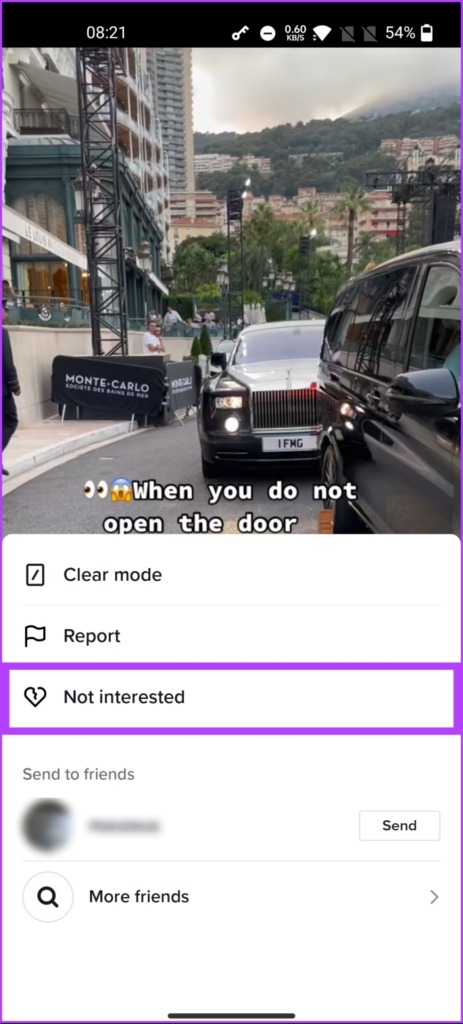
By doing this, you have informed TikTok that you are not interested in the content from a specific video or profile. If TikTok’s algorithm still recommends content from the account, repeat the above steps a few times. It takes some time for TikTok to figure out the pattern and adjust the algorithm accordingly.
Also read: Why is TikTok lagging on Android or iPhone and how to fix it
Method 3. Unfollow TikTok Accounts You Don’t Like
Sometimes, unfollowing accounts you no longer enjoy watching may trigger the algorithm to refresh your recommendations. Follow the instructions below.
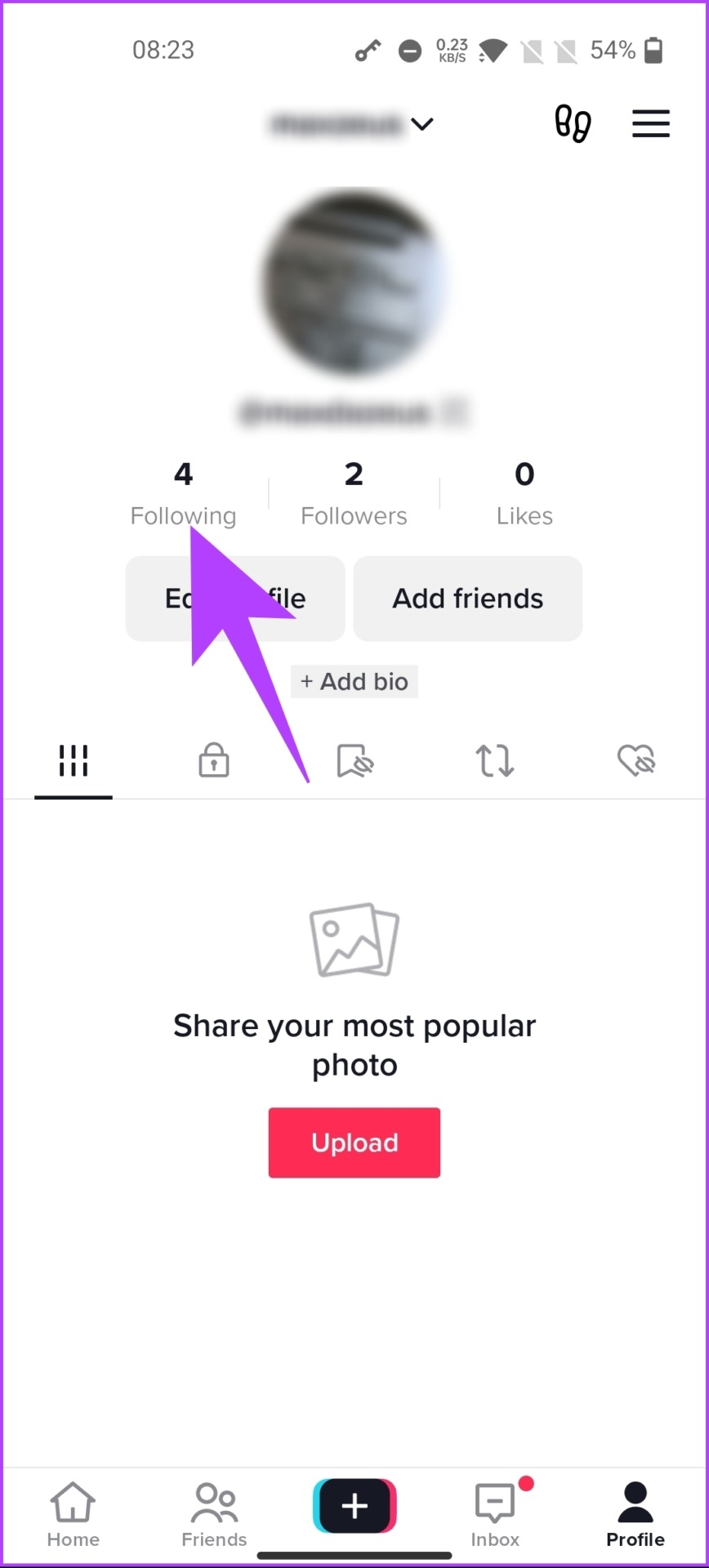
Step 1: Launch TikTok, and from the Home, go to the Profile tab from the bottom navigation.
Step 2: On the Profile tab, go to Following.
Step 3: Under Following, unfollow the account that is irrelevant to you.
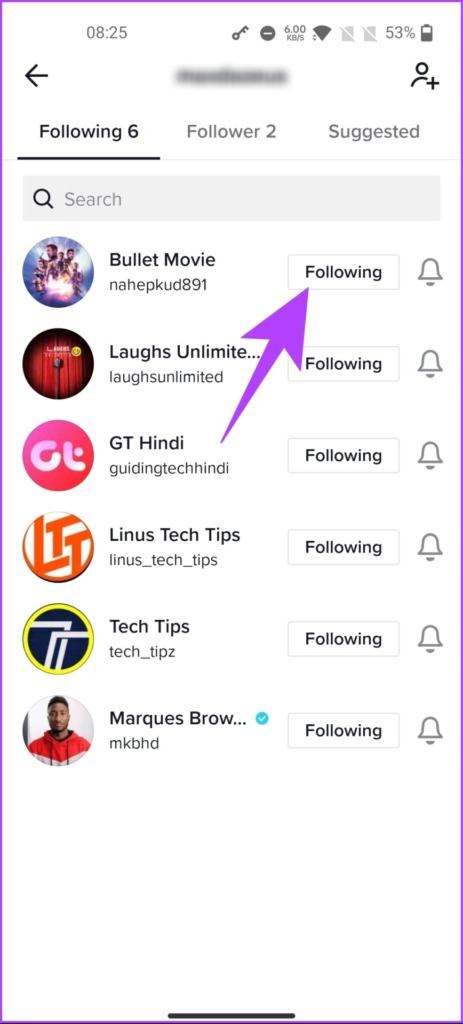
This change will let the TikTok algorithm understand that you are no longer interested in the content of the account you unfollowed.
Now that you have removed or at least made the TikTok algorithm realize that you are not interested in the kind of content it recommends, re-create a unique ‘For Your Page (FYP)’ on TikTok.
How to Create a Unique For Your Page (FYP)
To make TikTok’s algorithm recommend content based on your preferences or to create a unique FYP, you need to train it by liking the content you enjoy watching on TikTok. Follow the steps below to do so.
Step 1: Launch TikTok, and from the Home tab, tap on the search icon at the top right.
Step 2: Type the niche you like in the search bar and hit search.

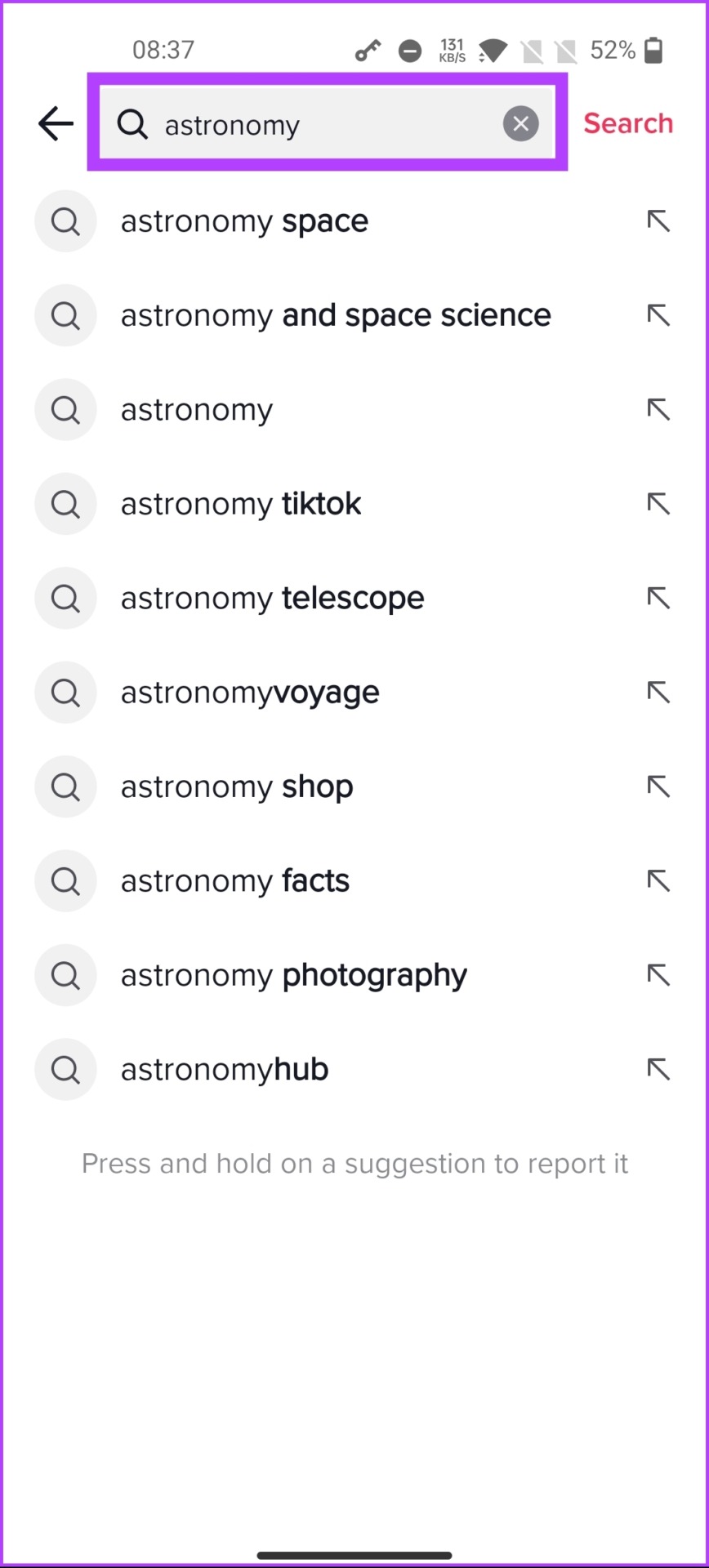
Step 3: From the list of hashtags, videos, and users, go through the videos and like the ones you loved watching.
Repeat the above steps for every niche or kind of video you prefer to watch on TikTok. The change will not be immediate; however, your FYP should start reflecting your new interest in a day or two.
FAQs
When you delete videos on TikTok, it may affect the TikTok algorithm. Deleting a video removes it from your profile, and other users can no longer view it. If the deleted video had already received a lot of views, likes, and engagement, it could impact your overall engagement rate and decrease your visibility in the algorithm. However, deleting a video with little to no engagement may not have any significant impact.
It’s important to note that repeatedly deleting videos may signal to the algorithm that your content is not high-quality or relevant, ultimately decreasing your reach and visibility on the app.
Clearing the TikTok cache can help resolve issues like videos not loading or the app crashing. Although the cache is essential as it helps the app run smoothly and load content faster, clearing it can sometimes improve the app’s performance and save data usage.
Was this helpful?
Last updated on 23 August, 2024
Read Next
 TikTok vs TikTok Lite: What’s Best for You?
TikTok (previously known as Musical.ly) is one of the massively growing social media apps out there, and it's easy to see why.
TikTok vs TikTok Lite: What’s Best for You?
TikTok (previously known as Musical.ly) is one of the massively growing social media apps out there, and it's easy to see why.
 3 Ways to Repost and Undo Repost on TikTok
If you are on TikTok browsing the endless feed and come across a video that you liked very much and want to share with your followers, you can quickly do
3 Ways to Repost and Undo Repost on TikTok
If you are on TikTok browsing the endless feed and come across a video that you liked very much and want to share with your followers, you can quickly do
 3 Ways to Fix TikTok App Not Loading on Your Phone
Basic Fixes Check your network connection: Ensure your smartphone has a robust internet connection.
3 Ways to Fix TikTok App Not Loading on Your Phone
Basic Fixes Check your network connection: Ensure your smartphone has a robust internet connection.
 4 Ways to Fix TikTok Notifications Not Working on iPhone and Android
Preliminary Fixes Disable Do Not Disturb: If your phone is on DND, you don’t receive notifications from TikTok and other apps.
4 Ways to Fix TikTok Notifications Not Working on iPhone and Android
Preliminary Fixes Disable Do Not Disturb: If your phone is on DND, you don’t receive notifications from TikTok and other apps.
 3 Ways to Fix TikTok Effects Not Working
Basic Fixes: Ensure you're in the correct region: Due to region restrictions, some TikTok filters may not be available in your country.
3 Ways to Fix TikTok Effects Not Working
Basic Fixes: Ensure you're in the correct region: Due to region restrictions, some TikTok filters may not be available in your country.
 3 Ways to Fix TikTok Not Working in Web Browser
Preliminary Fixes Check network connection: Ensure your device has a stable network connection.
3 Ways to Fix TikTok Not Working in Web Browser
Preliminary Fixes Check network connection: Ensure your device has a stable network connection.
 3 Ways to Fix TikTok Not Saving Videos
Basic Fixes: Check storage permission on Android: TikTok needs storage access to save videos.
3 Ways to Fix TikTok Not Saving Videos
Basic Fixes: Check storage permission on Android: TikTok needs storage access to save videos.
 3 Best Ways to Fix TikTok Not Showing Likes or Views
Preliminary Fixes Close & Reopen: Sometimes, a simple app restart can refresh the data.
3 Best Ways to Fix TikTok Not Showing Likes or Views
Preliminary Fixes Close & Reopen: Sometimes, a simple app restart can refresh the data.
The article above may contain affiliate links which help support Guiding Tech. The content remains unbiased and authentic and will never affect our editorial integrity.