3 Workarounds to Hide Following List on Instagram
Let’s look at three ways to hide the people or accounts you follow on Instagram.
Method 1: Make Your Instagram Profile Private
An easy solution to all your Instagram woes is to switch to a private Instagram account instead of a Business account. This will not only hide who you follow on Instagram but also ensure that those who are not your followers don’t access your other account information. Follow the below steps to do it.
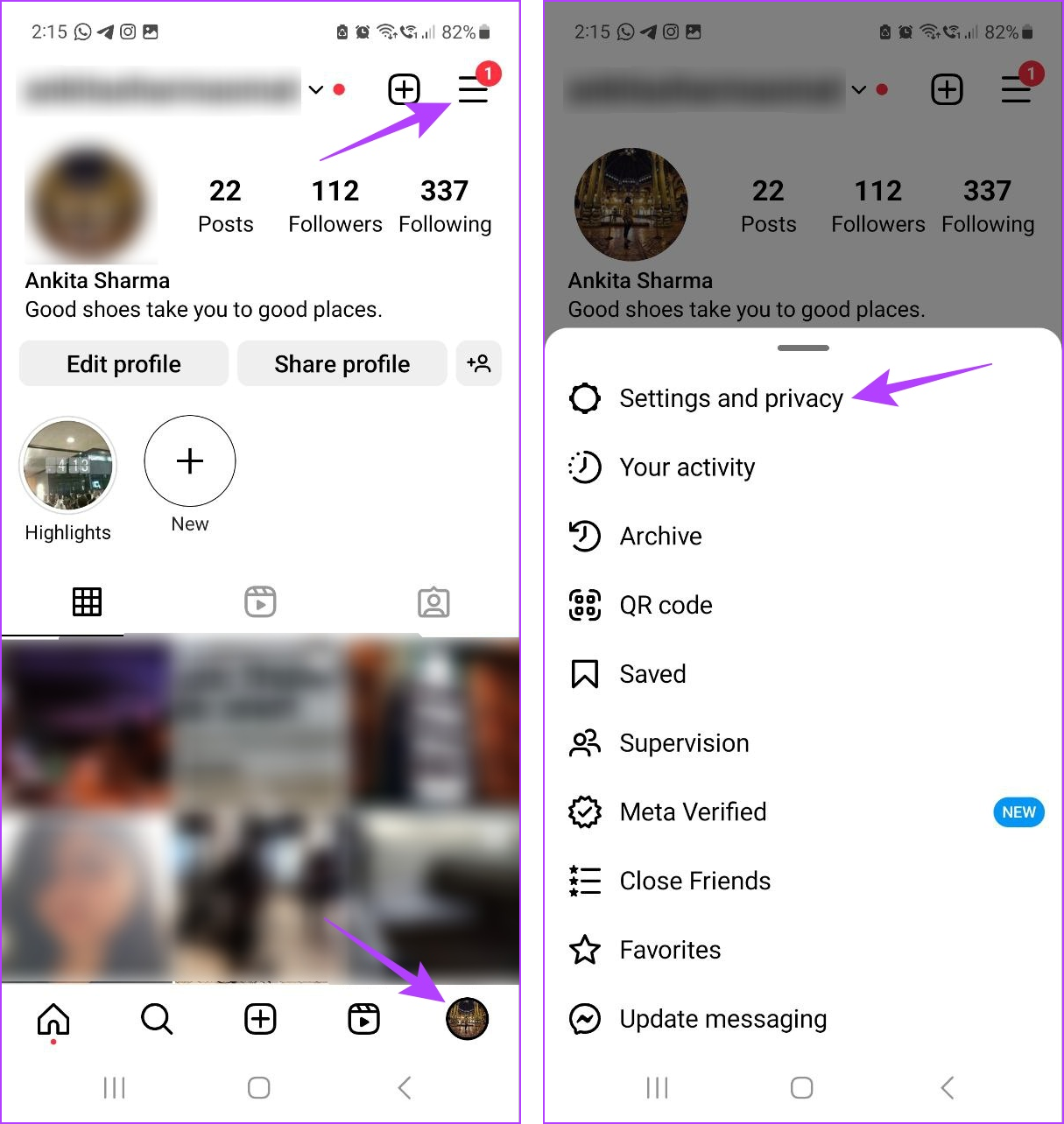
Step 1: Open Instagram and tap on your profile icon at the bottom right corner. Then, tap on the hamburger menu.
Step 2: Tap on Settings and privacy.
Step 3: Scroll down and tap on Account privacy. Turn on the toggle for Private account.
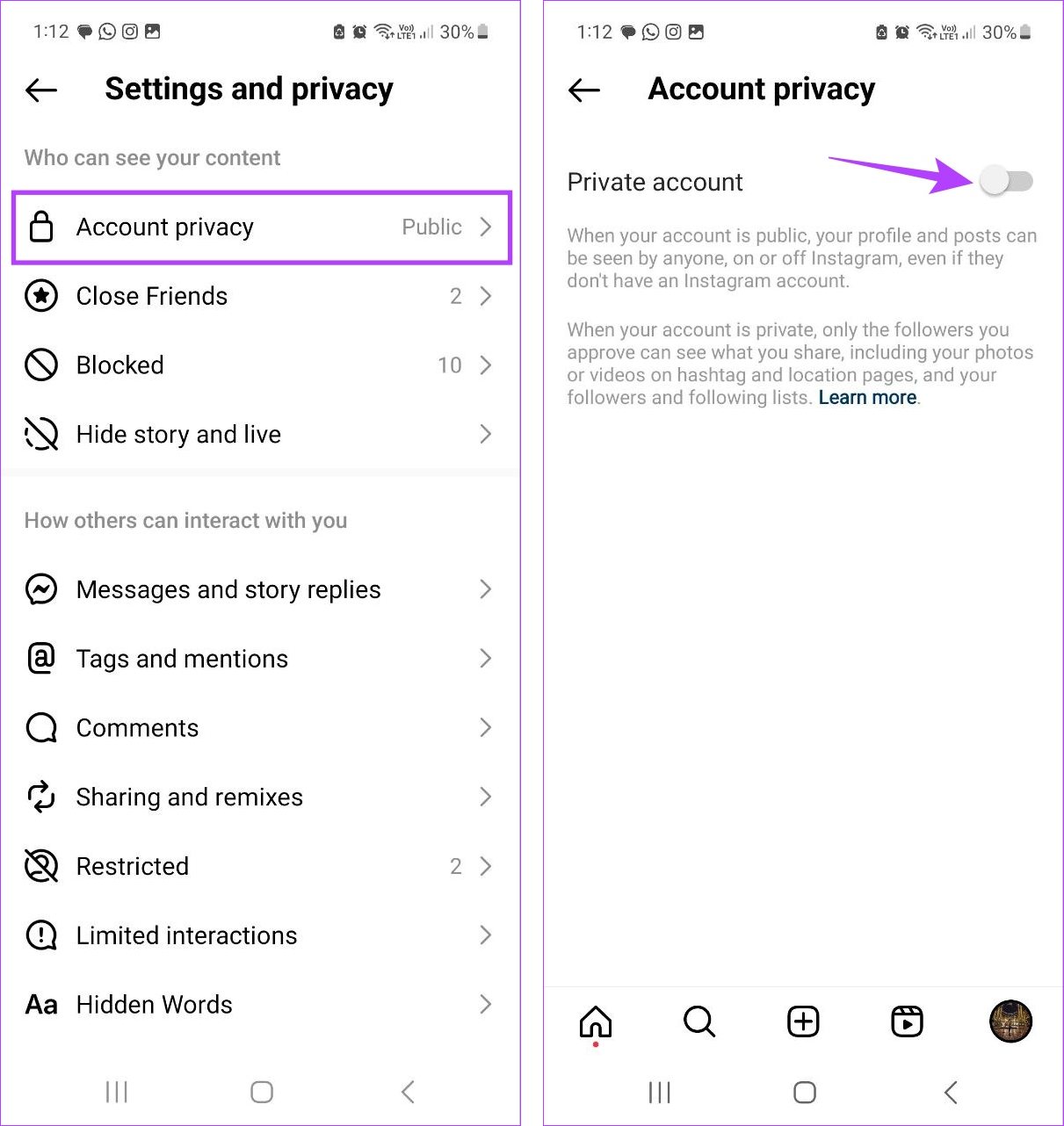
This will instantly make your public account private on Instagram. You can also use this method to hide your Instagram posts from someone.
Method 2: Remove Followers on Instagram
Once you have set your Instagram account to private, it is time to ensure the relevant user or account is not in your followers list to restrict their access to your Instagram profile. If the user is indeed your follower, remove them on Instagram. Here’s how.
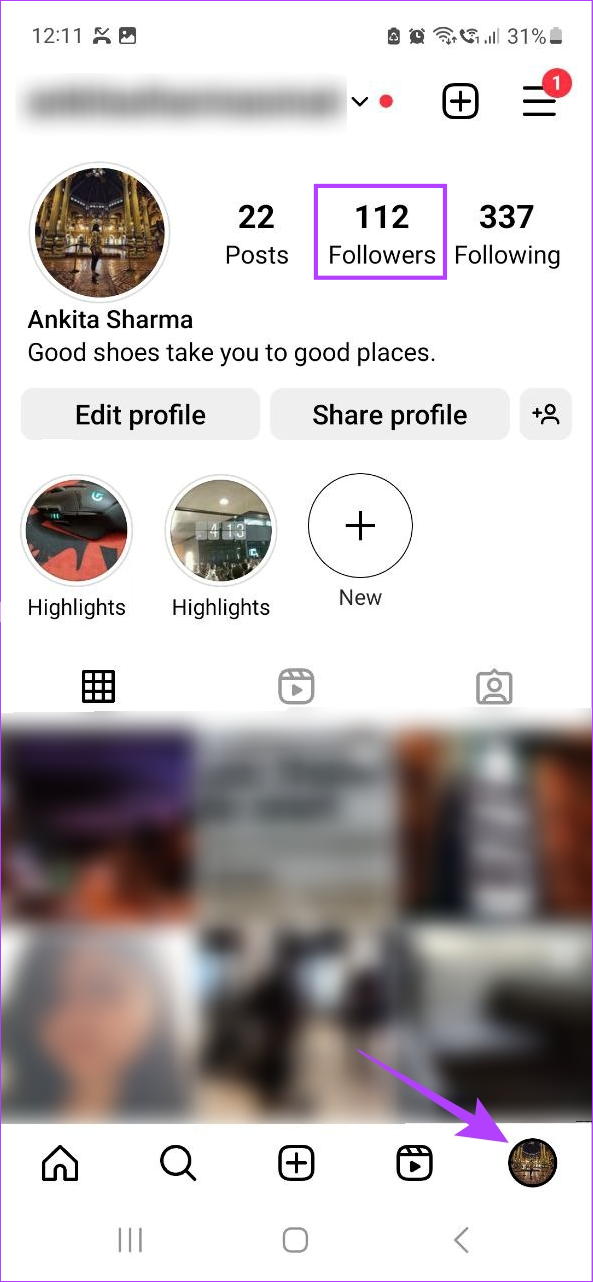
Step 1: Open the Instagram app on your phone > tap on your profile icon at the bottom > tap on Followers.
Step 2: Scroll through the list and tap on Remove in front of the user or account you wish to remove.
Step 3: Again, tap on Remove to confirm.


Repeat these steps to remove other unwanted followers on Instagram. Please note Instagram will not notify the users that they have been removed from your Follower list.
Tip: If you want to clean up your Instagram feed without affecting your follower count, consider muting those accounts on Instagram.
Method 3: Block the User on Instagram
Blocking users effectively hides who you follow on Instagram. Once done, the blocked Instagram users can no longer access your account. Instagram will also block any other account that they might create. This can help hide the details of your Instagram, even if it is a public account. Here’s how.
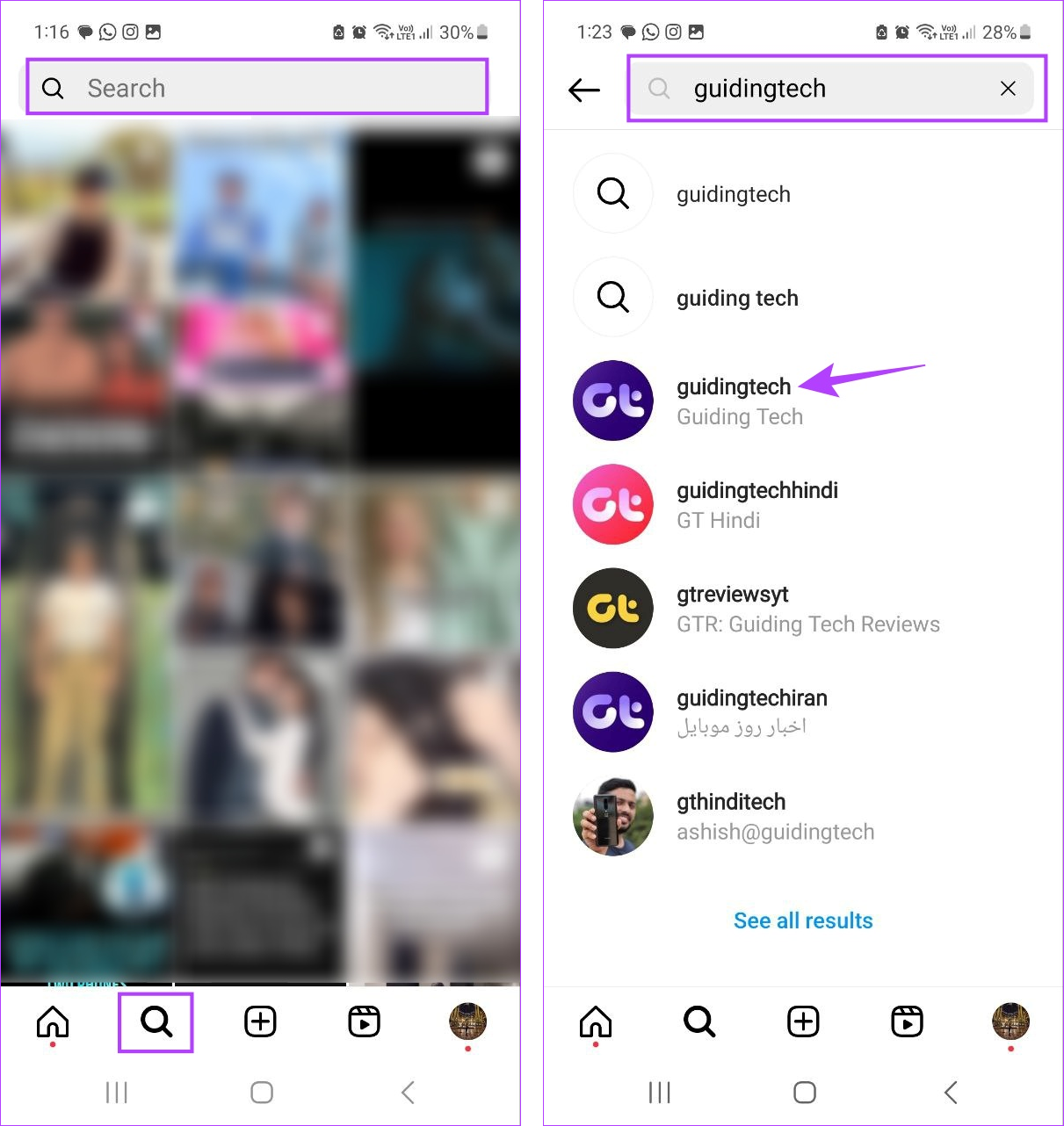
Step 1: Open Instagram > tap on the search icon > search bar.
Step 2: Type the name of the account or user you want to block and tap on the relevant search result.
Step 3: Here, tap on the three-dot icon > select Block. Confirm when prompted.
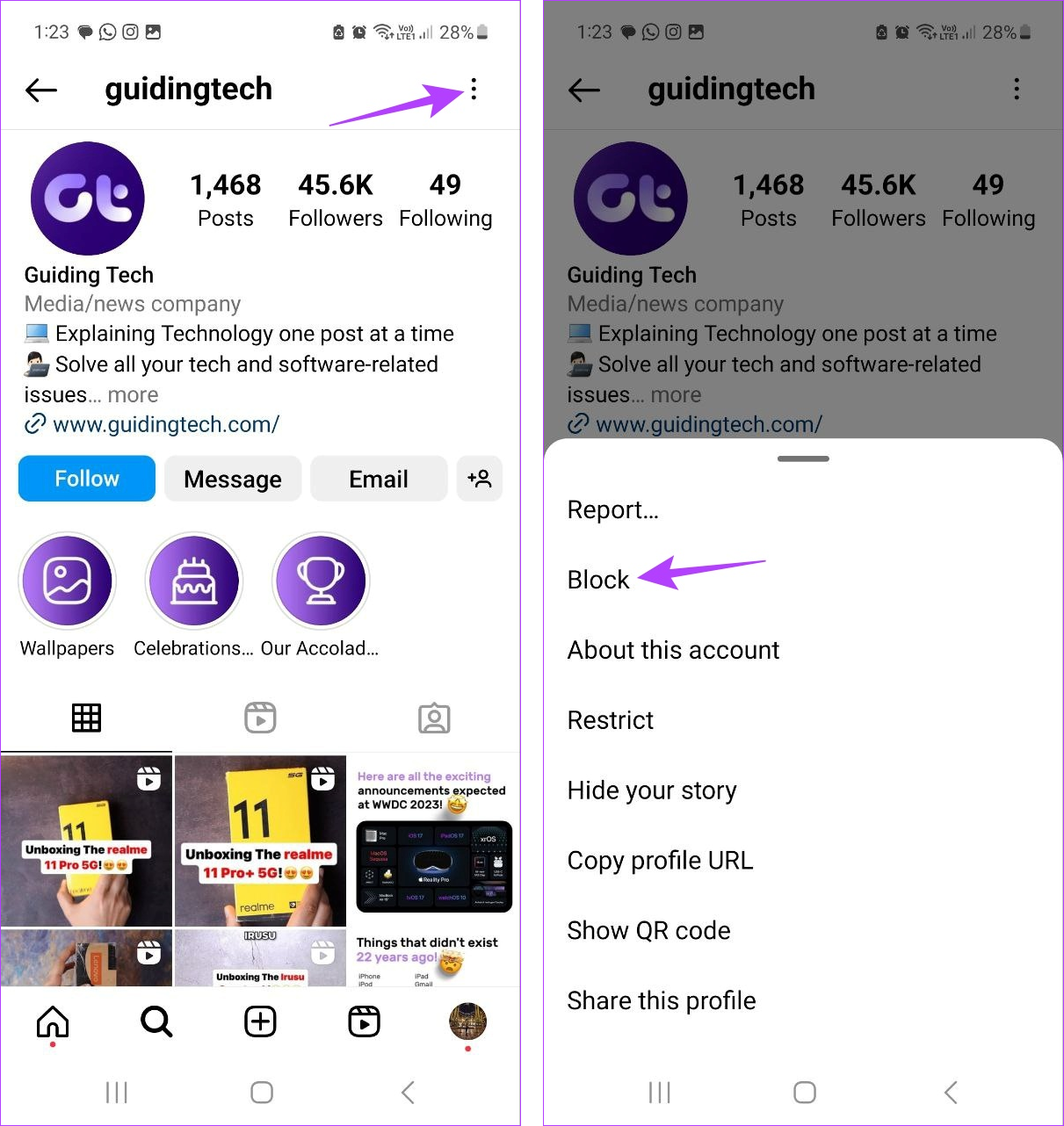
This will block and automatically unfollow the account or user on Instagram. As a less in-your-face way, you can also restrict the account or user on Instagram.
Also Read: Instagram Restrict vs. Block: What is the difference
FAQs
By turning your Public account into a Private one, you can restrict who has access to your account posts. To do this, turn your Instagram account Private and remove the relevant user from your list of followers.
Yes, as long as you haven’t blocked the user, they can still send you private messages on Instagram.
Was this helpful?
Last updated on 26 June, 2024
Read Next
 Why Can’t I Follow Someone on Instagram
Preliminary Fixes You Have Exceeded Limit: Instagram has limits in place to prevent spam and misuse of its platform.
Why Can’t I Follow Someone on Instagram
Preliminary Fixes You Have Exceeded Limit: Instagram has limits in place to prevent spam and misuse of its platform.
 How to Turn Off Follow Suggestions on Instagram
Turn Off Follow Suggestion on Instagram On Mobile After understanding how Instagram suggests other accounts to follow, here is a guide on how to disable this feature in the app.
How to Turn Off Follow Suggestions on Instagram
Turn Off Follow Suggestion on Instagram On Mobile After understanding how Instagram suggests other accounts to follow, here is a guide on how to disable this feature in the app.
 5 Ways to Fix TikTok Not Letting You Follow Someone
Basic Fixes Check TikTok servers: If TikTok servers are down, you may not be able to follow accounts.
5 Ways to Fix TikTok Not Letting You Follow Someone
Basic Fixes Check TikTok servers: If TikTok servers are down, you may not be able to follow accounts.
 How to Hide Instagram Story From Everyone Except One Person
https://www.youtube.com/embed/SgnBlWR97EY Method 1: Use the Close Friends List You can hide your story from all except one by using the close friends list.
How to Hide Instagram Story From Everyone Except One Person
https://www.youtube.com/embed/SgnBlWR97EY Method 1: Use the Close Friends List You can hide your story from all except one by using the close friends list.
 Instagram Block vs Mute vs Hide: Common Terms Explained
What Does Blocking on Instagram Mean Similar to other social networks, blocking on Instagram completely restricts your profile from the other person.
Instagram Block vs Mute vs Hide: Common Terms Explained
What Does Blocking on Instagram Mean Similar to other social networks, blocking on Instagram completely restricts your profile from the other person.
 How to Hide or Unhide Tagged Photos From Your Instagram Profile
How to Hide Tagged Photos From Your Instagram Profile Hiding a tagged photo or video from your Instagram profile is easy.
How to Hide or Unhide Tagged Photos From Your Instagram Profile
How to Hide Tagged Photos From Your Instagram Profile Hiding a tagged photo or video from your Instagram profile is easy.
 3 Easy Ways to Hide Posts From Someone on Instagram
Note: Changing settings on your desktop automatically syncs to your mobile device, so you don't have to follow the same methods on your mobile device as you would on your
3 Easy Ways to Hide Posts From Someone on Instagram
Note: Changing settings on your desktop automatically syncs to your mobile device, so you don't have to follow the same methods on your mobile device as you would on your
 How to Hide and Unhide Viber Chats on Mobile
How to Hide Viber Chats You can hide individual chats or group conversations on Viber to protect your privacy.
How to Hide and Unhide Viber Chats on Mobile
How to Hide Viber Chats You can hide individual chats or group conversations on Viber to protect your privacy.
The article above may contain affiliate links which help support Guiding Tech. The content remains unbiased and authentic and will never affect our editorial integrity.