Basic Troubleshooting
- Clear Instagram cache: If Instagram collects a corrupt cache, it may fail to load the latest insights. You can clear your Instagram cache and try to access insights.
- Check Instagram status: When Instagram servers face an outage, you encounter issues like invite collaborator not working, story sound problems, and insights not loading. You can visit Downdetector and search for Instagram. You will see high outage graphs. After Instagram solves server-side issues, try loading insights again.
- Incompatible browser (it doesn’t work in Safari): Some users have observed that Instagram insights don’t work properly with Safari. So, switch browsers to check your Instagram insights.
- Update or reinstall Instagram: An outdated Instagram app can cause issues, such as insights not working. You should update or delete and reinstall the app to the latest version from the App Store or Play Store.
Fix 1. Check Your Account Type
Instagram insights are unavailable for personal accounts. If the Instagram insight option is missing for your account, switch to a business or creator account.
To check your account type, go to Instagram → profile tab → three-line icon. Here, check the options under For professionals. If it says,
- Account type and tools: It’s a personal account. So, you must switch to avail Instagram account.
- Creator tools and controls: You have a creator account.
- Business tools and controls: You have a business account.

If you’re trying to view past insights: As per Instagram’s official support page, you can’t view insights of posts created before converting your account to a business or creator account. Additionally, if you switch back to a personal account, past insights data is erased.
Fix 2. Wait for Some Time
Are you experiencing an error similar to ‘currently unavailable due to lack of data needed to provide a value’? And did you recently post a story, reel, or video on Instagram?
Well, this error usually occurs when not enough data is available for Instagram to show. It may be due to low engagement, a newly created IG account, or recently converted to a creator/business account.
It may take some time before insights start showing up for your posts. You should wait for some time and check your insights.
Fix 3. Log Out and Log In to the Instagram App
Due to an account authentication error, Instagram may fail to see posts or reel insights on Instagram. You need to log out from your account and log in again.
Step 1: Open the Instagram app. Tap your profile icon, followed by the three-line icon to open Settings & privacy.
Step 2: Here, scroll down and log out from your account.


Sign in with your Instagram account details and check Insights again.
Alternative Ways to View Instagram Insight
Method 1. View Insights on Instagram Web
If Instagram doesn’t show insights on the phone, move to Instagram’s web version.
Step 1: Visit Instagram web and sign in with your account details.
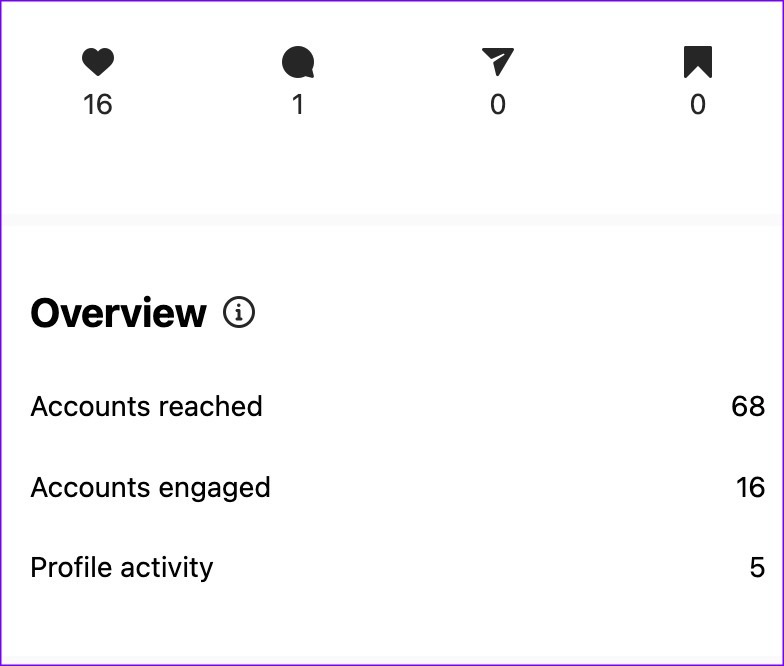
Step 2: Open a post. Select View Insights.

Step 3: You can check a detailed overview, reach, impression, and engagement from the following menu.
Method 2. View Instagram Insights From a Facebook Page
If you have connected your Instagram business account to a Facebook page, you can check insights from Facebook, too.
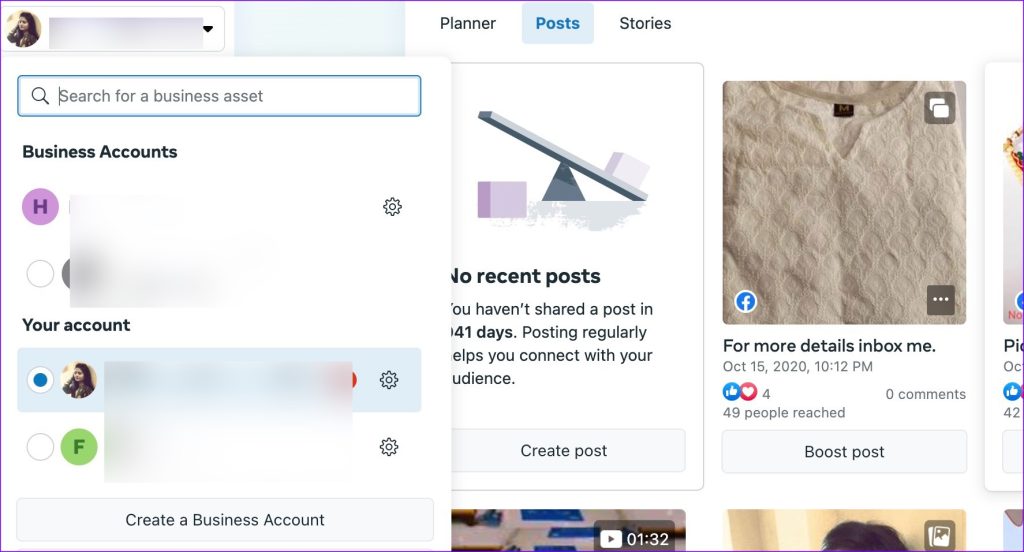
Step 1: Open the Facebook website on the desktop. Sign into your account and select your page from the sidebar.
Step 2: Next, select Meta Business Suite from the sidebar.
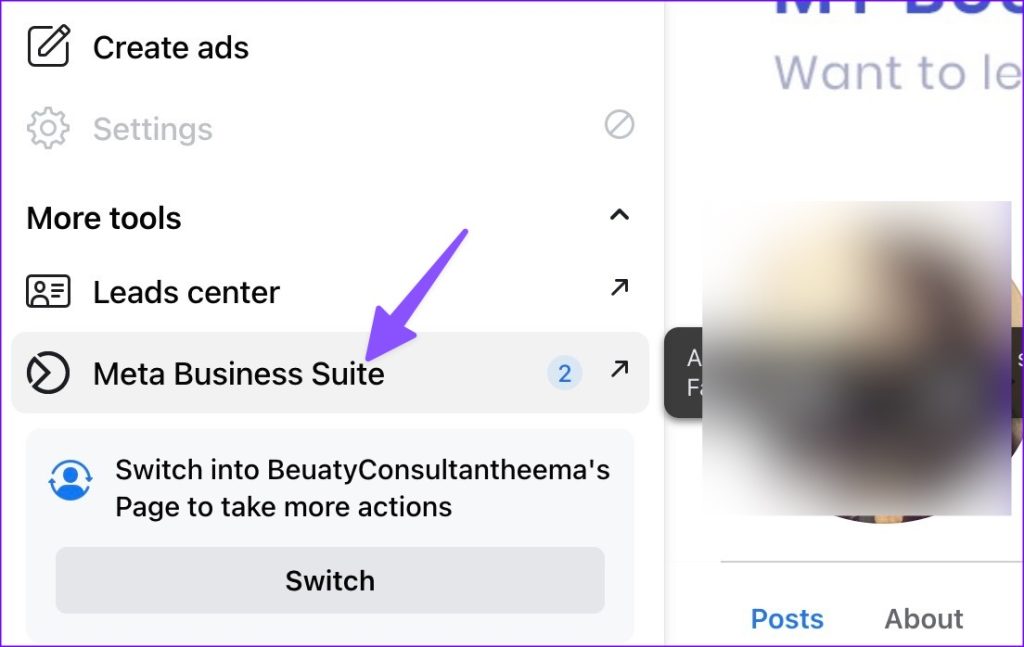
Step 3: Select your Instagram page from the top menu and check insights.
Are Instagram insights still unavailable on your account? You need to report a problem to Instagram. Thankfully, the Instagram team responds quickly. So, you’ll be in safe hands.
Was this helpful?
Last updated on 07 August, 2024
Read Next
 3 Methods to Know Who Stopped Following You on Instagram (With/Without App)
Do you ever wonder who quietly slips away from your Instagram circle?
3 Methods to Know Who Stopped Following You on Instagram (With/Without App)
Do you ever wonder who quietly slips away from your Instagram circle?
 3 Ways to Fix “This Story Is Unavailable” on Instagram
What Does Story Unavailable Mean on Instagram?
3 Ways to Fix “This Story Is Unavailable” on Instagram
What Does Story Unavailable Mean on Instagram?
 4 Ways to Fix Spotify Jam Not Working Issue
https://youtu.be/VlNJzz-q-Gs Basic Fixes: Check for Spotify app updates: Since Spotify Jam is a recent addition, the Spotify mobile app needs to be updated to use it.
4 Ways to Fix Spotify Jam Not Working Issue
https://youtu.be/VlNJzz-q-Gs Basic Fixes: Check for Spotify app updates: Since Spotify Jam is a recent addition, the Spotify mobile app needs to be updated to use it.
 Top 8 Ways to Fix Unfortunately Messenger Has Stopped Error on Android
Facebook Messenger app is an integral part of the millions of Facebook users.
Top 8 Ways to Fix Unfortunately Messenger Has Stopped Error on Android
Facebook Messenger app is an integral part of the millions of Facebook users.
 4 Fixes for Bad Module Info Has Stopped Working Error on Windows
Fix 1: Turn off Fullscreen Optimizations Full-screen optimizations in Windows can enhance the performance of your games and programs while they're in full-screen mode.
4 Fixes for Bad Module Info Has Stopped Working Error on Windows
Fix 1: Turn off Fullscreen Optimizations Full-screen optimizations in Windows can enhance the performance of your games and programs while they're in full-screen mode.
 6 Ways to Fix Windows Hello Fingerprint Option Unavailable or Not Working
Basic Fixes Restart PC: Restart your PC to fix any temporary bugs and glitches.
6 Ways to Fix Windows Hello Fingerprint Option Unavailable or Not Working
Basic Fixes Restart PC: Restart your PC to fix any temporary bugs and glitches.
 5 Ways to Fix Video Unavailable in Amazon Prime Video
Basic Fixes Check network connection: Playing Prime without any problems requires an optimum internet speed.
5 Ways to Fix Video Unavailable in Amazon Prime Video
Basic Fixes Check network connection: Playing Prime without any problems requires an optimum internet speed.
 4 Ways to Fix Roblox Error 503 “This Service Is Unavailable”
Why Are You Seeing Roblox Error Code 503 Server overload: One of the most common reasons for Roblox error 503 is when the servers become overloaded with too many user
4 Ways to Fix Roblox Error 503 “This Service Is Unavailable”
Why Are You Seeing Roblox Error Code 503 Server overload: One of the most common reasons for Roblox error 503 is when the servers become overloaded with too many user
The article above may contain affiliate links which help support Guiding Tech. The content remains unbiased and authentic and will never affect our editorial integrity.