Check Discord ID on the Web or Desktop App
Step 1: Go to Discord from your preferred browser on your Windows or Mac and log in to your account.
Step 2: Click on the gear icon at the bottom left to access User Settings.

Step 3: In the right pane, next to your username and avatar, click on the three horizontal dots.

Step 4: From the pop-up, select Copy ID.

Find Your Discord ID on Android or iPhone
Note: The steps are the same for both Android and iOS devices.
Step 1: Open the Discord app from your app drawer on your Android or iOS device.
Step 2: Go to your profile from the bottom tab.
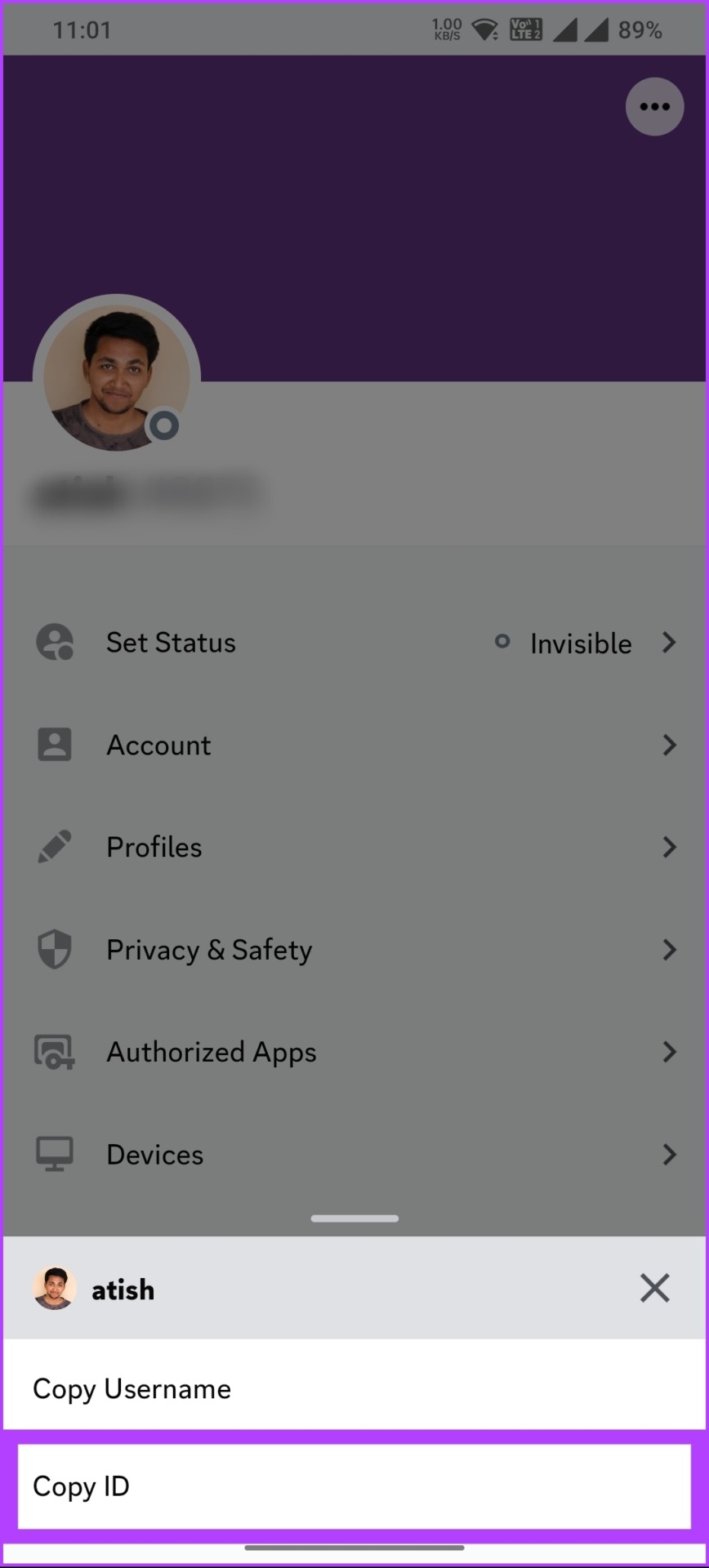
Step 3: Tap the three horizontal dots button on the Profile page and tap on Copy ID.

FAQs
Discord IDs are used to track and identify individual users on Discord. With your Discord User ID, one can see your username, profile picture, server activity, and account creation date. However, it is essential to note that Discord IDs do not reveal any private information or settings associated with your account.
Discord user IDs are generally safe to share, as they do not reveal sensitive or private information about your account. Other users can use your Discord ID to send you friend requests, add you to servers, and view your profile. However, they cannot see your private messages or account settings.
In any case, it’s critical to be cautious when sharing your Discord ID with others, especially if you don’t know them well or trust them. Sharing your Discord ID with strangers or on public forums can lead to unwanted messages or harassment.
There’s no official way to obtain someone’s IP address from their Discord ID alone. However, you can try a tool called the Discord IP resolver. This uses the Discord user ID to get the IP address of someone online.
Also, it’s important to know that trying to get someone’s IP address without their permission or for malicious purposes is against Discord’s terms of service. This can result in Discord account suspension or legal trouble.
Was this helpful?
Last updated on 30 May, 2024
Read Next
 How to Mark Emails as Read in Outlook on Web, Desktop, or Mobile App
Outlook is a widely used email client for personal and professional purposes.
How to Mark Emails as Read in Outlook on Web, Desktop, or Mobile App
Outlook is a widely used email client for personal and professional purposes.
 How to Turn Off Focused Inbox in Outlook on Web, Desktop, or Mobile
Not too long ago, Outlook introduced a Focused Inbox feature that automatically sorts your incoming email into two tabs.
How to Turn Off Focused Inbox in Outlook on Web, Desktop, or Mobile
Not too long ago, Outlook introduced a Focused Inbox feature that automatically sorts your incoming email into two tabs.
 How to Download Emails From Outlook on Web, Desktop, and Mobile
How to Download an Email From Outlook’s Web Version Note: You may choose to skip this method if you have multiple emails you want to download.
How to Download Emails From Outlook on Web, Desktop, and Mobile
How to Download an Email From Outlook’s Web Version Note: You may choose to skip this method if you have multiple emails you want to download.
 How to Change Outlook Password on Mobile, Desktop, and Web
Change Password in Outlook Mobile App The Outlook client app on Android and iPhone doesn’t have the option to change your account password.
How to Change Outlook Password on Mobile, Desktop, and Web
Change Password in Outlook Mobile App The Outlook client app on Android and iPhone doesn’t have the option to change your account password.
 How to Delete a Word Document on Desktop, Web, and Mobile
Deleting a Word document may seem straightforward, but the process can vary across platforms.
How to Delete a Word Document on Desktop, Web, and Mobile
Deleting a Word document may seem straightforward, but the process can vary across platforms.
 2 Best Ways to Create a Poll on Discord for Desktop and Mobile
Want a quick and easy way to gain input from friends, family, or a community on Discord?
2 Best Ways to Create a Poll on Discord for Desktop and Mobile
Want a quick and easy way to gain input from friends, family, or a community on Discord?
 How to Log Out of Discord on Desktop and Mobile
How to Log out of a Discord Account After using Discord for a while, you might want to log out.
How to Log Out of Discord on Desktop and Mobile
How to Log out of a Discord Account After using Discord for a while, you might want to log out.
 How to React to Messages on Discord (Mobile and Desktop)
How to React to Discord Messages on Desktop You can also react with custom emojis on Discord if you have Manage Emoji permission, are server owners, or have Discord Nitro.
How to React to Messages on Discord (Mobile and Desktop)
How to React to Discord Messages on Desktop You can also react with custom emojis on Discord if you have Manage Emoji permission, are server owners, or have Discord Nitro.
The article above may contain affiliate links which help support Guiding Tech. The content remains unbiased and authentic and will never affect our editorial integrity.