How to Call With an Extension on iPhone Directly
If you have an iPhone, here’s how to call with an extension before you dial a number. This will transfer the line directly to the extension, which means you don’t have to wait for the robotic instruction to enter the extension.
Step 1: Open the Phone app and go to the Keypad tab.
Step 2: Dial the phone number you wish to call, but don’t hit the Call button just yet.
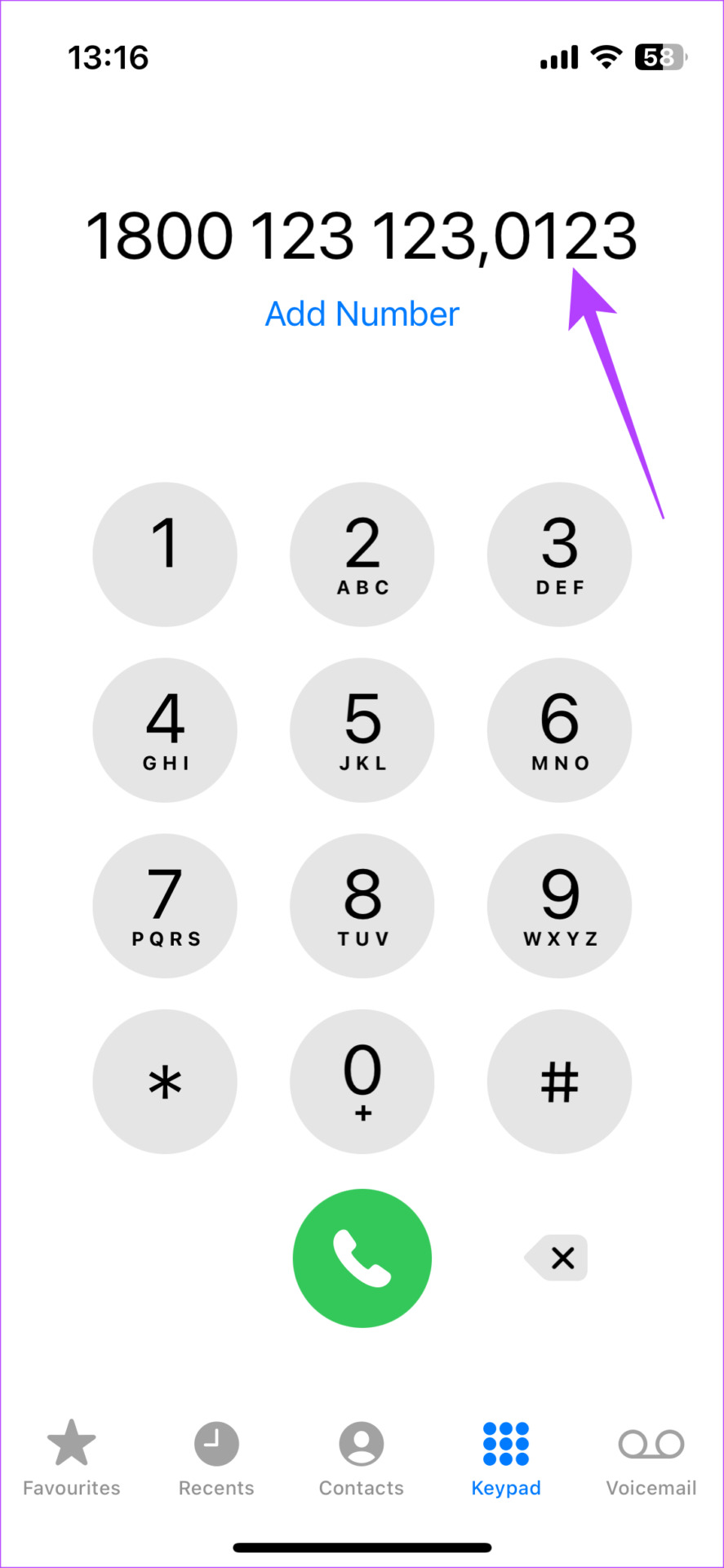
Step 3: Tap and hold on to the asterisk (*) key to add a comma after the phone number.
Note: The comma indicates a two-second pause before dialing the extension.
Step 4: Now, enter the extension you want to dial. For example, if the extension is 0123, enter 0123 after the comma. Then, tap on the Call button to place a call.


How to Save a Contact With an Extension on iPhone
If you dial a particular phone number and extension numerous times, it’s best to save the contact with the extension so you can reach them with a single tap. Here’s how to do it.
Step 1: Open the Phone app on your iPhone and enter the phone number along with the extension.
Step 2: Tap the Add Number option. Then, select whether you want to create a new contact or add to an existing contact.
Step 3: Enter the contact details. Select Done in the top-right corner once you’re ready to save the contact.


Next time you want to dial the number with the extension, just call this contact you created.
How to Dial a Number With an Extension on Android
The procedure to dial an extension on an Android device is slightly different. Here’s how it works.
Step 1: Open the Phone app on your Android phone.
Step 2: Dial the phone number you wish to call, but don’t hit the Call button just yet.
Step 3: Tap on the three vertical dots and select the Add 2-sec pause option. This will add a comma at the end of your phone number.
Step 4: Enter the number you want to add as an extension to the phone number and tap the Call button.


How to Save a Contact With an Extension on Android
Here’s how you can enter an extension number and save the contact on your Android. This way, you can call a number much more quickly.
Step 1: Open the Phone app and enter the phone number along with the extension.
Step 2: Select whether you want to create a new contact or add the number to an existing contact.
Step 3: Enter all the details and hit the Save button.


Was this helpful?
Last updated on 05 September, 2024
Read Next
 4 Ways to Setup Speed Dial on Android
Method 1: Add Contact to Favorites Your Android phone lets you create and manage a list of your favorite contacts so that you can contact them quickly without shuffling through
4 Ways to Setup Speed Dial on Android
Method 1: Add Contact to Favorites Your Android phone lets you create and manage a list of your favorite contacts so that you can contact them quickly without shuffling through
 4 Ways to Fix Android Phone Hangs up as Soon as I Dial
Basic Fixes: Enable and disable Airplane mode: You can reset your Android phone's network connection using the Airplane mode.
4 Ways to Fix Android Phone Hangs up as Soon as I Dial
Basic Fixes: Enable and disable Airplane mode: You can reset your Android phone's network connection using the Airplane mode.
 4 Android Browsers With Extension Support
1.
4 Android Browsers With Extension Support
1.
 How to Change the File Extension on Android Devices
Method 1: Change File Extension Using the Files by Google App Most Android phones come with the Files by Google app as the default file manager, which offers several useful
How to Change the File Extension on Android Devices
Method 1: Change File Extension Using the Files by Google App Most Android phones come with the Files by Google app as the default file manager, which offers several useful
 How to Change File Type (Extension) on iPhone
Whatever files you currently have on your iPhone, all have an extension attached to them.
How to Change File Type (Extension) on iPhone
Whatever files you currently have on your iPhone, all have an extension attached to them.
 Top 7 Ways to Fix Google Chrome Failed to Load Extension
Extensions play an important role in the Chrome ecosystem.
Top 7 Ways to Fix Google Chrome Failed to Load Extension
Extensions play an important role in the Chrome ecosystem.
 5 Ways to Fix Grammarly Extension Not Working on Chrome
Basic Fixes Check internet connection: Grammarly will only work with an internet connection.
5 Ways to Fix Grammarly Extension Not Working on Chrome
Basic Fixes Check internet connection: Grammarly will only work with an internet connection.
 6 Best Flat and Thin Extension Cords You Should Buy
Flat and thin extension cords are a great way to add extra power outlets to your home without the unsightly clutter of a traditional round cord.
6 Best Flat and Thin Extension Cords You Should Buy
Flat and thin extension cords are a great way to add extra power outlets to your home without the unsightly clutter of a traditional round cord.
The article above may contain affiliate links which help support Guiding Tech. The content remains unbiased and authentic and will never affect our editorial integrity.