What Is Last Seen on Truecaller and How to Disable It
The “Last Seen” Truecaller means the last time a person was active on the Truecaller app. Last seen on Truecaller depends on when the person last used their phone with an internet connection and had the app open.
- Truecaller records your last seen time when you either manually open the app, or whenever the caller ID banner pops up during phone calls. However, information is not recorded if your device is not connected to the internet.
- Last-seen data and other information are only shared if you are using an Android device. If you are using the latest version of Treucaller on your iPhone, other users will not be able to see your activity.
- Thanks to a few restrictions on iOS, Truecaller cannot capture and monitor your status. But you can still view the last seen and status of Android users of Truecaller on your iPhone.
Turn Off Availability on Truecaller Android App
Here’s how you can turn off Truecaller availability to turn off last seen on your Android device.
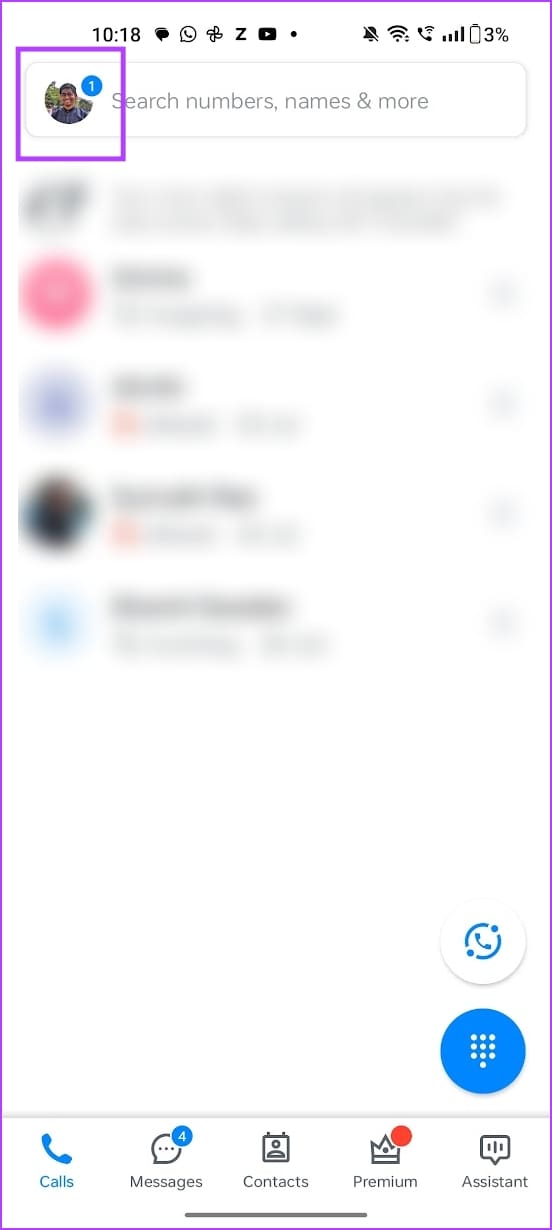
Step 1: Open the Truecaller app. Tap on your profile icon at the top left corner.
Step 2: Scroll down the list, and tap on Privacy Center. Turn off the toggle for Availability.

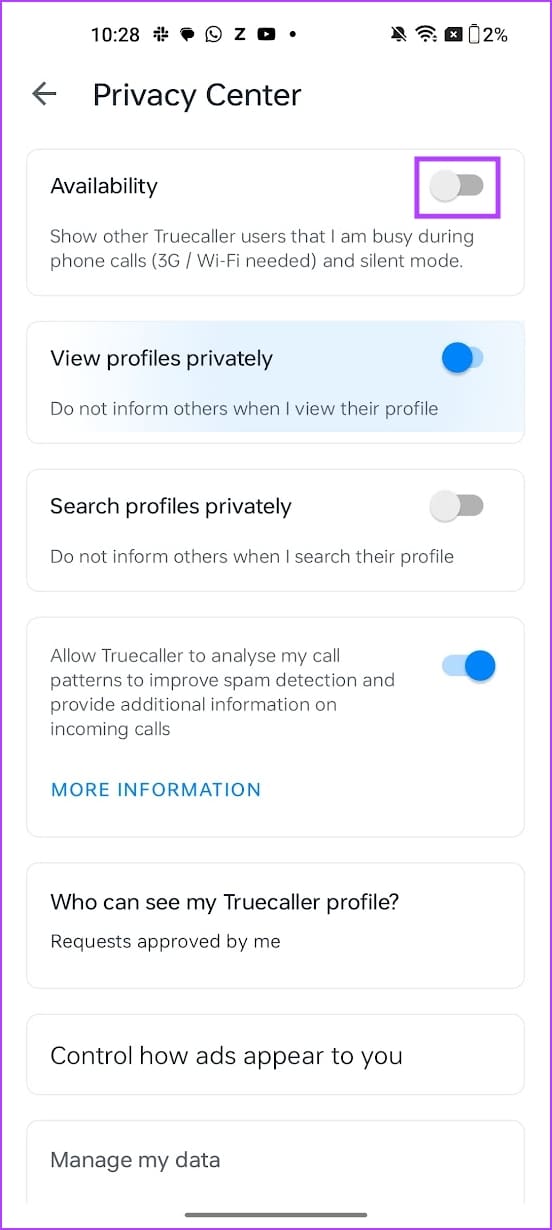
This also hides other information, and it doesn’t show if your device is in silent mode, or if you are currently engaged in a phone call.
Also Read: How to unlist your phone number from Truecaller
Bonus: How to Hide Profile Visibility on Truecaller
If someone is using the premium version of Truecaller, they will be informed whenever you check their profile. To make sure Truecaller doesn’t let them know, here’s how you can browse profiles in incognito mode in Truecaller on both iPhone and Android devices.
However, doing this requires you to purchase the premium version of Truecaller.
Step 1: Open the Truecaller app. Tap on your profile icon in the top right corner.
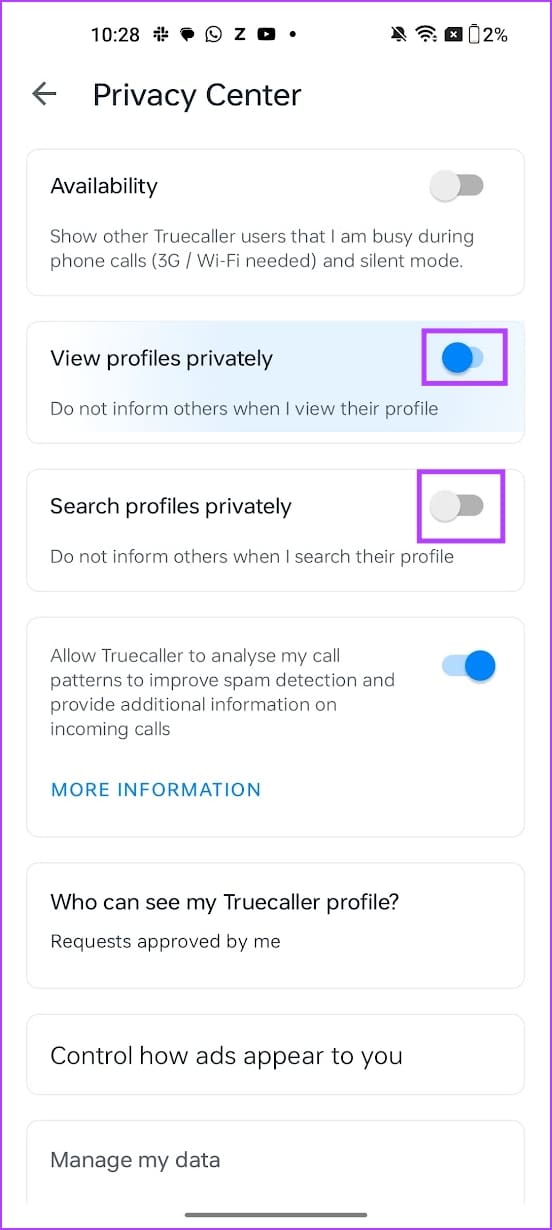
Step 2: Scroll down the list, and tap on Privacy Center.
Step 3: Turn on the toggle for View profiles privately. Additionally, also turn on the toggle for Search Profiles Privately.
If you are using an iPhone, turn on the toggle for ‘Incognito Mode’.
Also Read: How to disable and remove Truecaller messaging service
Was this helpful?
Last updated on 25 July, 2024
Read Next
 How to Hide Last Seen From Specific Contacts on WhatsApp
Thanks to WhatsApp’s new privacy tools, you no longer need to explain your latenight last seen to your friends or family members.
How to Hide Last Seen From Specific Contacts on WhatsApp
Thanks to WhatsApp’s new privacy tools, you no longer need to explain your latenight last seen to your friends or family members.
 How to Hide Last Seen and Online Status in WhatsApp
Hide Last Seen and Online Status For Everyone in WhatsApp Used by over two billion users worldwide, WhatsApp eventually added privacy features to hide your status, profile picture, and About
How to Hide Last Seen and Online Status in WhatsApp
Hide Last Seen and Online Status For Everyone in WhatsApp Used by over two billion users worldwide, WhatsApp eventually added privacy features to hide your status, profile picture, and About
 How to Disable and Remove Truecaller Messaging Service (and Cool Tricks)
Step 1: Begin by going to Settings and searching for Default Apps.
How to Disable and Remove Truecaller Messaging Service (and Cool Tricks)
Step 1: Begin by going to Settings and searching for Default Apps.
 How to Unlist Your Phone Number From Truecaller
Truecaller is a great way to find out who called you from an unknown phone number.
How to Unlist Your Phone Number From Truecaller
Truecaller is a great way to find out who called you from an unknown phone number.
 How to Appear Offline and Browse Facebook Privately
Disable Your Active Status on Facebook (Desktop) If you're browsing Facebook on your PC and wish to appear offline, turn off your Active Status to hide it from everyone or
How to Appear Offline and Browse Facebook Privately
Disable Your Active Status on Facebook (Desktop) If you're browsing Facebook on your PC and wish to appear offline, turn off your Active Status to hide it from everyone or
 Why Can’t I See “Last Seen” or “Online” on WhatsApp
Basic Fixes Check Network Connectivity: If you use WhatsApp without an internet connection, the app can't fetch the Last Seen or Online status of a user.
Why Can’t I See “Last Seen” or “Online” on WhatsApp
Basic Fixes Check Network Connectivity: If you use WhatsApp without an internet connection, the app can't fetch the Last Seen or Online status of a user.
 5 Ways to See WhatsApp Status Without Being Seen
Method 1: Turning off Read Receipts Read receipts help you know who has seen your message, status, story, etc., on WhatsApp.
5 Ways to See WhatsApp Status Without Being Seen
Method 1: Turning off Read Receipts Read receipts help you know who has seen your message, status, story, etc., on WhatsApp.
 How to See Instagram Messages Without Being Seen
Your friends on Instagram can send you DMs or direct messages, delivered straight to the messages section.
How to See Instagram Messages Without Being Seen
Your friends on Instagram can send you DMs or direct messages, delivered straight to the messages section.
The article above may contain affiliate links which help support Guiding Tech. The content remains unbiased and authentic and will never affect our editorial integrity.