


How to Hide Viber Chats
You can hide individual chats or group conversations on Viber to protect your privacy. This is especially necessary if you share your device with others or want to keep specific conversations more discreet. Hiding a chat removes it from the main chat list but doesn’t delete the conversation, ensuring you can always retrieve it when needed.
From Chat Screen
If you previously had a conversation with the person and want to hide that chat in Viber, this is the quickest way.
Step 1: Open the Viber app on your device and locate the chat you want to hide.
Step 2: Press and hold the chat, select Hide chat, and tap on Set PIN in the pop-up window.
Note: PIN prompt occurs only during the initial attempt to conceal a chat.

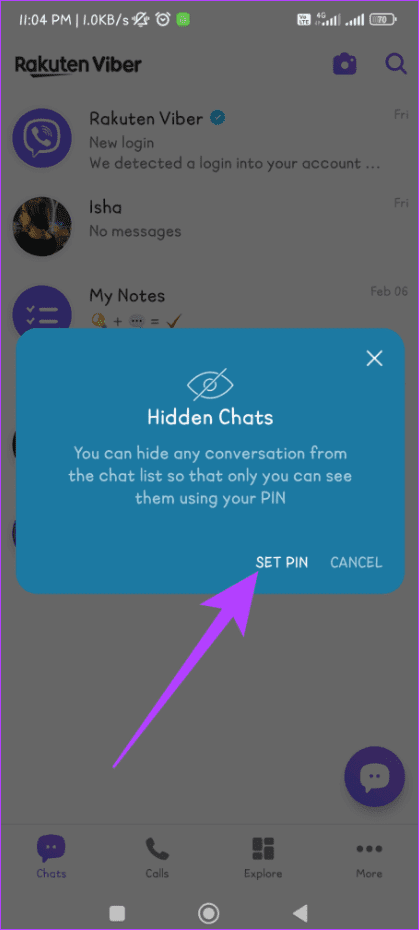
Step 3: Enter and confirm your PIN by entering it again.
Note: You can also enable Face ID or Touch ID on iPhone.
From All Contacts
If you can’t locate the chat you wish to hide, you can also do so from the All Contacts section. Adhere to the easy steps below:
Step 1: Navigate to the Viber app and tap the Chats icon.
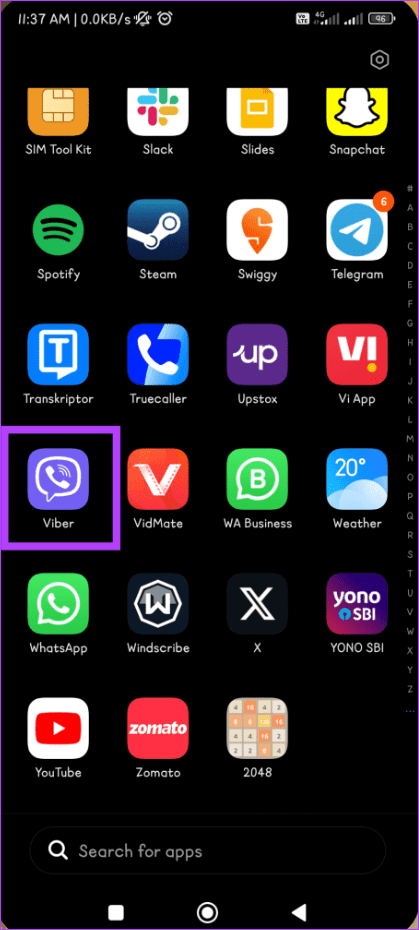

Step 2: Press the Search icon, enter the user’s name, and tap the contact card to open the chat.


Step 3: Press the three-dot icon and select Chat info.


Step 4: Scroll down and select Hide this chat. Tap on Set PIN when prompted.
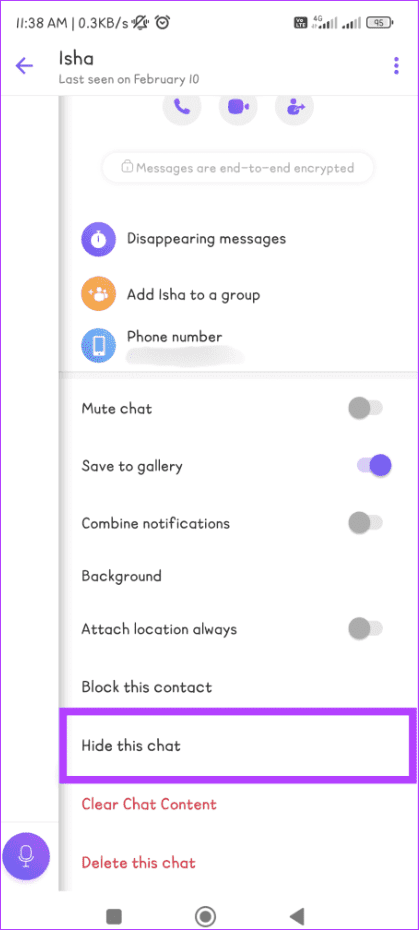

Step 5: Type your 4-digit PIN and re-enter it to confirm.
Also Read: How to block or unblock someone on the Viber app
How to Unhide Viber Chats
While hiding Viber chats offers a layer of privacy, there may come a time when you wish to revisit those tucked-away conversations. The process is remarkably straightforward. Follow along:
Note: You can reset your PIN if you ever forget it, but this will permanently delete your hidden conversations.
From Chat Screen
You can use the chat screen on your Viber app to unhide Viber chats in the blink of an eye. Follow the steps below:
Step 1: Go to the Viber app on your device and tap the Search icon.
Step 2: Enter the 4-digit PIN. Press and hold the chat you want to unhide.
Step 3: Select Unhide chat from the options and enter your PIN.


From All Contacts
If you’re looking for a more orthodox way of unhiding chats on Viber, using the All Contacts section is your way. Follow along to learn how it’s done:
Step 1: Open Viber on your phone and tap the icon that looks like a chat bubble.
Step 2: Find the contact you want to unhide. Tap on that person’s contact card and enter your 4-digit PIN.


Step 3: Tap the three dots icon and select Chat info.
Step 4: Scroll down and tap Unhide this chat. Lastly, type your PIN again to confirm.


Also Read: How to deactivate or delete your Viber account
FAQs on Viber Secret Chat
1. Do I get notifications from hidden conversations on Viber?
No, when you hide a conversation on Viber, it means that the chat is archived and won’t appear in your main chat list. As a result, you won’t receive notifications for messages in hidden conversations. However, you can still access and view these conversations at any time.
2. Can I hide Viber chats on my desktop app?
Unfortunately, the Viber desktop app doesn’t allow you to hide chat as of writing this guide.
Was this helpful?
Last updated on 26 August, 2024
Read Next
 How to Hide and Unhide Yourself on Google Meet (PC and Mobile)
Note: When you hide your camera feed, you can still see others, depending on their camera privacy setting.
How to Hide and Unhide Yourself on Google Meet (PC and Mobile)
Note: When you hide your camera feed, you can still see others, depending on their camera privacy setting.
 How to Hide or Unhide Tagged Photos From Your Instagram Profile
How to Hide Tagged Photos From Your Instagram Profile Hiding a tagged photo or video from your Instagram profile is easy.
How to Hide or Unhide Tagged Photos From Your Instagram Profile
How to Hide Tagged Photos From Your Instagram Profile Hiding a tagged photo or video from your Instagram profile is easy.
 How to Unhide Posts on Reddit and What Happens When You Hide Them
No matter which social media platform you are on, there will be some loose ends in content moderation, and Reddit has it too - it lets you hide posts that
How to Unhide Posts on Reddit and What Happens When You Hide Them
No matter which social media platform you are on, there will be some loose ends in content moderation, and Reddit has it too - it lets you hide posts that
 5 Ways to Hide WhatsApp Chats
Method 1: Hide WhatsApp Chat of One Person WhatsApp has a native feature known as Chat Lock that lets you hide individual chats by locking them using a fingerprint, Face
5 Ways to Hide WhatsApp Chats
Method 1: Hide WhatsApp Chat of One Person WhatsApp has a native feature known as Chat Lock that lets you hide individual chats by locking them using a fingerprint, Face
 How to Hide and Unhide Some Desktop Icons on Windows 10
You might want to hide some apps icons from your Windows PC if you share them with your family or kids.
How to Hide and Unhide Some Desktop Icons on Windows 10
You might want to hide some apps icons from your Windows PC if you share them with your family or kids.
 How to Hide or Unhide Apps on Samsung Galaxy Phones
Method 1: Hide Apps From Home Screen and App Drawer Samsung One UI Launcher has a built-in feature to hide apps from your home screen and app drawer.
How to Hide or Unhide Apps on Samsung Galaxy Phones
Method 1: Hide Apps From Home Screen and App Drawer Samsung One UI Launcher has a built-in feature to hide apps from your home screen and app drawer.
 How to Deactivate or Delete Your Viber Account
Closing the door on any online account can feel monumental, and the weight might be heavier, considering your Viber account's connections and conversations.
How to Deactivate or Delete Your Viber Account
Closing the door on any online account can feel monumental, and the weight might be heavier, considering your Viber account's connections and conversations.
 How to Delete Messages in Viber
How to Delete Messages on Individual Chat Deleting messages in Viber is straightforward, especially regarding individual chats.
How to Delete Messages in Viber
How to Delete Messages on Individual Chat Deleting messages in Viber is straightforward, especially regarding individual chats.
The article above may contain affiliate links which help support Guiding Tech. The content remains unbiased and authentic and will never affect our editorial integrity.

