If you’ve been using Google Chrome for a long time, we’re sure you’ve encountered a version called Google Chrome Canary. If the yellow-colored Chrome icon got your attention, and you’re curious about what it is – you are in the right place. In this article, we want to tell you everything about Google Chrome Canary.
Of course, you’ll have plenty of questions. Who should be using Google Chrome Canary, and why? Is Chrome Canary even safe? Another one that’s asked more often is why are there four different versions of Chrome.
We’ll answer your questions, so let’s jump right in.
What Is Google Chrome Canary Used For
Google Chrome Canary is an experimental version that is intended for development and testing. It is aimed at developers who want to build applications for the new and upcoming versions of Google Chrome since Canary offers an early look and the first access to the new features before they are rolled out to the public version.
Canary is updated more frequently than the regular versions of Chrome, sometimes multiple times a day. Since the browser contains experimental features, it is bound to be unstable and we don’t recommend to use it as a primary browser.

Based on the feedback and the results of testing, these experimental features will be deemed successful or not and will then be pushed to the public versions of Google Chrome.
However, anyone can download Google Chrome Canary on Windows Mac, and Android devices. Even if you aren’t a developer, you can use Canary to see what Google is up to and all the advanced features it plans to ship in the future with Chrome.
What Are the Features of Google Chrome Canary
To help you understand the features that are shipped with Google Chrome Canary, here are some examples in some of the recent versions of the web browser :
- In a recent version of Chrome Canary, Google added a slew of AI features to the web browser. This includes an AI theme personalizer, improved tab organization, and improvements to features that let you autofill and compose information.
- In September, Google started testing a feature in Canary that lets you read aloud the contents present on the webpage.
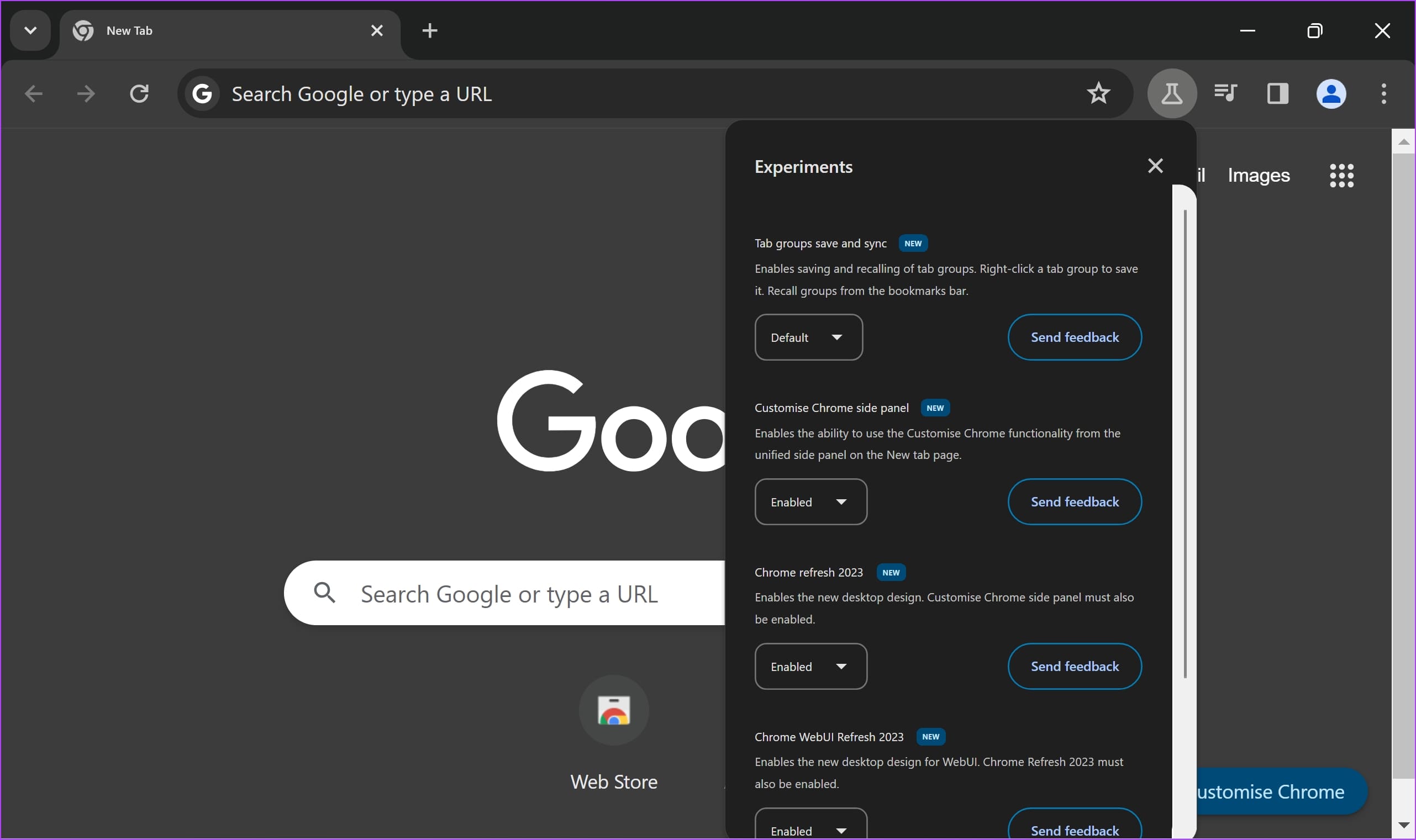
- In October, Google released an update to Canary which allows you to pin the performance settings panel to the toolbar for easier access.
- Google is also testing a feature in Canary that lets you share login credentials from the password manager with your family members.
- Google Chrome Canary also has a feature called Link Capturing for PWAs. This lets PWAs (Progressive Web Apps) catch links and open them in the app itself instead of opening them in a new tab.
If you want to stay updated regarding everything Google is testing with Canary, Leopeva64 is an account that you can follow on X.
Also Read: 9 Experimental flags to make Google Chrome faster.
Is Google Chrome Canary Safe
Google Chrome Canary is a safe application that you can install on your device. Since it is developed by Google, there are no security concerns as long as you download it from the official source.
However, many new features that are added and updated with Canary are highly experimental. If you don’t configure them correctly, it may lead to a few concerns on your device. This makes it prone to crashes, bugs, and performance issues.
While Canary undergoes rigorous security testing, it’s not as thoroughly tested as the stable version of Chrome. There’s always a risk of encountering security vulnerabilities. However, Google will immediately work on a fix for any critical bugs.
How to Install Google Chrome Canary
Now that we’ve given you a good understanding of Google Chrome Canary, you can install the browser on your device. You can still keep the normal version of the Chrome browser, and install Chrome Canary independently. It will not affect the functionality of any other web browsers as well.

Chrome vs. Chrome Beta vs. Chrome Canary vs. Chrome Dev: What Are the Differences
It is also worth noting that Google has four versions of Chrome – the stale build, Chrome Beta, Chrome Developer, and Chrome Canary. If you’re wondering what the differences are, here’s a simple explanation.
- Google Chrome: This is the public and stable version of the web browser. This contains all the features that are fully tested, and stable enough to be used.
- Google Chrome Beta: Google Chrome Beta offers a preview of features coming to the public version of Chrome browser four weeks before the release. Chrome Beta is updated nearly every week, and these features are in their last legs of testing, so they are relatively stable.
- Google Chrome Developer Chrome Developer Version lets you preview features 9-12 weeks before the public release. Chrome Dev is updated once or twice a week, and features are tested for bugs and stability.
- Google Chrome Canary: This is the bleeding edge version of Google Chrome, where the first iterations of features are tested. It is updated daily, and features are quite unstable and buggy.
That is everything you need to know. If you have any more questions regarding Google Chrome Canary, you can look at the FAQ section below.
FAQs: Google Chrome Canary
As of December 14, 2023, the latest build of Canary is version 122.0.6183.0.
No. Google Chrome Canary is not available for iOS.
There isn’t a fixed number, but features are first shipped to Chrome Developer, and then it may take several weeks or months of testing for them to be launched to the public version.
No. Not all features necessarily make their way to the public version of Google Chrome.
A Sneak Peek Of What Google Is Upto
Chrome is one of the most feature-rich browsers available today. If the curious geek inside you wants to know what Google is up to with Chrome, you can check out Canary. However, Canary can break, and get very buggy – so proceed with caution.
Was this helpful?
Last updated on 04 July, 2024
Read Next
 Google Chrome Release Channels: Stable vs. Beta vs. Canary vs. Dev
What Is Chrome Canary?
Google Chrome Release Channels: Stable vs. Beta vs. Canary vs. Dev
What Is Chrome Canary?
 Here’s Why I Switched From Google Chrome to Arc and You Should Too
Web browsers dictate a user’s experience when surfing the internet.
Here’s Why I Switched From Google Chrome to Arc and You Should Too
Web browsers dictate a user’s experience when surfing the internet.
 How to Disable Tumblr Safe Mode or Bypass it Without an Account
Tumblr is a great place to get your daily fix of cool GIFs and memes.
How to Disable Tumblr Safe Mode or Bypass it Without an Account
Tumblr is a great place to get your daily fix of cool GIFs and memes.
 Why Chrome is Asking for Sync Passphrase and How to Fix That
Chrome Sync arguably is the best feature in Google Chrome.
Why Chrome is Asking for Sync Passphrase and How to Fix That
Chrome Sync arguably is the best feature in Google Chrome.
 5 Fixes for Android Phone Stuck in Safe Mode
Try Basic Fixes Restart your phone: Restarting your Android is the most straightforward method for disabling Safe Mode.
5 Fixes for Android Phone Stuck in Safe Mode
Try Basic Fixes Restart your phone: Restarting your Android is the most straightforward method for disabling Safe Mode.
 3 Fixes for Windows 11 Stuck in Safe Mode
Fix 1: Use System Configuration System Configuration is a utility used to define how your PC starts up and which programs and services run with it.
3 Fixes for Windows 11 Stuck in Safe Mode
Fix 1: Use System Configuration System Configuration is a utility used to define how your PC starts up and which programs and services run with it.
 ChatGPT vs. Google Search: Which Should You Pick and Why
Ever since its release in late November 2022, ChatGPT has taken the world by storm; from garnering over 1 million users in its first week to putting Google in an
ChatGPT vs. Google Search: Which Should You Pick and Why
Ever since its release in late November 2022, ChatGPT has taken the world by storm; from garnering over 1 million users in its first week to putting Google in an
 Opera GX vs. Chrome: Is Opera GX Better Than Chrome
Opera GX vs.
Opera GX vs. Chrome: Is Opera GX Better Than Chrome
Opera GX vs.
The article above may contain affiliate links which help support Guiding Tech. The content remains unbiased and authentic and will never affect our editorial integrity.