Quick Fixes
- Check TikTok Servers: If TikTok servers are down, you may run into glitches with the search function. You can visit Downdetector to confirm your suspicions. That said, you’ll need to wait for TikTok to resolve server-side issues.
- Update TikTok: An outdated TikTok app can cause issues with the search fubctionality. You should update TikTok to the latest version from the Play Store or the App Store.
- Clear Cache: TikTok may collect corrupt cache at times and cause issues with the core functions of the app. You can try clearing the app cache to resume the normal funstion.
Fix 1: See if the TikTok Account Is Banned
Are you looking for a specific account on TikTok and failing to find it? The person may have deleted the account on TikTok. Sometimes, TikTok also shadowbans the account from search results to limit their reach. If a TikTok account repeatedly violates the company’s guidelines and rules, it may end up with such a treatment.
Fix 2: Try Refining your Search
When you search for a specific term on TikTok, the app showcases top results, including videos, users, sounds, and hashtags. You can use the built-in filters to narrow down search results. Here’s how.
Step 1: Launch TikTok and search for a video, sound, or user at the top.
Step 2: You can use the top menu to keep the search results limited to videos, users, sounds, or hashtags. Tap the three horizontal dots menu in the top-right corner and select Filters.
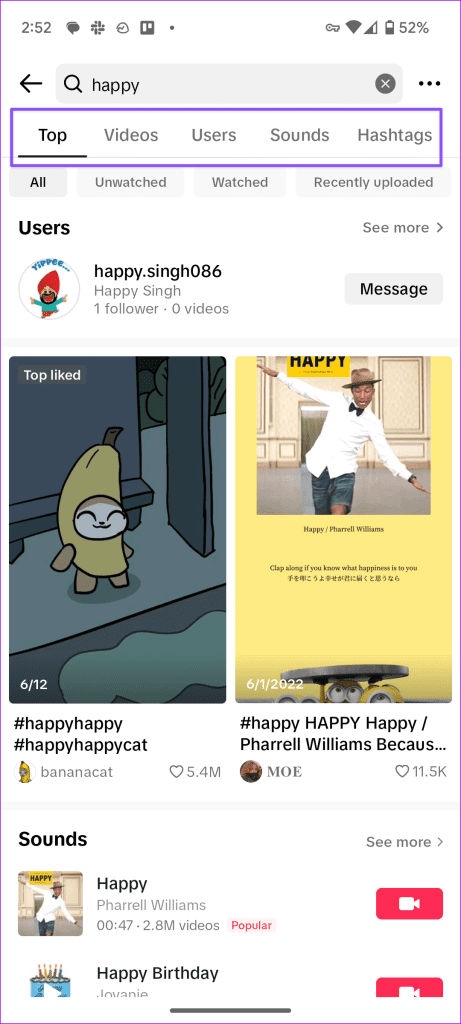


You can sort search results by video category, like count, date posted, and more. Hit Apply and find what you are looking for.
Fix 3: Try Searching for a Video in TikTok History
TikTok stores your watch history by default. You can find your recently viewed videos from the Settings menu. Here’s what you need to do.
Step 1: Launch TikTok and go to your profile. Tap the hamburger menu at the top-right corner and open Settings and privacy.
Step 2: Open the Activity center. Next, tap Watch history and go over your recently viewed videos on TikTok.


You can also access your comment and search history from the same menu.
Fix 4: Check Network Connection
When you use TikTok on a slow network connection, you may face issues finding relevant results. You should temporarily enable the Airplane mode and disable it after some time. If the network issues persist on your phone, reset the network settings and try again.
Refer our guide on resetting network settings on Android and iPhone.
Was this helpful?
Last updated on 20 August, 2024
Read Next
 TikTok vs TikTok Lite: What’s Best for You?
TikTok (previously known as Musical.ly) is one of the massively growing social media apps out there, and it's easy to see why.
TikTok vs TikTok Lite: What’s Best for You?
TikTok (previously known as Musical.ly) is one of the massively growing social media apps out there, and it's easy to see why.
 3 Ways to Fix TikTok App Not Loading on Your Phone
Basic Fixes Check your network connection: Ensure your smartphone has a robust internet connection.
3 Ways to Fix TikTok App Not Loading on Your Phone
Basic Fixes Check your network connection: Ensure your smartphone has a robust internet connection.
 4 Ways to Fix TikTok Notifications Not Working on iPhone and Android
Preliminary Fixes Disable Do Not Disturb: If your phone is on DND, you don’t receive notifications from TikTok and other apps.
4 Ways to Fix TikTok Notifications Not Working on iPhone and Android
Preliminary Fixes Disable Do Not Disturb: If your phone is on DND, you don’t receive notifications from TikTok and other apps.
 3 Ways to Fix TikTok Effects Not Working
Basic Fixes: Ensure you're in the correct region: Due to region restrictions, some TikTok filters may not be available in your country.
3 Ways to Fix TikTok Effects Not Working
Basic Fixes: Ensure you're in the correct region: Due to region restrictions, some TikTok filters may not be available in your country.
 3 Ways to Fix TikTok Not Working in Web Browser
Preliminary Fixes Check network connection: Ensure your device has a stable network connection.
3 Ways to Fix TikTok Not Working in Web Browser
Preliminary Fixes Check network connection: Ensure your device has a stable network connection.
 5 Ways to Fix TikTok Not Letting You Follow Someone
Basic Fixes Check TikTok servers: If TikTok servers are down, you may not be able to follow accounts.
5 Ways to Fix TikTok Not Letting You Follow Someone
Basic Fixes Check TikTok servers: If TikTok servers are down, you may not be able to follow accounts.
 3 Ways to Fix TikTok Not Saving Videos
Basic Fixes: Check storage permission on Android: TikTok needs storage access to save videos.
3 Ways to Fix TikTok Not Saving Videos
Basic Fixes: Check storage permission on Android: TikTok needs storage access to save videos.
 3 Best Ways to Fix TikTok Not Showing Likes or Views
Preliminary Fixes Close & Reopen: Sometimes, a simple app restart can refresh the data.
3 Best Ways to Fix TikTok Not Showing Likes or Views
Preliminary Fixes Close & Reopen: Sometimes, a simple app restart can refresh the data.
The article above may contain affiliate links which help support Guiding Tech. The content remains unbiased and authentic and will never affect our editorial integrity.