Fix 1: Turn on Missing Media Features
Chances are, if you live outside of Europe or Korea, your copy of Windows came with the media features turned off by default. Maybe you even disabled them yourself and forgot about it. Don’t worry because enabling them again is super easy. Here is how:
Step 1: Press the Windows + R keys to open the Run dialog box. Then, type optionalfeatures.exe in the search bar and click OK.

Step 2: In the Windows Features window, scroll down and check the box for Media Features > click OK and wait a moment while your Windows PC turns on Windows Media Player and other media features.
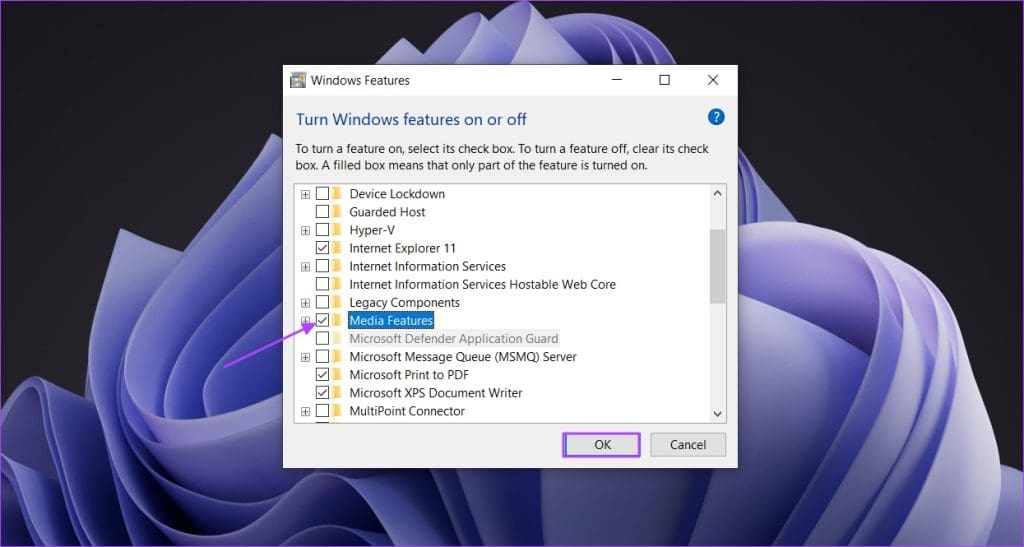
Once the process is complete, restart your computer. You can then install iCloud without encountering the Missing Media Features error.
Fix 2: Manually Download Missing Media Feature Packs
If you live in Europe or South Korea or can’t find the Media Features option within Windows Features, your version of Windows likely doesn’t include Windows Media Player by default.
However, Microsoft still lets you download and install the missing media features separately. Here’s how to get it:
Step 1: Visit the Media Feature Pack download page > select your language > click Download.
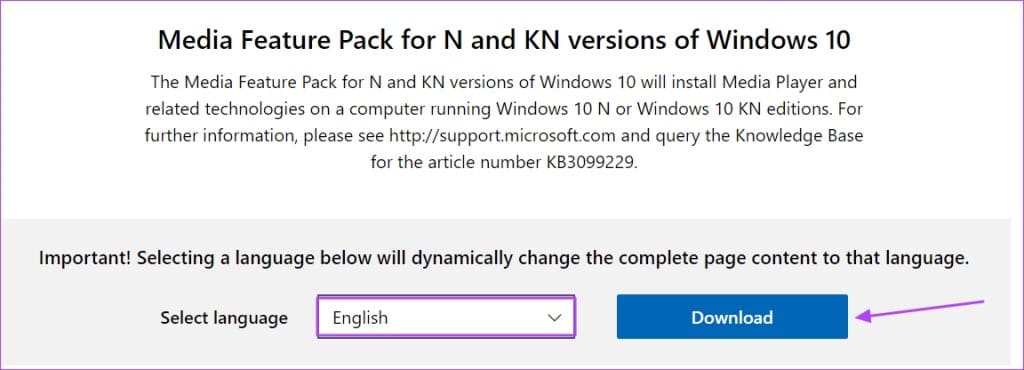
Step 2: In the Choose the download you want window, select the file that matches your operating system > click Download.
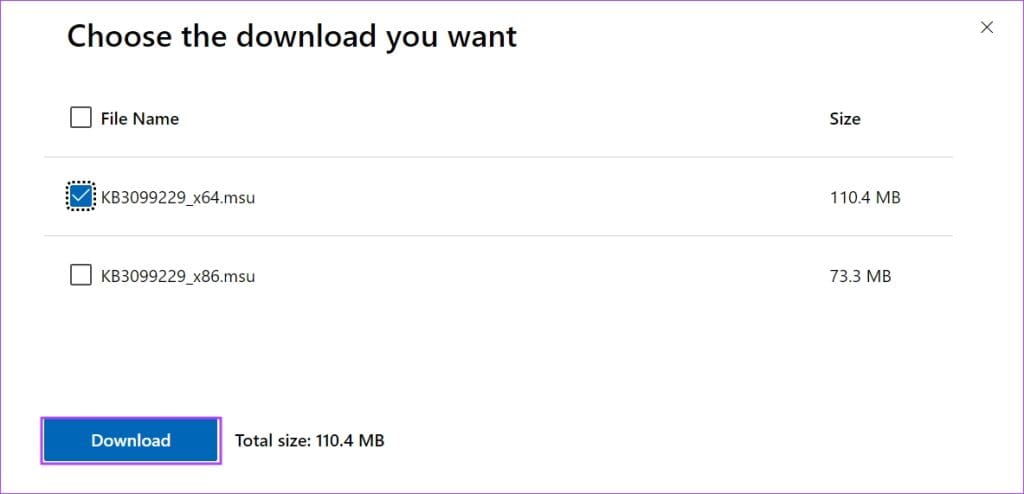
Step 3: Now, double-click the file and follow the on-screen instructions to install it.
Fix 3: Download Necessary Media Codecs
Even after downloading the media feature pack from the Microsoft website, there’s a slight chance you might encounter the issue. This is because your computer might be missing important codecs. You can install these codecs from the Microsoft Store using the links below:
The first three codecs are free to install, while the last one (HEVC Video Extensions) costs $0.99. If you’re comfortable paying for it, purchase it from the Microsoft Store. However, if you prefer not paying, download the HEVC Video Extensions from Codecpack.

This extension works as well as the Microsoft HEVC Video Extensions. Once you’ve downloaded it, install it like any other Windows application. After that, you shouldn’t encounter the iCloud Missing Media Features error anymore.
Also Read: Where to find downloaded files on iPhone and iPad
Was this helpful?
Last updated on 30 July, 2024
Read Next
 How to Fix Optional Features Missing or Not Installing on Windows 11
Fix 1: Disable Metered Connection Windows has a metered connection feature that reduces data consumption and helps save on internet bills.
How to Fix Optional Features Missing or Not Installing on Windows 11
Fix 1: Disable Metered Connection Windows has a metered connection feature that reduces data consumption and helps save on internet bills.
 9 Ways to Fix “Update Device Settings to Accept Media Transfers” Error on Windows 11
When you connect your Android or iPhone to your Windows device, you can see most files in the Photos app.
9 Ways to Fix “Update Device Settings to Accept Media Transfers” Error on Windows 11
When you connect your Android or iPhone to your Windows device, you can see most files in the Photos app.
 5 Ways to Fix Some Update Files are Missing or Have Problems Error on Windows 11
Fix 1: Run the Windows Update Troubleshooter Windows 11 includes a dedicated troubleshooter to automatically identify and resolve any common issues with the Windows Update process.
5 Ways to Fix Some Update Files are Missing or Have Problems Error on Windows 11
Fix 1: Run the Windows Update Troubleshooter Windows 11 includes a dedicated troubleshooter to automatically identify and resolve any common issues with the Windows Update process.
 6 Ways to Fix the “Missing File Privileges” Error in Steam for Windows
Fix 1: End the igfxEM Module Process The igfxEM process is a component of the Intel Graphic Executable Main Module.
6 Ways to Fix the “Missing File Privileges” Error in Steam for Windows
Fix 1: End the igfxEM Module Process The igfxEM process is a component of the Intel Graphic Executable Main Module.
 6 Ways to Fix WhatsApp Media Download Failed Error on Phone
Basic Fixes: Use a strong network connection: Large media files require a stable and strong network connection for a smooth download process in WhatsApp.
6 Ways to Fix WhatsApp Media Download Failed Error on Phone
Basic Fixes: Use a strong network connection: Large media files require a stable and strong network connection for a smooth download process in WhatsApp.
 How to Fix Safari “Media Could Not Be Loaded” Error
Basic Fixes: Check the internet connection: If you have slow data speeds, the Safari browser may fail to load media.
How to Fix Safari “Media Could Not Be Loaded” Error
Basic Fixes: Check the internet connection: If you have slow data speeds, the Safari browser may fail to load media.
 How to Fix Windows Media Player Add to Library Not Working
The latest version of Windows Media Player is 12, which was released in the year 2009 and has not received any major updates.
How to Fix Windows Media Player Add to Library Not Working
The latest version of Windows Media Player is 12, which was released in the year 2009 and has not received any major updates.
 6 Ways to Fix Media Player Not Working in Windows 11
Fix 1: Check the File Format The latest Windows Media Player is built to work with all the popular audio and video formats.
6 Ways to Fix Media Player Not Working in Windows 11
Fix 1: Check the File Format The latest Windows Media Player is built to work with all the popular audio and video formats.
The article above may contain affiliate links which help support Guiding Tech. The content remains unbiased and authentic and will never affect our editorial integrity.