Try Basic Fixes
- Ask the file owner to enable download access: If you can’t download a file shared with you, the file owner may have restricted your access with the view-only setting. In that case, Google Drive will not display the download option for the file. You can ask the file owner to enable download access.
- Free up storage space: Inadequate storage space can also lead to failed Google Drive file downloads on your Android or iPhone. Hence, ensure your phone has enough free storage space.
- Update the Google Drive app: An outdated Google Drive app can cause issues such as download failures. Head to the Play Store or App Store to update the Google Drive app and see if that helps.
Fix 1: Allow Google Drive to Run in the Background (Android)
You might run into problems while downloading large files from Google Drive if you have restricted the app from running in the background on your Android. Here’s how to change that.
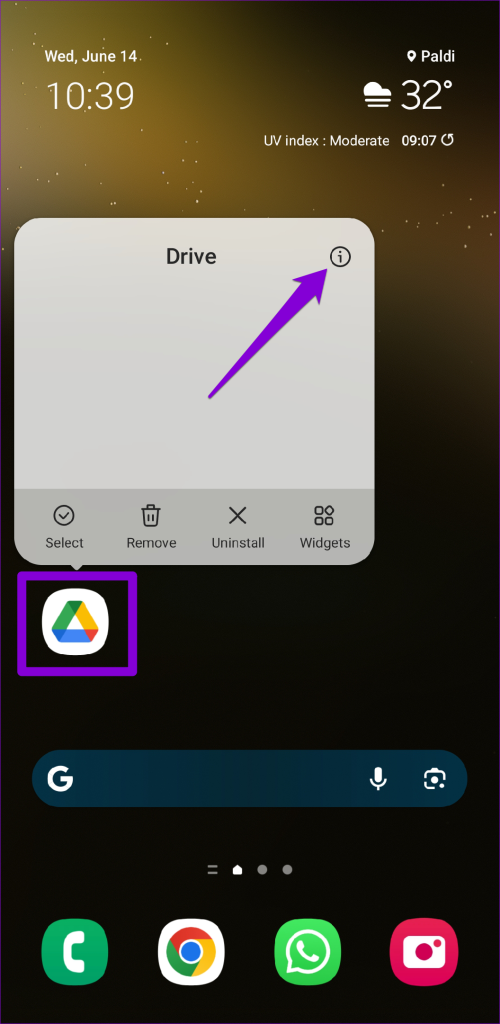
Step 1: Long-press on the Google Drive app icon and tap the info icon from the menu.
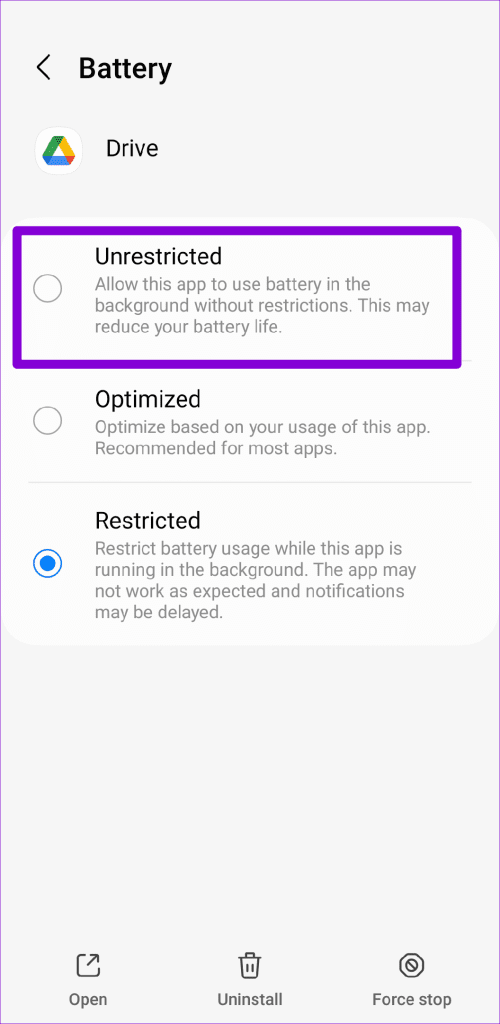
Step 2: Tap on Battery > select Unrestricted from the following menu.

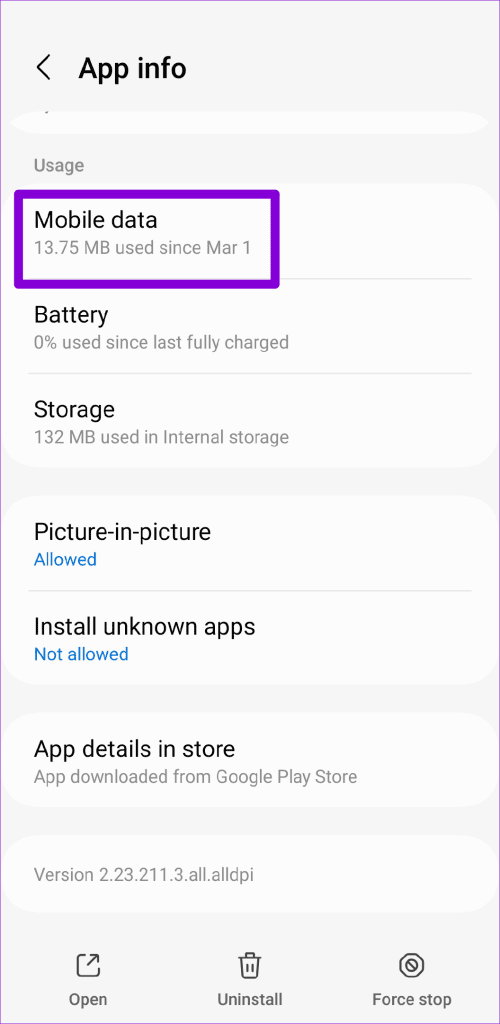
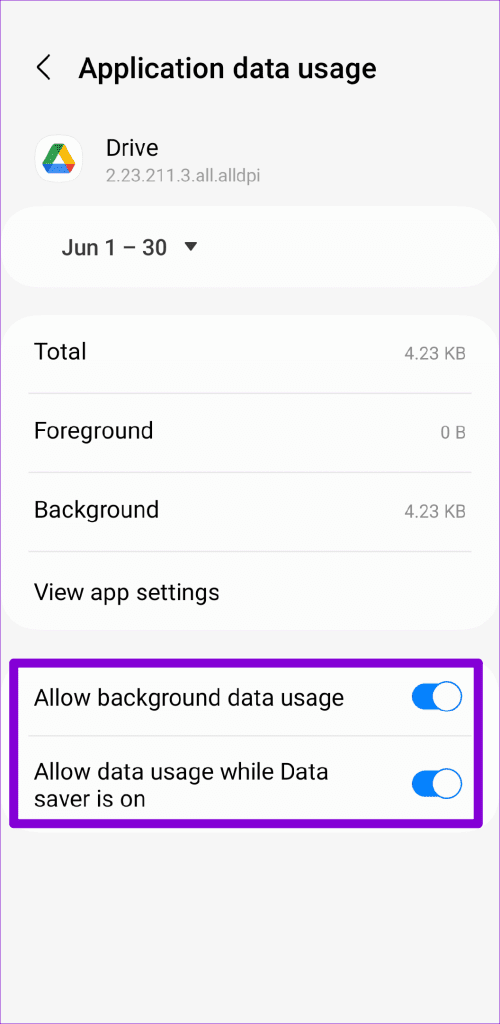
Step 3: Return to the app info page and tap on Mobile data. Enable the toggles for Allow background data usage and Allow data usage while Data saver is on.
Fix 2: Enable Background App Refresh (iPhone)
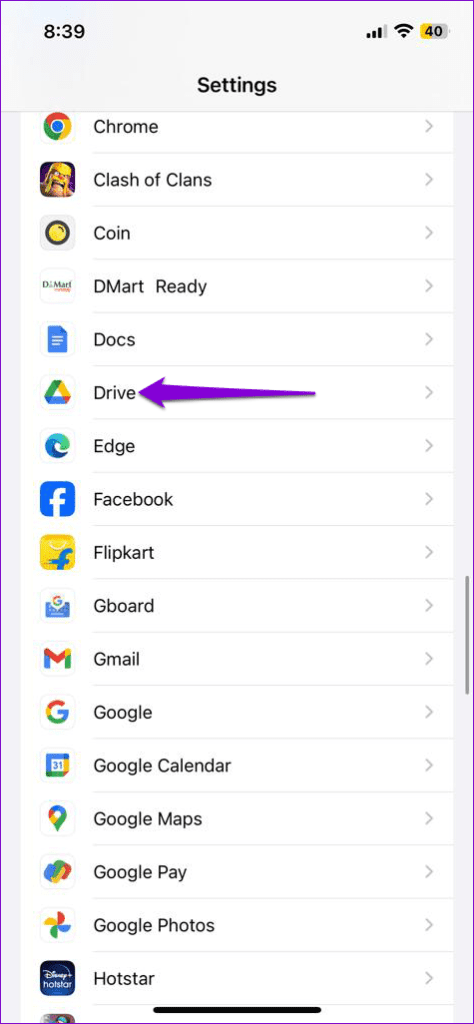
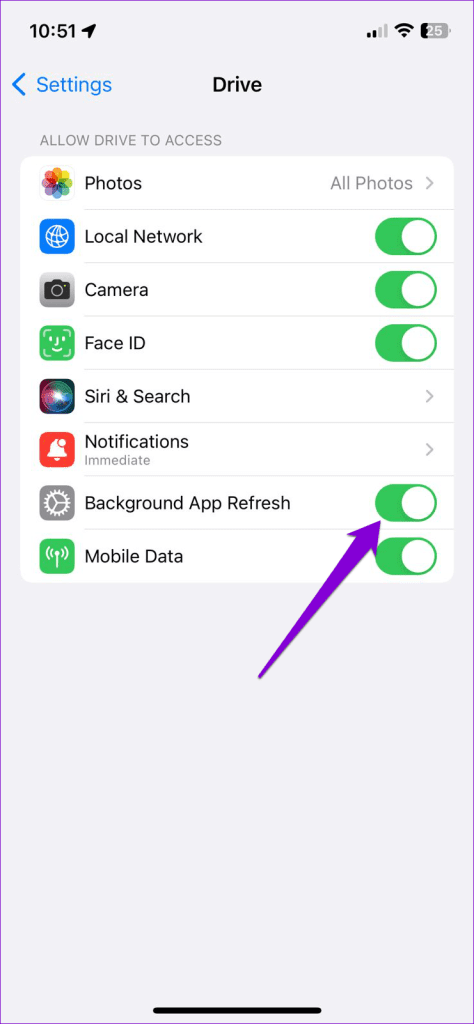
Disabling Background App Refresh for the Google Drive app on your iPhone can prevent it from syncing your data or downloading files in the background. To avoid this, open the Settings app and scroll down to tap on Drive. Then, enable the toggle for Background App Refresh.
Fix 3: Clear App Cache (Android)
As you continue to use the Google Drive app, temporary files are accumulated to improve your experience. However, these cache files can become corrupted over time, causing the Google Drive app to misbehave on your phone. Clearing the Google Drive app cache should help restore normalcy.
Step 1: Long-press on the Google Drive app icon > tap the info icon from the menu.
Step 2: Go to Storage > tap Clear cache at the bottom.


Was this helpful?
Last updated on 12 August, 2024
Read Next
 How to Fix Google Drive Not Downloading Files After Zipping
Basic Fixes Check internet connection: Check whether you have a stable internet connection on your desktop for downloading heavy files.
How to Fix Google Drive Not Downloading Files After Zipping
Basic Fixes Check internet connection: Check whether you have a stable internet connection on your desktop for downloading heavy files.
 6 Ways to Fix Google Chrome Crashes When Downloading Files on Windows
Fix 1.
6 Ways to Fix Google Chrome Crashes When Downloading Files on Windows
Fix 1.
 3 Ways to Fix WhatsApp Web Not Downloading Files
https://youtu.be/M9HiNzXcH_A Preliminary Fixes Restart Browser and PC: Sometimes, temporary glitches in the browser or PC can prevent WhatsApp Web from functioning correctly.
3 Ways to Fix WhatsApp Web Not Downloading Files
https://youtu.be/M9HiNzXcH_A Preliminary Fixes Restart Browser and PC: Sometimes, temporary glitches in the browser or PC can prevent WhatsApp Web from functioning correctly.
 5 Ways to Fix Microsoft Edge Not Downloading Files
Try Basic Fixes Check antivirus settings: Third-party antivirus programs can sometimes block downloads from the internet to protect your PC from suspicious files.
5 Ways to Fix Microsoft Edge Not Downloading Files
Try Basic Fixes Check antivirus settings: Third-party antivirus programs can sometimes block downloads from the internet to protect your PC from suspicious files.
 7 Ways to Fix Safari Not Downloading Files on iPhone and Mac
Basic Fixes Check network connection: Safari won’t download media or other files if the data connection on your iPhone or Mac is spotty.
7 Ways to Fix Safari Not Downloading Files on iPhone and Mac
Basic Fixes Check network connection: Safari won’t download media or other files if the data connection on your iPhone or Mac is spotty.
 5 Ways to Fix Google Docs Not Downloading Issues
Basic Fixes Disable Extension: There can be a few extensions in your browser that are actually preventing downloads from Google Docs.
5 Ways to Fix Google Docs Not Downloading Issues
Basic Fixes Disable Extension: There can be a few extensions in your browser that are actually preventing downloads from Google Docs.
 How To Automatically Extract ZIP Files After Downloading
ZIP files are necessary for combining multiple files together into one downloadable file.
How To Automatically Extract ZIP Files After Downloading
ZIP files are necessary for combining multiple files together into one downloadable file.
 4 Ways to Fix Telegram Not Downloading Media on iPhone and Android
Why Does Telegram Download Stop?
4 Ways to Fix Telegram Not Downloading Media on iPhone and Android
Why Does Telegram Download Stop?
The article above may contain affiliate links which help support Guiding Tech. The content remains unbiased and authentic and will never affect our editorial integrity.