Why Is There a Dark Spot on iPhone Camera?
Before we discuss all the ways to fix this issue, let’s consider a few factors causing black spots on your iPhone’s camera.
- There is dirt or smudges on your iPhone’s camera lens.
- Your iPhone’s software is out-of-date.
- The screen protector or case for your device is blocking the camera lens.
- Your iPhone’s camera is not working properly with the third-party app.
Basic Fixes:
- Remove the iPhone case and screen protector: Remove your iPhone’s case if you’ve got one on, and try taking a photo. While phone cases are designed to protect our devices, they might obstruct the camera. You can also remove the screen protector, if you’re using one, and check again.
- Restart iPhone: Restarting your device will close all services and features and start them over again, fixing any bugs or glitches from the previous device restart.
- Check for iOS updates: Updates allow your devices to stay on top of the latest changes and help fix any software bugs from the previous update. So, install the latest software updates on your iPhone. Then, check again.
Fix 1: Clean iPhone Camera Lens
If your camera lens has smudges or any other debris, it can also add a black spot to your photos. In this case, take a soft or microfiber cloth and gently clean your iPhone’s camera lens. You can also use a light cleaning solution or water to rub the stains off gently. Then, take a photo and check again.
Fix 2: Use the Native Camera App
On the off chance you’re using a third-party app to access your iPhone’s camera and are noticing a black spot in your photos, it might be time to ditch the app. Use your iPhone’s native camera app to capture the images and upload them to the relevant third-party app.
Fix 3: Reset All iPhone Settings
If you are still getting a black dot in your photos after trying the above fixes, consider resetting all iPhone settings. This way, all the custom iPhone settings will be deleted without affecting the device data. Here’s how to do it.
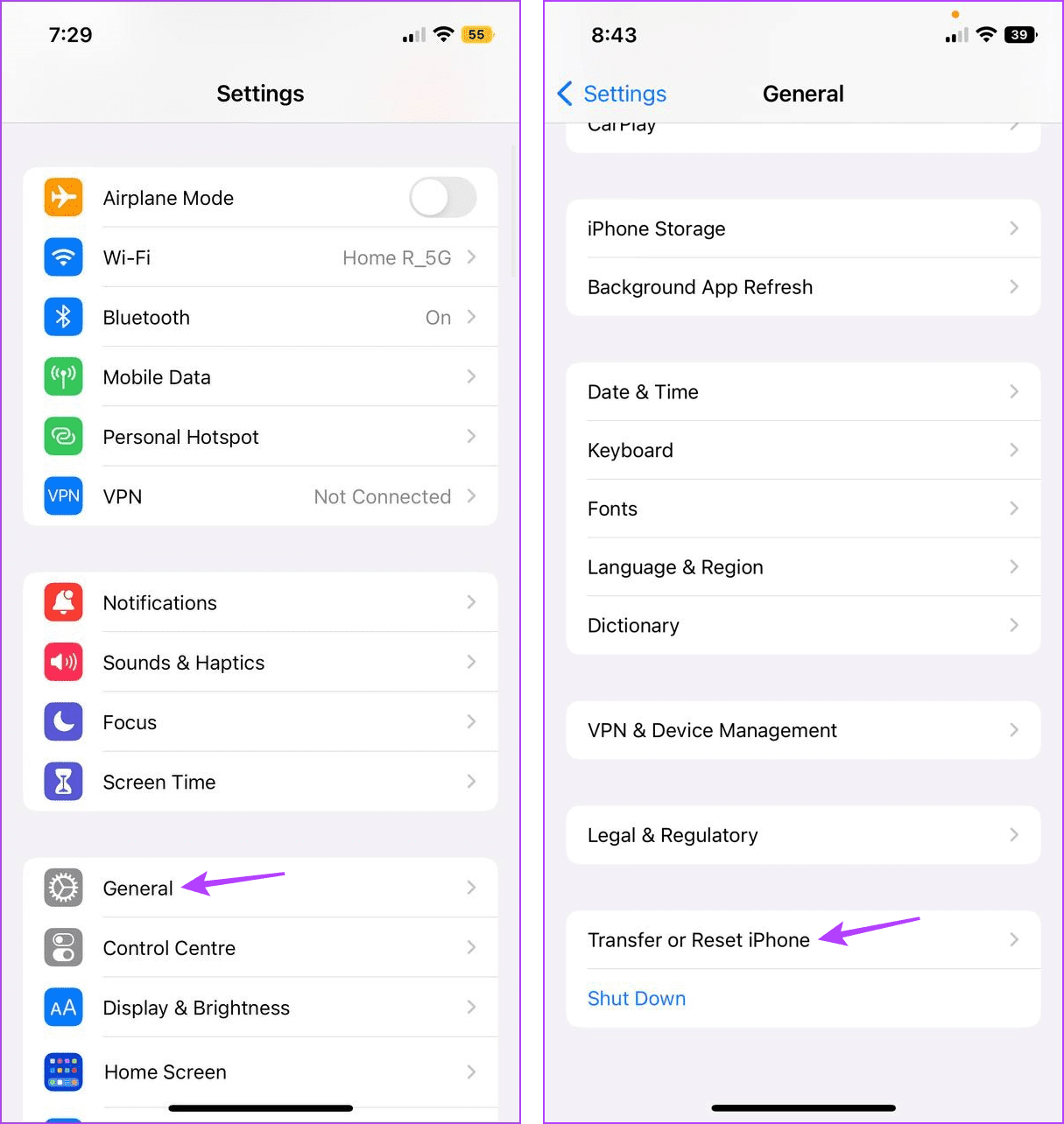
Step 1: Open Settings > tap on General > Transfer or Reset iPhone.
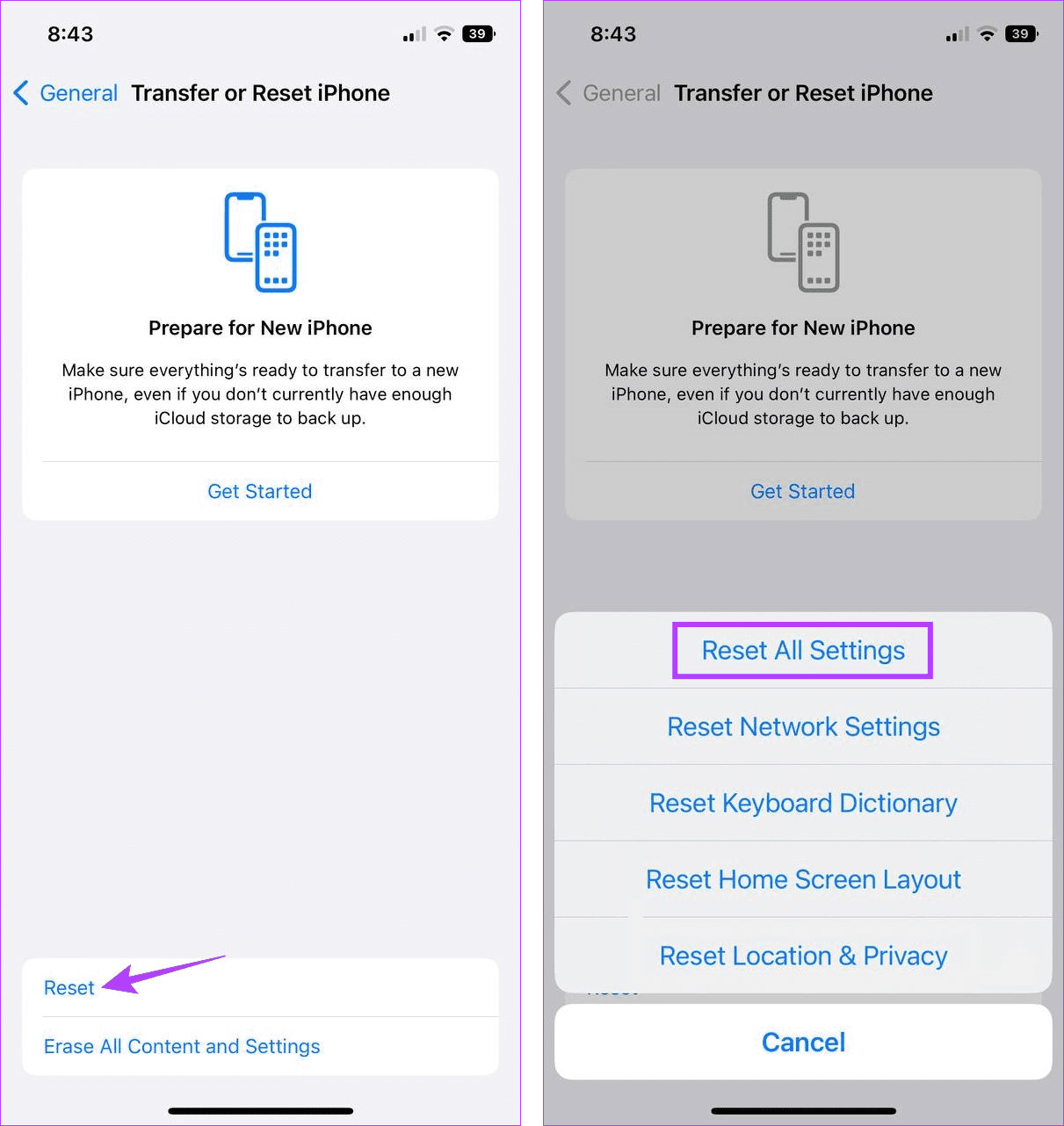
Step 2: Here, tap on Reset. Then, tap on Reset All Settings and enter your passcode to start the process.
Now, try using the camera again to check. If you’re still seeing a black spot, consider contacting Apple support and get your iPhone checked for any hardware damage.
Was this helpful?
Last updated on 27 June, 2024
Read Next
 6 Fixes for iPhone Camera Black Screen
Basic Troubleshooting Switch between the back and front camera: The camera may be stuck between front or back camera modes, between lenses, etc., leading to a black screen.
6 Fixes for iPhone Camera Black Screen
Basic Troubleshooting Switch between the back and front camera: The camera may be stuck between front or back camera modes, between lenses, etc., leading to a black screen.
 How to Add Photos and Pictures to Amazon Echo Spot
The Amazon Echo Spot beautifully balances both looks and performance.
How to Add Photos and Pictures to Amazon Echo Spot
The Amazon Echo Spot beautifully balances both looks and performance.
 4 Ways to Fix Camera Showing a Black Screen on Windows 11
Basic Fixes: Ensure the camera lens is unobstructed: Certain laptops come with built-in privacy shutters for the device camera.
4 Ways to Fix Camera Showing a Black Screen on Windows 11
Basic Fixes: Ensure the camera lens is unobstructed: Certain laptops come with built-in privacy shutters for the device camera.
 Your iPhone Can Now Take Pictures Like a $10,000 Camera — Thanks to Leica’s New Camera App
Over the years, phones have become synonymous with pocket cameras.
Your iPhone Can Now Take Pictures Like a $10,000 Camera — Thanks to Leica’s New Camera App
Over the years, phones have become synonymous with pocket cameras.
 How to Fix iPhone Screen Goes Black During Call
https://youtu.be/AoTMsNjBpdw Why Does My iPhone Screen Go Black During Call?
How to Fix iPhone Screen Goes Black During Call
https://youtu.be/AoTMsNjBpdw Why Does My iPhone Screen Go Black During Call?
 3 Ways to Fix iPhone Screen Black and White Issue
Basic Fixes: Connect to a charger: If your device has low battery levels, it might automatically switch to the Grayscale setting to extend battery life.
3 Ways to Fix iPhone Screen Black and White Issue
Basic Fixes: Connect to a charger: If your device has low battery levels, it might automatically switch to the Grayscale setting to extend battery life.
 Why Is iPhone 15 Pro’s Log Video Not Working and How to Fix It
Fix 1: Using an Incorrect Encoding Setting The iPhone 15 Pro camera app, by default, won’t allow you to record in Log unless you specifically go into the settings, enable
Why Is iPhone 15 Pro’s Log Video Not Working and How to Fix It
Fix 1: Using an Incorrect Encoding Setting The iPhone 15 Pro camera app, by default, won’t allow you to record in Log unless you specifically go into the settings, enable
 2 Ways to Fix Instagram Black Screen on Android and iPhone
https://youtu.be/weNJZPY80NE Basic Fixes: Check if Instagram is down: App downtime can often cause problems and can also be why Instagram goes black when using the app.
2 Ways to Fix Instagram Black Screen on Android and iPhone
https://youtu.be/weNJZPY80NE Basic Fixes: Check if Instagram is down: App downtime can often cause problems and can also be why Instagram goes black when using the app.
The article above may contain affiliate links which help support Guiding Tech. The content remains unbiased and authentic and will never affect our editorial integrity.