Key Differences and Similarities
| Feature | Facebook Stories | Messenger Stories |
| Cross-Posting | Facebook Stories are visible to Messenger contacts. | Messenger Stories are visible to Facebook friends. |
| Availability | Available on mobile apps and the Facebook website. | Available only on the mobile Messenger app (iOS and Android). |
| Mode of Access | Stories can be accessed by tapping the Stories icon at the bottom right. | Provides options for the public, friends, specific contacts, and hidden lists. |
| Filters and Effects | Offers stickers, text, effects, drawing, tagging, and music. | Offers stickers, text, effects, drawing, and cropping. |
| Replies | Replies appear as messages on Messenger. | Replies appear as messages on Messenger. |
| Privacy Settings | Detailed analytics, including viewers, interactions, and engagement metrics. | Provides the same privacy settings as Facebook. |
| Insights | Detailed analytics including viewers, interactions, and engagement metrics. | Basic insights focused on personal interactions. |
Cross-Posting
Facebook and Messenger Stories are similar in most aspects. Because these two platforms enjoy enhanced interconnectivity, your Messenger stories will be visible to your friends on Facebook, just as your Messenger contacts can view stories on Facebook. This means there is no need to post separately on both platforms.
Availability
Messenger Stories can be created on the mobile Messenger app for iOS and Android but not on the Messenger website. You can not also view stories on the Messenger website.
This is where Facebook stories differ. You may create them or view them on the mobile Facebook applications or the Facebook desktop website.
Both Facebook Stories and Messenger Stories are archived after 24 hours.
Mode of Access
Accessing a Facebook Story is much easier than accessing a Messenger story. On Facebook, Stories are displayed at the top of the interface. You only need to swipe right or left to view new stories.
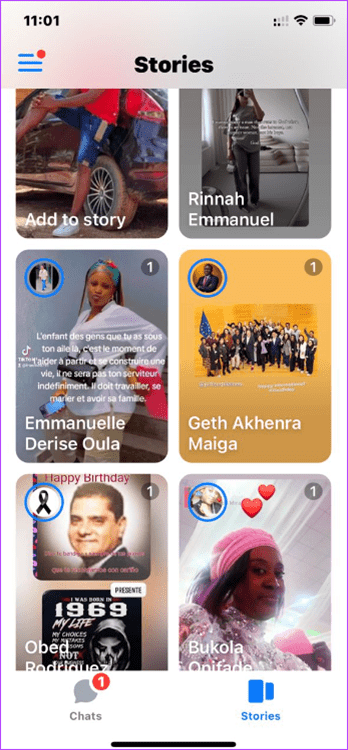
On the Messenger app, Stories are comparatively hidden. You will have to tap on the Stories icon at the bottom right to open the Stories page. Now, you may scroll through different Stories.

Filters and Effects
The Story interfaces for Messenger and Facebook are slightly different. However, they have very similar effects and filters.
On both platforms, you have options for stickers, text, effects, and drawing. Facebook Stories, however, has a few features missing on the Messenger platform, including tagging and music options. On Messenger, however, you can crop.
Replies
When Facebook Stories was first launched, there was an ephemeral direct messaging feature where the messages would disappear automatically once you checked them. Later, the feature was scrapped. Now, when a person replies to your Facebook or Messenger story, the response appears as a message on Messenger.
For both Facebook and Messenger replies, you may use text, emojis, GIFs, etc, as you would while chatting with any of your contacts.
Privacy Settings
When a story is posted on Messenger, you have several Privacy options. For instance, you may make it visible to the public, meaning anyone on Messenger or Facebook can see the story. You may also limit it to only your Facebook friends or contacts.
You have additional settings to choose specific contacts or friends who may see the story or those it should be hidden from. Interestingly, Stories on Facebook have the same privacy options, so there is no difference.
Insights
Facebook provides detailed analytics on who has viewed your Story. This includes a list of viewers, which can be broken down into friends and followers, giving you a clear picture of your Story’s reach.
You can see how many people have interacted with your Story through reactions, comments, and shares on Facebook. These metrics help you gauge the effectiveness and engagement level of your content.
On Messenger, you get a similar set of insights, and it may be hard to tell one from the other.
Was this helpful?
Last updated on 13 August, 2024
Read Next
 Instagram Reels vs Story: What Are the Differences
Instagram’s journey has been predictable.
Instagram Reels vs Story: What Are the Differences
Instagram’s journey has been predictable.
 How to Add Multiple Photos to Facebook and Messenger Story
Add Multiple Photos From Android and Ios Devices Step 1: Tap on Create Story on the home screen and tap on Select Multiple.
How to Add Multiple Photos to Facebook and Messenger Story
Add Multiple Photos From Android and Ios Devices Step 1: Tap on Create Story on the home screen and tap on Select Multiple.
 How to Fix Facebook Messenger Story Not Showing on iPhone and Android
Why Can't I See Stories on Facebook Messenger Several factors can affect your story experience in Facebook Messenger.
How to Fix Facebook Messenger Story Not Showing on iPhone and Android
Why Can't I See Stories on Facebook Messenger Several factors can affect your story experience in Facebook Messenger.
 What to Do if You Can’t Delete a Story on Facebook Messenger
Try Basic Fixes Wait for the story to post and try again.
What to Do if You Can’t Delete a Story on Facebook Messenger
Try Basic Fixes Wait for the story to post and try again.
 Snapchat Block vs Remove: Know the Differences
Understand the Concept The Snapchat Block function is designed to remove a person from your Snapchat history once and for all.
Snapchat Block vs Remove: Know the Differences
Understand the Concept The Snapchat Block function is designed to remove a person from your Snapchat history once and for all.
 WhatsApp Groups vs. Communities: Understand the Differences
What Is a WhatsApp Group?
WhatsApp Groups vs. Communities: Understand the Differences
What Is a WhatsApp Group?
 WhatsApp Mute vs. Archive: Understand the Differences
What Is Mute on WhatsApp Muting someone on WhatsApp stops message notifications from them.
WhatsApp Mute vs. Archive: Understand the Differences
What Is Mute on WhatsApp Muting someone on WhatsApp stops message notifications from them.
 WhatsApp Channels vs Telegram Channels: Know the Differences
WhatsApp Channels vs Telegram Channels: Key Differences Feature WhatsApp Channels Telegram ChannelsEngagement and Interaction One-way broadcast One-way broadcastSix basic emojisOptional group linking for discussionsSubscribers vs.
WhatsApp Channels vs Telegram Channels: Know the Differences
WhatsApp Channels vs Telegram Channels: Key Differences Feature WhatsApp Channels Telegram ChannelsEngagement and Interaction One-way broadcast One-way broadcastSix basic emojisOptional group linking for discussionsSubscribers vs.
The article above may contain affiliate links which help support Guiding Tech. The content remains unbiased and authentic and will never affect our editorial integrity.